
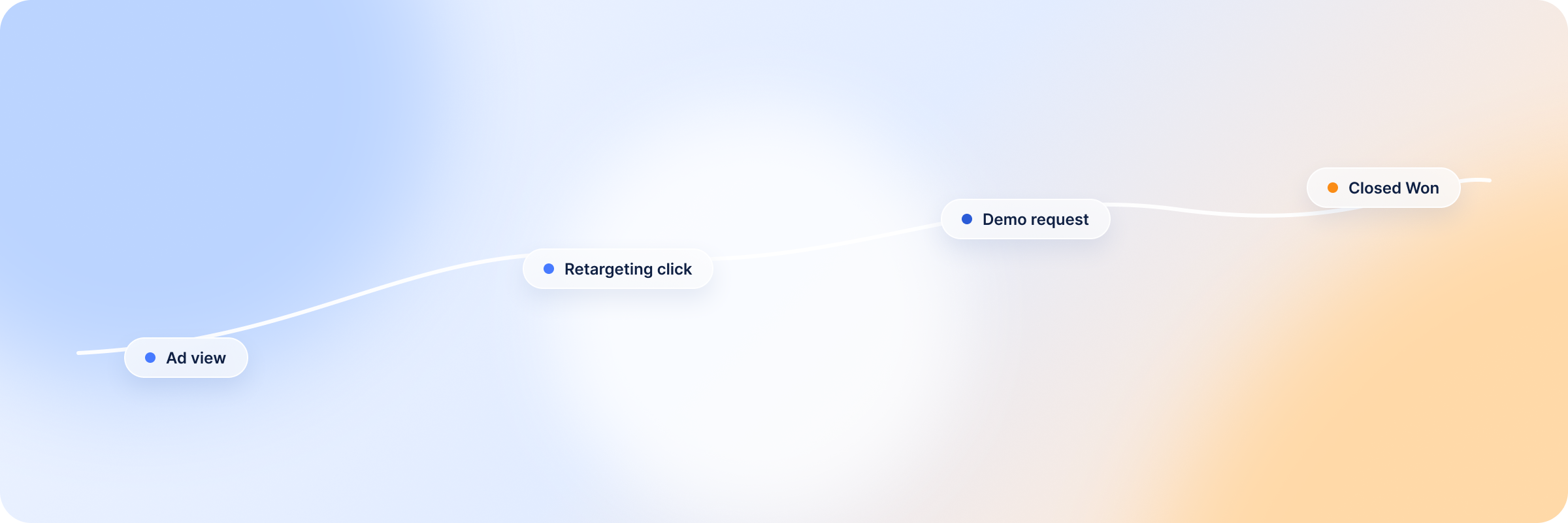
If you’ve been optimizing your LinkedIn campaigns (scheduling, audience tuning, frequency control), you’ve probably reached a point where the platform metrics look reasonable. CPC is trending down, and impressions are up. And then someone in a meeting asks what LinkedIn is actually contributing to revenue, and you realize you can’t really answer that.
It’s not because the campaigns aren’t working. It’s because LinkedIn’s native attribution wasn’t built for how B2B deals actually close. It has a 30-day attribution window. Most B2B sales cycles run three to nine months. So the deals your campaigns influenced — the ones where LinkedIn created the first awareness, kept your brand visible during the evaluation phase, nudged someone to finally book a call — never show up in your conversion data. They fell outside the window before the deal even opened.
Revenue Attribution closes that gap. It connects your LinkedIn ad activity to deal and company records in your CRM, and shows you the fuller picture: which companies were exposed to your campaigns, at what stage, and what happened to those deals. Not as a replacement for conversion tracking — as the layer that shows everything conversion tracking misses.
What Is LinkedIn Ads Influenced Pipeline?
LinkedIn ads influenced pipeline is the portion of your open and closed deals where the company was exposed to your LinkedIn campaigns at some point during the sales cycle — whether or not that exposure ever turned into a click, a form fill, or a last-touch conversion.
It’s a different question than “how many leads did LinkedIn generate.” Most B2B buyers research quietly for months before they raise their hand. During that window, they might see your retargeting ads, your thought leadership posts, your case study promotions — none of which get credited anywhere, because nobody clicked through and converted on that specific touch. Influenced pipeline asks a more useful question: of the deals sitting in your CRM right now, how many belong to companies LinkedIn was actually talking to?
For B2B teams, this number is usually a lot bigger than the conversion-based one. That’s because it captures the awareness and consideration work LinkedIn does best — the part of the funnel that almost never shows up in last-click reporting, but is often where the deal actually started.
How DemandSense Tracks LinkedIn Ads Influenced Pipeline?
LinkedIn Ads Influenced Pipeline works as a CRM integration that syncs your LinkedIn Ads data — impressions, clicks, and engagements — with deal and company records in HubSpot or Salesforce (one CRM at a time). It matches your ad activity against companies in your pipeline on a weekly sync, and surfaces influenced pipeline, closed-won revenue, ROAS, and buyer journey data across five tabs: Overview, Accounts, Campaigns, Journeys, and Settings.
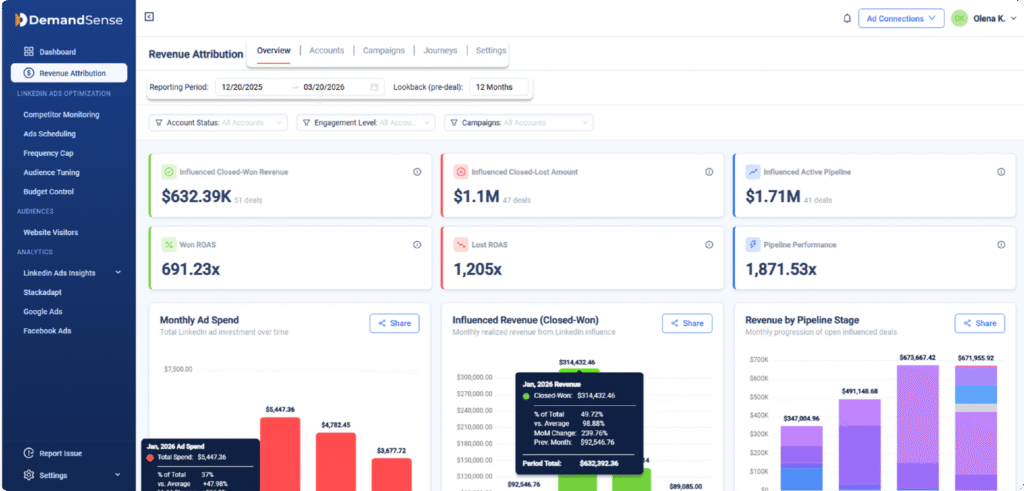
The key distinction from native LinkedIn reporting: it tracks impression-level influence, not just clicks, and it isn’t capped at 30 days. If a company saw your ad in October and closed in March, that touchpoint still counts.
Here’s what that makes possible once it’s connected.
#1 See Which Open Pipeline Deals Were Exposed to LinkedIn Ads
Once your CRM is connected, DemandSense matches LinkedIn impressions, clicks, and engagements against companies with open deals in your pipeline. You can see which deals had exposure to your campaigns, even if those contacts never clicked a conversion link or filled out a form.
If you’re managing 50 open deals and 30 of those companies have been seeing your LinkedIn ads, that’s a number worth knowing. It changes how you think about contribution and gives you something concrete to bring into a pipeline review. Actual deal-level data.
#2 Build a LinkedIn Ads Influenced Revenue Report for Leadership
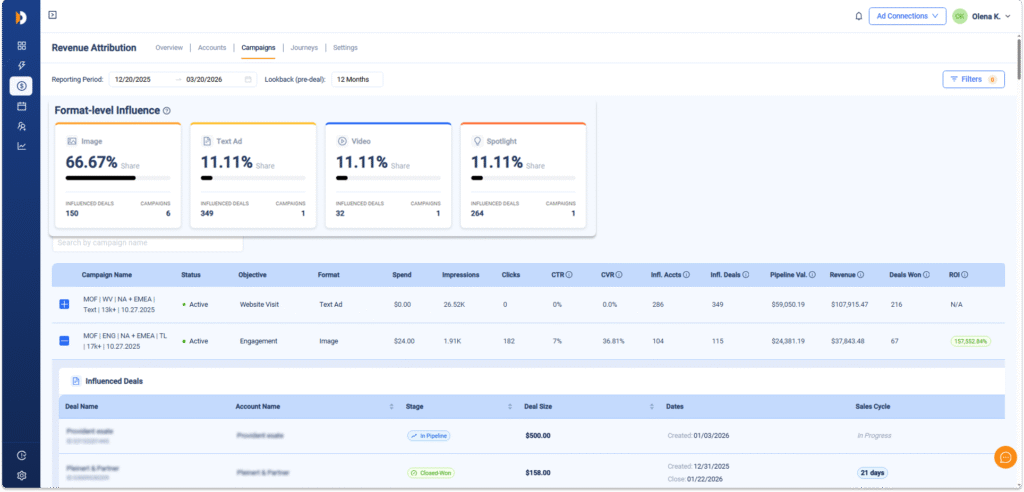
Revenue Attribution gives you a defensible number: deals that closed where the company had exposure to your LinkedIn campaigns during the sales cycle. The Overview tab surfaces this as Influenced Closed-Won Revenue alongside Won ROAS — calculated as total influenced closed-won revenue divided by total ad spend for those accounts.
It’s influenced attribution, not last-click — nobody’s claiming LinkedIn was the only reason they bought. But it’s a much more honest and useful metric than CTR when you’re defending a budget or making the case for more spend. Numbers tied to closed revenue tend to end those conversations faster.
#3 Automatically Exclude Closed Deals From LinkedIn Targeting
When a deal closes (won or lost), you don’t want to keep spending budget reaching those companies. Auto-Exclusion syncs with your CRM weekly and automatically downvotes companies with closed deals, removing them from your LinkedIn targeting without anyone manually exporting a list.
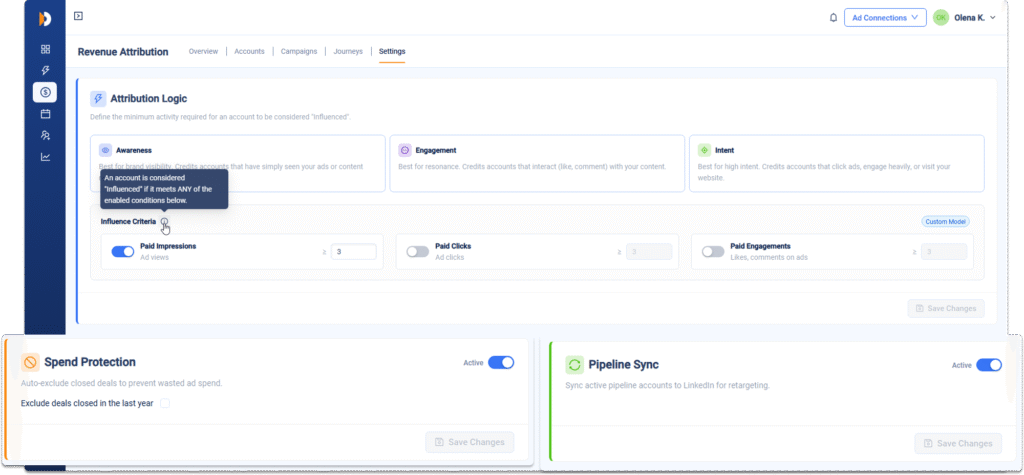
It sounds like a small thing until you realize how often it doesn’t happen. If you’re closing deals every month and none of them are being excluded from active campaigns, you’re consistently burning impressions on accounts that already made a decision. That’s budget competing with itself.
#4 Keep Active Pipeline in Your Targeting Automatically
The flip side of exclusion is inclusion. Auto-Inclusion creates and updates a LinkedIn custom audience of active pipeline companies on a weekly sync. Your ads stay in front of the accounts your sales team is actively working — without someone manually pulling a CRM export and uploading it to Campaign Manager every week.
Paired with frequency capping, this means pipeline accounts see your ads at a controlled, sustainable rate. Present throughout the deal without being heavy-handed about it.
#5 Use the Journeys Tab to See the Full Buyer Path
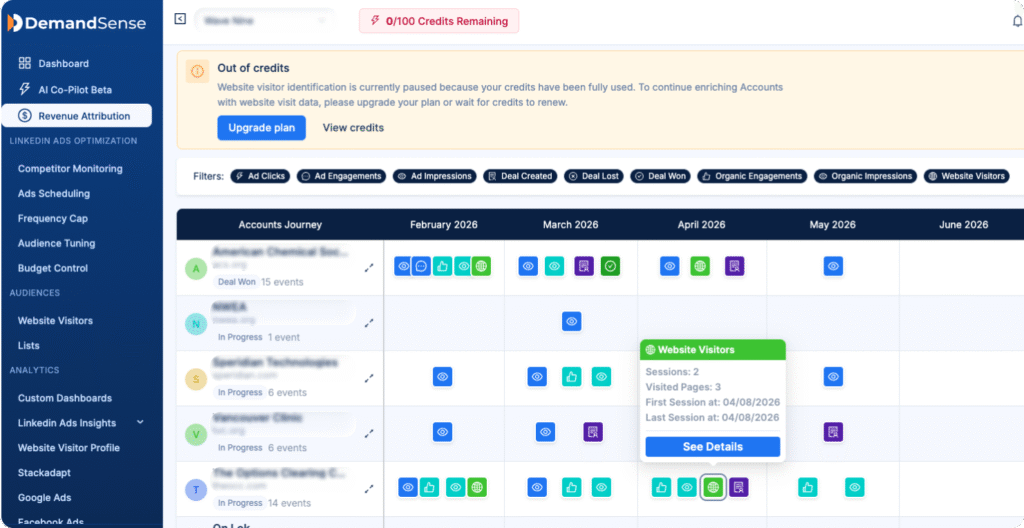
The Journeys tab shows the sequence of LinkedIn touchpoints for influenced accounts — what campaigns they saw, in what order, and where in the deal stage each touchpoint happened. It’s the closest thing to seeing LinkedIn’s actual role in a deal, from first impression to close.
Over time this tells you things worth knowing: which campaign types tend to show up at the start of a buyer journey, which ones appear closer to close, whether your awareness campaigns are actually creating pipeline or just generating impressions for accounts that were never going to buy.
#6 Justify LinkedIn Ads Budget With Pipeline and Revenue Data
Clicks and CTR are easy to question. Influenced pipeline and closed-won revenue tied to ad-exposed accounts are harder to argue with. Revenue Attribution gives you the reporting layer to connect spend to business outcomes, which is a completely different conversation than showing someone a campaign performance dashboard.
The goal isn’t to overclaim what LinkedIn did. It’s to show it accurately. That turns out to be more than enough.
Why Native LinkedIn Attribution Misses B2B Pipeline Influence
LinkedIn’s Campaign Manager reports on what happens inside its own attribution window — clicks and conversions, with a lookback of 30 days (up to 90 if you’re using CAPI). Within that window, the data is accurate. The problem isn’t accuracy. It’s that the window doesn’t match how B2B buying actually works.
B2B sales cycles routinely run three to nine months, longer for enterprise deals. A prospect who saw your campaign in week two and signed in month seven generates zero attribution data in LinkedIn’s reporting, because that touchpoint aged out of the window long before the deal closed. Native reporting also only tracks clicks and form conversions — so the impression-based influence that kept your brand visible during evaluation never enters the picture at all.
The result is a structural blind spot, not a measurement error. LinkedIn isn’t underreporting because the campaigns are weak. It’s underreporting because the reporting window and the sales cycle run on different timelines. Closing that gap means connecting ad exposure data to the CRM records where the actual deal timeline lives.
LinkedIn Native Reporting vs DemandSense Pipeline Attribution
What Metrics Should You Track for LinkedIn Ads Influenced Pipeline?
| LinkedIn Native Reporting | DemandSense Pipeline Attribution | |
|---|---|---|
| Attribution window | 30 days (up to 90 with CAPI) | No window — tracks exposure across the full sales cycle |
| What it tracks | Clicks and form conversions | Impressions, clicks, and engagements |
| Data source | Campaign Manager only | Synced with HubSpot or Salesforce deal and company records |
| Granularity | Campaign and ad level | Account and deal level, matched to pipeline stage |
| Core output | CTR, CPC, conversions | Influenced pipeline, closed-won revenue, Won ROAS |
| Sync frequency | Real-time within the platform | Weekly sync with CRM |
| Best for | Optimizing campaign delivery | Reporting business impact to leadership |
Once your CRM is connected, a handful of numbers matter more than the rest:
- Influenced Pipeline — the total value of open deals where the company was exposed to your LinkedIn campaigns during the sales cycle.
- Influenced Closed-Won Revenue — the total value of closed-won deals with LinkedIn exposure. This is the number that holds up in a budget conversation.
- Won ROAS — influenced closed-won revenue divided by total ad spend for those accounts. It’s a return number, not an engagement number.
- Account coverage — the share of your open pipeline that’s actually been reached by your campaigns. If it’s low, that’s a targeting problem before it’s a measurement problem.
- Touchpoint sequencing (via the Journeys tab) — which campaigns tend to appear early in a buyer journey versus near close, so you know which content is doing awareness work and which is doing nurture work.
None of these replace conversion tracking. They sit alongside it — and they’re the numbers that actually answer the “what’s LinkedIn doing for revenue” question, instead of one that measures clicks against a 30-day window.
So, What’s Next?
Getting your CRM connected is the first step. Our knowledge base walks you through the full setup, from linking HubSpot or Salesforce to configuring your attribution settings and reading your first influenced pipeline report. The team is available if you need a hand.