

Your competitors have already spent budget testing the messages, offers, and ad creatives that land with your target audience. Every campaign they run is a marketing experiment you did not pay for, and the results are sitting in public.
Reading them well takes more than scrolling the LinkedIn Ad Library for creative inspiration. To act on what you find, you need their positioning, their offers, the audience they are speaking to, and how all of that shifts across social platforms over time.
This guide covers how to run a comprehensive LinkedIn competitor analysis: which signals to track, where to find them, and how to turn competitor insights into campaigns that beat theirs.
Summary: How to Use LinkedIn Competitor Insights
Competitor insights are only worth collecting if they change what you do next. Here is what they should change:
- Competitive benchmarking – compare your ad performance on LinkedIn against competitors to see where you stand in the market.
- Sharper marketing strategies – learn from what competitors have already validated, then refine your messaging, ad creatives, and offers so they fit your audience better than theirs do.
- Trends and gaps – find the weaknesses in their social media marketing and position your brand as the better answer.
What Is LinkedIn Competitor Analysis?
LinkedIn competitor analysis is the process of monitoring competitor activity on LinkedIn to understand their marketing strategies, strengths, and weaknesses. You analyze competitor posts, ad creatives, offers, how they position their product, and how their LinkedIn ad campaigns appear to be performing.
The platform is crowded, and your ads compete for attention with everyone else selling to the same buyer. You monitor competitor activity to stay ahead of that, and because competitor insights give your own numbers context: a flat month means one thing if the whole category is flat and something very different if a rival just doubled their social presence.
LinkedIn’s native reporting is a starting point. You get follower growth, page views, and a competitors tab that compares your page’s organic performance against a short list of others. What it will not show you is anything about their paid activity. For that you need the LinkedIn Ad Library, or competitive analysis tools built to analyze competitor ads at scale.
Why Analyze LinkedIn Competitor Ad Insights
Every campaign your competitors are running on LinkedIn is a test you did not have to fund. Read those results, and you learn:
- Whether your content still speaks to the challenges buyers care about right now.
- Which content strategies are working well enough that competitors keep paying to repeat them.
- Where the gaps are, including the objections and use cases nobody in the category is answering.
- How your campaign performance compares to peers, so you know whether you are gaining ground or losing it.
- When a competitor strategy shifts, such as a move into a new industry, theme, or audience segment.
Which Signals Should You Track?
Tracking the right signals makes the patterns, and the shifts in competitor behavior behind them, easy to see. Are your campaigns outperforming your competitors’? What is the audience saying about them? Are there problems your product solves better? Here is what to watch, and what to do with each one:
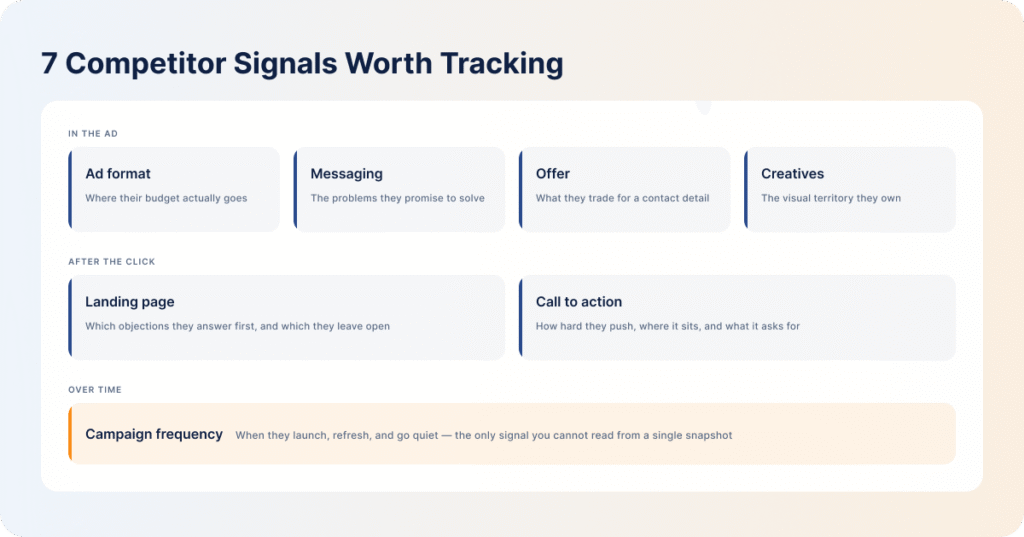
| Signal | What it can reveal | How to apply it |
|---|---|---|
| Ad format | Which ad formats competitors prioritize, and by extension which ones are earning their budget | Use the formats that are clearly working, but test the ones they have ignored as well. Pick for your campaign objective, not for theirs. |
| Messaging | The pain points and problems they promise to solve | Look for messaging gaps and take a fresh angle. If every competitor is selling on “saves you money,” build your ads around a different problem. |
| Offer | The resources they use to attract buyers, such as ebooks, free trials, and tools, and which of those keep reappearing | Match the offer or beat it. A repeated offer is usually a converting offer. |
| Creatives | Their visual style, branding, color scheme, and imagery | Build a look that is distinctly yours. Imitation is easy to spot and it costs you credibility. |
| Campaign frequency | How often they launch or refresh campaigns, and roughly how much weight is behind each push | Refresh your own creatives often enough to avoid ad fatigue, and keep brand awareness running through the quiet periods when competitors go dark. |
| Landing page | How they pitch the product once the click happens, and which objections they answer first | Close the gaps on your own page, and look for the objections their page leaves unanswered. |
| Call to action (CTA) | How they write low-friction and high-friction CTAs, and where those CTAs sit on the page | Look for patterns across their CTAs, then replace generic ones like “Get started” with something benefit-driven. |
Two more sources are worth checking on a regular basis. Social listening tools tell you how buyers actually feel about a product, and the comments under organic and promoted posts are free, unfiltered sentiment analysis of a competitor’s own audience. Competitor websites and job ads point at direction before the campaigns do, since a run of hires in a new vertical usually shows up in the ad copy a quarter later. Website traffic estimates round out the picture by showing which of their pages the spend is actually feeding.
It is also worth checking whether they run the same plays elsewhere. The Facebook Ad Library and the Google Ads Transparency Report cover what your competitors are running outside LinkedIn, and a company spending heavily on paid social in one channel and nothing in another is telling you where it believes its buyers are.
Once you are tracking all of this, the messaging angles that will make your ads stand out become much easier to find.
How to Conduct a LinkedIn Competitor Ad Analysis
You can find active ads in the LinkedIn Ad Library, but you have to search competitors one at a time and read every ad yourself. That is workable for two or three companies. Past that, manual competitor research becomes a data-collection job nobody has time to repeat every week, which is why most teams quietly stop repeating it.
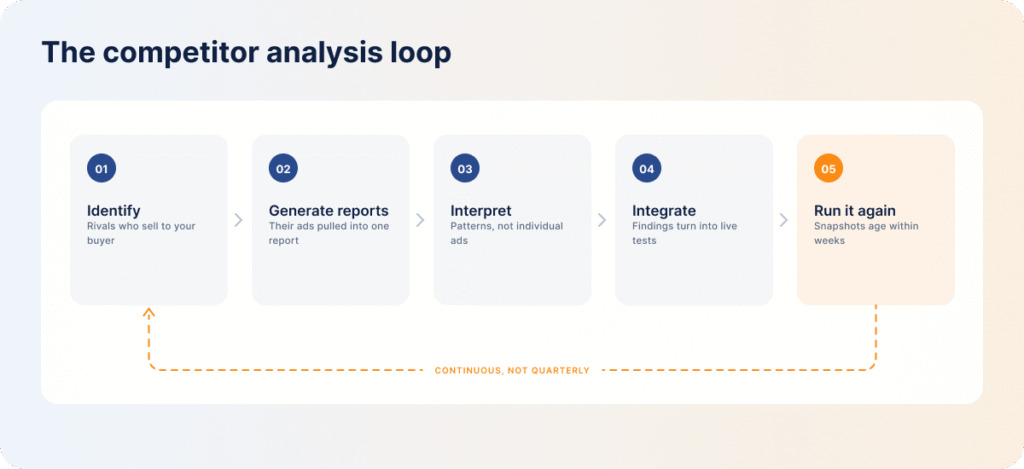
Here is the process:
- Identify the competitors you want to analyze. Start with companies that sell a similar product to a similar buyer, not everyone who shows up in your category. DemandSense’s free Competitor Analyzer does the first pass for you: enter your URL, and it returns a suggested list of your closest competitors, so you are not building it from memory.
- Generate your competitor reports. The tool pulls the ads together and organizes the formats, messaging, offers, and creative patterns into one report, so you are not collecting screenshots or rebuilding a comparison deck by hand every time.
- Interpret the findings. Look for patterns rather than individual ads: recurring pain points, the formats they lean on hardest, the offers they keep bringing back, and the gaps nobody is filling. Compare all of it to your own PPC campaigns to see where you are strong and where you are exposed.
- Integrate the analysis into your marketing strategy. Turn the findings into specific changes to messaging, offers, and targeting, and give each one a test rather than a rewrite.
- Run it again. Competitive research only pays off while it is current. Timely competitor tracking is what makes that practical, and it is the case for automating this rather than blocking out an afternoon each quarter.
How to Turn LinkedIn Competitor Insights into Action
Once you have the reports, the work is applying them, and that is not a matter of copying the best-performing strategy. The goal is to answer buyer needs better than the competition does, in a way that still sounds like you.
How to Use LinkedIn Competitor Insights to Improve Campaigns
Start with the gaps in your own strategy that competitors are already covering. Compare their apparent target audience to your ICP: are there sectors, seniorities, or company sizes they are working that you have never tested? Those are audience insights you can use to refine your own ad targeting, tested on a small budget first.
The reverse is just as useful. Personas your competitors have not touched are cheaper to reach, and you can use the LinkedIn Audience Explorer to check those segments genuinely match your ICP before you expand targeting into them.
How to Use Competitor Insights to Build Better Ad Creatives
Ad copy analysis pays off fastest here. Look at how competitors write their hooks, which pain points they lead with, and what sits behind the click, then test angles and offers of your own rather than reworking theirs.
Distinct creative is a real advantage in a saturated feed, and it is one of the few things a competitor cannot copy back overnight. Keep it inside the LinkedIn Ads creative best practices so the work still performs against the format’s own constraints.
How to Use Competitor Insights to Find Leads
When you find a gap between what competitors offer and what buyers are asking for, that gap is a lead source. Expand your offering into the unmet need, and speak to it directly in the copy. Pairing competitor tracking with social listening surfaces buyer objections faster than waiting for them to reach a sales call.
LinkedIn skews toward demand generation, but a competitor gap plus the right offer is exactly the setup that makes LinkedIn Ads for B2B lead generation work.
Common Mistakes When Manually Analyzing LinkedIn Competitor Ad Insights
- Treating competitive analysis as a one-off project. Markets move and buyer priorities move with them. A competitor content audit you ran last quarter describes a campaign landscape that no longer exists. Competitor updates need to arrive on a schedule, not when someone remembers to check.
- Monitoring competitors who are targeting a different audience. Ad formats and messaging angles that work on enterprise buyers often fall flat with SMBs, and the reverse is equally true. Borrowing competitor strategies built for a different segment gets you a well-executed campaign aimed at the wrong people.
- Focusing only on the formats that look like they are winning. If a competitor keeps running the same format, it is probably working for them. That does not make it right for your objective, and it says nothing about the formats they have left untouched, where competition for attention is lower.
- Reading the creative and skipping the landing page. The post-click experience decides whether a click was worth anything. A competitor with average creative and an excellent landing page beats you while looking like they are losing, and none of that shows up in the ad library.
- Mistaking activity for performance. Ad libraries show you what is running, not what is working. A campaign that has been live for months is a reasonable signal, but a competitor can just as easily be burning budget on something nobody clicks. Treat volume as a hypothesis, not a verdict, or you will copy someone else’s wasted ad spend.
Turn LinkedIn Competitor Insights into Better Campaigns with DemandSense
Manual monitoring holds up while you are watching two or three companies. A comprehensive competitor picture means reading far more than that across both organic and paid marketing campaigns, and the companies worth watching launch new ones faster than anyone can keep up with by hand.
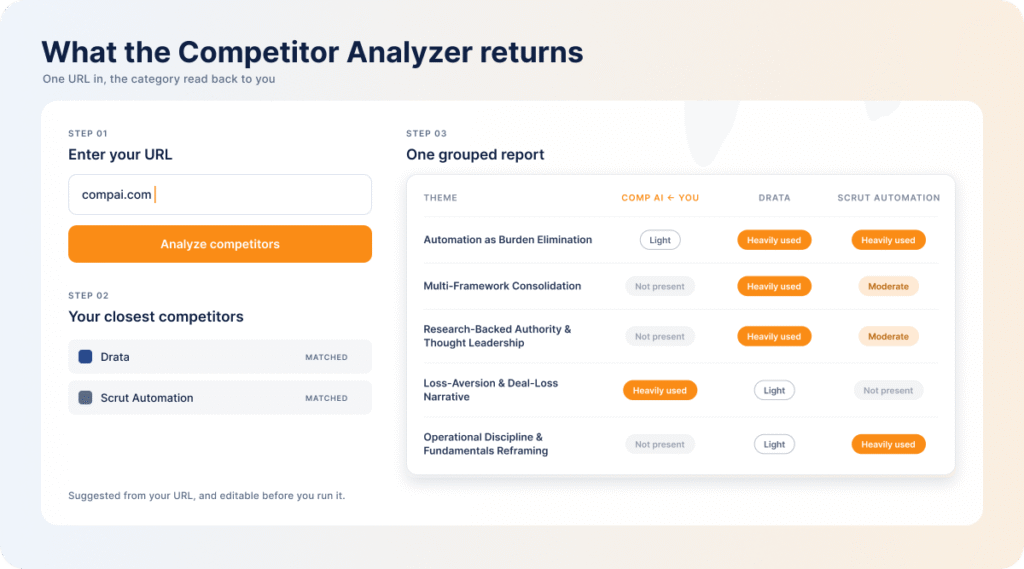
The free Competitor Analyzer is the shortcut. Enter your URL, get your closest competitors, and get the ads your competitors are running back as a report you can act on, with the messaging, offers, and creative patterns already grouped. It works alongside the other LinkedIn ads tools most B2B teams already run.
Point the Ad Strategy Scanner at your own campaigns next, and the comparison stops being a hunch. This is where AI tools earn their place: layered with AI marketing insights, the ad intelligence arrives as a shortlist of actionable insights to apply before the next campaign goes live, not a report to interpret.
Kept running, competitor ad tracking shows you how offers, creatives, and positioning move across an entire category, and it shows you early. That is the difference between adjusting to a market shift and paying for a quarter of campaigns aimed at where the market used to be.
FAQ
Are LinkedIn competitor ad insights publicly available?
Some are. The LinkedIn Ad Library shows the ads a company is currently running and where those ads point, but it does not show performance or spend, so there is no impression count, no CTR, and no budget. To get from a list of ads to the ad strategies behind them, you need a competitor ad analysis tool that reads the patterns across all of them.
How many competitors should you track on LinkedIn?
Track 3 to 5 direct rivals. Focus on companies selling a comparable product to buyers who look like your ICP, at a similar company size. Tracking too many leaves you with more data than you can process and no clear read on any of it. Expand the list as you move into new segments.
Can competitor ad insights reveal a company’s target audience?
Yes, though not directly. You will never see their ICP list or targeting settings, but you can infer a great deal from audience call-outs in the copy, the pain points the ads address, and visual cues, since an ad full of medical equipment is not aimed at fintech. Landing pages and CTAs add the funnel stage: a demo request and a downloadable checklist are pitched at very different moments.
Should you copy successful-looking competitor LinkedIn Ads?
No. B2B buyers see the same ads you do, and imitation is obvious to them in a way that costs you credibility. Use high-performing competitor ads to find the messaging angles that resonate with your shared audience, then write your own around that insight.
Can competitor ad insights help identify market trends?
Yes. When several competitors start pushing similar themes or shift to the same ad format at once, it usually reflects something real about what buyers are responding to. Competitor tracking lets you spot the shift while it is forming instead of reading about it in a year-end roundup.
What is the difference between competitor ad insights and competitor performance data?
Competitor ad insights are what you can observe: the competitor ad copy, the offers, the creative, the landing pages, and how often all of it changes. Competitor performance data is what those ads actually earned, meaning impressions, CTR, and cost, and none of that is public. Any tool promising a competitor’s real LinkedIn CTR is estimating. Useful competitive analytics work the other way around, reading the observable signals closely enough to infer intent and priority, then benchmarking your own measured performance against the category.