
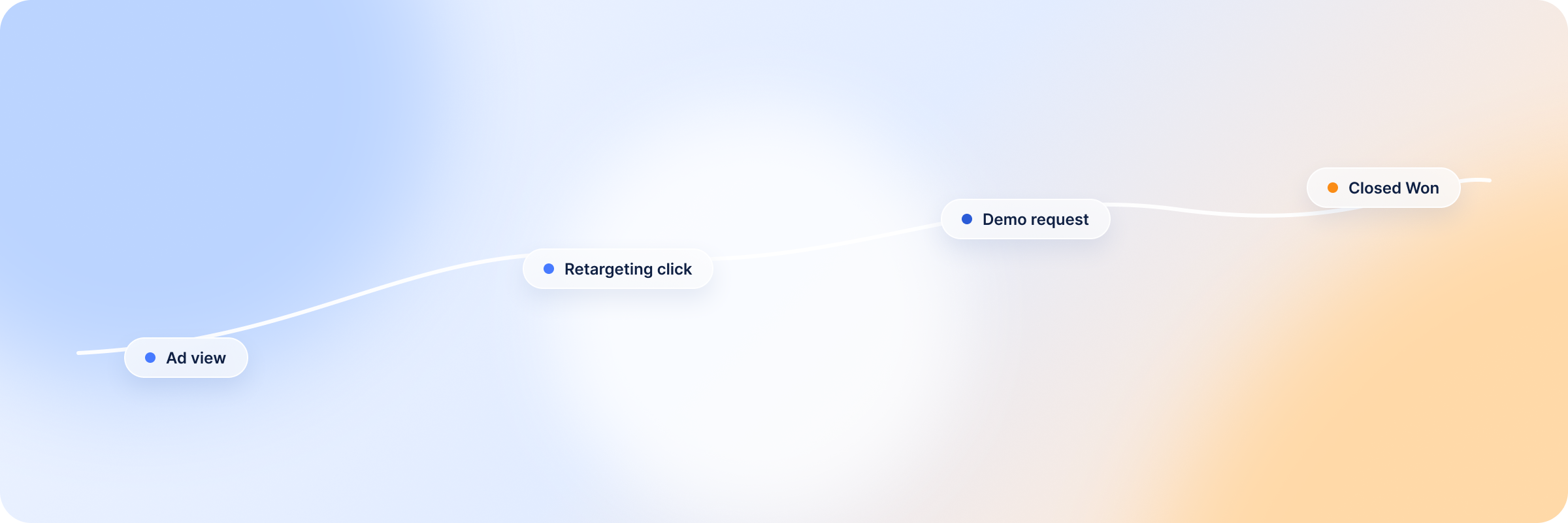
Your ad shows up in a VP’s LinkedIn feed on a Tuesday morning. She scrolls past it without clicking.
A few weeks later, someone else on her team clicks a retargeting ad, spends four minutes on your pricing page, and closes the tab. No form, no follow-up. Nothing happens in your CRM.
A month after that, the VP submits a demo request herself — the first click she’s ever made on anything you’ve run. By then she’s seen your ads a dozen times.
Which touchpoint gets credit for that deal?
That’s the question multi-touch attribution is built to answer. And it’s a harder one to answer in Salesforce and HubSpot than most marketing teams expect. Both platforms can track campaigns and deals just fine. Neither one was built, out of the box, to connect LinkedIn Ads activity to CRM revenue in a way that reflects how B2B buying actually happens.
Here’s what multi-touch attribution means in Salesforce and HubSpot, how each platform handles it natively, where the gaps show up for LinkedIn Ads, and how to close them.
What Is Multi-Touch Attribution in Salesforce and HubSpot?
Multi-touch attribution distributes credit across the marketing touchpoints that influenced a deal, instead of handing all the credit to one interaction. Rather than crediting whichever channel happened to close the deal, it asks which touchpoints across the whole buyer journey actually contributed to that deal getting created and won.
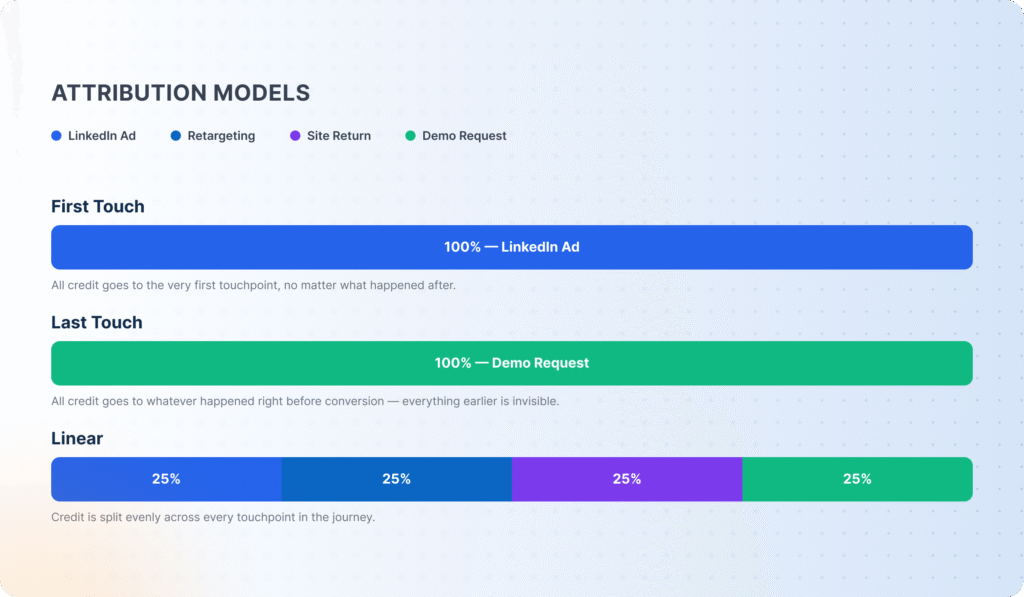
Single-touch attribution does the opposite: it credits one moment, usually the first touch (whatever introduced the account to your brand) or the last touch (whatever happened right before conversion). It’s easy to set up, and it’s also wrong more often than not in B2B, because it ignores everything that happens in the middle of the sales cycle — which is usually where LinkedIn Ads is doing most of its work.
The path from first exposure to closed deal rarely runs through one channel. A fairly typical sequence: an account sees a LinkedIn ad, doesn’t click, gets served a retargeting ad a week later, clicks through, lands as a new contact in the CRM, and only becomes an opportunity once sales follows up weeks later.
Credit the last touch only, and none of that early LinkedIn activity (the stuff that actually built the awareness and intent in the first place) ever makes it into the report. It’s the same last-click attribution problem that distorts B2B pipeline reporting everywhere, not just in Salesforce and HubSpot.
How Salesforce Handles Multi-Touch Attribution
Salesforce’s native attribution runs through four objects: Campaign Influence, Campaign Members, Opportunities, and Opportunity Contact Roles. Campaign Members record who saw which campaign, Opportunity Contact Roles tie the people on a deal back to those campaigns, and Campaign Influence stitches the two together to assign credit.
That setup is genuinely good for opportunity-based attribution, or crediting campaigns tied to actual pipeline, not just leads. But it only works if the underlying CRM data is clean. Skip populating Campaign Members consistently, leave Opportunity Contact Roles blank, or forget to build campaign hierarchies before launch, and Campaign Influence quietly understates what marketing actually did. Salesforce gives you the objects. Keeping them populated correctly is on you.
How HubSpot Handles Multi-Touch Attribution
HubSpot is the more plug-and-play option. Its attribution reports connect contacts, deals, campaigns, and marketing assets automatically, so you can see how a piece of content or a campaign moved a contact toward becoming a deal without configuring much of anything first.
That ease comes at the cost of flexibility. HubSpot’s attribution models are more fixed than Salesforce’s, and teams running longer, messier B2B sales cycles across several tools sometimes find themselves fighting the reporting instead of shaping it.
HubSpot Revenue Attribution Reports
Revenue attribution reports, which credit closed-won deal revenue to the interactions before it, need Marketing Hub Enterprise. You choose the model: first touch, last touch, linear, time decay and others (HubSpot Knowledge Base). LinkedIn Ads reach these reports only as tracked clicks and form fills. An impression that a buyer saw and never clicked doesn’t exist in HubSpot, and that’s the part of LinkedIn’s influence the reports miss.
HubSpot vs Salesforce for Multi-Touch Attribution
Both platforms report on multi-touch attribution. They just take different approaches to the same problem, and neither one is purpose-built to isolate LinkedIn Ads’ contribution to revenue.
| HubSpot | Salesforce | |
|---|---|---|
| Setup effort for attribution reporting | Low — works with default contact/deal/campaign tracking | High — requires configured Campaign Members, Opportunity Contact Roles, and campaign hierarchies |
| Attribution model flexibility | Moderate — prescriptive built-in models | High — customizable via Campaign Influence, though setup-intensive |
| Native LinkedIn Ads connection | Indirect, via campaign UTMs and marketing assets | Indirect, via Campaign Influence tied to synced campaigns |
| Best fit | Marketing-led teams wanting fast, contact-level attribution | Sales-led orgs needing opportunity-based, customizable attribution |
| Revenue reporting depth | Deal-level, tied to marketing assets | Opportunity-level, tied to campaign hierarchy |
HubSpot is simpler for marketing attribution. Salesforce is more flexible for opportunity-based attribution. But neither one, on its own, gives you the full picture of what LinkedIn Ads is actually doing for revenue. That takes connecting LinkedIn activity, company-level engagement, and CRM deal data — and neither platform does that natively for LinkedIn Ads specifically.
Why LinkedIn Ads Attribution Needs a CRM Connection
LinkedIn Campaign Manager reports on impressions, clicks, and engagement at the campaign level. What it can’t tell you is whether any of that activity turned into pipeline or revenue, because Campaign Manager has no visibility into your CRM.
LinkedIn Ads Influence Often Happens Before the Deal Is Created
Most B2B buyers interact with ads well before they’re ready to talk to sales, sometimes months before a deal exists in the CRM at all.
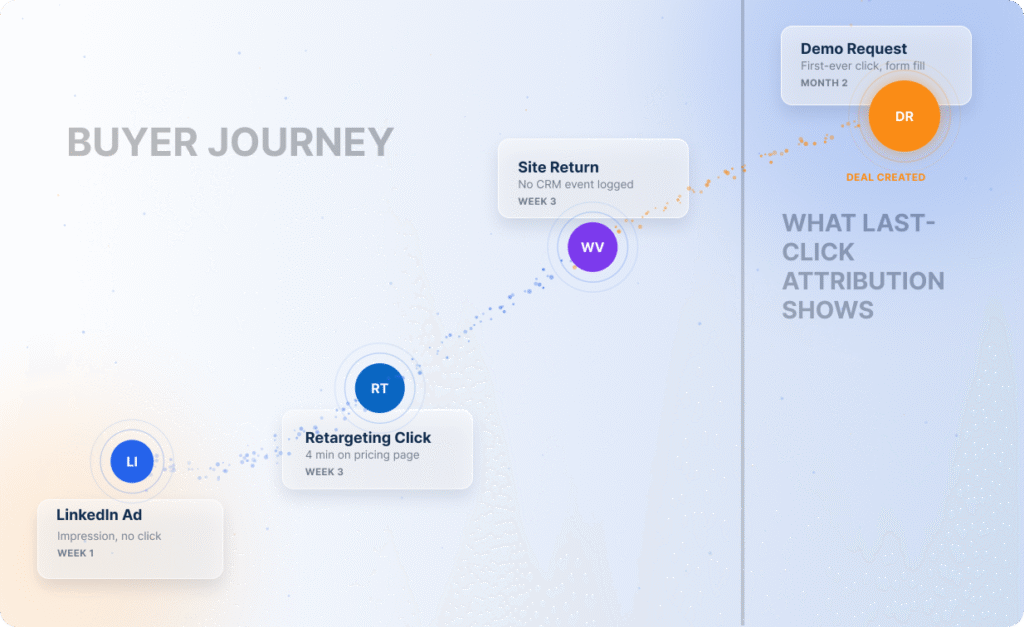
If your attribution setup only starts counting influence once a contact or opportunity is created, you’re missing the ad exposure, retargeting touches, and website visits that built intent in the first place. A meaningful multi-touch attribution model has to look backward from the deal to the earliest qualifying LinkedIn touchpoint — not just forward from the moment a record enters the CRM. Those early signals are exactly what buyer intent tracking is built to catch — spotting accounts warming up long before they’re CRM-ready.
Company-Level Engagement Matters More Than Individual Clicks
B2B purchases are rarely made by one person. A buying committee at a target account might include five or six people, each engaging with your ads differently: one clicks, one only sees impressions, one visits your site later through organic search.
Attribution models that only track individual click-level conversions miss the bigger signal — that an account, as a whole, is showing buying intent. Rolling engagement up to the company level is what turns scattered signals into real account-based intelligence, and what actually makes account-based marketing measurable.
Revenue Attribution Helps Optimize Spend
Once LinkedIn activity is tied to actual deals and revenue, and not just clicks and form fills, you can make real budget decisions:
- Which campaigns are generating influenced pipeline
- Which industries and company sizes convert best
- Which accounts have already closed and should be excluded from further spend.
Without that connection, campaign ROI is a guess based on last-touch conversions, and that guess chronically undercounts what LinkedIn is contributing to the funnel.
Manual vs Automated LinkedIn Ads Attribution
Teams generally close the CRM connection gap one of two ways.
→ Manual attribution means building UTM parameters for every campaign, exporting LinkedIn Campaign Manager data, and matching it against CRM records by hand in spreadsheets or custom reports. It’s possible. It also breaks down fast: UTMs get inconsistent across campaign creators, exports need constant refreshing, and matching LinkedIn accounts to CRM companies by hand doesn’t scale past a handful of campaigns. It can’t capture impression-level or company-level engagement either, since that data never flows into the CRM through clicks alone.
→ Automated attribution connects LinkedIn Campaign Manager and your CRM directly, syncing engagement data to Companies and Deals on an ongoing basis, applying a consistent attribution model, and updating reporting without manual exports. This is the approach platforms like DemandSense are built around — taking the manual matching work off your plate and keeping the CRM connection current as campaigns and deals change.
How to Use Multi-Touch Attribution to Improve LinkedIn Ads Performance With DemandSense
DemandSense connects LinkedIn Campaign Manager directly to HubSpot or Salesforce, syncing LinkedIn engagement data with your CRM’s Companies and Deals so you can see how ad activity contributes to pipeline and closed revenue, not just clicks and conversions.
What LinkedIn Revenue Attribution Metrics You Can Track in DemandSense
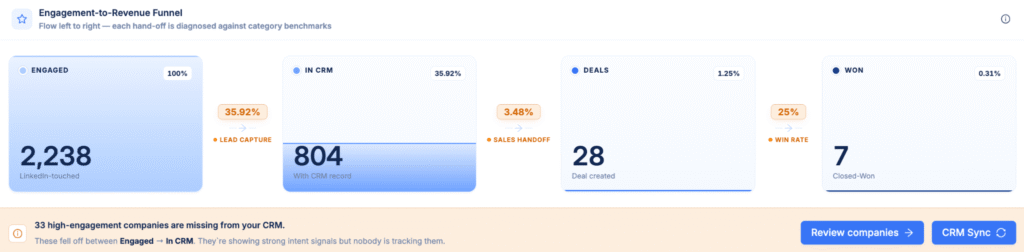
Inside DemandSense’s Revenue Attribution module, an Overview dashboard shows an engagement-to-revenue funnel that tracks accounts through four stages.
- Engaged covers companies with qualifying LinkedIn activity — impressions, clicks, website visits, content interactions.
- In CRM shows influenced companies that exist in your connected CRM.
- Deals shows companies that progressed to an opportunity.
- Won shows deals that closed. The conversion rate between each stage points to exactly where influenced accounts are dropping off, whether that’s weak CRM capture, a slow sales handoff, or a low deal-to-win rate.
Alongside the funnel, you can track:
- Influenced Closed-Won Revenue — total revenue from closed-won deals with qualifying LinkedIn activity before deal creation
- Influenced Active Pipeline — the value of open opportunities influenced by LinkedIn activity
- Influenced Closed-Lost Amount — value of opportunities that closed as lost despite LinkedIn engagement
- Won ROAS — closed-won revenue divided by ad spend
- Pipeline Performance — influenced active pipeline divided by total ad spend
You can also break performance down by industry, company headcount, and country, review a full account-by-account buyer journey with LinkedIn impressions, clicks, website visits, and CRM events on one timeline, and switch between First Touch, Last Touch, or Linear attribution models to see how credit shifts across the journey. An Opportunity Gap view surfaces companies showing strong LinkedIn engagement that haven’t made it into your CRM yet — a ready-made prospecting list for sales.
How DemandSense Connects LinkedIn Ads With HubSpot or Salesforce
Setup starts with connecting your LinkedIn Campaign Manager account, followed by HubSpot or Salesforce. (DemandSense supports one CRM connection at a time.)
Once both are connected, DemandSense starts syncing LinkedIn engagement data, such as impressions, clicks, and engagements, with your CRM’s Companies and Deals, and rebuilds account-level journeys to show how marketing touchpoints line up with pipeline creation and revenue.
Two automations run on top of that connection.
- Spend Protection automatically excludes companies with closed deals, won or lost, from LinkedIn targeting, so you’re not paying to reach accounts that are already customers or already gone.
- Pipeline Sync syncs active pipeline accounts to LinkedIn audiences for sharper retargeting and nurturing. Both are optional and can be switched on or off — essentially an automated version of the account-level exclusions and inclusions you’d otherwise be rebuilding by hand every week.
Try DemandSense free for 30 days. No credit card. Sign up and connect HubSpot or Salesforce to see which LinkedIn campaigns are actually driving your pipeline.
FAQ
What Is Multi-Touch Attribution?
Multi-touch attribution is a method of distributing credit for a deal, opportunity, or revenue outcome across the multiple marketing touchpoints that influenced it, rather than crediting a single interaction.Add image
What Is the Difference Between MMM and Multi-Touch Attribution?
Marketing mix modeling (MMM) is a statistical, aggregate approach that estimates the impact of marketing channels on overall business outcomes using historical spend and performance data, without tracking individual users. Multi-touch attribution tracks specific touchpoints tied to individual accounts or contacts and assigns credit based on their actual journey through your funnel. MMM is better for high-level channel mix decisions; multi-touch attribution is better for campaign- and account-level optimization.
What Is the Difference Between Single-Touch and Multi-Touch Attribution Models?
Single-touch attribution assigns all the credit for a conversion to one touchpoint, typically the first or last interaction. Multi-touch attribution spreads credit across several touchpoints across the buyer journey, giving a more complete view of what actually influenced the outcome — especially in longer B2B sales cycles.
What Is the Best Tool for Bringing Multi-Touch Attribution to Salesforce?
It depends on what you’re trying to attribute. For general campaign-to-opportunity attribution, Salesforce’s native Campaign Influence can work fine, as long as your CRM data is clean and consistently maintained. For attributing LinkedIn Ads activity specifically, including impressions and company-level engagement that never generate a click, that’s where dedicated B2B attribution software like DemandSense comes in — connecting LinkedIn Campaign Manager directly to Salesforce to close the gap that native Campaign Influence alone doesn’t cover.
Can HubSpot and Salesforce Track LinkedIn Ads Revenue Attribution Natively?
Not fully. Both platforms can track campaigns, deals, and contacts, and both can report on attribution within their own data. But neither has a native, direct connection to LinkedIn Campaign Manager that syncs impression- and engagement-level data to CRM records automatically. Without that connection, LinkedIn’s contribution to revenue — particularly the earlier-funnel activity that happens before a deal is created — gets undercounted.
Which CRMs Does DemandSense Connect To?
Today, DemandSense connects natively to HubSpot, Salesforce, and Attio, syncing LinkedIn Ads engagement data with your CRM’s Companies and Deals. Support for additional CRMs, including Pipedrive, is on the roadmap.
How to Implement Multi-Touch Attribution?
Start by defining which attribution model fits your sales cycle: linear, time decay, U-shaped, W-shaped, or a custom model built on your own criteria. Then make sure your CRM data can actually support it — consistent Campaign Members and Opportunity Contact Roles in Salesforce, or accurate campaign and deal tracking in HubSpot. From there, connect your ad platforms, LinkedIn Ads in particular, directly to your CRM so engagement data syncs automatically instead of getting matched by hand. Finally, review attribution reporting regularly and use it to adjust targeting, budget, and campaign strategy based on which touchpoints are actually driving pipeline and revenue.