
When you’re dealing with paid marketing, ~70% of your time is spent on watching. Analyzing the market, figuring out your competitors’ tactics, gathering ideas, and, finally, testing them.
But let’s be real: when you have campaigns stacking up, and leadership looking for proof your ideas actually bring revenue, watching becomes a silent luxury.
You get to testing almost immediately. And if you test LinkedIn Ad campaigns, you know it’s not cheap. CPCs in most B2B categories run $8 to $15, sometimes higher.
In B2C, you can run a dozen bad Meta ads while you figure out what works, and the cost is manageable. On LinkedIn, weak creative burns real budget fast, and the audience you’re paying to reach is small enough that you’ll exhaust it before you’ve collected enough data to fix anything.
So skipping that research entirely doesn’t actually save you anything. In this article, we’ll walk you through the process of analyzing your competitors’ ads without sacrificing your time and the quality of what you find.
Why Competitor Ad Analysis Matters for LinkedIn Ads Creative
The reason LinkedIn ads cost more than other channels is the targeting. Job title, seniority level, company size, industry — LinkedIn profile data is more accurate for B2B than anything you can build elsewhere. You’re paying for access to decision-makers, and that premium is usually worth it when everything else is working.
When creative is the weak link, though, the cost structure works against you. You’re spending decision-maker CPCs on an ad that a junior marketer might scroll past.
Competitor analysis doesn’t solve that directly. What it does is give you a clearer picture of the creative landscape your ads are competing in. Which hooks repeat across multiple brands? What offers are table stakes in your category? What do the visuals that actually capture attention look like? How are the strongest advertisers using social proof in the creative itself versus saving it for the landing page?
The goal isn’t to find something to replicate. It’s to understand what your category defaults to, so you can make deliberate choices about where to follow those patterns and where to break them.
How to See Your Competitors’ LinkedIn Ads
There are a few different approaches, and they’re not interchangeable. Each one gives you different information.
| Method | How it works | What you can learn | Limitations | Best for |
|---|---|---|---|---|
| LinkedIn Ad Library | Search by company name at linkedin.com/ad-library — or reach the same data via any company’s LinkedIn page under “Posts > Ads” | Active ads, headline copy, format choice, basic creative | No performance data, no historical rotation, one company at a time — thought leader ads may not appear | Quick check on what a specific competitor is running right now |
| DemandSense Ad Strategy Scanner | Free tool that surfaces competitor ad creatives across your category | Format patterns, offer types, copy themes across multiple competitors at once | — | Competitive research before briefing a campaign |
LinkedIn Ad Library is the most obvious place to start, and it’s free without any login. The catch is that it only shows what’s currently active.
The limitation with all of the above is that they’re manual: one company at a time, one search at a time. If your competitive set is more than three or four brands, that adds up.
So, when you want to scale your competitive intel game, it’s worth considering more comprehensive tools like DemandSense’s free Ad Strategy Scanner.
What to Analyze in Competitor LinkedIn Ad Creatives
Looking at a competitor ad and thinking “that looks good” might work if you have a good marketer’s hunch, but let’s be honest: it’s hardly an analysis. Here’s a more useful checklist.
Copy and Messaging
- What’s the opening line — does it name a job title, a problem, or a specific result?
- Is the copy short and punchy or longer and explanatory?
- What’s the central claim: product features, business outcomes, or problem framing?
- Is the ad speaking to the person buying the software or the person using it?
- What tone does the brand use?
The headline is where most of the work happens. If a particular type of opening line shows up across five different advertisers in your category, it’s resonating with the target audience. That doesn’t mean copy it — it means understand why it works before you decide whether to go a different direction.
Visual Contrast and Layout
- High contrast, dark background, or bright color versus the standard white-and-stock-photo approach?
- Is there text overlaid on the image, and what does it say?
- Does it look like it was made for LinkedIn specifically, or repurposed from a brand asset deck?
- Would it register if you were scrolling through your LinkedIn feed at normal speed?
The majority of B2B ad creatives use the same visual approach: white background, product screenshot or generic stock image, logo. That’s actually useful information. If every ad in your category looks the same, even modest visual contrast becomes a differentiator.
Proof and Credibility
- Are customer logos, G2 ratings, or review counts in the ad itself?
- What types of numbers appear — ROI percentages, headcount, case study stats?
- Is social proof built into the creative, or is it saved for after the click?
Strong advertisers tend to front-load credibility. The assumption is that by the time someone clicks through to the landing page, they’ve already made most of their decision. Proof points in the creative do that work earlier.
Offer and CTA
- What’s the offer — demo, free trial, report, webinar, lead gen form?
- How specific is the CTA? “Book a 15-minute call” does different work than “Learn more.”
- Is there any sense of urgency, or is the offer always-on?
CTAs are one of the faster wins to identify here. If your category is full of vague “Learn more” and “Get started” buttons and you switch to something specific — “Download the 2026 LinkedIn benchmarks” or “See your own data in 10 minutes” — that’s a meaningful test with a clear hypothesis behind it.
Format and Funnel Stage
- Which LinkedIn ad formats are in use: single image ads, carousel ads, video ads, document ads, thought leader ads, dynamic ads, sponsored content?
- Does one format dominate across the category?
- Does the creative feel like brand awareness content or closer to conversion?
This matters more than it sounds. Single image ads and lead gen forms work differently than carousel ads or video ads. Seeing which formats your competitors are investing budget in tells you something about where they’re focusing in the funnel, and sometimes reveals formats that no one in the category is using yet.
Testing and Rotation Signals
- Are multiple variations of the same ad visible in the ad library?
- Small changes — same offer, different headline or visual — that suggest a systematic test?
- How long has a particular creative been running?
An ad running for three or four months is almost certainly profitable. Advertisers don’t keep paying for LinkedIn ads that aren’t converting. When you find long-running competitor creatives, those are worth studying more carefully than the things they launched last week.
The Ad Library shows a moment, so rotation is hard to read from it. DemandSense’s competitor ad tracking keeps the history for the brands you follow: what launched each week, how long each creative has been running, and which ones LinkedIn keeps delivering.
LinkedIn Ads Creative Best Practices (Based on Your Competitor Analysis)
Once you’ve done the research, a few things tend to separate the ad creatives that consistently drive results from the ones that just spend.
The opening line is the whole game.
LinkedIn members scroll fast, and a weak first sentence means the rest of the ad doesn’t matter. Most competitor research shows that the ads getting click-throughs lead with a specific outcome or a named problem — not a product description. If your ad starts with the product name, that’s usually the first thing to test.
Short copy wins most of the time, but not because it’s short.
The reason tight ad copy tends to outperform long copy isn’t length for its own sake — it’s because short copy forces you to be specific. “Get a 14-day free trial” does less work than “See which accounts visited your site in the last 30 days — free for 14 days.” Both are short. One is specific.
Contrast is underrated.
The LinkedIn feed is mostly text and muted professional imagery. An ad that uses a genuinely different visual approach — dark background, bold typography, something that doesn’t look like every other sponsored post — doesn’t have to be better designed to outperform. It just has to be different enough to register.
Put proof in the creative.
Waiting until the landing page to show customer logos and case study results is a common mistake. By then, most people have already decided whether they’re interested. A G2 rating or a specific stat in the creative itself does the trust work earlier in the sequence.
Format isn’t neutral.
A carousel ad built to showcase product features is doing different work than a single image ad with a direct offer. Video ads are better at building brand awareness and telling a story than driving immediate conversions. Thought leader ads perform differently than standard sponsored content because they come from a person’s profile rather than a company page. Using the right ad format for what you’re actually trying to accomplish matters more than most creative decisions.
Be specific in the CTA.
Vague CTAs push ambiguity onto the reader. “Download the report” is better than “Learn more” because it answers the question “what am I clicking into?” before the click happens. Specific CTAs also tend to filter better — if someone clicks “See your competitor’s active LinkedIn ads,” they’re a more qualified lead gen prospect than someone who clicked “Get started.”
Test one thing at a time.
The teams that improve their LinkedIn ad performance over time usually aren’t running more tests — they’re running more disciplined tests. If you change the headline and the visual and the offer simultaneously, you can’t learn anything useful from the result. Competitors whose ad libraries show a lot of similar-looking variations are usually doing something right.
Creative fatigue is faster than you think.
LinkedIn audiences are small relative to Meta. If you’re targeting 50,000 people and running the same creative for two months, frequency climbs fast and click-through rate falls. The time to brief new creative is before performance drops, not after.
LinkedIn Ad Creative Examples: How to Learn from Competition Without Copying
There are a lot of roundup posts listing dozens of LinkedIn ad examples, and they’re a reasonable place to start if you don’t have competitor access. But the instinct to screenshot something that looks polished and share it with your designer as a reference usually doesn’t go anywhere useful.
The better approach: don’t look at what the ad looks like. Look at what decision it’s making.
When you study a specific LinkedIn ad creative, the questions worth asking are
- What’s the structural logic here?
- Why does this headline work? Is it because it names the buyer’s job title, or because it leads with a number, or because it creates curiosity without being vague?
- Why does this visual work — is it contrast, or does it immediately communicate what the product does?
A comparison ad works because comparison framing moves people from awareness into evaluation mode. A case study stat works because specificity is more credible than generic benefit claims. A lead gen form offer works when the perceived value of what you get matches the perceived effort of filling out the form. These are principles. Once you understand the principle, you can apply it to your own messaging without reproducing someone else’s creative.
A Real Example: Decoding a Gong LinkedIn Ad
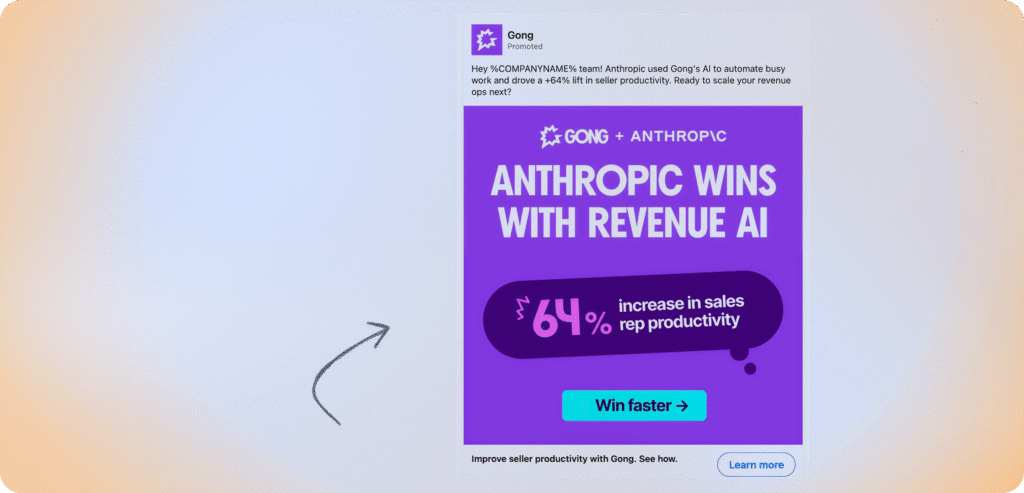
The ad above is a Gong single image ad currently running in the LinkedIn feed. A few things worth noticing.
- The opening line — “Hey %COMPANYNAME% team!” — uses LinkedIn’s dynamic personalization to insert the viewer’s company name at scale. The raw token is visible here because it didn’t populate in this instance, but the intent is clear: make a mass ad feel like it was written for your specific team.
- The copy doesn’t claim the result. It attributes it to a named customer: “Anthropic used Gong’s AI to automate busy work and drove a +64% lift in seller productivity.” Anthropic is a recognizable company. Putting their name on a specific number is harder to dismiss than “customers see up to 64% improvement” — one is a promise, the other is a documented outcome from a brand people have heard of.
- The visual reinforces the copy without repeating it. The 64% stat gets its own visual treatment in the creative. The in-image CTA (“Win faster →”) sells the outcome. The LinkedIn button below (“Learn more”) handles the click. Two different jobs.
- The transferable principle: proof-by-association combined with a specific result shifts the burden of proof. The reader doesn’t have to take Gong’s word for it. Anthropic already did.
The lesson here isn’t to find a recognizable logo and put a stat next to it, or to use bold typography on a bright background. It’s that the most credible claim in a LinkedIn ad is often not yours to make. It belongs to the customer whose result you’re reporting.
Once you see that, you can look at any ad and ask the same question: whose voice is actually carrying this, and why does that work here?
How to Turn Competitor Insights into Creative Tests
Competitor research that stays as a folder of screenshots doesn’t help anyone. The output should be a short list of testable hypotheses.
A useful hypothesis looks like: “Competitors in our category lead with ROI stats in the creative. We’ve been leading with product features. Let’s run a single image ad that opens with a customer result and see whether CTR improves.”
From there:
- Write two versions of the ad — one following the current approach, one based on the competitor insight.
- Change one element: headline, visual, or CTA. Changing all three at once means you won’t know what drove any change in results.
- Decide what success looks like before launch — CTR, lead gen form completion rate, or cost per qualified lead. Pick one metric per test.
- Run long enough to actually collect data. LinkedIn audience sizes are small, and you’ll hit frequency limits faster than you expect.
- Write down what you learned before briefing the next test. The compounding value of a testing program comes from building on what you know, not starting fresh each time.
Analyze Competitor LinkedIn Ads Creatives with DemandSense
Before you write a creative brief, it’s worth knowing what your competitors are already running — which formats, which offers, which messaging patterns keep showing up across the category.
Free Tool
Skip the advertiser-by-advertiser search in LinkedIn Ad Library
DemandSense’s Ad Strategy Scanner is a free tool that lets you do that research without manually searching LinkedIn Ad Library advertiser by advertiser. Surface competitor ad creatives across your category in one place, spot trends in format and offer type, and build a clearer picture of the creative landscape before you commit to a direction.
Try the Ad Strategy Scanner →P.S. And if you’re looking for ways to optimize your ad spend and prove that some creatives are more pipeline-worthy than others, start your free 30-day DemandSense trial today.
Frequently Asked Questions
LinkedIn Ad Library is the most reliable primary source — search by company name and you’ll see what any advertiser is currently running. For research across multiple competitors at once, DemandSense’s Ad Strategy Scanner covers that without manual searching. Roundup articles listing LinkedIn ad examples are also worth looking at, though the goal is to understand what structural decisions are working, not to find things to visually reference.
Go to linkedin.com/ad-library and search by the company name you want to research. You can filter by ad format. The main limitation is that it only shows active ads — you can’t see what was tested six months ago or how long any specific creative has been running.
For competitor research specifically, company name search is more reliable than keyword search. LinkedIn’s keyword search in the ad library doesn’t always surface what you’d expect. If you know which advertisers you want to look at, go to their advertiser profile directly.
Six things worth looking at systematically: the opening line and what it leads with, the visual approach and how much contrast it uses, what proof points appear in the creative itself (not just on the landing page), the offer type and CTA specificity, which ad formats are being used and whether they match the campaign goal, and any signs of creative testing or rotation. The practical goal is to understand what your category defaults to, so your creative choices are deliberate rather than coincidental.
Turn what you observe into a specific hypothesis: “Competitors lead with X. We lead with Y. Let’s test X.” Then change one variable per test, define the success metric before you launch, and document the result in a way that informs the next test. The teams that consistently improve LinkedIn ad performance are usually the ones with better testing discipline, not more creative volume.