
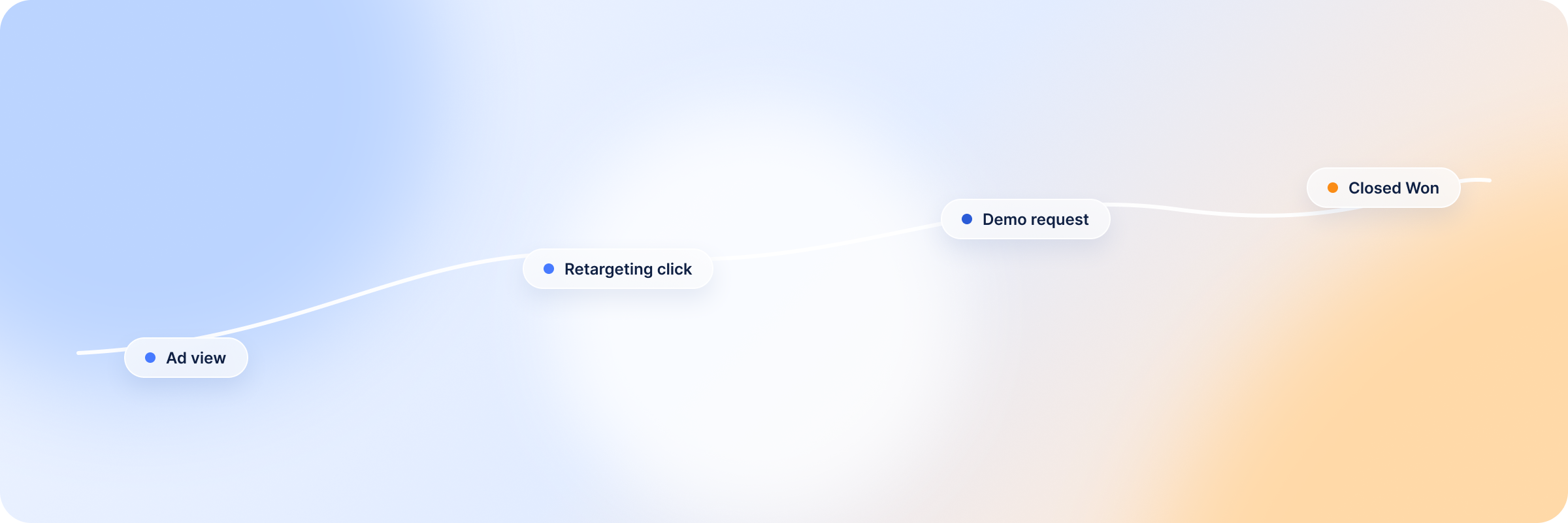
LinkedIn’s firmographic filters help you narrow your audience to reach your ICP, but most of the time, your ads still reach the wrong audience because the filters are too broad.
The best approach is to start with the closed-won accounts and open opportunities in your CRM, then work backwards. Look at what your best customers have in common beyond the basic traits, then use those unique attributes to refine your target account lists.
Attio CRM gives you that flexibility — you use the unique patterns you have identified to build custom AI attributes for your accounts. Attio’s data enrichment then fills in the missing details for the companies, and the AI feature segments accounts into tiers based on the instructions you give. From there, you will be able to see high-priority accounts you can target in your LinkedIn campaigns.
In this guide, we will show you step-by-step how to use Attio AI and data enrichment to reach the right LinkedIn accounts and how to identify priority accounts for sales.
Summary: How Attio AI Helps Prioritize the Right LinkedIn Accounts
The best thing about Attio CRM is that you don’t have to squeeze your account data into rigid CRM fields. You can create custom objects, attributes, and views that fit your go-to-market strategy. Here’s how it works:
- You build custom objects using the attributes you want to track, giving you a clear view into how accounts and deals connect.
- Attio automatically enriches the data by adding missing details for companies or people without you having to dig for the information across the internet. Attio’s enrichment and web agent do the work for you.
- Prompt Attio AI in plain English on how you want it to score the accounts, and it segments your audience into high, mid and low priority accounts.
- You can build audience lists from your high-priority list and use them to build Matched Audiences and reach the right LinkedIn accounts.
What Is Attio and What Makes It an AI-Native CRM?
Attio is an AI-native CRM built around a flexible data model that allows its users to create custom objects, relationship attributes or views to fit their business needs. You can add the information you want to track, such as technographic signals and buying triggers, and then use these signals to filter, organize and segment your CRM records.
Attio is AI native because its AI is built in, unlike other CRMs that add AI as a separate tool. Its AI Attributes and Web Agent can research public information about your listed companies and contacts, analyze the data and give you structured attributes for your customers.
Benefits of Attio’s AI-Native CRM
- Custom data models — it lets you create custom objects and relationship attributes that fit your GTM strategy.
- AI-powered data enrichment — you don’t have to enter account data manually. You enter the company name or domain, and Attio’s enrichment fills in the remaining details: company description, location, employee range, funding raised and estimated revenue.
- Interaction summaries — it reads through your records and emails and gives you detailed summaries about deals. You can also get call summaries through its Call Intelligence feature.
- Account prioritization — AI attributes score your accounts based on your set rules and segment the accounts into high, mid and low priority segments so you know the accounts you should reach out to first.
- Workflow automation — you set the rules for multi-step workflows, and Attio automatically triggers the next step when an account meets the set conditions, like creating tasks after a stage change. This helps with B2B deals that involve multiple stages.
What Attio AI Doesn’t Do: Data Silos, Campaign Blind Spots, and Common Pitfalls
Attio’s flexible data model comes with its own challenges. It organizes your business based on what you feed it — from objectives to attributes to audience scoring to the layout — feed it wrong or messy data and you end up with a messy workspace all the same.
Like every other CRM, Attio can only see the data within its system (and available public data) and cannot access your LinkedIn ads data unless you connect the two systems through an attribution platform or manually add LinkedIn conversations to Attio — which is error-prone.
This means that the audience segments Attio builds often don’t reflect the buying stage or account status.
For example, if Attio marks 200 CRM accounts as high priority or ICP fit, the accounts could be: high fit + no engagement, high fit + actively engaging, high fit + already in pipeline, or high fit + previously exposed to LinkedIn but now cold. Without a connection to your LinkedIn data, it’s hard to make the distinctions you need to build tight audience segments you can target using personalized messaging.
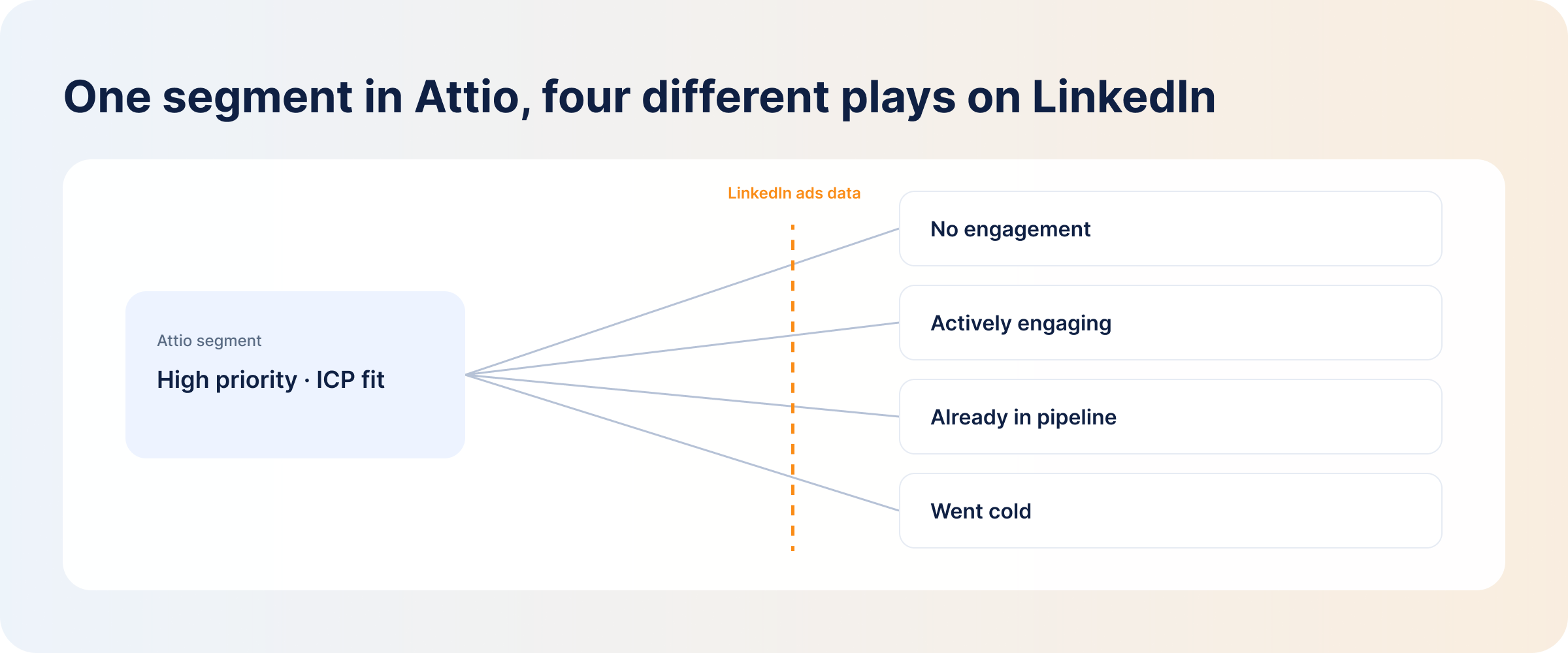
Here is a list of things Attio can do and where it’s still limited:
| Attio’s AI capabilities | Limitations |
|---|---|
| Enriches company and people records automatically | Enrichment depends on the available data. If you are dealing with SMBs and non-tech firms that have limited online presence, you still have to fill gaps manually |
| You can segment audiences based on custom attributes and set scores | It has no access to your LinkedIn ads data, hence the segments may not always reflect buying intent |
| Workflow automations trigger actions when accounts move to the next stage | It cannot tell you whether your LinkedIn ads contributed to the change |
| It keeps company, people, deals and custom object data connected in one workspace | It creates campaign blind spots as most of the time you’ll find the leads marked as “direct” even if their journey was influenced by LinkedIn ads |
Attio AI Features for Data Enrichment and Account Intelligence
For Attio to enrich your customer records, you should add the company domain for companies and valid email addresses for individual contacts.
AI-Powered Enrichment and Account Research
Attio enrichment fills in firmographic data for all the companies and people recorded in your CRM. When that is not enough, you can prompt the Web Agent to research the companies you want to reach based on more specific features like:
- Whether the companies sell primarily to enterprises
- The type of products they offer
- Whether they operate only in a particular market
- Their business model
- Even the most recent company events or hiring
AI Attributes, Classification, and Record Summaries
AI Attributes then analyzes the research data and classifies your audience according to instructions. You steer it with plain-English guidance — tell it how you want records classified or scored, give it an example of the output you want, and rerun it as your criteria evolve. AI attributes don’t recalculate on their own, so refreshes are something you trigger for a single record or a whole list.
Attio also tracks relationship strength as its own connection strength attribute, rating each account across 6 tiers — no connection, very weak, weak, good, strong and very strong — based on your team’s actual interactions with the account, so the sales team knows how to approach each one.
If you want to know anything about deals or accounts, you don’t have to read through the records; you simply prompt the AI to summarize the records for you, and it tells you what you need to know and if there is anything that needs immediate attention.
How to Enhance Your CRM With Attio AI
Attio AI needs background data about your customers for it to surface your high-priority accounts.
Add the Data Needed for Account Prioritization
Tell it what makes a company or contact qualify as a high-priority account:
- Company size and growth
- Industry and sub-industry
- Location or market
- Funding stage
- Technology used
- Business model
- Hiring activity
- Target customer type
- Existing relationship with your team
You should connect your Attio CRM to your product usage events and communication platforms so the system builds segments for you based on current data, and sync changes as they happen.
Build the Data Model for Scoring and Segmentation
Look at the attributes of your best customers, their buying signals, then use those attributes to score accounts.
Structure your scores around 3 signals:
- Fit — does the account match your custom attributes? Do they fall under your ICP?
- Intent — are they asking about pricing? Or downloading your content? Or looking at competitors?
- Relationship strength — do you have a connection with the company?
So if you have accounts that tick all the firmographic filters, their intent and relationship scores will help you narrow down the list further. For example:
Account A
- Matches your ICP
- Two to three stakeholders have engaged with your content
- They recently made a demo request
- Your sales team already has a strong connection with someone
Account B
- Matches the same ICP
- No recent engagement or buying signals
- No known relationship with your team
Account A is the high-priority while Account B is still a low-priority.
If you use the firmographic and technographic filters alone without checking intent, you will end up with a bloated high-priority segment like the one we discussed earlier.
How to Turn Attio Account Tiers Into LinkedIn Campaigns
You can export the account data in a CSV file and use it to build LinkedIn Custom Audiences — you have to upload the lists manually.
Start with Tier 1 (high priority) accounts — check how far gone they are in the buying funnel. Send the high-intent accounts to sales and target the others using BOFU campaigns.
Retarget Tier 2 (mid priority) accounts with educational content to build trust and nurture them further.
Leave Tier 3 (low priority) for awareness campaigns and also filter out the accounts that don’t match your ICP so you only reach the right LinkedIn accounts.
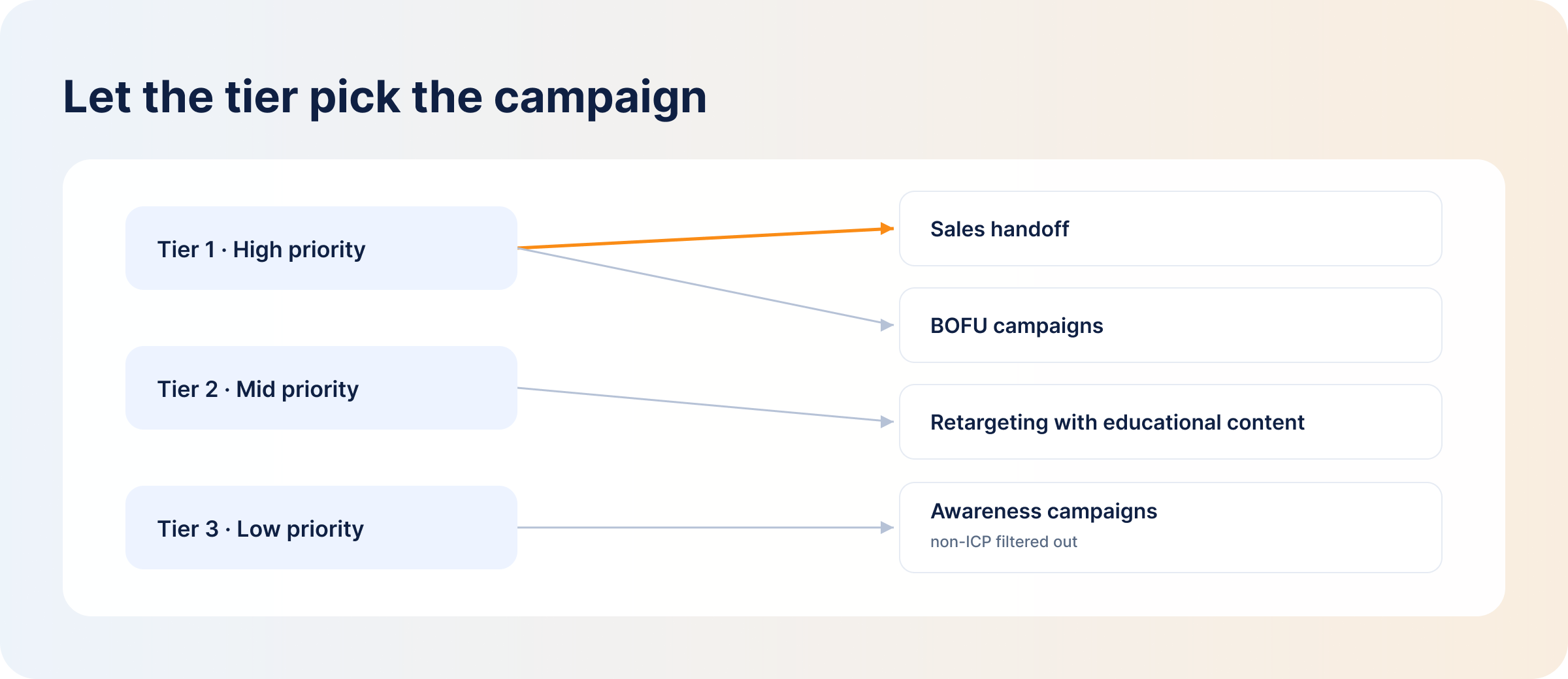
Across the three stages, ensure you target the audience with personalized messages that meet them where they are in their buying journey. If a prospect downloads content about what your product solves, you should follow up with video ads demonstrating your expertise or case studies to build trust before pushing for demo requests.
Once the campaigns are up, you need to update your audience lists as new opportunities enter pipeline and others turn into closed-won and closed-lost deals, so you don’t keep paying to reach accounts that have already decided. With a manual CSV workflow, that means re-exporting from Attio and re-uploading your lists on a schedule — put it on the calendar, because LinkedIn keeps spending against a stale list either way. Connecting your CRM and your LinkedIn ads data through an attribution layer removes most of that housekeeping, and we’ll get to that below.
How Attio AI Compares With HubSpot AI and Salesforce AI for Account Prioritization
Attio stands out from the other CRMs because of its flexible data model and its built-in AI feature, but HubSpot AI and Salesforce AI beat it in building audience segments because they can both analyze your CRM history and predict audiences that are more likely to convert — predictive lead scoring. Here’s how the three compare in AI capabilities:
Attio AI vs. HubSpot AI
Attio AI lets you build custom objects from the attributes you want to track and then enriches data using public data. But HubSpot’s Breeze Intelligence is a bit rigid and enriches data from its commercial dataset and third-party providers. HubSpot’s custom objects are available to high-tier customers.
Attio AI vs. Salesforce AI
Attio AI does not require much of your historical data to build account segments, while Salesforce AI (Einstein + Agentforce) requires high volumes of historical data to learn from before building predictive audiences.
- Use Attio if you are a GTM or PLG team that needs flexibility in your CRM, and you don’t have a lot of historical data to work with.
- Use HubSpot if you are looking for an all-in-one suite for your marketing, sales and service.
- Use Salesforce if you are a large enterprise team with lots of data that needs processing and a complex sales cycle.
DemandSense: Bringing Attio, HubSpot, Salesforce, and LinkedIn Ads Data Into One Place
No matter the CRM you pick, if your data systems exist separately, you will always have data blind spots in your campaigns.
DemandSense connects Attio to your LinkedIn ads for pipeline attribution. It integrates natively with HubSpot, Salesforce and Attio, with webhooks for other systems, and acts as your middle layer between your LinkedIn ads data and your CRM data.
It reads Attio deal data and matches it to LinkedIn ad exposure and identified website visitors, so you can see how LinkedIn campaigns influence accounts in your CRM — and stop paying to advertise to accounts that already closed.
Once you make the connection, you can ask ChatGPT or Claude questions about your LinkedIn ads or CRM deals in plain English through DemandSense MCP and skip the report-building process entirely. It is open on both plans, and setup is on the MCP Intelligence Hub.
FAQ
Can Attio Replace Clay or Apollo for Data Enrichment?
No. Attio, Apollo and Clay can help you with data enrichment, but Attio is limited when it comes to prospecting new accounts, as it only focuses on accounts already recorded in your CRM. So if you need to build prospect lists, you will still need enrichment tools like Clay and Apollo.
How Often Should Attio AI Attributes Be Refreshed?
It depends on the attributes — basic firmographic data like industry and company name rarely change and don’t need regular refreshes, but attributes that change quickly like funding and company growth should be refreshed regularly. Remember that AI attributes don’t recalculate automatically — you rerun them for a record or a list when you need the data current.
What Data Does Attio Need to Enrich Company and Person Records?
Attio needs company domains to enrich companies and email addresses for people records. It then researches public databases to fill in the missing information in each record. Give it as much data as you can since some companies and people don’t leave a lot of details online.
How Accurate Is Attio AI Enrichment for Account Prioritization?
The accuracy depends on input data completeness and how well you define your scoring. If you set scores based on basic attributes like company name, industry size, tech stack and geographical location, you will get a list of accounts that match your ICP but have no buying intent.
Can Attio Automate Follow-Ups After an Account Becomes a Priority?
Yes, through workflow automation. Attio allows you to build multi-step workflows so when an account becomes a priority, it can automatically add it to your email sequences or trigger alerts to sales — depending on your set rules.