
Most guides on connecting LinkedIn Ads to ChatGPT walk you through linking your ad account so ChatGPT can pull a raw data feed. That gets you LinkedIn’s own numbers in a chat window, which is a friendlier place to read them than Campaign Manager.
DemandSense MCP connects ChatGPT to something else: a single buyer record already joined on DemandSense’s side. LinkedIn ad exposure down to the impression level, identified website visitors matched to a person and a company, and CRM state from HubSpot, Salesforce or Attio. By the time ChatGPT sees any of it, the three sources are one record.
That is what makes a question like “which ICP-fit companies saw our ads, visited the site, and aren’t in our CRM yet?” answerable inside ChatGPT at all, instead of by hand in a spreadsheet.
Summary: Connect LinkedIn Ads to ChatGPT for Analysis and Reporting With MCP
The short version, before the detail.
- MCP is a connector standard. It lets ChatGPT read live data from an outside system instead of working from whatever you pasted into the conversation.
- A LinkedIn Ads MCP connection on its own reports what Campaign Manager already shows. Most wrap the LinkedIn Marketing API, so you get the same native numbers, faster to reach.
- DemandSense MCP reads three streams before ChatGPT does. Impression-level ad exposure, identified website visitors at the person and company level, and CRM state, side by side before ChatGPT queries anything.
- The join is what makes cross-system questions answerable. LinkedIn ads data alone cannot tell you which reached accounts never came to the site, because it does not know what happened on your site.
- It is read-only. ChatGPT analyzes your LinkedIn ads campaigns; it does not launch, pause or change anything.
- It is open to everyone. MCP comes with every DemandSense plan and with the 30-day free trial. There is no application or waitlist anymore.
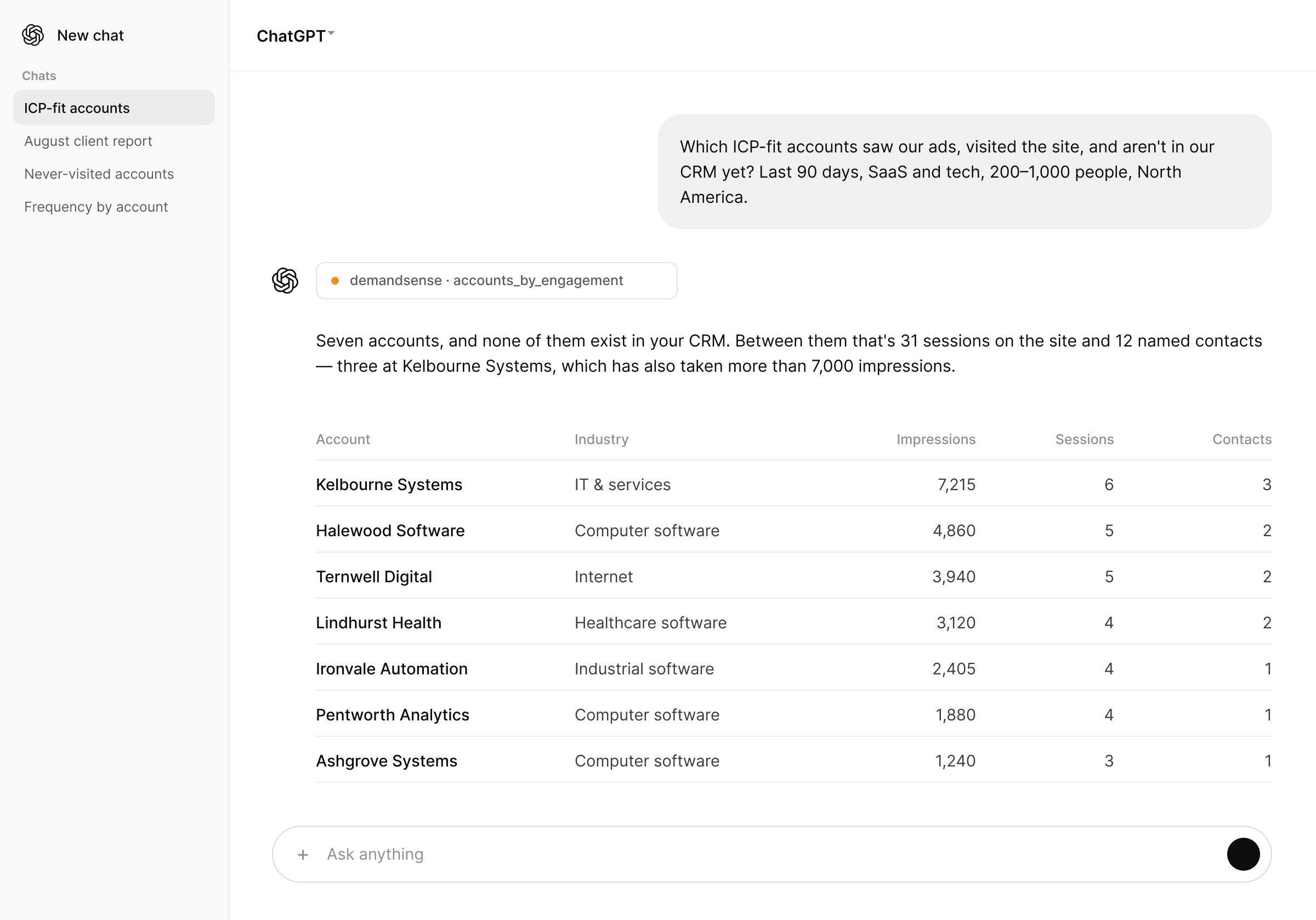
Figures from a DemandSense MCP run against our own account. Account names are placeholders.
Native ChatGPT Apps vs. MCP Connections for LinkedIn Ads
ChatGPT reaches outside tools in two ways, and both of them run on the Model Context Protocol.
The first is an app from the ChatGPT app directory. OpenAI’s Apps SDK is built on MCP, so a directory app is an MCP server that has been packaged, submitted and reviewed. It installs in a click, and it gains a new capability when its developer ships an update and OpenAI approves it.
The second is a custom MCP connection. You give ChatGPT the server’s endpoint yourself, choose an authentication method, run a tool scan, and from then on ChatGPT queries that server directly with no directory in between. That path sits behind developer mode, under Settings → Apps → Advanced settings. On Business and Enterprise plans an admin or an authorized developer sets it up for the workspace. Pro accounts can add one with read and fetch tools only, which for a read-only server is the entire surface anyway.
DemandSense MCP is the second kind. On day one that is mostly procedural. Over a year it decides whether a new capability arrives when DemandSense ships it or when a review queue clears.
ChatGPT MCP Capabilities for LinkedIn Ads
Without a connection of some kind, ChatGPT knows exactly as much about your LinkedIn ads account as you pasted into the chat. Ask it to analyze last month’s campaign performance and it works from that block of text, so every follow-up question sends you back to Campaign Manager for another export.
An MCP server gives ChatGPT tools it can call instead:
- It requests current data at the moment the question is asked, rather than working from whatever is already in the conversation
- It calls a structured function for a specific question, rather than parsing an unstructured export and guessing what each column means
- It chains several tool calls in one conversation, so a follow-up does not cost you another export
- It answers from a live query, which means the CTR and CPC in the answer are the ones in the account today
That is the general shape of what a well-built MCP server gives ChatGPT. What separates one server from another is the data sitting behind it, since that decides which questions you can ask at all.
How LinkedIn Ads and ChatGPT Integration Works Through MCP
Most LinkedIn Ads to ChatGPT integrations work the same way. Connect the ad account, and ChatGPT gets campaign metrics, impressions, clicks and spend directly from the LinkedIn API. That is useful for anything that stays inside LinkedIn’s own data, and it runs out the moment a question crosses into another system, like whether a company that saw your ads ever came to the site.
DemandSense joins three sources on its own side, before ChatGPT is involved:
- LinkedIn ad exposure, tracked to the impression level rather than aggregated campaign totals
- Identified website visitors, resolved to a person and a company rather than a reverse-IP guess at the organization behind a visit
- CRM state, from HubSpot, Salesforce or Attio
Those three sit side by side in DemandSense, and that is what ChatGPT queries. You ask in plain language, ChatGPT calls DemandSense MCP’s tools, and the answer comes back from data that was already connected.
Visitor identification is probabilistic. Match rates move with your traffic and your audience, and not every visitor resolves to a person.
Wiring three separate connectors into ChatGPT gets you the same three sources in the same chat window, and the matching stays your problem. Each system files the same company under a different key, so ChatGPT has to reconcile them across separate tool calls with nothing shared between them. It will produce an answer and it will sound sure about it, and there is nowhere to go and check the rows.
| Question you ask ChatGPT | LinkedIn Ads-only MCP connection | DemandSense MCP |
|---|---|---|
| Which campaigns had the best CTR last month? | Answered from LinkedIn ads data | Answered from LinkedIn ads data |
| Which companies did our budget actually reach? | Impression totals by audience segment | Impression-level exposure, company by company |
| Which of those companies came to the site? | Not in LinkedIn’s data | Identified visitors, resolved to people and companies |
| Which of them aren’t in our CRM yet? | Not in LinkedIn’s data | In the same record, alongside CRM state |
| Which accounts are we paying to reach that never visit? | Needs two exports and a spreadsheet | One question, one conversation |
How to Connect LinkedIn Ads to ChatGPT With MCP
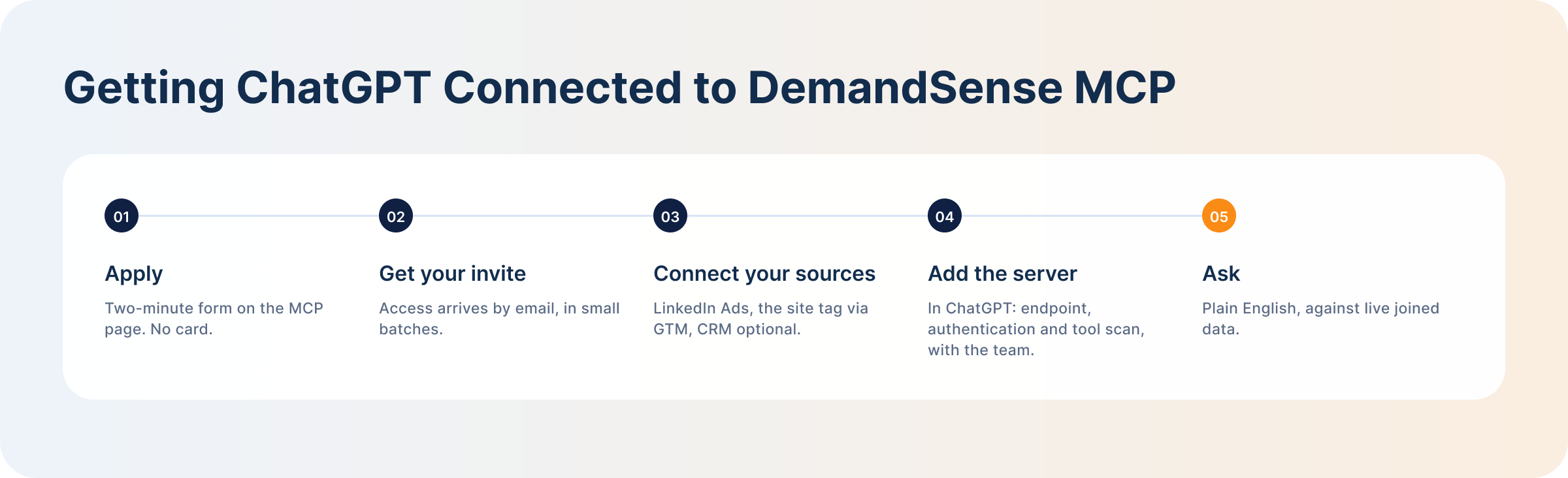
DemandSense MCP is open to every DemandSense account, trial included. The path in:
- Start a free trial. Go to demandsense.com/mcp-intelligence-hub and click Start Free, or sign in if you already have an account. The trial is 30 days, no card needed, and MCP is included.
- Add the MCP server inside ChatGPT. Once your workspace is live, connect it from ChatGPT: endpoint, authentication and tool scan.
- Ask your first question. Plain English, in a new ChatGPT conversation.
The trial is free for 30 days and includes MCP, so trying it costs nothing.
The same server answers the same questions in other clients, so a team that would rather not use ChatGPT can analyze LinkedIn Ads with Claude instead. MCP is a standard, and this connection is not tied to one assistant.
What LinkedIn Ads Data Can ChatGPT Analyze?
Once DemandSense MCP is connected, three layers of data are in reach.
- Campaign and ad performance. Spend, impressions, clicks, CTR, CPC and lead gen form completions, broken out by campaign, campaign group and individual creative. Every LinkedIn Ads MCP server reaches this layer, and our breakdown of LinkedIn ads metrics covers where each of these numbers misleads.
- Audience and account data. Which companies your budget reached, at impression level, and which of them came to the site afterwards — resolved to named people and companies with industry, employee size and region attached. That is what turns “we reached 4,000 accounts” into “we reached these accounts, and these ones came looking.”
- Pipeline and revenue data. With a CRM connected, deal stage, open pipeline value and account status sit in the same record as the ad exposure, which is what makes LinkedIn pipeline attribution a question you can ask in a sentence. The server also works without a CRM: you keep the ad and visitor layers and lose the deal context.
How to Analyze LinkedIn Ads With ChatGPT
Campaign and Creative Performance
Ask ChatGPT to compare impression-level exposure and click activity across campaigns, or to find the campaigns whose CPC drifted since last month. That much is familiar LinkedIn ad performance work. The half a LinkedIn-only connector cannot add is whether the efficient-looking campaigns are reaching accounts you want, which is usually the more expensive question.
High-Engagement Accounts
This is where the joined record does the most work:
“At [account], which people visited after seeing our ads?”
The answer comes back as named people at a named company, so you get account behavior rather than an engagement score. Run it weekly and it becomes a shortlist of ICP-fit accounts showing both ad and site activity.
Budget Allocation Opportunities
Ask where spend and engagement have come apart:
“Which accounts are we paying to reach that have never once visited the site?”
That is a spend problem hiding inside a delivery report, and useful input to a LinkedIn ads budget review. The reverse cut is worth running too: CRM accounts that went quiet but keep visiting the site after seeing your ads.
Pipeline and Revenue Impact
Ask which open opportunities saw your LinkedIn ads before they entered the pipeline, and how much open pipeline those accounts carry. The same record supports account-based marketing attribution without an export, and answers in accounts rather than last-click conversions. For a quarterly review:
“What changed for [account] this quarter?”
ChatGPT builds that from ad exposure, site visits and CRM stage changes together.
LinkedIn Ads Reporting With ChatGPT
Reporting works the same way analysis does. You ask a question in one conversation and get an answer built from the pre-joined record. There is no scheduled email or Slack delivery for this today, so think of it as reporting on request.
That covers three practical shapes:
- Campaign performance reports. Impressions, clicks, CTR and spend by campaign or creative, with the account-fit layer attached.
- Account and pipeline reports. Ask for a brief on one account before a call and get impression counts, click history and site-visit behavior together.
- Executive and client reports. Ask for this month’s client report (reach, identified visitors, top engaged accounts, versus last month) and get a summary you can hand off or lightly edit, built in one prompt instead of three exports.
For agencies and consultants, that last one changes the week. The joined report becomes the deliverable, and it is a list nobody else on the call can produce.
ChatGPT Prompts for LinkedIn Ads Analysis and Reporting
Every prompt below ran against a live account before it earned a place on the DemandSense MCP page. Treat them as a starting prompt library and edit the bracketed parts.
- Which ICP-fit companies saw our ads, visited the site, and aren’t in our CRM yet? Pipeline you already paid for that was never logged anywhere.
- Which accounts are we paying to reach that have never once visited the site? Paid reach that produced no site activity at all.
- At [account], which people visited after seeing our ads? Engagement narrowed to people rather than an account-level number.
- Which CRM accounts went quiet but keep visiting the site after seeing our ads? Accounts that look cold in the CRM and are not.
- Which open opportunities saw our LinkedIn ads before they entered the pipeline? The attribution question, asked in accounts.
- What changed for [account] this quarter? A QBR narrative from ad exposure, site visits and CRM stage changes.
- Brief me on [account] before my call. Impression counts, click history and site-visit behavior in one summary.
- Draft this month’s client report: reach, identified visitors, top engaged accounts, versus last month. A client-ready report in one exchange.
- Who should sales call this week? The shortest useful question in the set.
Each is a single prompt in a single conversation, and none of them starts with an export.
Analyze and Report on LinkedIn Ads With ChatGPT Using DemandSense MCP
Plenty of tools solve a real but narrower problem: getting LinkedIn ads analytics into a chat window faster than a CSV would. Several do it well.
DemandSense MCP is aimed at the questions that were never answerable at all, because the answer lived across LinkedIn, your website and your CRM at once. Reading those three streams side by side before the model does is the whole product, and the limits follow from it: read-only today, and probabilistic visitor identification.
If you run Attio, the CRM half of that join is worth reading separately, in how to connect LinkedIn Ads to Attio and attribute pipeline and revenue through it.
If the questions you ask your dashboard every Monday need two systems to answer, that is what this is for. It comes with every DemandSense trial, at demandsense.com/mcp-intelligence-hub.
FAQ
Do You Need Coding Skills to Connect LinkedIn Ads to ChatGPT With MCP?
No. There is no LinkedIn developer app to create, no OAuth pipeline to maintain and no query language to learn. You ask LinkedIn ads questions in plain English in a normal ChatGPT conversation. The setup underneath avoids a developer too: the DemandSense tracking code installs through Google Tag Manager, and the MCP connection is configured with the team once your access opens.
How Up to Date Is the LinkedIn Ads Data ChatGPT Analyzes?
Every question queries your live DemandSense workspace at the moment you ask it, rather than a stored export or the model’s training data. That applies to ad exposure, identified visitors and CRM state alike, since all three sit in one connected record. LinkedIn’s own reporting delay still applies to ad data exactly as it does in Campaign Manager, so treat same-day numbers as provisional.
Can ChatGPT Analyze Multiple LinkedIn Ads Accounts?
Cross-account questions are the shape DemandSense MCP is built around, so asking about many companies at once is normal. Running several separate LinkedIn ad accounts, the agency case, is a workspace the team sets up with you rather than something you switch on. If that is your setup, get in touch once you are in.
Can ChatGPT Make Changes Directly to LinkedIn Ads Campaigns?
No. DemandSense MCP is read-only. It answers questions; it does not edit campaigns, pause ads or move budget. Campaign management stays in LinkedIn Campaign Manager. Some MCP servers in the wider market do support write actions, and this one deliberately does not.
Can ChatGPT Replace LinkedIn Campaign Manager Reporting?
Not entirely. Campaign Manager is still where campaigns are built and managed, and it remains the record for spend. What ChatGPT adds through DemandSense MCP is the set of questions Campaign Manager cannot answer at all, because those answers depend on site visits and CRM state that live outside LinkedIn’s reporting.
Can ChatGPT Compare LinkedIn Ads With Other Advertising Channels?
Not through this connection. Within DemandSense MCP, LinkedIn is the ad channel, and what it adds is the two systems that decide whether LinkedIn spend worked. To put Google Ads or Meta Ads spend next to LinkedIn in the same view, use a general reporting connector alongside it.
Is It Safe to Connect LinkedIn Ads Data to ChatGPT Through MCP?
Read-only means there is no path from a conversation to a change in your live LinkedIn account. The connection reaches your own DemandSense workspace and nothing else: not another customer’s data, not a competitor’s private numbers. It is also built to say when nothing in the data matches a question, rather than producing a number to fill the gap. Access comes with every DemandSense account, trial included.