
Summary: Building a B2B Target Audience Profile for LinkedIn Ads
- A B2B target audience profile is a written description of the companies you sell to and the people inside them who buy, specific enough to target.
- It has three layers: the ideal customer profile (the companies), buyer personas (the people) and the buying group (everyone involved in one purchase).
- Four types of data define it: firmographics, technographics, intent data and behavioral patterns. Firmographics alone are too broad.
- You build it in four steps: define the ICP, turn it into a tiered account list, profile the buying group, then build one LinkedIn segment per ad set.
- The profile starts as a hypothesis. You refine it against campaign and pipeline results, segment by segment, once your ads are running.
What Is a B2B Target Audience Profile?
A B2B target audience profile is a written description of the companies you sell to and the people inside them who buy. It has to be specific enough to target. Something like “US software companies with 200 to 1,000 employees that sell to finance teams and use HubSpot” works; “mid-market SaaS” is too loose.
B2B targeting works differently from B2C. You’re reaching organizations and several people inside each one, and the purchase decision is shared. A champion can love your product and the deal still stalls with finance or IT, so the profile has to cover the whole group, not one buyer.
On LinkedIn, a written profile maps straight onto targeting, because members list their company, job title and function. The profile is also what lets you write a different message for each role instead of one ad for everyone.
Core Components of a B2B Target Audience Profile
A complete B2B audience profile has three layers, each of which shows up differently in LinkedIn targeting:
| Component | What it defines | Example attributes | How it shows up on LinkedIn |
|---|---|---|---|
| Ideal customer profile (ICP) | The companies | Industry, size, region, business model, tech stack | Company attributes and company lists |
| Buyer personas | The people | Role, seniority, goals, pain points, objections | Job function, seniority, job title and skills |
| Buying group | Who is involved in one purchase | Decision-maker, champion, users, finance, IT or security | Several ad sets, or one account list layered with different functions |
Why Audience Profiling Matters for B2B LinkedIn Campaigns
- LinkedIn is an expensive channel. A click there costs more than on most ad platforms (see the average LinkedIn CPC), so every impression that lands outside your ICP costs you more too.
- Broad targeting attracts clicks from people who won’t buy. The average LinkedIn CTR is 0.52%. Most of any B2B audience will never click, which means who you reach matters far more than how many people you reach.
- Sales and marketing aim at the same accounts. When the profile is written down, marketing brings in leads from the companies sales is trying to close, and nobody has to argue about lead quality after the fact.
- Measurement becomes possible. With defined segments, you can read results by segment (which industries, company sizes and roles engage, and which of them reach pipeline) instead of looking at one blended number for the whole campaign.
What Data Defines a B2B Target Audience?
No single data source is enough on its own. These four types work together to identify and reach the right accounts:
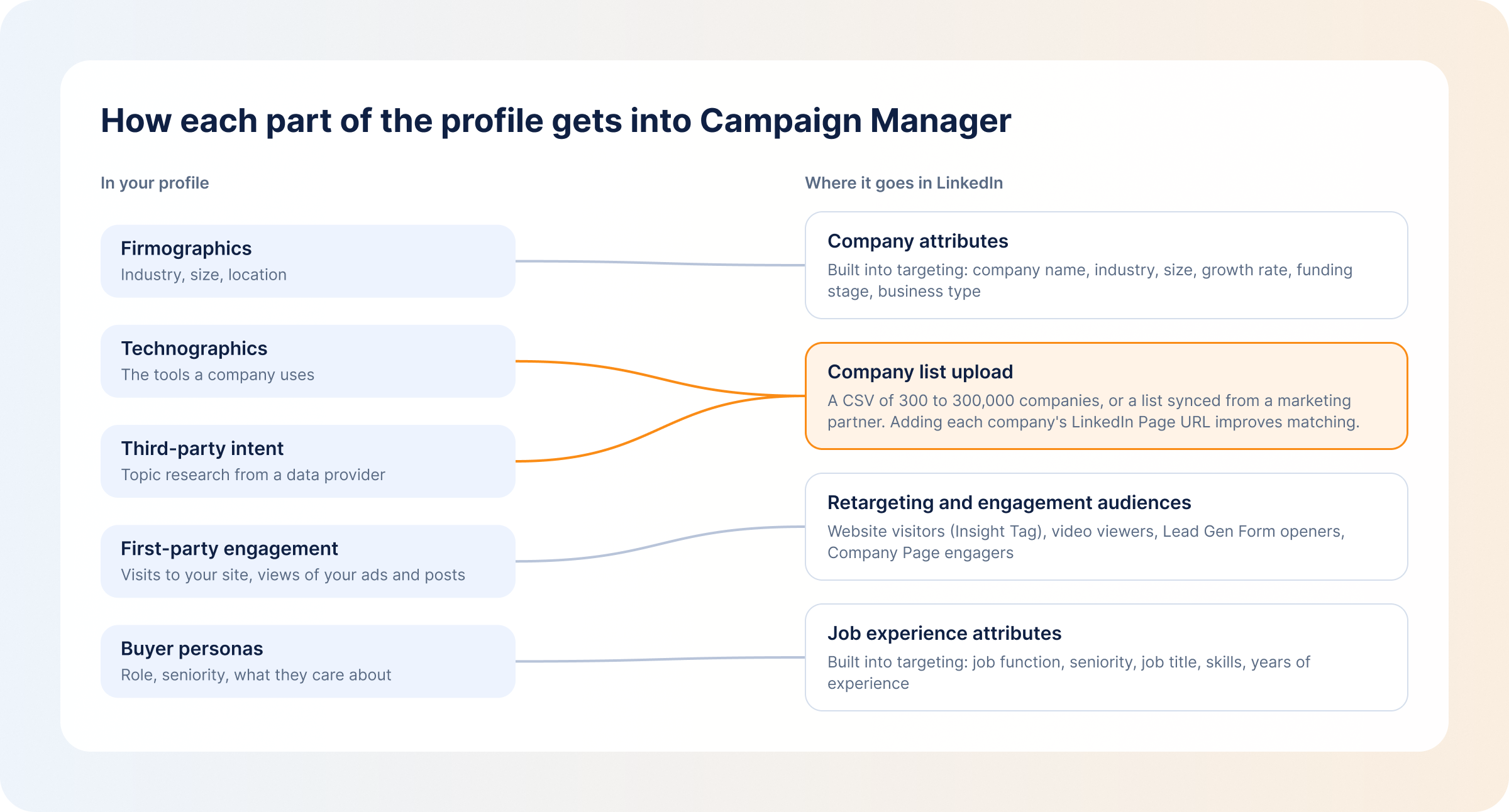
- Firmographics: basic company details like industry, size, revenue and location. On LinkedIn, they fall under company attributes. They’re the starting point, but they’re broad and say nothing about whether a company needs what you sell.
- Technographics: the tools a company uses. This matters most in tech, where you’ll want companies on tools your product integrates with. It isn’t a native LinkedIn targeting option, so the data comes from a third-party provider or your CRM, and you upload it to LinkedIn as a company list.
- Intent data: signals that an account is researching a problem you solve. It comes from third-party sources (topic research across the web) or first-party ones (engagement with your own ads and site). You can track buyer intent from both, but look at more than one signal, because research alone isn’t a decision.
- Behavioral patterns: how accounts engage with you over time, including the content they read, the pages they visit, how often they come back and how they evaluate vendors. High-engagement accounts become segments you can retarget with a more specific message.
An account can fit your firmographic and technographic criteria and still have no interest in your product. Intent and behavior are what tell you which of those well-fitting accounts are worth the spend right now.
How to Build a B2B Target Audience for LinkedIn Campaigns
These four steps take you from a list of traits to ad sets you can launch and compare.
1. Define Your Ideal Customer Profile
Your total addressable market is every company that could buy from you. Your ICP is the part of it worth paying to reach.
Start with your best existing customers, not the whole market: the ones who closed fastest, stayed longest and spent the most. Look at what they have in common. Those shared traits are the beginning of your account intelligence, and they tell you which accounts deserve priority.
Write the ICP as a short list of firmographic rules:
- Industry
- Company size
- Location
- Business model
- Revenue range
- Technology they use
Then write down your exclusions: students, competitors, companies too small to buy, and any segment your sales team has learned to walk away from.
2. Build Your Key Account List
Next, turn the ICP rules into named companies. Good places to pull them from:
- Current and past opportunities in your CRM
- Lost deals worth revisiting
- Companies that look like your best customers
- Accounts already showing intent
Tier the list so each group gets an ad that fits where it is in the buying journey:
- Tier 1: ICP-fit accounts showing strong engagement or intent. These get demo and conversation offers.
- Tier 2: ICP-fit accounts that have engaged with your ads but aren’t in your CRM yet. These get educational content.
- Tier 3: ICP-fit accounts with no engagement history. These get brand awareness.
This tiering is the backbone of a B2B ABM strategy on LinkedIn.
Upload each tier to Campaign Manager as a company list (the Custom Audiences guide walks through the upload). The file needs at least 300 rows and can hold up to 300,000 companies. LinkedIn can take up to 48 hours to build the list, and it expires if it isn’t used in an active or draft ad set for 90 days. Adding each company’s LinkedIn Page URL is optional, but it improves how many companies LinkedIn matches.
3. Profile the Buying Group
B2B deals are made by groups, but each person in the group is still an individual with their own job to protect. Once you know which accounts you want to reach, write a short persona for each role involved in a typical purchase: their goal, their main pain point, the objection they’ll raise and what they need to see before they agree.
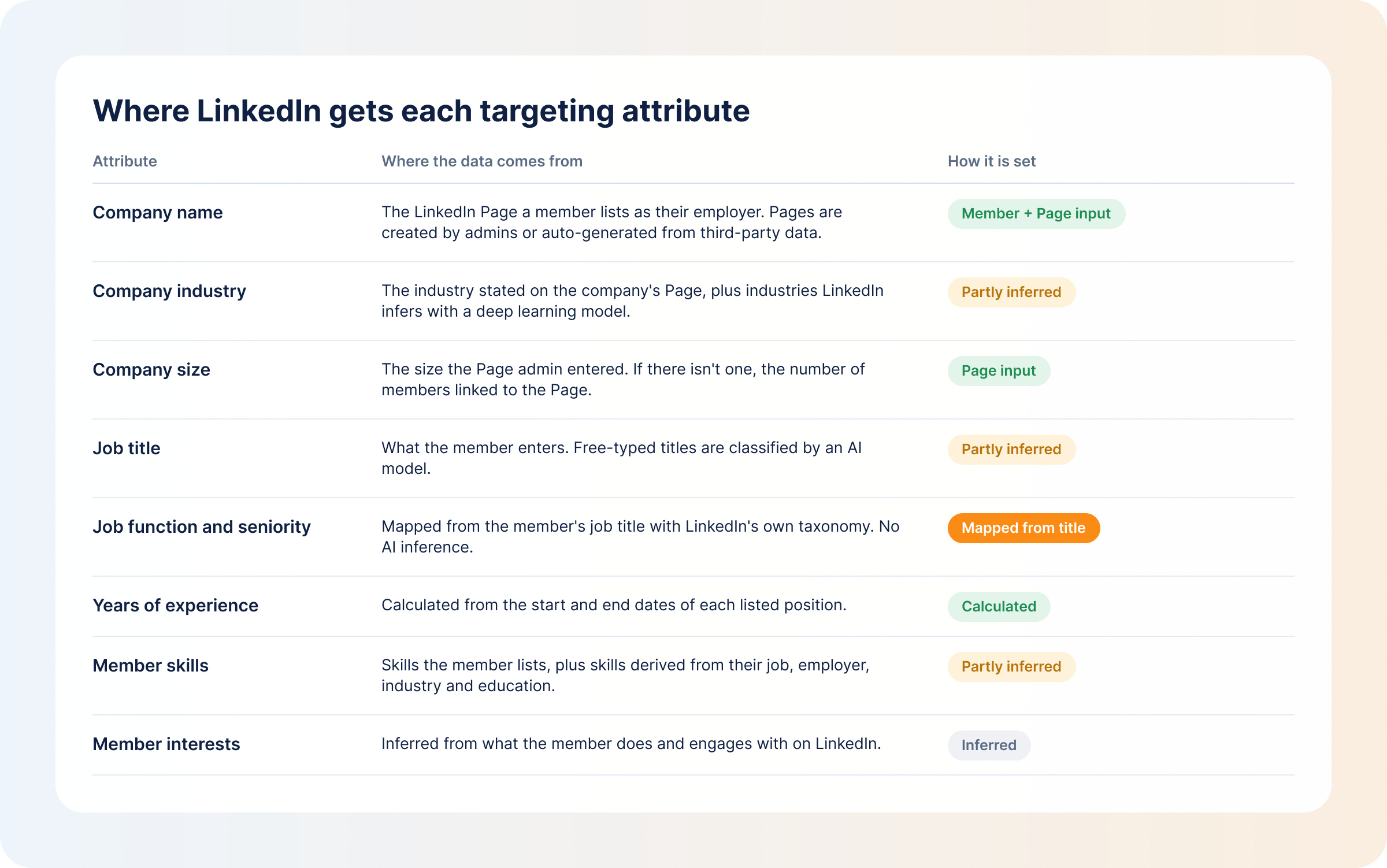
Then map each role to LinkedIn job functions and seniority levels, which is how you’ll find your target audience on LinkedIn when you set up the ad sets. A simple table with four columns is enough:
- Role
- Job function
- Seniority
- What they care about
Fill it in with your own roles, since it will look different for every product.
4. Build LinkedIn Campaigns Around Your Audience Segments
Give each segment its own ad set, with its own message and budget, so you can compare how each one responds. Tier 1 accounts × economic buyers is one ad set. Tier 1 accounts × day-to-day users is another.
Targeting logic decides how big each ad set ends up. Several attributes within one facet (three job titles, say) widen the audience, because a member only has to match one of them. A facet added under “Narrow audience further” shrinks it, because members have to match something from each facet.
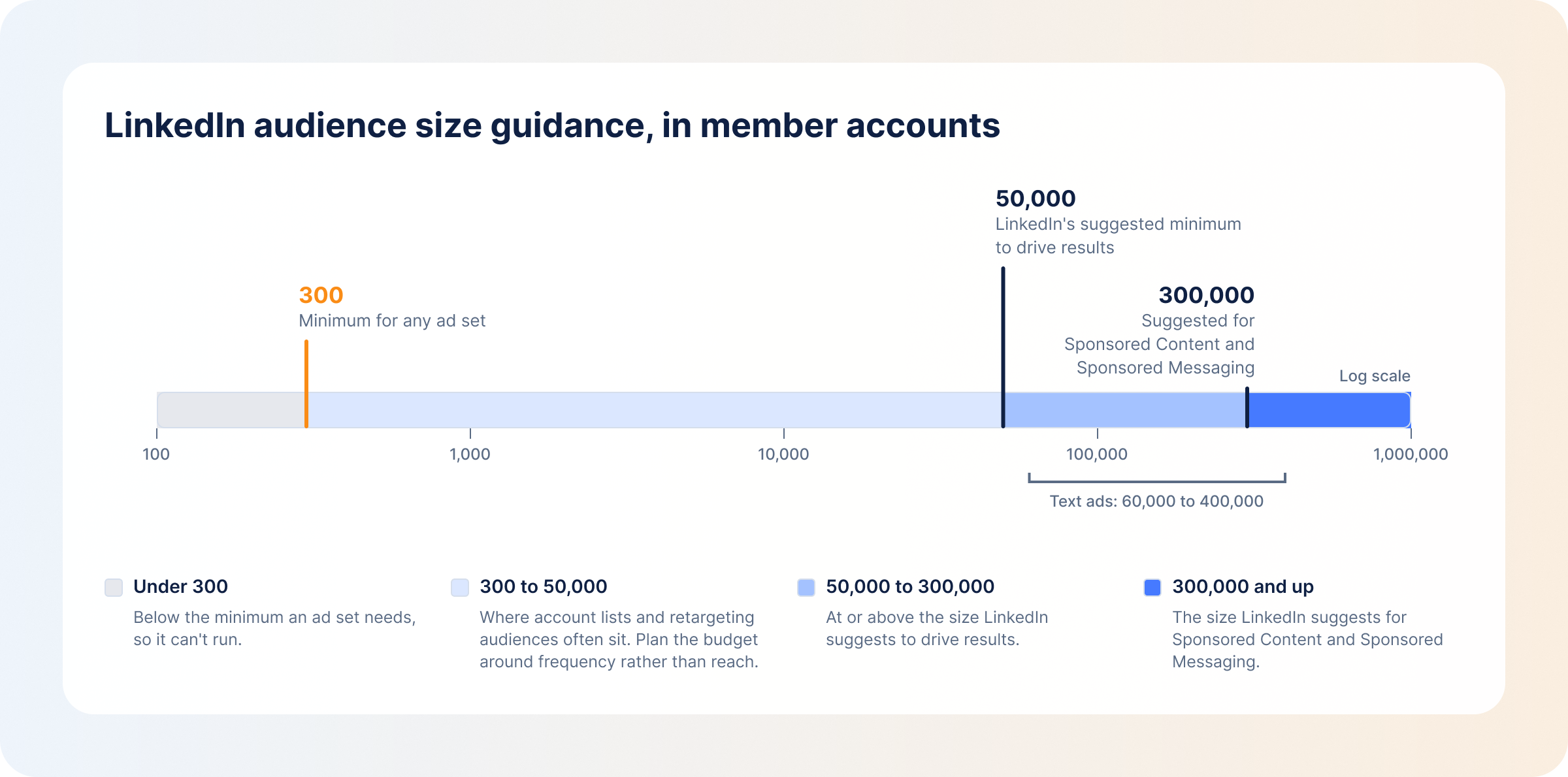
Keep an eye on size while you do this. The minimum for an ad set is 300 member accounts, but LinkedIn suggests at least 50,000 to drive results, and at least 300,000 for Sponsored Content and Sponsored Messaging. Account-list ad sets often sit below those numbers by design, which is fine as long as you know it.
Add your exclusions to every ad set: current customers, competitors and accounts with an open deal. For account-list ad sets, leave Audience Expansion off, since it reaches members outside the targeting you just built. LinkedIn also suggests starting broader and narrowing once you’ve seen who engages, so don’t be afraid to loosen a segment that isn’t delivering.
How AI Helps Identify and Refine Your B2B Target Audience
Studying accounts one by one doesn’t scale past a few dozen. B2B marketers now use AI to work through large data sets and find the traits worth building an ICP around.
AI is useful for:
- Finding patterns in CRM and campaign data, such as the traits your closed-won accounts share
- Spotting high-fit accounts you aren’t targeting yet
- Suggesting which roles belong in the buying group
- Reading intent signals across many accounts at once
- Prioritizing which segments to fund first
AI works from the data it’s given, though, and a CRM with few closed deals or messy fields will produce a confident, wrong ICP. Check its suggestions against what your sales team knows about who really buys.
You can also use AI on your campaigns while they run. The DemandSense MCP server lets Claude or ChatGPT query LinkedIn ad engagement, identified site visitors and CRM state together, so you can analyze LinkedIn ads with Claude or ChatGPT in plain English. A question like “Which ICP-fit companies saw our ads, visited the site, and aren’t in our CRM yet?” gets an answer drawn from all three. The DemandSense MCP server is read-only and open to everyone on the trial.
Where to Get B2B Audience Data for LinkedIn Campaigns
You’ll need both first-party and third-party data to build precise segments. These are the four sources most teams use:
- CRM: your customers, closed-won and closed-lost deals, and sales notes. It’s the best source for the ICP because it reflects real buying outcomes, not assumptions.
- Website and first-party data: who visits your site and what they read. Most B2B buyers leave without filling in a form, but you can identify companies visiting your website and turn them into company lists for LinkedIn, then layer job functions and seniority on top to reach the right people inside each one.
- LinkedIn campaign data: demographics reporting and Companies in Campaign Manager show which companies and roles engage with your ads. That’s where the profile gets its first test, though clicks and impressions only tell you about engagement. Pipeline and revenue live in your CRM.
- Intent and account signals: third-party data providers, review sites and your own engagement data show what target accounts are researching. They help you judge where buyers are in the buying process and adjust both your segments and your message.
DemandSense is a platform for the marketer who runs LinkedIn Ads in a small B2B team. It puts three things in one place that usually live in three separate tools: attribution, optimization, and website visitor profiling. On top of that sits an MCP server.
For audience profiling, the part that matters is what happens after launch. DemandSense reads paid and organic LinkedIn engagement per account alongside your site visits and CRM activity, so you can test the profile you wrote against what your campaigns are doing:
- Who your budget reaches: DemandSense Audience Tuning shows every job title and company your budget reaches, and lets you suppress a competitor, a customer or an active deal.
- Which segments become pipeline: DemandSense Revenue Attribution breaks performance down by industry, company size and country, so you can see which parts of your ICP turn into opportunities and closed-won deals.
- Accounts your lists are missing: Opportunity Gap is a panel you open in DemandSense that lists accounts with strong ad engagement and no CRM record.
- Your ICP as rules: DemandSense website visitor profiling identifies the companies visiting your site, and the people too for US traffic, and scores each visitor against ICP rules you write.
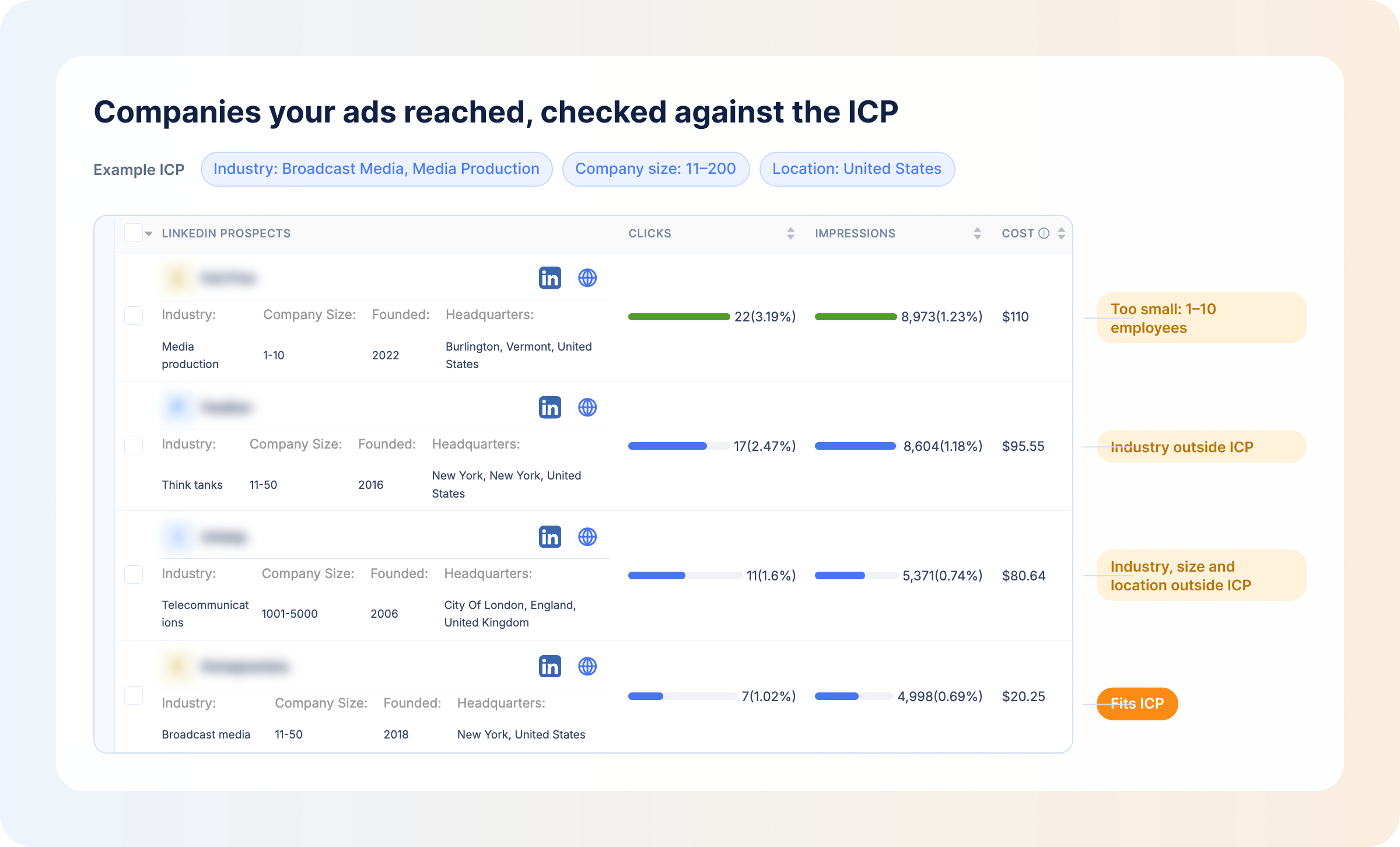
That shows you the gap between who you meant to reach and who you reached, and the next version of the profile is built from it.
Try DemandSense free for 30 days, no card needed.
FAQ
Narrow enough to be your ICP, wide enough to deliver. LinkedIn’s minimum is 300 member accounts per ad set, and it suggests at least 50,000 to drive results (300,000 for Sponsored Content and Sponsored Messaging). Most ABM audiences are smaller, so plan the budget around frequency rather than reach.
Yes. One profile can feed several segments. The ICP stays the same, while the persona, message, offer and objective change by campaign, because buyers need different things as they move through the funnel.
Review it quarterly against pipeline and closed-won deals by segment, and update it sooner after a product, pricing or market change. The profile starts as a hypothesis, and how each segment responds to your ads tells you whether it’s worth keeping.
– Add attributes within the same facet (more job functions or titles), which widens the audience with OR logic. – Remove a facet that narrows it. – Extend the lookback on engagement audiences. – Add predictive audiences built from a contact list or conversions. LinkedIn shows an “Audience Too Narrow” notification when a selection is too tight.
Use job functions and seniority for reach and consistency, because titles vary a lot between companies. Use job titles for precise roles with standard names. Many B2B marketing teams test both in separate ad sets to see which works for their audience.