
Summary: The Best MCP Servers for Marketing in 2026
The best MCP servers for marketing in 2026, by use case:
- Ad platform management: Meta Ads MCP, the official hosted server with read and write access, and Google Ads MCP, Google’s official read-only server for reporting and audits
- On-site analytics: GA4 MCP, Google’s official read-only server for funnels and behavioral data
- CRM and pipeline: HubSpot MCP, the official remote server for contacts, deals, and companies
- LinkedIn ads, website visitors and CRM in one answer (B2B): DemandSense MCP, which reads LinkedIn ad exposure, identified website visitors and CRM stage together before the AI queries anything
What Is an MCP Server for Marketing?
MCP (Model Context Protocol) is a standardized way to connect an AI application to data sources, tools, and workflows it wouldn’t otherwise have access to.
For a marketing team, instead of exporting a CSV from Google Ads, another from GA4, and another from your CRM, then stitching them together by hand, you connect an MCP server once and ask Claude or ChatGPT the question directly in plain language.
What that means for your marketing team:
- Without MCP: Claude or ChatGPT only knows what you paste into the chat. Any live number means leaving the chat, opening a dashboard, and copying it back in.
- With MCP: Claude or ChatGPT connects directly to Google Ads, GA4, HubSpot, or another marketing data source and can query it live, inside the same conversation.
- The result: questions that used to take a report request and a day’s wait, like “which campaigns drove pipeline last quarter,” can be asked and answered in one sitting.
How We Evaluated the Best Marketing MCP Servers
We ranked and grouped the servers in this guide against five criteria that matter once you’re using one day to day, not just what a landing page claims:
- Data coverage: What can this server actually see? A single ad account, a full CRM object model, every GA4 dimension? Broader coverage means fewer separate connections to manage.
- Read vs. read/write access: Can the AI only answer questions, or can it also take action, like editing a campaign or updating a CRM field? Read-only is safer by default; read/write needs a clear approval step before anything changes live.
- Setup effort: OAuth in a few clicks, or an API key and a developer to wire it up? This decides whether a marketer can connect it alone or needs engineering help.
- Pricing: Free official server, flat monthly fee, or usage-based credits? We noted where cost scales with data volume, since that changes the calculation for larger teams.
- Single-platform vs. joined data: Does the server hand the AI one platform’s raw feed, or does it pre-join data across platforms, like ad exposure and CRM stage, before the AI ever sees it? Joined data means fewer reconciliation errors and fewer tokens spent on the AI doing that math itself.
Which Marketing MCP Server Is Best for Each Use Case?
Those five criteria point to a different winner depending on what you’re trying to do, so instead of naming one overall best server, here’s the direct mapping: your use case and the server built for it.
| Use case | Recommended MCP server | Reason why |
|---|---|---|
| Google Ads reporting and audits | Google Ads MCP | Official server, direct API access, read-only |
| Meta Ads reporting and campaign management | Meta Ads MCP | Official hosted server, OAuth setup, read/write, new campaigns paused by default for safety |
| Web analytics and funnel questions | GA4 MCP | Official, read-only, covers standard reports and custom dimensions |
| CRM and pipeline visibility | HubSpot MCP | Official remote server, read/write on contacts, deals, and companies |
| LinkedIn ads, website visitors and CRM in one answer (B2B) | DemandSense MCP | Reads LinkedIn ad exposure, identified visitors and CRM stage together, so the AI gets one answer instead of three raw feeds to reconcile itself |
Best MCP Servers for Marketing Analytics and Attribution
DemandSense
Most MCP servers hand an AI one raw feed at a time: a LinkedIn connector, a separate CRM connector, a separate visitor-ID connector. The AI is left to reconcile all three itself, which burns tokens and produces more wrong answers. DemandSense MCP takes a different approach: it reads LinkedIn ad exposure, identified website visitors, and CRM state (HubSpot, Salesforce, or Attio) together on its own side, then hands the answer to Claude, ChatGPT, or any MCP-compatible client.
DemandSense MCP is read-only. It answers questions but doesn’t edit campaigns, pause ads, or move budget. It is open on both DemandSense plans, from $89 a month, and during the 30-day trial, with no waitlist. Setup is on the MCP Intelligence Hub.
Fibbler
Fibbler runs a live MCP server for B2B teams on its Unlimited and Agency plans. It ships two connectors, a LinkedIn Ads MCP server and a Google Ads MCP server, and both work the same way: ad engagement data (including accounts that saw a campaign but never clicked) is matched to companies and joined against pipeline in HubSpot, Salesforce, Attio, or Pipedrive.
It is read-only, and setup is OAuth-based for Claude and ChatGPT, with no API key needed; other MCP-compatible tools can use an API key instead.
SegmentStream
SegmentStream’s MCP server connects to its own measurement layer rather than a single ad platform, pulling in over 30 ad-platform connectors (Google, Meta, TikTok, LinkedIn, Pinterest, Snapchat, and more) alongside GA4-style web behavior, and runs on top of a customer’s own BigQuery, Snowflake, or Databricks warehouse.
Unlike most servers in this section, it is read/write: alongside reporting, it can carry out budget changes across connected platforms. It works with Claude, Cursor, and other MCP-compatible clients, and it is included in SegmentStream’s platform plans rather than sold separately as an MCP add-on.
CaliberMind
CaliberMind’s MCP server reached general availability in June 2026, aimed at enterprise go-to-market teams. It exposes CaliberMind’s own unified GTM data model, which combines CRM, marketing automation, ad platform, and website data into multi-touch attribution, buyer journey, and funnel models, with schema and table relationships pre-loaded so the AI doesn’t need to guess at joins.
It is read-only and not locked to Claude specifically. It works with any MCP-compatible client (ChatGPT, Gemini, Cursor, Windsurf, and others), since CaliberMind frames its role as the data layer rather than the AI interface.
Best Platform-Specific MCP Servers for Marketing Data
Google Ads MCP
- Official server from Google’s own Ads engineering team, open source since October 2025.
- Strictly read-only. Write access exists only in the full Google Ads API, not in the MCP server.
- Self-hosted, not a Google-hosted endpoint. You run it locally or deploy it yourself on Cloud Run, and you still need a Google Ads developer token plus OAuth credentials.
- Best fit: reporting, GAQL-based analysis, and campaign audits, not campaign management.
Meta Ads MCP
- Official server, launched in open beta in April 2026 and hosted by Meta.
- Unlike Google’s, this one ships with read and write access from day one, exposing 29 tools across reporting, campaign management, catalog management, and signal diagnostics.
- Setup is Meta Business OAuth with three granular scope tiers (read-only, read/write, and read/write/financial), granted per user, per account, so there’s no developer token or app review queue like Google Ads requires.
- Anything it creates lands paused, so nothing goes live without a person switching it on.
- Best fit: teams that want the AI to both analyze and act on campaigns, with the scope tier controlling how much it’s allowed to touch.
Google Analytics MCP
- Official server from Google’s Analytics team.
- Read-only by design; it can’t edit your Google Analytics configuration or settings.
- Runs locally, not hosted by Google.
- Covers account summaries, property details, standard reports, funnel reports, custom dimensions and metrics, and real-time reports.
- Best fit: pulling GA4 traffic, funnel, and behavioral data into a conversation without leaving Claude or ChatGPT to check a dashboard.
Microsoft Advertising MCP
- Official server from Microsoft, currently in open beta, connecting the Microsoft Advertising API to AI assistants including Microsoft 365 Copilot, Claude, and ChatGPT.
- Read-only, and positioned around reporting and diagnosis rather than campaign building: Microsoft’s own example use cases are pulling top campaign products, search queries, and key performance data such as month-over-month conversion changes.
- Multiple community-built alternatives exist with fuller write access (campaign creation, bid management, negative keywords), useful if the official server’s scope is too narrow for your workflow.
- Best fit: Bing/Microsoft Search Network reporting alongside Google and Meta, especially for accounts already standardized on Microsoft 365 Copilot.
HubSpot MCP
- The official remote server, hosted by HubSpot.
- Read and write. CRM records including contacts, companies, deals, tickets, line items, quotes, invoices, orders, carts, products, subscriptions, and segments, plus activity history like calls, meetings, notes, tasks, and emails.
- Authenticated with OAuth, scoped to whatever the connected user already has permission to see or edit in HubSpot, so it can’t be used to exceed a rep’s existing access.
- Separate from HubSpot’s Developer MCP server, which is a local tool for building HubSpot apps and CMS content, not for querying CRM data.
- Best fit: pipeline questions, deal updates, and activity history without opening HubSpot, for any team already running HubSpot as CRM.
Single-Platform vs. Full-Funnel MCP Servers: What’s the Difference?
Every server in the section above answers questions about one platform, and only that platform. Google Ads MCP only knows what happened inside Google Ads, GA4 MCP only knows what happened on your site, HubSpot MCP only knows what’s recorded in your CRM. None of them can see each other.
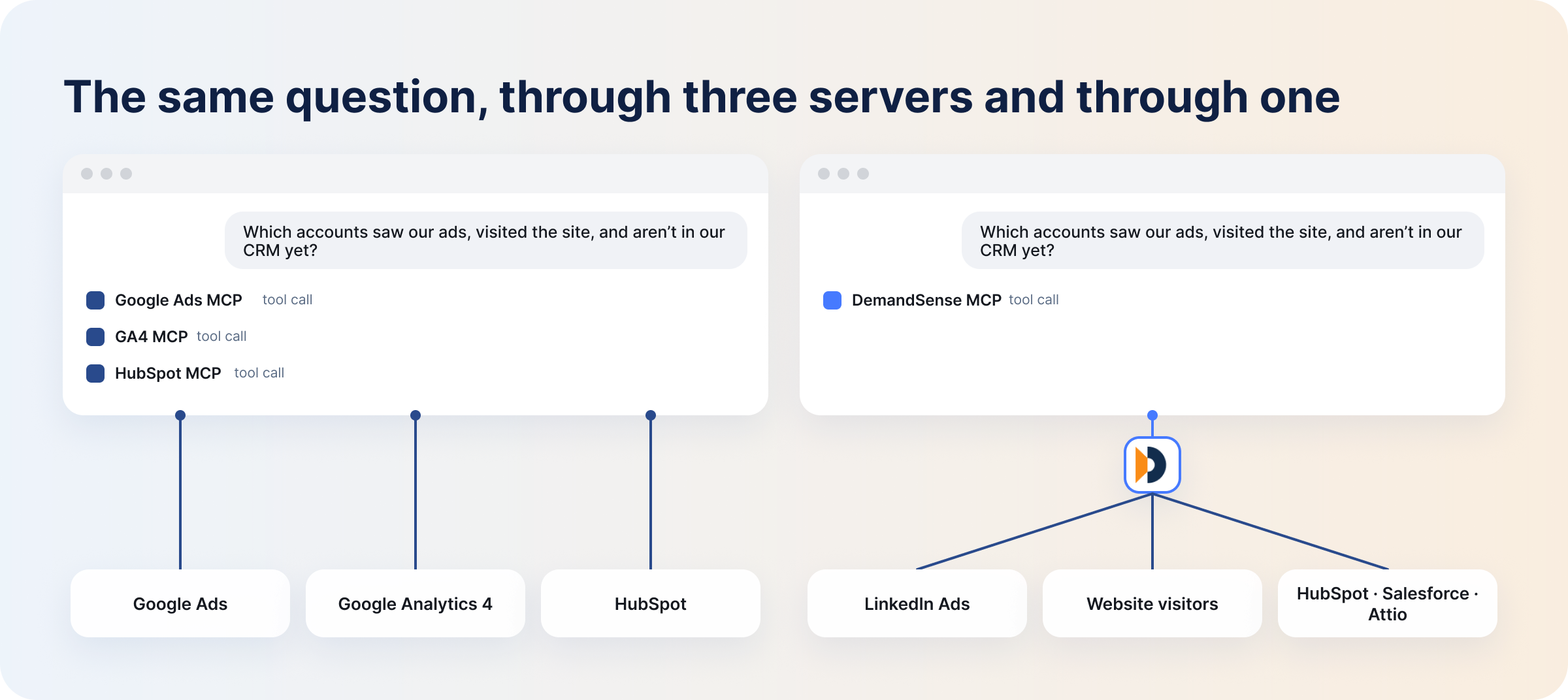
Here are the differences between a single-platform MCP server and a full-funnel MCP server:
| Single-platform MCP server | Full-funnel MCP server | |
|---|---|---|
| What it connects to | One data source (one ad platform, one analytics tool, one CRM) | Multiple data sources, read together before the AI queries them |
| Question it answers | “What happened on this platform?” | “What happened across platforms, for the same account or person?” |
| Who does the joining | You, manually, or the AI, by calling multiple servers and reconciling the output itself | The MCP server, before the AI ever queries it |
| Example question | “What’s my Google Ads CTR this month?” | “Which accounts saw our LinkedIn ads, visited the site, and aren’t in our CRM yet?” |
| Example server | Google Ads MCP, GA4 MCP, HubSpot MCP | DemandSense MCP |
That last question, the one about accounts that saw ads, visited, and never made it into the CRM, is impossible to answer with any single platform-specific server. Google Ads MCP has no idea who visited your site. GA4 MCP has no idea which of those visitors saw an ad first. HubSpot MCP only knows about the people who already became a CRM record, which is exactly the group this question is trying to find. A full-funnel server like DemandSense exists specifically to close that gap. It connects to ad exposure, site visits, and CRM state at once, and reads them together on its own side, before the AI queries anything.
Claude, ChatGPT, and Other AI Clients: Where MCP Fits
MCP isn’t a Claude-only standard, and it isn’t tied to one AI client. The same marketing MCP server, DemandSense included, works across Claude, ChatGPT, and any other MCP-compatible client, because MCP standardizes the connection itself rather than being built into one specific product.
- Claude connects to MCP servers natively, in Claude Desktop, Claude Code, and Claude.ai, including local servers running on your own machine, not just hosted ones.
- ChatGPT connects to remote MCP servers only, through Developer Mode or the Apps SDK. A local server has to be reachable over HTTPS (or through OpenAI’s tunnel for local servers) before ChatGPT can use it, so a server built only for local use in Claude Desktop won’t work in ChatGPT until it’s deployed remotely.
- Other clients, including Cursor, Gemini CLI, and Microsoft Copilot, all speak the same protocol, which is the entire point: build the server once, and it works with any MCP-compatible client rather than needing a separate integration per AI tool.
For a marketing team, the practical upshot is that connecting to a marketing MCP server like DemandSense isn’t a Claude-specific decision. If your team lives in ChatGPT, the setup steps are in our guide on how to connect LinkedIn Ads to ChatGPT for analysis and reporting; the Claude version covers how to analyze LinkedIn Ads with Claude using the same server.
What Are the Benefits of Using MCP Servers for Marketing Teams?
Here are the benefits of using MCP servers for marketing teams:
- Time saved versus manual reporting: Pulling a cross-platform report used to mean logging into each tool, exporting data, and building a comparison by hand. An MCP connection turns that into a question asked once, in the same conversation, with the AI querying the live data source directly.
- Natural-language access to data: No GAQL syntax, no custom report builder, no remembering which menu holds a specific metric. You ask the question in plain English and the MCP server translates it into the right API call.
- Fewer dashboard logins: Instead of separate sessions in Google Ads, GA4, and your CRM, one conversation can pull from all three, provided each one has an MCP server connected.
- Faster answers to cross-source questions: Questions that used to require a report request and a wait, like which accounts saw ads and went quiet in the CRM, can be asked and answered on the spot when the right server is connected.
- Lower setup cost per tool added: Since MCP is an open standard, a server built for one AI client generally works with any MCP-compatible client, so adding a new AI tool to your stack doesn’t mean rebuilding every data connection from scratch.
Why Use DemandSense MCP for LinkedIn Ads Analysis and B2B Marketing?
If you run LinkedIn ads for B2B accounts, the question you actually want answered is rarely “how many impressions did we get.” It’s closer to “did any of that spend turn into pipeline.” DemandSense MCP is built to answer that second question directly, by connecting Claude, ChatGPT, or any MCP-compatible client to LinkedIn ad exposure, identified website visitors, and CRM state (HubSpot, Salesforce, or Attio), read together.
That makes it possible to ask things like:
- Which open opportunities saw our LinkedIn ads before they entered the pipeline?
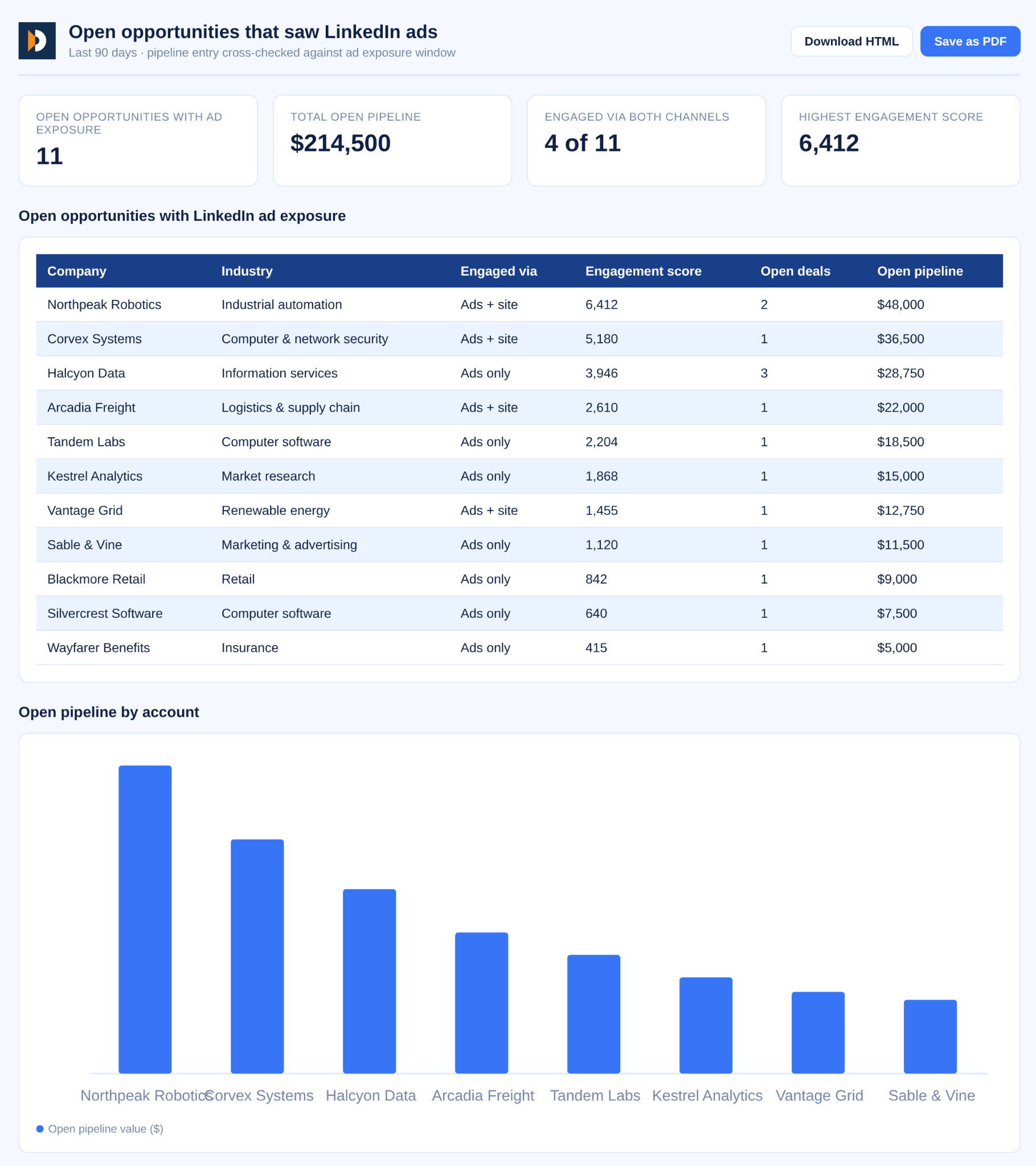
Figures from a DemandSense MCP run against our own account. Account names are placeholders.
- Draft this month’s client report: reach, identified visitors, top engaged accounts, versus last month.
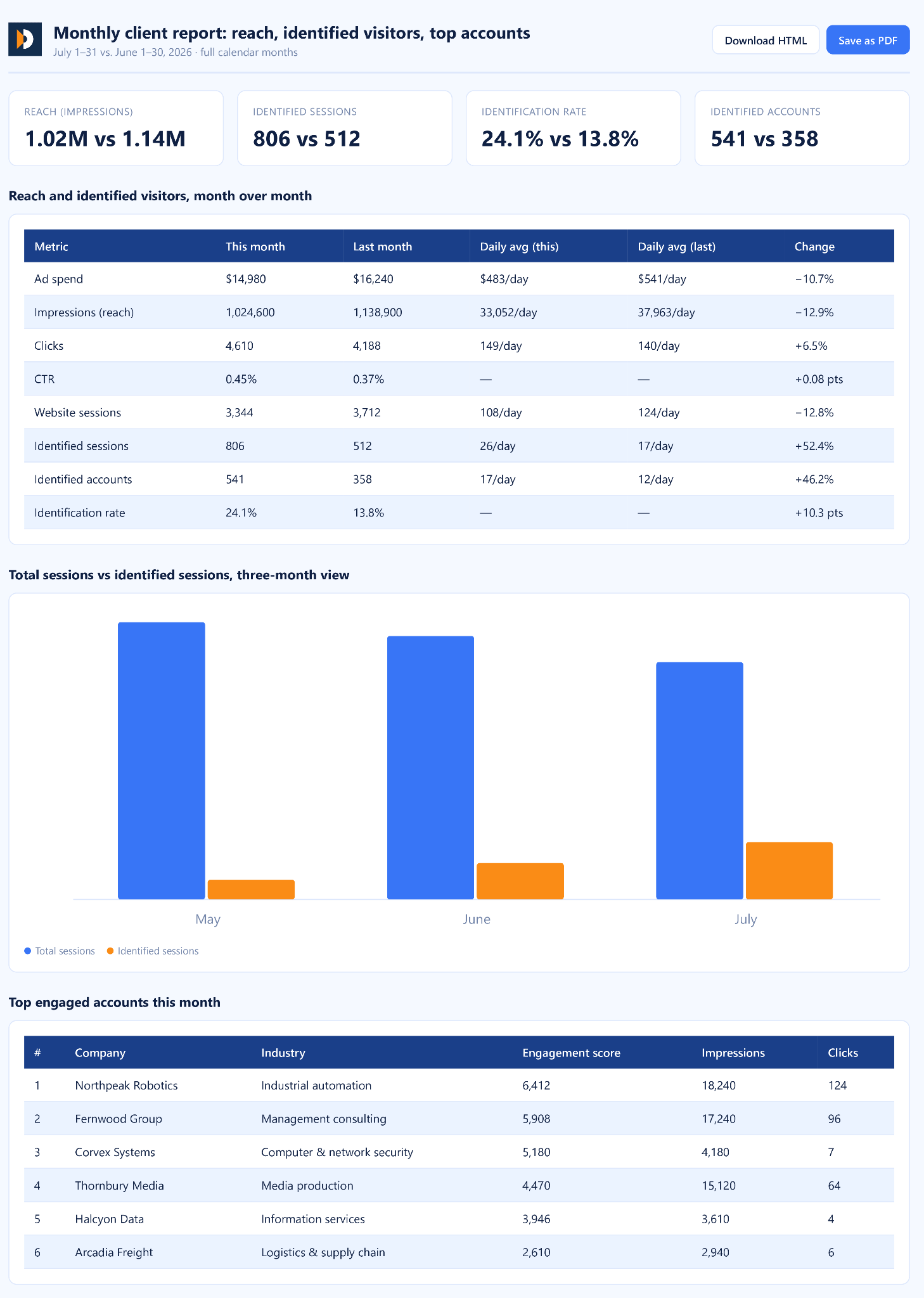
Figures from a DemandSense MCP run against our own account. Account names are placeholders.
Other questions you can ask include:
- Which ICP-fit companies saw our ads, visited the site, and aren’t in our CRM yet? The answer is a list of warm accounts your pipeline doesn’t know exist, along with the near-misses: accounts that are in the CRM but never got a deal.
- Which accounts are we paying to reach that have never once visited the site? That’s frequency you can cut without touching pipeline.
- Who should sales call this week? You get a ranked list of accounts warmed by ads and active on the site right now.
Because the join happens before the AI queries anything, the answer comes back as one clean result instead of three lists the AI has to reconcile on its own. Teams running attribution through Attio specifically can go deeper with LinkedIn Ads and Attio pipeline attribution, which covers the CRM-side setup in more detail.
DemandSense MCP is read-only: it answers questions and leaves campaigns, bids and budgets alone. It is open on both plans and during the 30-day trial, with no waitlist. Setup steps are on the MCP Intelligence Hub.
FAQ
Do Marketing Teams Need More Than One MCP Server?
Usually yes, since each server covers one data source. Most teams settle on three: their top ad platform, GA4 for independent measurement, and their CRM to close the loop on revenue.
Which AI Agent Is Best for Marketing, and How Do MCP Servers Help?
There’s no single best agent, since MCP is an open standard and most servers work across clients. Claude supports local and remote servers; ChatGPT only connects to remote ones. Either way, the MCP server is what gives the agent live access to your actual marketing data instead of a generic answer.
Can Multiple Marketing MCP Servers Work Together in One Workflow?
Yes. An AI client can query several connected servers in one conversation. With single-platform servers, the AI reconciles the answers itself; with a join-style server, that reconciliation already happens server-side for whatever data it covers.
Are Free MCP Servers Suitable for Marketing Teams?
Often yes. Google’s and Meta’s official servers are free to connect, with cost usually showing up in API usage limits or a vendor’s paid tier, not the MCP layer itself. Free, self-hosted servers trade a lower cost for more setup effort.
Should Marketing Teams Use a Remote or Local MCP Server?
It depends on the team. ChatGPT requires remote servers, since it doesn’t support local servers directly. Claude Desktop and Claude Code support both. Remote is also easier to roll out across a team without per-machine setup.
Are MCP Servers Safe and Secure to Use With Marketing Data?
It depends on the server, not MCP as a whole. Read-only servers can only report data. Read/write servers can take action, which raises the stakes. Official servers inherit the platform’s existing OAuth and permission limits; unverified custom connectors carry more risk and are worth vetting before connecting.