

There is a specific kind of frustration that comes with running LinkedIn Ads at scale. The data is all there, clicks, impressions, audience breakdowns, conversion events, spend pacing, and yet the next move is never obvious. Should you increase the budget on that campaign or wait for more data? Is that creative underperforming or just slow to gain traction? Which audience segment is actually producing the pipeline?
AI-driven marketing insights are built for exactly this problem. Instead of spending hours in spreadsheets, your marketing team gets clear direction on audiences, budget, creative, timing, pipeline, and revenue impact, fast enough to act. The right AI marketing tools turn raw marketing data into actionable insights without requiring a dedicated analyst.
This guide is a practical breakdown of how you can use AI-driven marketing insights for your LinkedIn ads and make better campaign decisions.
What Are AI-Driven Marketing Insights?
AI-driven marketing insights are conclusions drawn from marketing data by artificial intelligence rather than manual analysis. Instead of a person spending hours filtering spreadsheets or building custom reports, AI can analyze large volumes of marketing data from multiple sources, identify patterns, and surface what matters most, fast. This is where AI is transforming marketing analytics: it replaces slow, manual reporting with decisions your team can act on immediately.
For B2B marketing teams running LinkedIn ads, this means AI can tell you which audience segments are engaging most with your ads, which campaigns are influencing pipeline, and where budget is being wasted, without requiring a dedicated analyst or a week of reporting work.
AI-driven insights vs traditional marketing analytics
For traditional marketing analytics, you get dashboards full of impressions, clicks, and conversion rates, but the work of interpreting those numbers, spotting trends, and forming a decision still falls on the analyst or the marketing manager with enough time to dig in.
For AI-driven analytics, instead of presenting raw numbers, it analyzes patterns across your entire campaign history, compares performance across audience segments, flags anomalies, and returns a clear explanation of what is happening and why.
The difference is not just speed. It is the quality of the output. Traditional analytics tells you what occurred. AI-driven marketing insights tell you what it means and what to do next.
Why actionable insights matter more than more data
Marketing teams today have access to more campaign data than ever before across LinkedIn, Google, Meta, and CRMs, but that access has not automatically translated into better marketing performance. The problem has never been data volume. It has been the ability to turn data into a clear next step. AI in marketing addresses this by synthesising signals across marketing channels and converting them into specific, prioritised decisions.
Actionable insights close that gap. Instead of a dashboard showing that CTR dropped 12% last week, an actionable insight tells you which audience segment drove that drop, which creative it was tied to, and recommends next steps to take.
Why LinkedIn Ads Teams Need AI-Driven Marketing Insights
LinkedIn Ads is one of the highest-performing paid channels available to B2B marketing teams. According to Dreamdata, LinkedIn was the only major platform to deliver a positive ROAS of 121% in 2025, outperforming Google Search (67%) and Meta (51%). That level of performance comes with a corresponding level of investment, and that investment demands better decision-making than most teams are currently equipped to make.
The problem is not that LinkedIn Ads do not work. The problem is that the data it generates is harder to interpret than most teams expect.
The data gap inside LinkedIn Campaign Manager
LinkedIn Campaign Manager gives you dozens of metrics, including impressions, clicks, CTR, CPC, CPM, engagement rate, lead-gen form opens, and more, but the volume of metrics does not equal clarity of direction. Campaign Manager shows aggregate campaign performance, but it does not tell you which specific companies are engaging with your ads, how deeply they are engaging, or whether your target accounts are actually seeing your campaigns.
That gap has a direct cost. Without account-level visibility, marketing teams are making budget, audience, and creative decisions based on aggregate numbers, rather than insight, leading to the following pattern across B2B marketing teams:
- High impressions, low pipeline
- Strong CTR on campaigns that never touch a CRM deal
- Budget concentrated in Q4 despite data showing it is the least efficient quarter for MQL generation.
- Creative decisions made on instinct rather than performance signals
Data from HockeyStack’s 2025 LinkedIn Ads Benchmark Report shows that, despite Q4 receiving the highest budget allocation at 31% of total spend, it generated only 20% of total MQLs, likely due to increased competition in ad auctions, which drove up cost per MQL. Teams running on manual analysis rarely catch those patterns fast enough to act on them.
Why AI-driven marketing insights close that gap
AI-driven marketing insights work on LinkedIn Ads data the way an experienced analyst would, except faster, at greater scale, and without the lag of a weekly reporting cycle. Here is what that looks like in practice:
- Audience decisions: AI analyzes which account segments are engaging and which are consuming budget without generating pipeline, telling you exactly where to shift spend.
- Budget allocation: Rather than waiting for end-of-quarter reports, AI surfaces budget inefficiencies in real time so teams can reallocate before money is wasted.
- Creative performance: AI can identify which ad variants are driving meaningful engagement versus which ones are inflating CTR without influencing deals.
- Timing: AI-driven analytics can identify the hours and days that yield the lowest CPCs and highest conversion rates, enabling smarter ad scheduling.
- Pipeline influence: By connecting LinkedIn ad activity to CRM data, AI can show which campaigns are touching open deals and which are generating clicks that never convert.
- Revenue impact: AI can help close the loop between LinkedIn spend and closed revenue, giving marketing teams the proof of ROI that leadership requires.
If you are running LinkedIn Ads at any meaningful scale, implementing AI is no longer a competitive advantage. It is how you close the gap between data and decisions. The benefits of using AI in your marketing strategy compound over time: faster iteration, less wasted spend, and a clearer line from campaign activity to revenue.
Key Benefits of AI-Driven Marketing Insights for LinkedIn Ads
Here is what changes when AI is applied to LinkedIn Ads data:
#1 Faster campaign analysis
Instead of waiting for a weekly or monthly report, you can ask a direct question and get an answer in seconds. For you, this speed means:
- Performance issues get flagged within hours, not weeks.
- You can iterate on campaigns in near real time.
- Reporting time is reduced to nearly zero, freeing up the team to focus on strategy.
#2 Better budget allocation
With AI-driven analytics, you can identify exactly where your budget is working hardest and where it is being wasted. Benchmark data show that Q4 typically receives the largest share of the LinkedIn ad budget, around 31%, but generates only 20% of total MQLs, largely due to increased auction competition driving up cost per lead. With AI, you can surface patterns like this before the budget is spent, not after, allowing you to
- Shift spend toward historically higher-performing periods.
- Reallocate budget from underperforming campaigns mid-cycle
#3 More accurate audience and account prioritization
One of the most valuable applications of AI in marketing is account-level analysis. Campaign Manager shows aggregate performance but does not reveal which specific companies are engaging with ads or whether target accounts are actually being reached, which is the core gap between running ads and running an effective ABM program. With AI-driven marketing insights, you can close that gap by:
- Identifying which accounts are engaging most with campaigns
- Flagging target accounts that are not being reached
- Prioritising audience segments based on account-level engagement rather than aggregate clicks
4. Earlier detection of wasted spend and creative fatigue
Creative fatigue and budget waste are often invisible until a campaign has already underperformed for weeks. AI can analyze creative performance trends as they happen, identifying:
- Ads with declining CTR or engagement before performance collapses.
- Audience segments that have stopped responding to specific creative
- Spend is going toward placements or formats with disproportionately high CPC.
Benchmark data show that single-image ads can cost nearly six times as much per click as thought leader ads, yet many B2B teams continue to allocate the majority of their budget to single-image formats out of habit rather than performance. AI-driven insights catch patterns like this early, before they become expensive habits.
5. Stronger connection between campaign performance and pipeline impact
Without connecting ad data to CRM outcomes, teams can optimize for the wrong thing entirely. AI-driven analytics solves this by:
- Linking LinkedIn engagement data directly to CRM deal stages
- Showing which campaigns are influencing open pipeline, not just generating clicks
- Giving marketing teams a clear, defensible answer to the question every leadership team asks: what is this spend actually producing?
What LinkedIn Ads Data Can AI Analyze?
AI-driven marketing insights are only as useful as the data feeding them. For LinkedIn Ads, that data spans several layers, from campaign-level metrics down to individual account behaviour and CRM outcomes. Here is what AI can analyze across a LinkedIn Ads account:
- Campaign performance data
This is the foundation layer, the metrics most marketers are already familiar with from Campaign Manager. AI can process and cross-reference:
- Impressions, clicks, CTR, CPC, and CPM across campaigns and time periods
- Conversion rates and lead gen form completions
- Performance comparisons across campaign objectives, such as awareness versus lead generation
- Trends over time, including week-over-week and quarter-over-quarter shifts
What changes with AI is not the data itself, but the speed and depth of analysis. Campaign Manager shows over 40 metrics, but most do not matter for B2B outcomes on their own.
AI can identify which of those metrics actually correlate with the results that matter, rather than leaving teams to guess.
- Audience and account engagement data
AI can analyze:
- Which audience segments are engaging most with specific campaigns
- Account-level engagement, including which target companies have seen and interacted with ads
- Job title, seniority, and industry breakdowns of engaged audiences
- Target account reach, measured as the percentage of a target account list that has received at least one impression, with a strong performance benchmark of 50% or higher within the first 60 days of a campaign.
- Website, CRM, and pipeline signals
This is where AI-driven marketing insights move beyond the ad platform entirely. By connecting LinkedIn Ads data to website and CRM data, AI can analyze:
- Website visitors who arrived after engaging with a LinkedIn campaign
- CRM records showing which accounts have moved through deal stages after ad exposure
- Pipeline data, including which campaigns are touching open opportunities
- Closed-won revenue tied back to specific campaigns, audiences, or creatives
This layer is what allows marketing teams to move from reporting on engagement to reporting on revenue impact, which is the conversation that matters most to leadership.
- Budget, timing, frequency, and creative data
The final layer covers the operational variables that determine whether a campaign is efficient or wasteful. AI can analyze:
- Budget pacing and spend efficiency across campaigns and time periods.
- Timing patterns, including which days and hours produce the strongest performance
- Ad frequency, identifying when audiences are being shown the same creative too often
- Creative-level performance across formats, including single-image ads, video, and thought leader ads.
Comparing CPC by format, audience, and campaign objective rather than collapsing everything into a single dashboard number reveals significant differences; for instance, thought leader ads can cost nearly six times less per click than single-image ads. AI surfaces differences like this automatically, without requiring a marketer to manually slice the data themselves.
Example: How DemandSense Turns LinkedIn Ads Data into Better Decisions
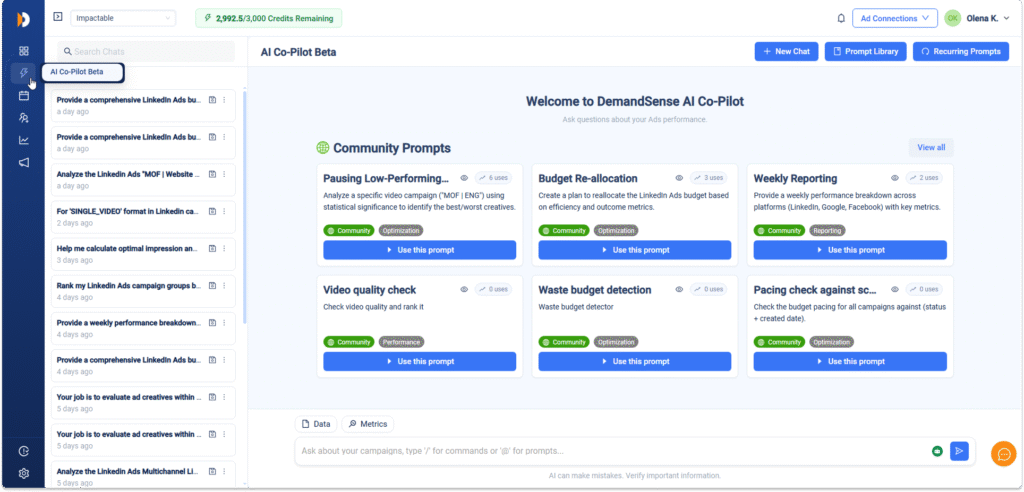
The clearest way to understand AI-driven marketing insights is to see them in action. Below are examples of how DemandSense’s AI Copilot turns raw LinkedIn Ads data into specific decisions, using a simple framework: data, insight and decision.
1. Audiences
- Data: A marketing team asks the AI Copilot which audience segments generated the most engagement from target accounts over the past 30 days.
- Insight: The Copilot returns a breakdown showing that one segment, senior decision-makers in a specific industry, accounts for a disproportionate share of account-level engagement compared to its share of spend.
- Decision: The team shifts a larger portion of the budget toward that segment and reduces spend on broader, lower-engagement audiences.
2. Budget
- Data: A team asks which campaigns are spending efficiently relative to pipeline contribution.
- Insight: The AI Copilot surfaces a campaign with strong impression volume but minimal influence on open deals, alongside a smaller campaign with lower spend but stronger pipeline touches.
- Decision: Budget is reallocated from the high-spend, low-pipeline campaign to the smaller, higher-performing one.
3. Creative
- Data: A marketer asks which ad creatives have seen declining engagement over the past two weeks.
- Insight: The Copilot flags a specific creative variant showing a consistent drop in click-through rate, suggesting creative fatigue within a key audience segment.
- Decision: The fatigued creative variant is paused and a refreshed version is developed and tested against the affected audience segment.
4. Timing
- Data: A team asks when their campaigns perform best across the week.
- Insight: The AI Copilot identifies that conversion rates are notably higher on specific weekdays, with cost-per-click rising significantly during certain windows.
- Decision: Ad scheduling is adjusted to concentrate spend during higher-performing windows and reduce delivery during the less efficient ones.
5. Pipeline
- Data: A team asks which LinkedIn campaigns are touching accounts currently in active deal stages.
- Insight: Because DemandSense connects LinkedIn engagement data with CRM records, Copilot can show which campaigns have reached accounts now in mid- or late-funnel stages.
- Decision: Those campaigns are protected from budget cuts during quarterly reallocation, since they demonstrably impact the active pipeline.
6. Revenue impact
- Data: Leadership asks for a summary of how LinkedIn Ads spend connects to closed-won revenue for the quarter.
- Insight: The AI Copilot generates a report showing which campaigns and audience segments were associated with accounts that closed during the period.
- Decision: The marketing team uses this report to justify continued or increased LinkedIn investment for the next quarter, with evidence tied to revenue rather than impressions or clicks.
Across all six examples, the structure is the same. A question is asked in plain language, the AI Copilot analyzes the relevant LinkedIn Ads data, and the output is a specific, actionable conclusion.
Sign up for a 30 days free trial and transform your LinkedIn ads reporting and impact today, no credit card required.
How to Turn LinkedIn Ads Data into Actionable Insights
Turning LinkedIn Ads data into actionable insights does not require a data science team. It requires a consistent process that connects raw data to specific decisions. Here is a process any LinkedIn Ads team can apply.
Step 1: Centralise your data
Before any analysis is possible, your campaign, audience, and CRM data need to be in one place. Scattered data across Campaign Manager, spreadsheets, and a separate CRM makes it almost impossible to see the full picture. The goal is a single source where LinkedIn campaign performance data is current, account and audience engagement data are visible at the company level and CRM pipeline and revenue data are connected to ad activity
Step 2: Ask specific questions, not general ones
“How is the campaign doing?” is not an actionable question. “Which audience segments generated the most pipeline last month?” is better. Specific questions produce specific answers, which is the foundation of using AI in marketing analytics effectively. Useful starting questions include:
- Which campaigns are driving the most engagement from our target accounts?
- Where is our budget being spent inefficiently?
- Which creatives are showing signs of fatigue?
- What is our CPC and conversion rate by day of the week?
- Which campaigns are connected to deals currently in our pipeline?
Step 3: Let AI surface the patterns
This is where AI-driven marketing insights do the heavy lifting. Rather than manually cross-referencing spreadsheets, AI can analyze marketing data from multiple sources simultaneously and identify which variables drive performance. AI algorithms surface patterns that would take analysts days to find, including predictive analytics signals that flag likely underperformance before it shows up in your results. This step replaces hours of manual analysis with a direct answer.
Step 4: Translate insights into specific decisions
An insight is only useful if it leads to a decision. For every insight surfaced, ask: what should change as a result of this? Common decision categories include:
- Shift budget toward higher-performing audiences or campaigns.
- Pause or refresh the creative if it shows signs of fatigue.
- Adjust ad scheduling based on timing data.
- Reprioritise audience segments based on account-level engagement
- Protect or scale campaigns shown to be touching the active pipeline.
 Free Tool
See what winning LinkedIn ads look like in your industry
Enter your website. We benchmark your LinkedIn ads against top performers in your vertical and email you a free report in 30 min.
Analyze My AdsStep 5: Act quickly and review regularly
The value of AI-driven analytics comes from speed. An insight that takes two weeks to act on has already cost the team two weeks of inefficient spend. Build a regular weekly cadence for the most active campaigns to review insights and make adjustments. Over time, this turns AI-driven marketing insights into a continuous loop to optimize marketing performance rather than a one-off report. Teams that embed this rhythm are best positioned for the future of AI in marketing, where decisions are made in hours, not weeks.
What to Look for in an Analytics Tool with AI-Driven Marketing Insights
With AI now embedded into almost every marketing platform, choosing the right analytics tool has become harder, not easier. The presence of an AI feature does not guarantee it produces useful insights, and the wrong tool can leave teams with more dashboards but no clearer direction.
Here is what to prioritise when evaluating an analytics tool with AI-driven marketing insights.
| Capability | Why it matters for LinkedIn Ads teams | What to check |
| LinkedIn Ads data integration | Without a direct, comprehensive connection to LinkedIn Campaign Manager, AI is working on incomplete data. A weak integration limits what AI can analyze and, by extension, the marketing insights it can produce. | • Direct API connection to LinkedIn Campaign Manager• Coverage of conversion data, video engagement, and creative-level performance• Sufficient historical data retention (weeks or months)• Support for all ad formats your team uses |
| Company and account-level visibility | B2B marketing analytics runs on accounts, not aggregate audiences. Without company-level data, you cannot tell whether your target accounts are seeing your campaigns or being influenced by them. | • Engagement data broken down by company, not just audience segment• Target account reach reporting (% of account list receiving impressions)• Visibility into engagement depth (one impression vs. repeated interaction)• Firmographic breakdowns by industry, company size, and seniority |
| CRM and pipeline context | LinkedIn Ads data tells you what happened on the platform. CRM context tells you whether that activity led to real pipeline. Without it, AI tools for marketing can only optimize for clicks, not revenue. | • Direct CRM integration with HubSpot or Salesforce (not manual export)• Account-level matching between LinkedIn engagement and CRM records• Deal stage visibility (early, mid, or late-stage pipeline)• Two-way data flow: ad engagement enriches CRM records and vice versa |
| AI recommendations, not just dashboards | Most AI marketing tools stop at the dashboard. A dashboard can show that CTR dropped, but it cannot tell you what to do about it. The difference between AI that reports and AI that recommends is the difference between data and a decision. | • Direct recommendations (budget shifts, creative flags, audience priorities)• Explanations behind each recommendation, not just the conclusion• Natural language query support (ask questions in plain English)• Proactive insight surfacing, not just responses to manual lookups |
| Budget, audience, timing, and frequency optimisation | These four variables determine whether a LinkedIn Ads campaign is efficient or wasteful. Reporting on them is useful; AI that actively optimises across all four simultaneously is what separates a dashboard from an AI marketing strategy. | • Specific budget reallocation recommendations based on pipeline contribution• Audience segment scoring by engagement and account-level data• Performance analysis by day and time to refine ad scheduling• Frequency monitoring and fatigue detection to prevent ad overexposure |
| Pipeline and revenue impact tracking | Revenue Attribution connects LinkedIn spend to closed deals. This is the capability that turns AI-driven marketing insights from an internal optimisation tool into proof of marketing’s contribution to business outcomes. | • Campaign-to-pipeline mapping for accounts in active deal stages• Deal progression tracking for accounts exposed to LinkedIn ads• Closed revenue attribution to specific campaigns, audiences, and creatives• Reporting formatted for leadership conversations, not just raw data exports |
Common Mistakes When Using AI-Driven Marketing Insights
AI-driven marketing insights only deliver value if they are used correctly. Even with the right tool in place, marketing teams can fall into patterns that limit or undermine the benefits. Here are the most common mistakes to avoid.
1. Treating AI output as final answers rather than starting points
AI can analyze marketing data and surface strong recommendations, but it is not infallible. A common mistake is acting on every AI-generated insight without considering context the AI may lack, such as an upcoming product launch, a known seasonal dip, or a change in sales strategy. AI-driven marketing insights work best when paired with human judgment, not as a replacement for it.
2. Asking vague questions and expecting specific answers
The quality of insights generated by AI depends heavily on the quality of the questions asked. “How are my campaigns doing?” will produce a general summary. “Which audience segments generated the most pipeline last month, and which campaigns are showing signs of creative fatigue?” will produce something actionable. Teams that only ask broad questions tend to get broad, less useful answers.
3. Ignoring account-level and pipeline data
It is easy to focus on campaign-level metrics like CTR and CPC because they are familiar and immediately visible. But the metric most teams obsess over, CTR, has actually been shown to have a negative correlation with pipeline generation. Teams that only look at surface-level performance data, even with AI assistance, miss the insights that matter most for revenue
4. Not acting on insights quickly enough
AI-driven analytics can surface a problem, such as a budget inefficiency or a fatigued creative, within hours of it emerging. If that insight sits unreviewed for two weeks before anyone acts on it, the speed advantage of AI is lost. The value of AI-driven marketing insights comes from how quickly teams respond, not just how quickly insights are generated.
5. Using AI in isolation from other marketing data
AI-driven insights are most powerful when they draw on data from across the funnel, LinkedIn Ads, website behaviour, CRM, and pipeline. Teams that only connect AI to ad platform data, without CRM or website integration, end up with insights limited to engagement metrics and miss the connection to revenue that matters most for B2B marketing.
6. Expecting AI to replace strategy entirely
AI can tell you what is happening and recommend specific adjustments, but it does not set overall marketing strategy, brand positioning, or messaging direction. Teams that expect AI to handle strategic decisions end up either disappointed by the output or, worse, following AI recommendations into decisions that conflict with broader business goals. AI works best as a tool that informs strategy, not one that replaces it.
How DemandSense Helps B2B Teams Make Better LinkedIn Ads Decisions
Everything covered so far points to the same conclusion: the value of LinkedIn Ads data depends on whether a team can turn it into decisions, not just reports. That requires more than a single capability. It requires a platform that brings together campaign data, company-level context, CRM and pipeline visibility, and AI-assisted recommendations in one place and DemandSense does just that.
At its foundation, DemandSense integrates directly with LinkedIn Ads, giving teams a complete view of campaign performance. Layered on top of that is company and account-level visibility, showing which businesses are engaging with campaigns and how that compares to a defined target account list. DemandSense also syncs with CRM platforms, connecting ad engagement to pipeline stages and, ultimately, to closed revenue.
To make all of this usable on a daily basis, DemandSense includes an AI Copilot that lets teams ask questions in natural language and get answers drawn from across this connected data, without needing to build reports manually or wait on an analyst.
For B2B teams trying to turn LinkedIn Ads data into decisions on audiences, budget, creative, timing, pipeline, and revenue, DemandSense is built specifically for that transition, from seeing metrics to knowing what to do with them.
Get better insights and make better LinkedIn Ads decisions. Sign up for a 30 days free trial today.
FAQs
AI-driven marketing insights are conclusions and recommendations generated when artificial intelligence analyzes marketing data, such as campaign performance, audience engagement, and pipeline activity, and turns it into a clear direction rather than raw numbers. Instead of showing metrics like impressions or clicks on a dashboard, AI identifies patterns, explains what they mean, and recommends specific next steps, such as adjusting budget, targeting, or creative.
AI-driven insights improve marketing campaigns by handling the analytical work that would otherwise take hours of manual review. AI can compare performance across audiences, creatives, and time periods, detect early signs of decline, and connect that data to CRM outcomes. The result is faster, more informed adjustments to budget, targeting, and creativ
AI-driven marketing insights help LinkedIn Ads teams by answering questions standard reporting cannot, including which target accounts are being reached, which campaigns are touching active pipeline, and what LinkedIn’s overall contribution to closed revenue looks like. By connecting campaign data, account-level engagement, and CRM outcomes, AI gives teams a faster basis for decisions across audiences, budget, creative, timing, pipeline, and revenue.
When looking for an AI marketing analytics tool, B2B teams should look for a tool that combines direct LinkedIn Ads data integration, company and account-level visibility, CRM and pipeline connectivity, and AI that provides recommendations rather than just dashboards. A tool that covers only one or two of these areas leaves gaps, particularly in connecting ad activity to pipeline and revenue, which are the outcomes that matter most for B2B marketing.