
Many B2B teams run LinkedIn ad campaigns to attract new leads and forget about the high-quality leads already sitting in their CRM — website visitors who left without converting, the 500+ contacts marked as marketing-qualified but stuck in limbo, or the list of companies you’ve always dreamt of working with.
With LinkedIn Matched Audiences, you can target your “bucket list” clients and make sure your ad dollars reach businesses that have already shown interest in you, instead of launching spray-and-pray campaigns that reach audience segments outside your ICP.
Here’s how to use LinkedIn Custom Audiences to build stronger audience lists that reach the right people, improve engagement and get more out of your retargeting and ABM campaigns.
What Are LinkedIn Custom Audiences?
LinkedIn Matched Audiences lets advertisers build customized audience segments from their email lists, website visitors, company lists and CRM contacts — or expand beyond that data with predictive audiences, which use LinkedIn’s model to find members who resemble the people already converting for you. (LinkedIn retired lookalike audiences in February 2024; predictive audiences replaced them.) It’s a more accurate way to reach your ICP and warm audiences than the platform’s native firmographic filters on their own.
You’ll find it under the “Create audience” button in Campaign Manager. Marketers can either upload CSV files of the companies or contacts they want to reach, or install the LinkedIn Insight Tag to build audiences from website visitors.
Why LinkedIn Custom Audiences Matter for B2B Campaigns
Four things change once you stop relying on firmographic filters alone:
Less budget lost to non-ICP impressions. You upload the list of the exact customers you want to reach, so your ad budget isn’t spent on people who were never going to buy. And if that list is synced to your CRM through an attribution platform, existing customers drop out of targeting automatically and that spend goes toward prospects instead.
Full buying-committee coverage for ABM. It’s much easier to reach everyone involved in a decision at a target account — you upload the list of companies you want to target, then layer in job function and seniority so you’re reaching decision-makers rather than junior employees.
Segmentation that survives a long buying cycle. B2B buyers take months to convert, and each one follows a different path. With Matched Audiences you can group prospects by buying intent and retarget them with messaging that matches where they actually are in the journey.
Reach expansion that stays inside your ICP. If your audience is small, a company list widens it without pulling in the wrong accounts. You reach every employee who matches your job function filter at target accounts, including the ones you never knew were there.
If you’ve run LinkedIn ads before, you’ve probably had the experience of realizing your budget went to people who were never going to buy — after it was already spent. Matched Audiences is the main lever you have against that.
How to Create LinkedIn Custom Audiences for Better B2B Campaigns
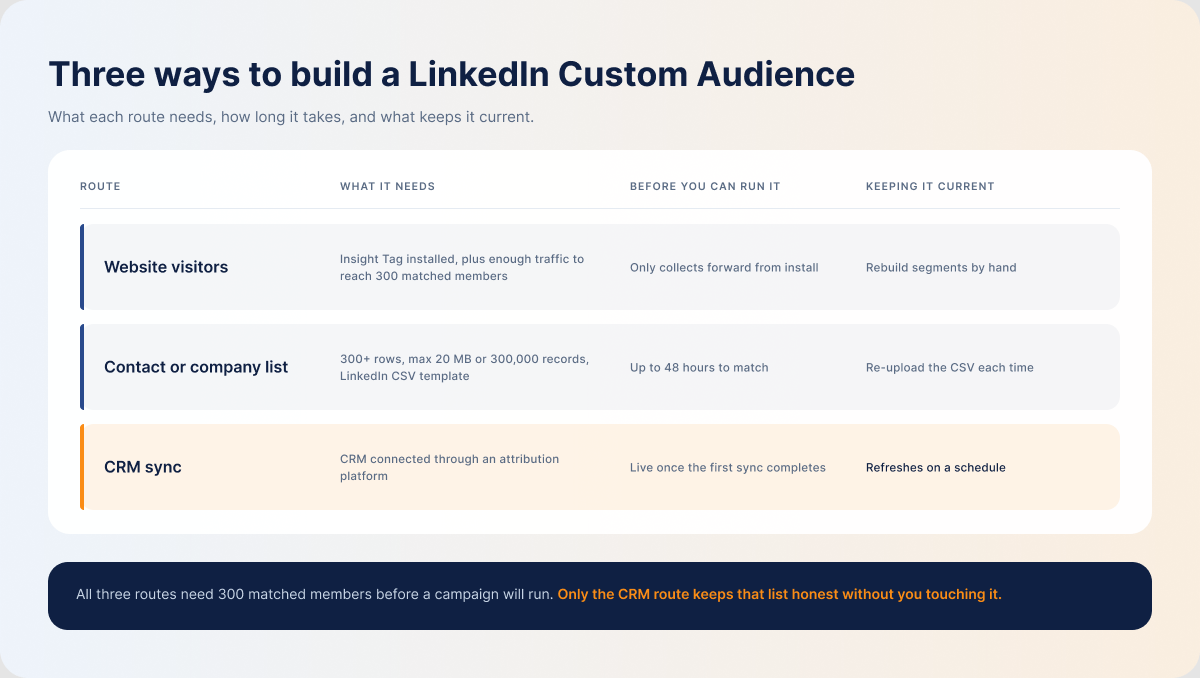
You can create Custom Audiences in three ways.
Build Audiences from Website Visitors
Install the Insight Tag first if you don’t already have it. Be clear about what it does: the tag powers LinkedIn’s Website Demographics report, which shows aggregated, anonymized breakdowns of the industries, job titles, job functions and company sizes visiting your site — and only once at least 300 LinkedIn members have visited in the reporting period. It does not name individual visitors or tell you which companies came to your site. What it does do is let you build retargeting audiences from the specific pages people visited.
Go to Campaign Manager → Plan → Audiences → Create audience → Matched Audiences → Website, name your audience segment, set your lookback window, then choose a URL rule:
- Equals — targets users who visited only the exact URL specified.
- Starts with — targets users who visited any page beginning with the specified URL.
- Contains — targets users who visited pages sharing a specific string of characters.
This makes it easier to segment website visitors by buying intent and tailor campaigns to their needs and interests. You can add more than one URL at a time.
Click Create and wait for the list to populate. Your audience needs at least 300 matched members before a campaign can run against it, so even if you’re not ready to build Matched Audiences yet, install the tag now — it only collects from the day it goes live, so every week you delay is a week of audience history you don’t get back.
Build Audiences from Contact and Company Lists
You can also upload a list of companies or email contacts you want to reach.
Build your list and save it as a CSV of no more than 20 MB or 300,000 records. The file needs at least 300 rows to upload, and the resulting audience needs at least 300 matched members before you can run a campaign against it. Download LinkedIn’s template from Campaign Manager so your file meets the platform’s formatting guidelines.
Go to Plan → Audiences → Create audience → Matched Audiences → Company/Contact, then choose the list type and upload your file. It can take up to 48 hours — occasionally longer — for LinkedIn to match your list against active profiles.
Company lists match more reliably than contact lists. Most CRM email fields hold work addresses, while a lot of members signed up for LinkedIn with a personal address, so contact matching drops records you’d expect it to catch. Company details stay consistent, which makes company lists the sturdier option for retargeting and account-based marketing campaigns. LinkedIn’s own guidance reflects this: for contact lists it recommends uploading at least 10,000 addresses to reliably clear the 300-match threshold.
To improve contact list match rates, include both work and personal emails, correctly spelled first and last names, company names, job titles, and profile URLs.
Build Audiences from CRM and First-Party Data
Alternatively, connect Campaign Manager to your CRM so your company and contact lists stay current, instead of revising and reuploading a CSV every week.
A native CRM–LinkedIn integration will push a list across, but it won’t keep your targeting honest on its own. What you want is a platform that keeps the sync running on a schedule, so non-ICP accounts and existing customers drop out of targeting without anyone remembering to remove them.
How to Choose the Right LinkedIn Custom Audience for Each Campaign Goal
Your buyers have different needs, and you can’t box all of them into one audience segment and hit them with the same ad set — you’ll alienate most of them and burn budget doing it.
Match your custom audience segments to your campaign goals instead:
| Campaign objective | Audience type | Why it fits | Targeting tips |
|---|---|---|---|
| Build trust through engagement | Website retargeting | They have already interacted with your brand and are in an active research phase, so they are more likely to engage with educational content than a cold audience. | Segment by buying intent (high, mid, low) based on the pages they visit and the actions they take, and track more than one signal. |
| ABM campaign | Company list | Matching against your own company list keeps your ads inside your ICP. | Layer in job function and seniority to filter out junior employees and reach decision-makers at target accounts. |
| Lead generation | Contact list | Most of these people already know your brand and have trusted you with their details once. | Use personalized messaging that speaks to their specific need, rather than a generic demo push. |
| Lifecycle campaign | CRM audiences | You can follow the buyer’s journey from first touch to last and nurture them from MQL to opportunity to SQL to closed-won to repeat customer. | Keep your CRM and LinkedIn data on a regular sync so existing customers drop out of targeting as deals close. |
How to Use LinkedIn Custom Audiences for Retargeting, ABM, and Lead Nurturing
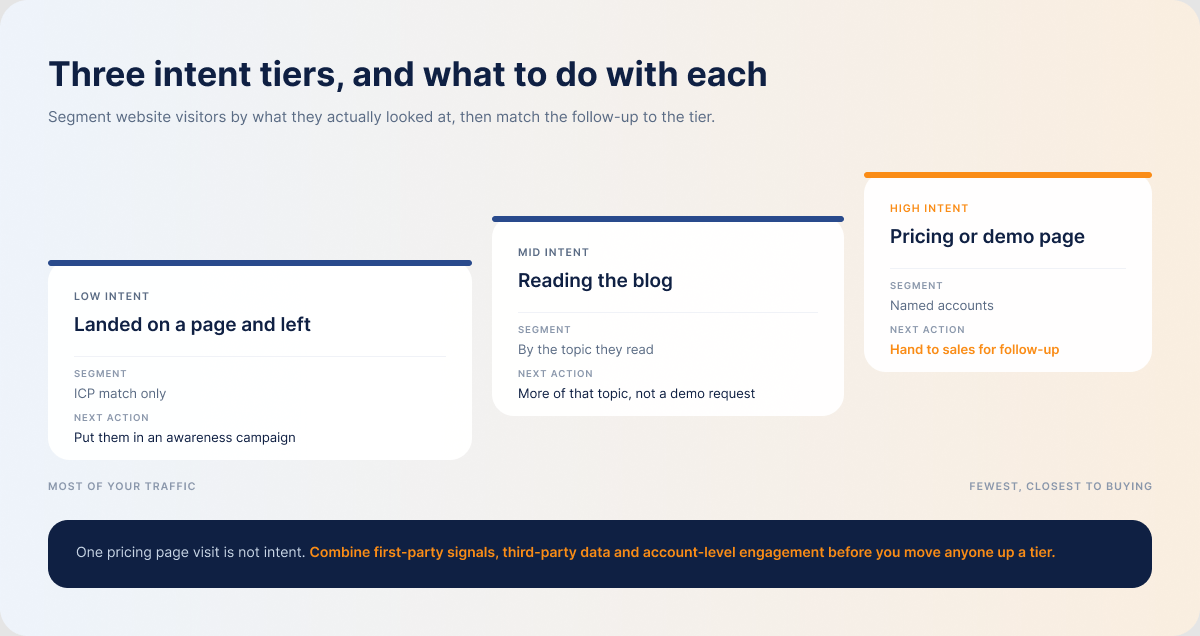
When building audience segments for retargeting or ABM campaigns, start by splitting the audience into three tiers:
- High intent — the ones visiting your pricing or demo pages. Forward them to sales for follow-up.
- Mid intent — prospects reading your blog. Retarget them with more of what they were already reading. If they clicked on revenue attribution, follow up with educational content on revenue attribution, not a demo request.
- Low intent — they landed on a page and left immediately. If they match your ICP, put them in an awareness campaign.
Don’t judge buying intent on a single action. One visit to a pricing page doesn’t make someone sales-ready. Combine first-party signals, third-party intent data and account-level engagement to separate the accounts that are ready to buy from the ones that still need nurturing.
How to Measure the Quality of LinkedIn Custom Audiences
Before you launch anything against a Matched Audience, run through this checklist:
Match rate. This is the share of your list that LinkedIn matched to active profiles. A low rate usually means the source data was inaccurate or out of date — clean the list and try again, or add more records. A high rate isn’t automatically good news either: if the list contained people outside your ICP, the matched audience will too.
Audience size vs. reach. A small audience limits delivery; a large one starts drifting outside your ICP. LinkedIn requires 300 matched members before a campaign can run, and recommends audiences above 50,000 for Sponsored Content and above 15,000 for Message Ads. Targeting companies rather than contacts is the easiest way to gain size without loosening your ICP.
Engagement concentration. Look at account-level engagement, not just clicks, impressions and CTR. If the decision-makers at your target accounts are the ones engaging — downloading, sharing, returning — your list is doing its job.
The whole point of customizing audiences is to reach your ICP, so review your Matched Audiences regularly to confirm they still contain the people you meant to reach.
Best Practices and Common Mistakes
Matched Audiences isn’t a “set it and forget it” feature. People change jobs, companies grow, priorities shift, and campaign objectives move with them. Here’s how to avoid the pitfalls most marketers hit:
| Common mistake | Better practice |
|---|---|
| Using the same audience segment for every campaign | Build audience segments that match each campaign goal |
| Building contact lists from stale CRM data | Clean the CRM data first, then keep it synced so your lists don’t drift out of date again |
| Skipping firmographic filters on ABM campaigns | Layer in job function and seniority so you’re reaching the right people at each account |
| Treating a high match rate as proof of a good audience | Check lead quality and confirm the matched audience actually fits your ICP |
How DemandSense Helps B2B Teams Build Smarter LinkedIn Audiences
The hard part of ICP targeting is that most B2B buyers stay anonymous until they fill in a form. The Insight Tag doesn’t close that gap — Website Demographics is aggregate reporting, so it will tell you that senior marketers at mid-market software companies visited, but never which companies or which people.
DemandSense closes it with website visitor identification:
- Website Visitors (WebID) shows you the companies and the people on your site who never filled in a form — company size, location, job title and seniority — and scores every identified visitor against your ideal customer profile automatically. You can install it yourself through Google Tag Manager, without a developer ticket.
- Lists takes the segment you’ve built from that data and pushes it straight to LinkedIn as a custom audience, and maintains a global suppression list that fills itself.
- Revenue attribution keeps your LinkedIn spend pointed forward. Spend Protection stops you paying to advertise to accounts that have already closed, and pipeline sync keeps CRM movement flowing back into who you’re targeting.
Instead of manually building, uploading and refreshing lists in Campaign Manager, connect an attribution platform to your CRM that can identify the companies and contacts already engaging with you, and let your Custom Audiences build themselves from real behavior. Start your free trial with DemandSense today.
Frequently Asked Questions
What is the minimum audience size for LinkedIn Custom Audiences?
You need at least 300 matched members before LinkedIn will run a campaign against an audience — below that, delivery simply won’t start. That’s the floor, not the target: LinkedIn’s audience size guidance puts the practical range above 50,000 for Sponsored Content and above 15,000 for Message Ads. If your list is short, a company list is usually the fastest way to add scale without stepping outside your ICP, since it reaches everyone matching your filters at each target account.
How often should B2B teams update LinkedIn Custom Audiences?
Rather than updating on a calendar, connect Campaign Manager to your CRM so the lists refresh on a sync. That way existing customers and non-ICP accounts drop out of targeting as their records change, and prospects who haven’t converted yet stay in.
Can you use LinkedIn Custom Audiences for ABM campaigns?
Yes — the company list is the backbone of ABM on LinkedIn. Layer firmographic filters like job function and seniority on top so your ad set budget reaches decision-makers at target accounts rather than everyone with a badge.
Why do LinkedIn Custom Audiences sometimes underperform?
Usually because the source data was stale: trash in, trash out. Clean your CRM data, then connect it to Campaign Manager so it stays clean. Where you can, use company lists over contact lists — people change jobs and job titles constantly, while company records stay stable.
Should you use predictive audiences for B2B campaigns?
Yes, but not first. Predictive audiences learn from a source audience of at least 300 members, so wait until your own segments are tight inside your ICP and you’ve gathered enough conversion data for the model to work from. Used at that point, they expand your reach to members who resemble your converters and give a small, heavily targeted audience some relief from ad fatigue.