
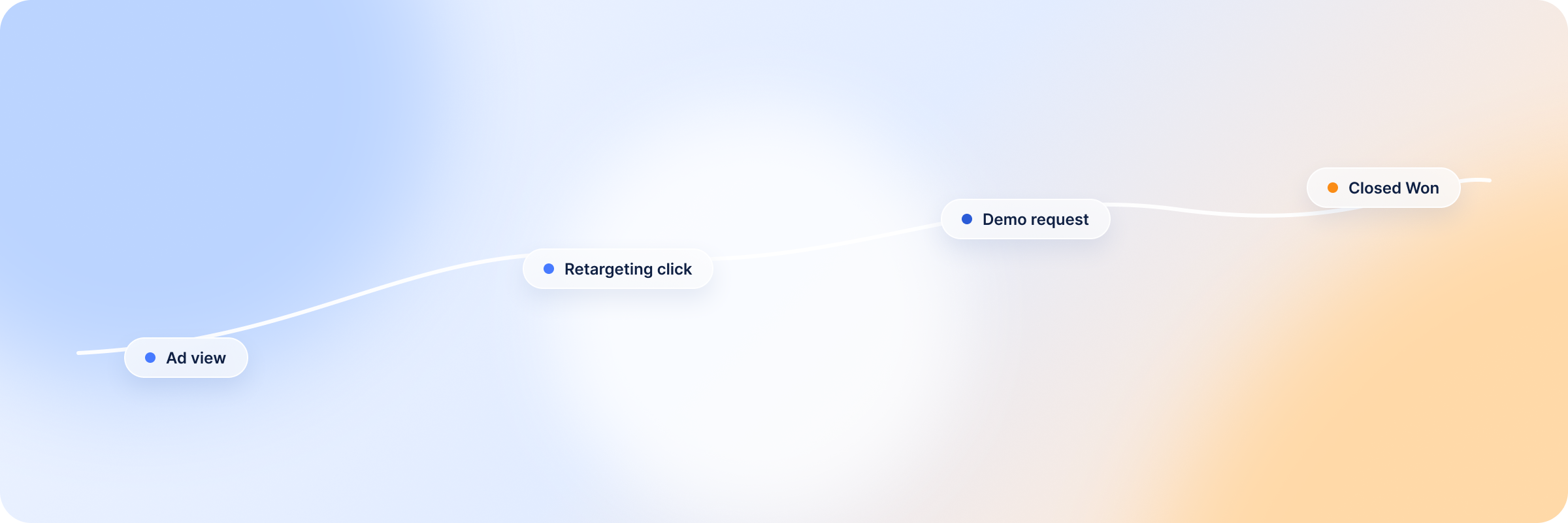
A deal moves to Closed Won in Attio, and the source reads “Direct” — while the buying committee spent four months seeing LinkedIn ads. Now you are in a meeting trying to explain how LinkedIn ad campaigns influenced those deals, but you have no concrete evidence to defend your marketing efforts because your CRM (Attio) and your LinkedIn ads data exist separately.
Somewhere between the first touch and the closed-won deal, the connection between campaigns and revenue gets lost.
This guide is all about connecting LinkedIn ads with Attio CRM for revenue and pipeline attribution, so you can keep track of how your LinkedIn ad campaigns influence pipeline and revenue — not about syncing LinkedIn messages into Attio.
Summary: How the LinkedIn Ads–Attio Integration Works
There is no direct Attio LinkedIn integration; you need an attribution platform as the middle layer to connect the two and match ad engagement to the accounts and deals already in your Attio workspace, no coding required. From there, you can track the buyer journey from the first interaction to the last.
Here’s how the LinkedIn integration works:
A prospect engages with your LinkedIn ad — an impression, a click, or a form fill. Your revenue attribution platform matches that engagement to the company record in Attio, using the company’s domain, and ties it to any deals attached to that company.
Attio continues to track the conversations and the deal stages as the lead progresses through the funnel, exactly as it does today.
In the attribution platform, you see how LinkedIn campaigns influenced pipeline and closed-won revenue, and every buyer touchpoint along the way.
You can also use the Attio accounts that match your ICP to build stronger Matched Audiences segments for your next LinkedIn campaign.
Benefits of Connecting LinkedIn Ads to Attio
Manually logging LinkedIn ads activity or copying and pasting contact and company information across LinkedIn and Attio CRM is tedious and error-prone. Revenue attribution platforms connect Attio with LinkedIn and automate the matching so you stop switching tabs between LinkedIn Campaign Manager and Attio to piece the story together.
The results:
Visibility into which Attio companies saw ads before a deal closes — you identify the companies visiting your site anonymously, nurture them through retargeting campaigns that address their specific needs, and monitor how each account interacts with your campaigns until the deals close.
Attribution and ROI measurement beyond form fills — every touchpoint gets credit for how it influenced the buyer journey, and marketers can see which specific campaigns bring in deals, instead of relying on last-touch models that mostly credit sales outreach.
Automation that excludes closed accounts from targeting — this keeps ad budget pointed at new prospects rather than existing customers or accounts that already said no.
Sales and marketing working from the same view — one set of numbers for revenue reporting, so both teams measure campaign performance the same way instead of reconciling two conflicting reports.
Influenced revenue reporting leadership will accept — with a revenue attribution tool as your middle layer, you get metrics like influenced closed-won revenue and won ROAS that show the impact of campaigns on revenue.
How to Connect LinkedIn Ads to Attio
Follow these steps to connect Attio with LinkedIn ads and create accurate revenue reports:
Step 1: Prepare Your CRM Data and Attribution Setup
Many attribution problems stem from inaccurate or outdated CRM data; start by cleaning up your CRM records to get more accurate attribution reports. This saves you hours of troubleshooting later on.
Get rid of:
- Duplicate Attio records of companies or contacts
- Outdated contact information; people change jobs and contact details all the time
- Unqualified leads that don’t match your ICP
Then:
- Ensure the records contain valid company domains, since domain is what the match runs on.
- Clearly define which pipeline stages qualify as closed won and closed lost so revenue reports are consistent.
- Make sure the deals you want to attribute are attached to company records in Attio — attribution reads companies and the deals linked to them.
Step 2: Connect LinkedIn Ads and Attio
Authorize DemandSense to access both your LinkedIn Campaign Manager and Attio. Until both are connected, the Revenue Attribution module stays locked — LinkedIn is required, and you pick one CRM alongside it.
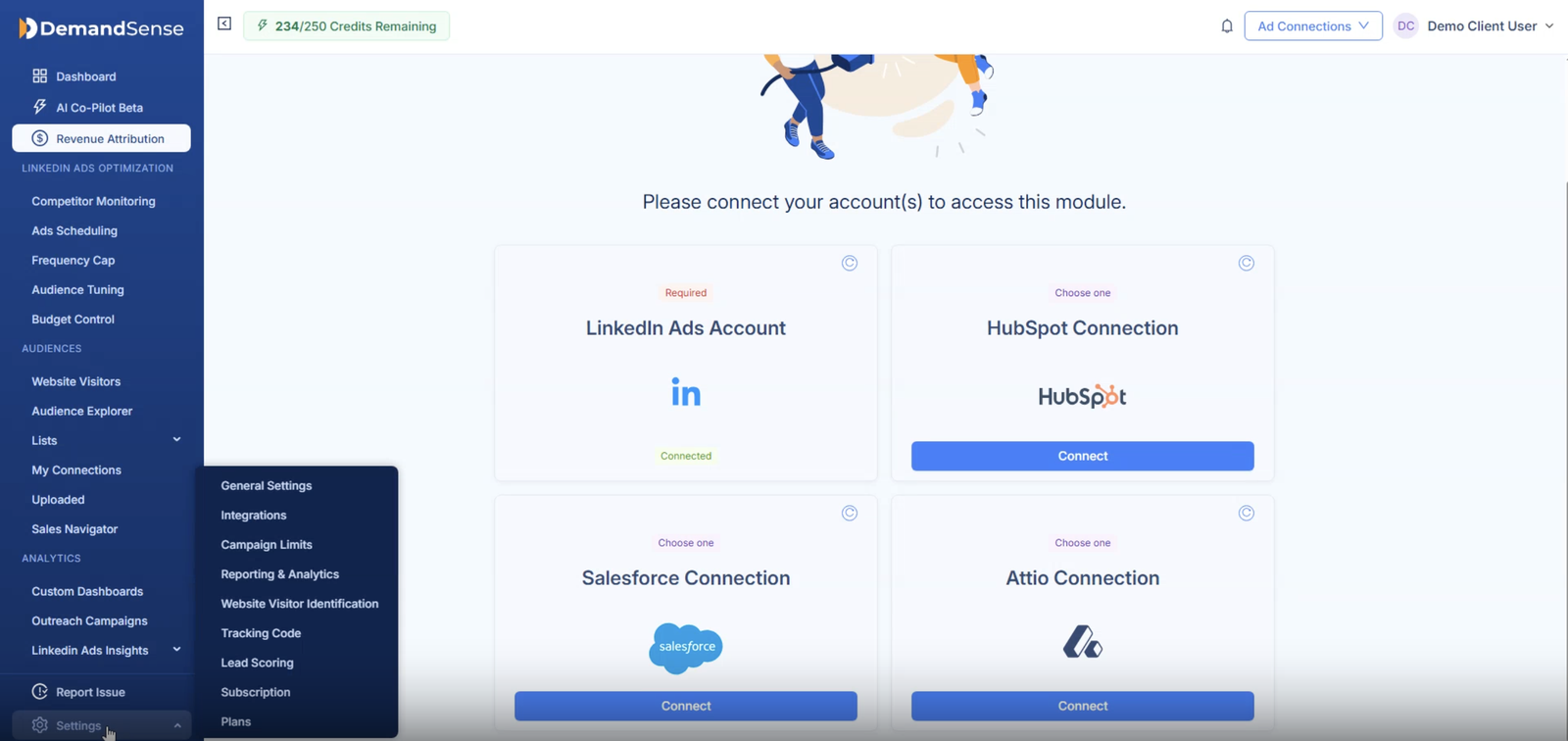
- Connect LinkedIn Campaign Manager first. It’s the required connection; the CRM is the second half.
- Then go to Settings → Integrations → CRM Connection and select Attio.
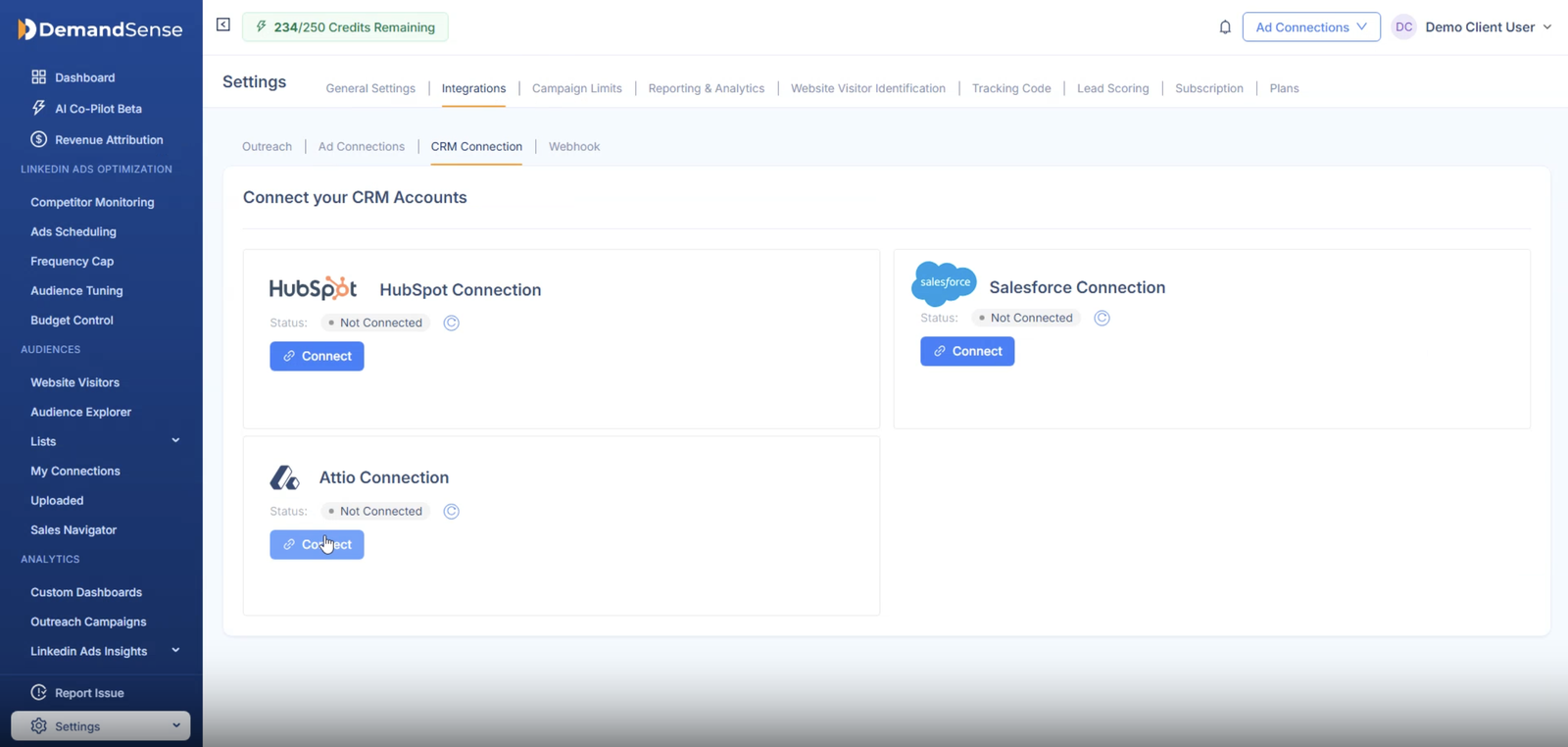
- Approve the access request in Attio. You’ll be asked to confirm which Attio workspace to connect and what the app can access.

- Select the Attio deal pipeline you want to use for attribution if you have more than one.
You can only connect one CRM at a time, which makes the CRM you choose the single source of truth for attribution — reading from two at once leads to conflicting and inaccurate reports when the systems disagree. You can always switch by disconnecting the current one first.
Once connected, DemandSense links your LinkedIn performance data — clicks, impressions, engagement, CTR — back to companies and deals in Attio, so you can see the companies interacting with your ads and the campaigns that influence revenue.
Step 3: Configure Data Mapping and Account Matching
Companies are matched to records in your Attio workspace on a domain basis. So to get more accurate account matching:
- Fill in missing domains and correct inaccurate ones for every company.
- Deduplicate company records.
- Review the companies that don’t match anything in Attio to check whether they fall under your ICP.
The more complete and accurate your domains are, the more of your engaged companies will match to real accounts — and the fewer opportunities you’ll miss.
Step 4: Validate the Integration and Data Quality
Catching data discrepancies early saves you from making costly campaign optimization decisions. Ask yourself:
- Are the reports showing a believable funnel progression from engaged to opportunity to closed won?
- Are known customers appearing in the reports? If they are missing, it usually means the domain on the record is wrong.
- Is the number of influenced accounts plausible against ad reach?
If there’s a disconnect, check your CRM data and make the necessary adjustments, then allow enough time for the data to update — DemandSense syncs CRM data on a weekly basis.
Step 5: Measure Pipeline and Revenue Attribution
The reporting period and lookback window you choose determine which deals appear in your reporting and how far back you can track the buyer journey. DemandSense gives you three lookback windows — three, six, or twelve months — so you can match the window to your actual sales cycle rather than to LinkedIn’s default.
That matters, because LinkedIn’s native window is far shorter than most B2B cycles. Campaign Manager defaults to a 30-day click window. You can extend it to 90 days for standard conversions, or 365 days for lead and purchase events sent through the Conversions API — but that’s a per-conversion-rule setting, and even at maximum, LinkedIn only counts the conversion event you send it. For a typical B2B program, a six-month lookback is a sensible starting point. Our guide to LinkedIn pipeline attribution covers how to pick the window from your own average sales cycle.
For revenue attribution, focus on metrics like:
- Influenced closed-won revenue — revenue from closed deals influenced by LinkedIn ads.
- Influenced active pipeline — open opportunities influenced by LinkedIn campaigns.
- Won ROAS — how much closed-won revenue was generated for every ad dollar spent.
These show how well campaigns are performing and give you concrete evidence for the campaign ROI conversation with leadership.
What Data Syncs Between LinkedIn Ads and Attio?
LinkedIn provides the campaign engagement data while Attio brings the account data needed to connect LinkedIn engagement to pipeline and revenue. Here’s what you get from each platform:
| LinkedIn Ads data | Attio CRM data |
|---|---|
| Ad format | Companies and their associated deals |
| Engagement metrics: impressions, clicks, conversion rate | Company details (firmographic data): industry, size, country, year founded |
| Ad spend | Deal value |
| Active campaigns | Deal start date, stage and closed date |
Without a middle revenue attribution layer to connect the two, you may never see how campaigns impact pipeline unless your deals happen to close inside the campaign period.
Measuring and Optimizing LinkedIn Ads With Attio Data
Apart from reporting, revenue and pipeline attribution also helps with making better campaign optimization decisions. You need to know which campaigns drive revenue and which don’t to decide where to allocate more budget and where to cut.
Here are some of the decisions marketers can make with confidence once attribution is in place:
Cutting campaigns that generate engagement but not pipeline
With accurate attribution, you can see which campaigns lead to open opportunities and direct spend towards them. Judging campaigns purely on LinkedIn engagement metrics like lead volume is risky — a campaign with few leads can still be the one producing the most revenue, and lead count alone won’t tell you which is which.
Scaling audiences that produce deals
Select high-value accounts to create a company list and use it to build LinkedIn Matched Audiences. You get audience segments that mirror the accounts already converting, rather than chasing unqualified leads.
Reallocating by industry and headcount
If you targeted enterprise healthcare companies but your attribution shows most of your closed deals come from mid-market, that’s a market worth exploring. Enterprise deals bring in more revenue per deal, but the mid-market segment may be closing faster and cheaper.
Handing high-engagement, no-deal accounts to sales
Attribution surfaces accounts that are engaging heavily with your ads but have no deal in Attio yet, so your sales team can reach out while interest is still fresh.
Why Standard LinkedIn Ads Tracking Falls Short in Attio
The standard LinkedIn ads–Attio connection falls short because it only captures direct leads — that is, after a prospect fills out a lead gen form. But most B2B deals start long before a prospect fills out a form, so standard reporting misses most of the buyer journey.
| Feature | Standard Attio–LinkedIn ad connection | Full attribution setup |
|---|---|---|
| What registers as a touchpoint? | A website or lead gen form fill by a buyer | Any qualifying engagement, including clicks and impressions |
| Unit of measurement | Individual contact engagement | Account-level engagement — you can see how your ads reach the buying committee |
| Impressions included | No, reporting starts after a lead is captured | Yes |
| Attribution window | Short (30–90 days for standard conversions) | Configurable lookback window — three, six or twelve months |
| Pipeline and revenue visibility | Captures only direct leads and deals that close within the short campaign period | Connects campaigns to active pipeline and closed-won revenue |
| Campaign-level revenue reporting | None — cannot tell you how ads influence revenue | Maps deals from first touch to closed-won or closed-lost so you see how campaigns influence revenue |
| Audience automation | You have to manually upload and update contact and company lists | Lists update automatically and push directly into LinkedIn, with auto-exclusion and auto-inclusion so targeting stays sharp |
Standard tracking also leans on browser cookies, which today’s privacy restrictions have made far less reliable. A full-funnel revenue attribution setup tracks buyers at the account level over a longer period, which is where the account-based view of attribution makes the difference.
How DemandSense Combines Its Data With Attio for Pipeline and Revenue Attribution
DemandSense Revenue Attribution connects your LinkedIn ad account and your Attio workspace so you can see the impact of your campaigns on pipeline and revenue. What it does differently:
You decide what counts as “influenced.” Three presets — Awareness, Engagement and Intent — set the bar for which LinkedIn activity qualifies as influence on a deal, and you can adjust the thresholds yourself. Most attribution tools make that decision for you and never tell you what they chose.
A lookback window that fits your sales cycle. Three, six or twelve months, built around real B2B cycle length rather than LinkedIn’s 30-day default.
Engagement-to-revenue funnel. Shows how accounts progress across funnel stages and where they fall off.
Opportunity gap. Surfaces the accounts engaging heavily with your ads that have no record in Attio yet, so you can add them to targeting or hand them to sales. A companion Rising Accounts panel shows which accounts are heating up this week.
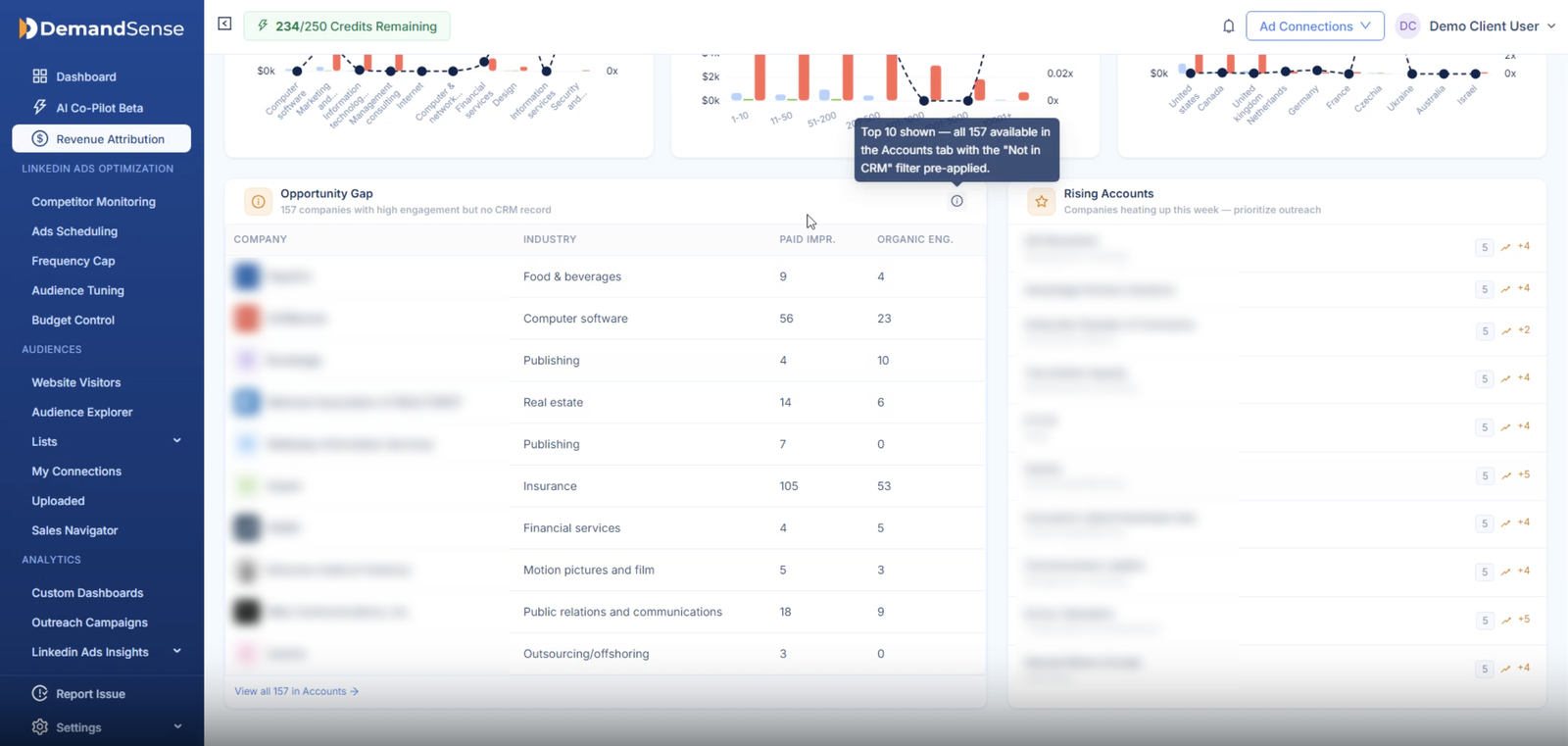
Spend protection and pipeline sync. Automatically exclude closed-deal accounts from targeting, and automatically push active pipeline accounts into LinkedIn audiences for retargeting.
Segment performance breakdowns by industry, headcount and country, so you can see which market segments bring in the most revenue.
Most LinkedIn integration tools sync messages, contact data and connection requests into Attio so SDRs stop copy-pasting — useful, but a different job. They aren’t built to show you how LinkedIn ads influence pipeline and revenue.
Frequently Asked Questions
Can LinkedIn Ads Integrate Directly With Attio?
No. LinkedIn keeps campaign analytics inside Campaign Manager, and Attio only knows about the companies and deals recorded in it. You need a middle revenue attribution layer to match LinkedIn activity to your Attio records and see the connection between campaigns and revenue.
What Is the Best LinkedIn Ads to Attio Integration for Pipeline Attribution?
Look for a revenue attribution platform with a lookback window that matches your B2B sales cycle, account-level engagement metrics so you can track campaign performance against real accounts, and the ability to surface gaps before they become problems. DemandSense covers all three, and adds budget control tools for managing campaigns while they run.
Does Attio Integrate With LinkedIn Sales Navigator?
No, Attio does not integrate with LinkedIn Sales Navigator directly. Sales Navigator is an outbound prospecting tool that helps SDRs find prospects and keep contact records updated — a different job from what LinkedIn Campaign Manager solves. To get Sales Navigator data into Attio, you can use Attio’s Chrome extension to save profiles manually, or a third-party tool to automate it.
How Is DemandSense Different From LinkedIn Contact and Message Sync Tools?
Tools like Kondo, Groovin and AddToCRM move DMs, profiles and connection requests into Attio. They’re built for SDR workflow, not revenue attribution. DemandSense matches LinkedIn ad engagement to your Attio accounts and deals so B2B teams can see how campaigns influence pipeline and revenue.
Can I Track Revenue From LinkedIn Ads in Attio?
Yes, by tracking influenced revenue — the revenue from deals your LinkedIn campaigns influenced. Set a lookback window that reaches back far enough before the close date to capture the buyer’s earlier touchpoints; six months works for most B2B programs.
What Data Is Required for Accurate Attribution?
Company records with accurate domains, deals linked to companies, clearly defined Closed Won and Closed Lost stages, deal amounts populated, and enough campaign volume for LinkedIn to return demographic data.
Can I Connect Attio and Another CRM at the Same Time?
No. DemandSense integrates with one CRM at a time. If you want to connect HubSpot or Salesforce, you have to disconnect Attio first. Reading from two separate CRMs can double-count influenced deals and skew your results, so one connection keeps reporting consistent.