
Summary: ROI vs. ROAS for B2B LinkedIn Ads at a Glance
ROAS and ROI both compare what came back with what went in, but they count different costs:
- ROAS (return on ad spend) measures the revenue generated per advertising dollar: revenue attributed to ads ÷ ad spend.
- ROI (return on investment) measures overall profitability: (revenue − total cost) ÷ total cost, once every expense is counted.
- On LinkedIn, revenue arrives months after the click, so ROAS has to be measured at the account level and against pipeline first. ROI only makes sense once deals close.
- Use ROAS to tune campaigns, and ROI to decide whether LinkedIn earns its budget.
Understanding ROAS and ROI for LinkedIn Ads
Launching LinkedIn ad campaigns is the easy part. Proving they work, and knowing what to change when they don’t, is harder. ROAS and ROI are the two key metrics for that job, and they differ mainly in which costs each one counts.
What Is ROAS (Return on Ad Spend) for LinkedIn Ads?
Return on ad spend (ROAS) measures the revenue you generate for every dollar spent on advertising. It’s the first metric to check when you’re judging campaign performance.
ROAS = Revenue attributed to ads ÷ ad spend
It’s expressed as a ratio (3:1) or a multiple (3×). A 3× ROAS means every dollar spent on ads brought back three in attributed revenue.
On LinkedIn, ROAS depends on what counts as “revenue attributed to ads”: clicks only, or account-level impressions too, and how far back your lookback window reaches. Two campaigns with identical spend can show a higher ROAS or a lower ROAS purely because of those settings.
What Is ROI (Return on Investment) for LinkedIn Ads?
LinkedIn ads ROI (return on investment) is the profit or loss your LinkedIn program makes relative to everything it cost.
ROI = (Revenue − total cost) ÷ total cost × 100
It’s expressed as a percentage. Unlike ROAS, ROI accounts for every cost of the program:
- Media spend
- Creative and landing pages, including agency fees
- Tools, such as your CRM and attribution platform
- The people running the campaigns
- Sales time spent on ad-sourced leads (the one most teams forget)
- The cost of delivering what you sold, which is where your gross margin comes in
ROI tells you whether the marketing investment is profitable. The catch is that it needs closed revenue, so it lags the campaign by the length of your sales cycle.
ROI vs. ROAS for B2B LinkedIn Ads: What’s the Key Difference?
Here are the key differences between ROAS and ROI side by side:
| Criterion | ROAS | ROI |
|---|---|---|
| Focus | Revenue generated against ad cost | Net profit against total investment |
| Scope | A single campaign or channel (tactical) | The whole program (strategic) |
| Included costs | Media only | Media plus creative, tools, people, agency fees and the cost of delivery |
| Formula | Revenue attributed to ads ÷ ad spend | (Revenue − total cost) ÷ total cost × 100 |
| Best for | Weekly campaign decisions | Channel and budget decisions |
In B2B there’s one more difference between ROI and ROAS, and it’s time. You can read ROAS against pipeline within weeks of a campaign going live, while ROI has to wait for deals to close. With sales cycles that run for months, ROAS is the metric you can make ongoing campaign decisions with.
When Should B2B Marketers Use ROAS vs. ROI?
ROI and ROAS describe the same spend, so the choice depends on the decision in front of you.
Use ROAS to Evaluate Campaign Efficiency
ROAS helps you compare campaigns, audience segments, creative and ad formats on a like-for-like basis, and decide where your next ad dollar goes.
Its blind spot is everything outside media cost. A campaign can show a strong ROAS while it fills the pipeline with deals that take months of sales time to close, or that never close because the ads reached the wrong people. Read ROAS alongside influenced pipeline at the account level before you scale anything.
Use ROI to Evaluate Full-Funnel Profitability
ROI helps you answer the question leadership actually asks: is LinkedIn worth the money? It’s the metric for deciding whether LinkedIn as a channel earns its place in the budget, for making the case to finance, and for annual planning.
Its blind spot is timing. You can’t measure it accurately until deals close, which makes it the wrong metric for weekly optimization. Use ROAS to manage campaigns while they run, and ROI to judge the channel once the results are in.
Why a High ROAS Can Still Mean a Low ROI for B2B LinkedIn Ads
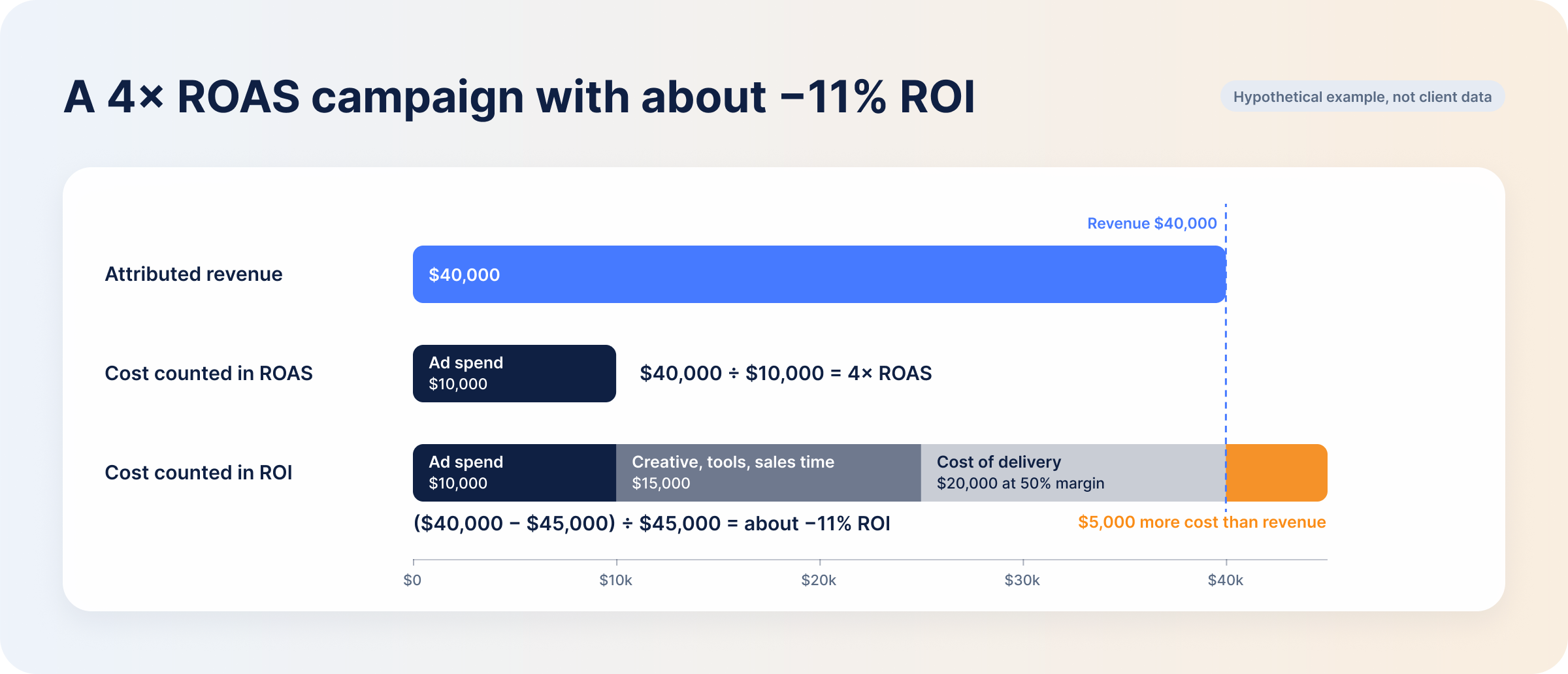
ROAS only takes ad spend into account, so a campaign can look great in the report while the program behind it loses money. Here’s a hypothetical example with round numbers:
- A team spends $10,000 on LinkedIn ads and gets $40,000 in attributed revenue: a 4× ROAS.
- The program also cost $15,000 outside media, in creative, tools and sales time.
- The business runs at a 50% gross margin, so delivering that $40,000 of business costs another $20,000.
Total cost is $10,000 + $15,000 + $20,000 = $45,000.
ROI = ($40,000 − $45,000) ÷ $45,000 × 100 = about −11%
The campaign brought back four dollars for every dollar of spend and still ended in a negative ROI. In B2B, three things usually sit behind a gap like this.
Margin. Break-even ROAS is 1 ÷ gross margin. At a 50% margin you need a 2× ROAS just to cover the media, before any other cost. Services and hardware usually carry lower margins than software, which pushes that line up: halve the margin and break-even ROAS doubles to 4×, exactly where the example campaign sits. A ROAS only tells you something next to your own margin.
Cost of the lead after the click. B2B buyers rarely convert straight after a click, and every lead still has to be worked by sales before it turns into revenue. None of that time shows up in ad spend. The route a lead takes also changes what it costs: in our 2026 LinkedIn B2B Benchmark Report, leads from native Lead Gen Forms averaged $810.83, against $221.14 for leads from an external landing page. A campaign built on the expensive route needs far more revenue per lead to hold its ROAS, before sales has spent an hour on it.
Deal quality. A high-ROAS campaign that fills the pipeline with deals that close late, close small or churn early looks worse the longer you measure it. ROAS alone won’t show you that. You need your LinkedIn data read against CRM outcomes to see whether the ads bring in customers who stay.
Should You Optimize LinkedIn Ads for ROAS, ROI, or Both?
Both, at different times. ROAS is the leading indicator you can act on every week, and ROI is the lagging one that tells you whether the channel paid off.
Optimize campaigns on ROAS measured against pipeline and won revenue at the account level. The account view counts LinkedIn’s influence on the whole buying committee, not only the one person who filled in a form.
Be careful with last-click ROAS in particular. The default LinkedIn attribution model in Campaign Manager gives full credit to the last ad interaction before a conversion. That favours the campaigns closest to the form fill and gives little or nothing to the ones that reached the account first, so optimizing to it tends to cut the campaigns that started the deals. Keep funding the ones that influence high-value accounts, even if their last-touch ROAS looks lower.
Then, once a full sales cycle has closed, use ROI to judge the channel.
How to Improve Both ROAS and ROI From LinkedIn Ads
Creative, audience, bidding, sales follow-up and deal size all move these numbers, but in different places. ROAS responds to what happens in the ad account. ROI also depends on what happens after the click, in sales and in the product.
How to Improve LinkedIn Ads ROAS
Each lever either raises the numerator (attributed revenue) or lowers the denominator (ad spend). Our tactics to improve LinkedIn ad ROAS cover each one in more depth.
- Refine account targeting and audience segments. Company and contact lists and tighter ICP targeting put more of your spend in front of buyers likely to become well-paying customers (numerator).
- Test ad creative and messaging. Angles that resonate lift CTR, and more relevant ads can cost less per click, so the same budget buys more qualified traffic (numerator).
- Optimize bids, budgets and campaign delivery. Manual bidding and cost caps limit what you pay, and running ads in the hours your buyers are active, by hand or with a tool, cuts spend in hours that don’t perform (denominator).
- Improve landing page and lead conversion rates. Fast pages with one clear CTA convert more of the clicks you’ve already paid for, so the same spend produces more leads and more pipeline (numerator).
How to Improve LinkedIn Ads ROI
- Reduce customer acquisition costs. The ROAS levers above help. So does using organic content to keep warming your audience instead of paying for every touch.
- Improve lead quality and sales conversion rates. Keep targeting close to your ICP so sales spends its time on leads that can close.
- Increase deal value and customer lifetime value. Upsells, cross-sells and packaging that grows with the customer raise the revenue side without adding ad spend.
- Improve pipeline-to-revenue conversion. Find where deals stall and remove the friction, so opportunities move through the pipeline and close faster.
Three of these four happen after the click. Sales conversion, deal value and lifetime value sit in your CRM rather than in Campaign Manager, and you only see their effect once deals close. That’s why ROI belongs to the channel decision, not the campaign decision.
How to Track ROAS and ROI Across the B2B LinkedIn Funnel
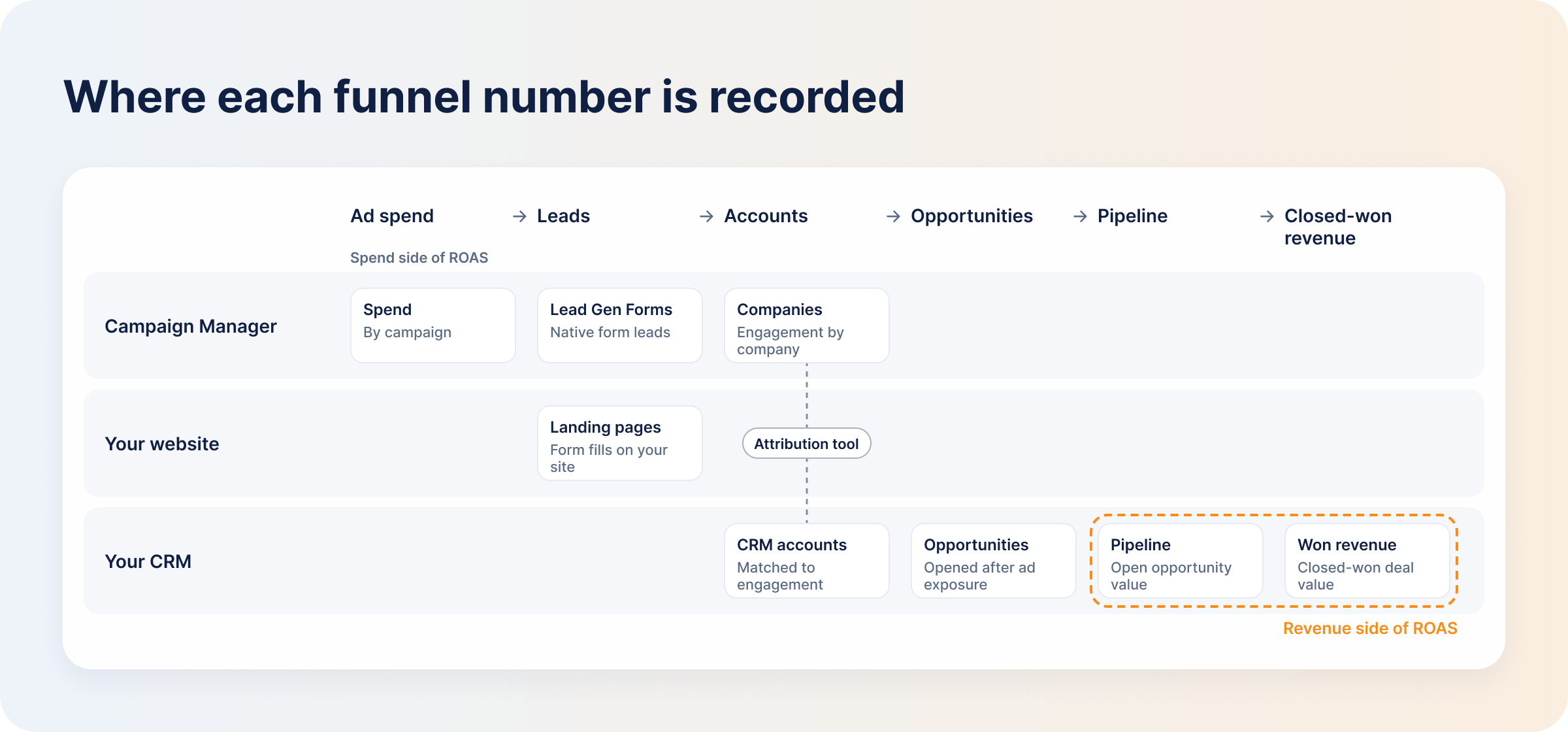
You can only calculate ROAS at the stages where a dollar value exists: pipeline and closed-won revenue. Both live in your CRM, not in Campaign Manager. To track LinkedIn ad revenue, read your LinkedIn data, website activity and CRM side by side, stage by stage:
- Ad spend: Campaign Manager.
- Leads: Lead Gen Forms in Campaign Manager, or the forms on your landing pages.
- Accounts: the companies that engaged with your ads, including people who never filled in a form. Campaign Manager shows engagement by company; matching it to your CRM accounts takes an attribution tool.
- Opportunities: your CRM, for accounts that entered the pipeline after seeing your ads.
- Pipeline: your CRM, as the dollar value of open opportunities.
- Closed-won revenue: your CRM, as revenue from won deals.
Click and Impression Attribution
Click attribution credits only the person who clicked. Account-level impression attribution credits the account that saw your ads before the deal was created. For B2B, the second gives you the more honest numerator, because most of a buying committee never clicks an ad. Count clicks only and campaigns that were part of the buyer’s journey look like they did nothing. View-through attribution is how those impressions get counted.
Pipeline ROAS vs. Revenue ROAS
Not every opportunity becomes a won deal, so calculate these two separately:
- Pipeline ROAS = influenced pipeline ÷ spend. It’s the leading one, readable within weeks, and the one to optimize campaigns on.
- Revenue ROAS = closed-won revenue ÷ spend. It lags, like ROI, and it’s the one finance trusts.
Whichever you track, set the lookback window to match your sales cycle. If the window is shorter than the cycle, revenue ROAS understates every campaign.
How DemandSense Connects LinkedIn Ad Spend to Pipeline, Revenue, and ROI
Campaign Manager’s reporting stops at the form fill. The pipeline and revenue that both ROAS readings need are in your CRM, and without the two read together you’re left guessing which campaigns produced deals.
DemandSense revenue attribution reads your LinkedIn engagement alongside the deals in HubSpot, Salesforce or Attio, and reports influenced pipeline and closed-won revenue per campaign. That pipeline attribution happens at the account level, so influence counts when the account saw your ads, not only when someone clicked. You decide what “influenced” means with three presets (Awareness, Engagement and Intent) or your own thresholds, and set a 3-, 6- or 12-month lookback to match your sales cycle.
Won ROAS is the revenue ROAS: revenue on won deals against the spend that influenced them. Spend Protection stops spending on accounts that have already closed, which improves ROI by removing cost rather than adding revenue.
ROI also needs your full cost base (salaries, agency, tools, content), and that lives in your finance model, not in any ad tool. DemandSense gives you the revenue side per campaign, and you bring the costs to calculate ROI.
Try it on your own campaigns at demandsense.com, free for 30 days — no card needed.
Frequently Asked Questions
What is a good ROAS for B2B LinkedIn Ads?
A good ROAS clears your break-even point with room left for the costs ROI adds. Break-even ROAS is 1 ÷ gross margin, so a business with a 50% margin needs a 2× ROAS to break even. A single benchmark ratio doesn’t help much in B2B, because deal size, margin and sales-cycle length vary too much between advertisers for one number to mean anything.
Should pipeline value be included when calculating LinkedIn Ads ROAS?
Yes, as a separately labelled pipeline ROAS, never blended with won revenue. Not every open opportunity closes, but pipeline gives you a number to optimize on weekly while you wait for deals. If you present it to finance, weight it by stage or win rate.
How long should you wait before evaluating LinkedIn Ads ROI?
At least one full sales cycle for the segment you’re advertising to, plus the attribution lookback window you use. Until then, read pipeline ROAS and account engagement. Campaign Manager’s standard conversion windows run up to 90 days, which many B2B sales cycles outlast. DemandSense offers a 3-, 6- or 12-month lookback so the window can match the cycle.
Does LinkedIn’s Revenue Attribution Report show true marketing ROI?
No. It connects your CRM to LinkedIn and reports LinkedIn-influenced pipeline, won revenue and ROAS, which makes it a ROAS view of one channel. It carries no costs beyond media and no other channels, so for ROI you still need your full cost base from your own model.
Should impression-based conversions count toward LinkedIn Ads ROI?
Yes, as long as you apply the rule consistently. Most B2B buyers see ads without clicking, and those impressions still influence pipeline. Use the same rule for every campaign and every period, and state it in the report, so nobody can accuse the number of being flattering.