
Most B2B teams already have the data they need to build better LinkedIn audiences. CRM records, ad engagement, website behavior and enrichment tools all say something useful about who’s buying and why. The problem is that each of those lives in a different system, and none of it reaches the audience actually being targeted in Campaign Manager.
That gap is what audience data management closes. It pulls the sources together and resolves them to accounts, so you can see who to reach and who to leave out before you spend anything — and so the segment you built in week one hasn’t quietly gone stale by week six.
Summary: How to Build Better LinkedIn Audience Segments
LinkedIn is the strongest platform for reaching B2B buyers, but its native firmographic filters only narrow the field so far — you’re still choosing from more than a billion members on job title and company size alone. Here’s what separates a segment that drives revenue from one that only drives clicks.
- Start with the data you already own. First-party CRM and website data tells you more about buying intent than any filter in Campaign Manager.
- Build segments around real signals. Combine first-party data, LinkedIn engagement and enrichment to group accounts by shared behavior rather than shared attributes.
- Suppress aggressively. Existing customers, employees, competitors and prospects who already said no should never see a prospecting ad.
- Measure at the account level. Influenced pipeline, engaged accounts, buying committee coverage and closed-won revenue tell you what CTR can’t.
What Is an Audience Data Management Platform for LinkedIn Ads?
An audience data management platform (DMP) collects audience data, organizes it into segments, and activates those segments across advertising platforms.
Think of it as a central store that pulls in three kinds of data:
- First-party data: CRM records, email lists and website visits.
- Second-party data: partner data — someone else’s first-party data, shared with you.
- Third-party data: external data bought from providers for enrichment.
It then segments audiences by:
- Behavior — visited the pricing page three times in the last month, for instance, which reads as intent.
- Similarity — finding new prospects who resemble your best customers.
- Enriched profile — combining offline and online data into multi-dimensional segments.
For LinkedIn, the job is the same. The architecture isn’t.
Traditional DMPs track anonymous visitors through third-party cookies and mobile IDs, which still works across much of the open web. LinkedIn is a walled garden and blocks that kind of outside tracking entirely. Its targeting runs on self-declared professional data — job titles, company names, seniority — and on lists you upload yourself.
So you can’t drop a tracker onto LinkedIn and sync data across. You match external customer files to active member profiles through LinkedIn Matched Audiences, or you put a revenue attribution platform between your CRM and LinkedIn so the two stay in step.
Why LinkedIn Ads Teams Have an Audience Data Access Problem
Audience data is hard to get at, for four reasons.
Campaign Manager shows demographics, not companies. You see impressions, clicks, CTR, and that a share of your audience carries a director title. Which companies engaged, and who inside them, stays hidden.
CRM data lives somewhere else. Without a join between the two systems, you can’t see which campaigns produced revenue, which accounts should be excluded, or which ones are warm enough to retarget.
Website visitors are anonymous. Who came, what they read, whether they’re evaluating or just browsing — none of it gets answered unless you deliberately solve for it.
Uploaded lists go stale. A Matched Audience is a snapshot. Contact lists decay fastest, since people change jobs constantly, but company lists drift too.
The result is targeting decided once at setup and never revisited against evidence.
What Data Should Power a LinkedIn Audience Platform?
Your buyers leave signals across AI search, LinkedIn, your website, review sites and competitor content. Choose one source and you profile them on a fraction of the evidence.
First-Party Customer Data
The most valuable asset you have, because no browser restriction can take it away. It covers CRM accounts and deals, closed-won patterns, website behavior, form fills and product usage — everything you need to retarget open opportunities and drop existing customers out of targeting before the budget reaches them.
LinkedIn Platform and Engagement Data
What Campaign Manager gives you directly: impressions, clicks, CTR, and demographic breakdowns by company, company size, industry, job function and seniority.
There’s a constraint most guides skip. LinkedIn applies a three-event minimum to demographic reporting — any value with fewer than three events is dropped from the results entirely. Tightly targeted campaigns often don’t clear it, so the smaller and sharper your audience, the less LinkedIn will tell you about who engaged. Connecting ad data to your CRM is how most teams work around that blind spot.
Third-Party Enrichment Data
Firmographics, technographics and off-site intent signals based on what prospects read elsewhere. Enrichment fills gaps in fit and context, and it’s the practical way to find accounts you don’t know about yet.
Treat it as supporting evidence, not proof. Records age quickly, intent providers disagree with each other more often than their marketing suggests, and a technographic match tells you a company could buy, not that anyone there wants to. Lead with your own behavioral data and let enrichment widen the net.
How Does a LinkedIn Audience Data Platform Work?
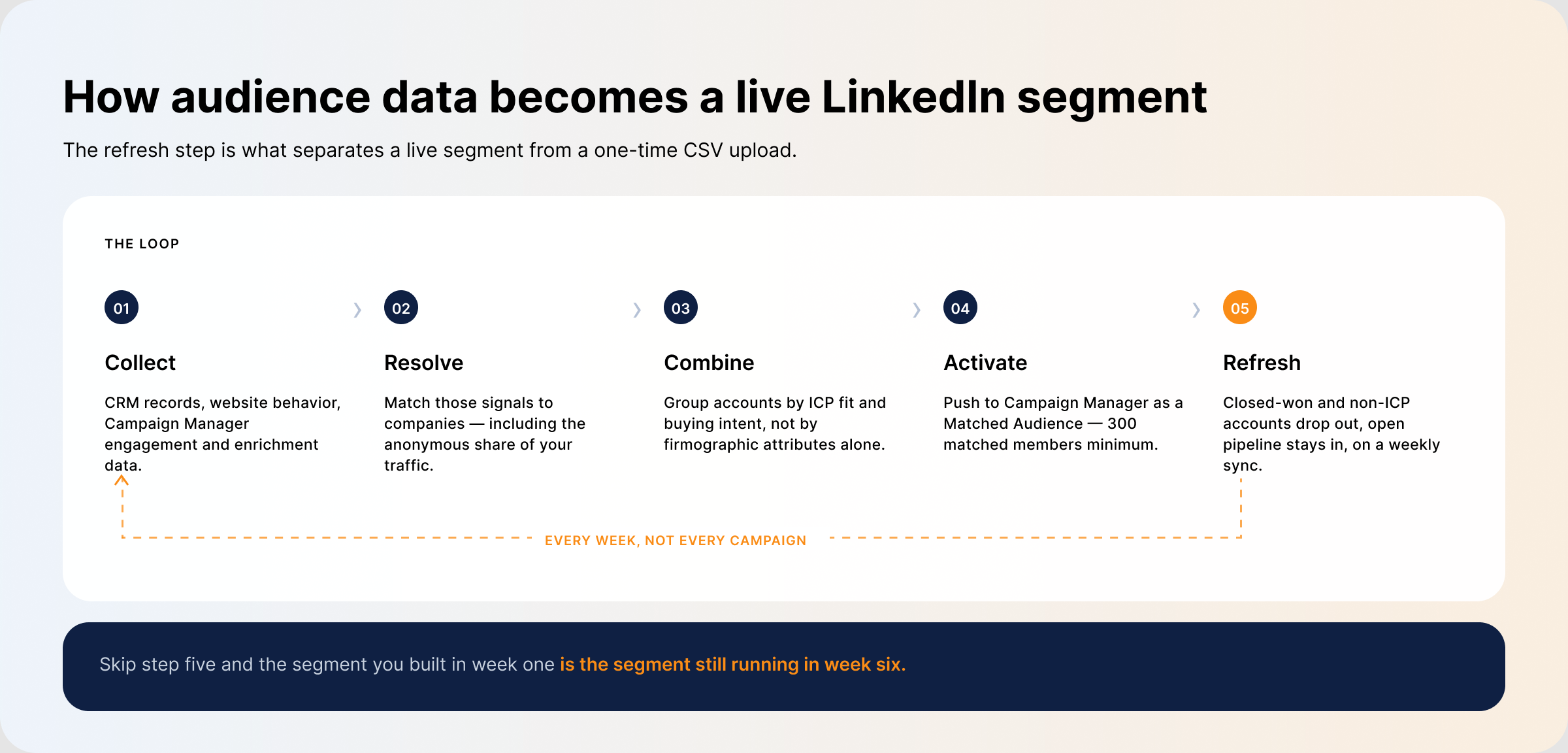
A LinkedIn audience data platform brings the sources together and keeps segments current as deals close and new engagement arrives. Five steps:
- Collect signals across CRM, website, Campaign Manager and enrichment.
- Resolve them to companies. Anonymous traffic is the hard part here — a tool that can identify website visitors turns a meaningful share of that traffic into named accounts you can act on.
- Combine them into segments based on account fit and buying intent, so messaging can speak to where an account actually is rather than addressing everyone at once.
- Activate by pushing segments into Campaign Manager as Matched Audiences. An audience needs at least 300 matched members before a campaign can run against it.
- Refresh automatically by keeping the CRM connected, so closed-won accounts, non-ICP companies, employees and competitors drop out while open opportunities stay in — without anyone rebuilding a CSV.
Step five is where most of the value sits. LinkedIn doesn’t offer a native CRM connection that does this, so it takes either a partner integration or a platform sitting between the two systems.
Build LinkedIn Audience Segments That Convert
B2B deals involve several people with different priorities, and segmentation is the only way to address them separately.
Define the ICP, Account Audience, and Buying Committee
Three layers, not one: which companies fit, which of those you’re targeting now, and who inside them you need to reach. Start with the company list and narrow it:
- Industry: healthcare, finance, B2B SaaS
- Company size or revenue: SMB, mid-market or enterprise
- Geography: EMEA, LATAM, North America
- Tech stack: do they run Salesforce or HubSpot? Favor companies whose stack integrates with yours.
- Job title and seniority: VP of Sales, Senior Product Manager — the layer that keeps spend on decision-makers
Layer Engagement, Website Intent, and CRM Data
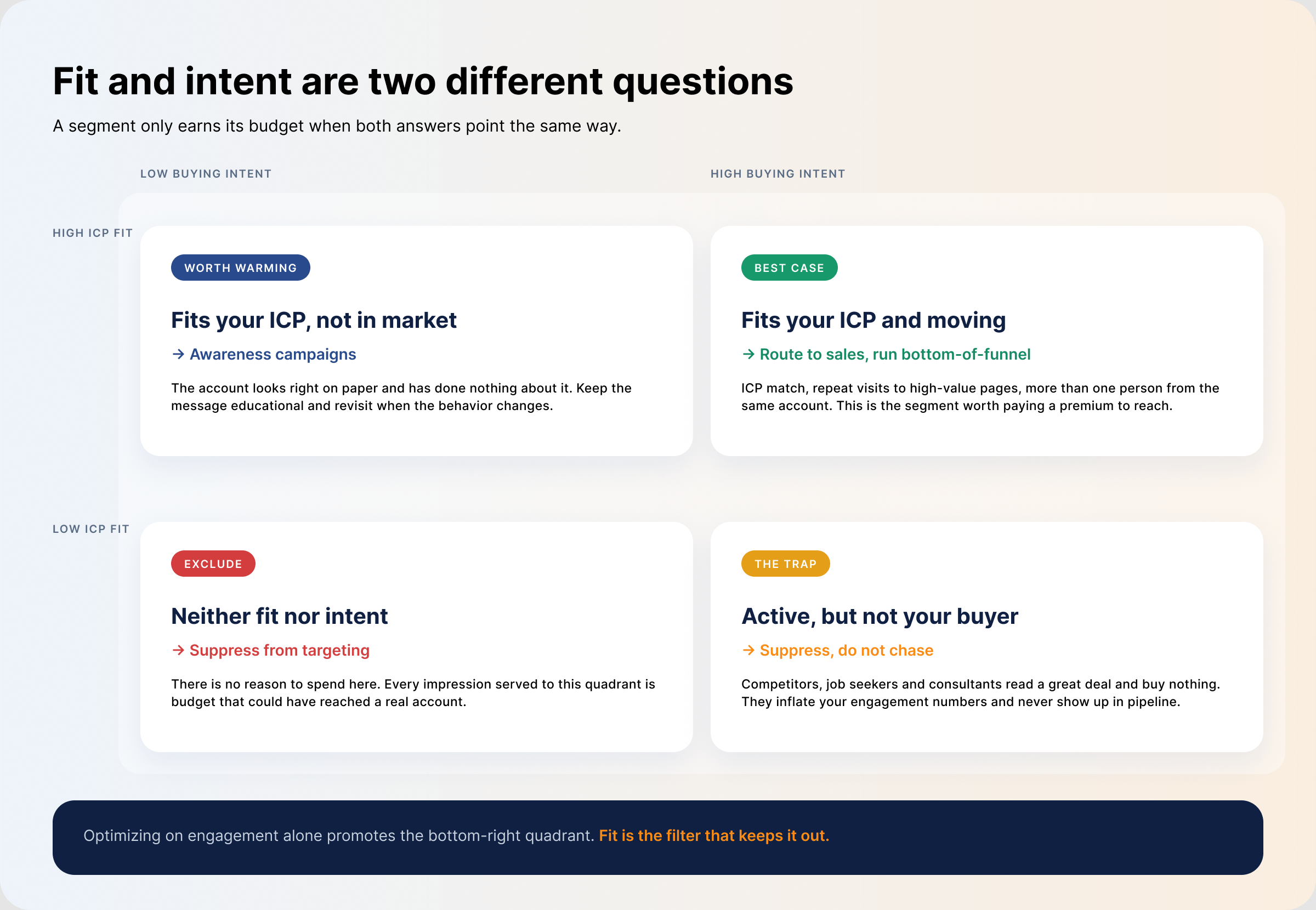
Fit tells you who could buy. Behavior tells you who might, now.
- High intent — matches your ICP, visited high-value pages more than twice in the last week, filled in a form, no open deal in the CRM. Route to sales.
- Mid intent — ICP fit, recently engaged with your ads, open deal already in the CRM. Support with bottom-of-funnel campaigns.
- Low intent — ICP fit, downloaded something once and went quiet, still searching in your category. Awareness campaigns.
Never score intent on one signal. Someone can land on your pricing page by accident, or because they’re building a competitor comparison. A high-value page view only means something alongside a second action — a demo booking, a webinar registration, a return visit from a colleague.
For ABM, add committee coverage as a segmentation input. Two people engaging regularly isn’t a sales-ready account; it’s two people. Once your systems are joined you can see which accounts have real spread across the committee and which are still one champion deep.
Apply Suppression and Exclusion Rules
Every impression served to an account that should have been excluded is spend that bought nothing. Exclude closed-won customers, closed-lost accounts inside a cooling window, opportunities sales is already working, competitors, your own employees, and industries you don’t sell into.
This is the least glamorous step and usually the one with the fastest payback.
Activate and Continuously Refresh the Segment
Push the list to Campaign Manager as a Matched Audience, built from website visitors, a company list or a contact list depending on the goal. Then keep it moving as accounts enter and leave the pipeline.
Watch the floor while you refine. Segments need 300 matched members to run at all, and LinkedIn recommends far larger audiences — 50,000+ for Sponsored Content — before delivery becomes predictable. An over-refined segment doesn’t fail loudly; it just stops spending.
What Can B2B Teams Do With LinkedIn Audience Segments?
Good segments make three things possible that broad targeting doesn’t.
Retargeting and Suppression
Two sides of the same mechanism: you re-reach accounts that engaged and haven’t converted, while accounts that are finished — won, lost, or already in sales’ hands — stop costing you money. Once intent is visible you can sequence accounts deeper, from an awareness ad to a case study to a trial offer. Buyers rarely move through that in a straight line, so read what an account is doing rather than assuming the next step.
Lookalike Modeling and Predictive Audiences
LinkedIn retired lookalike audiences in February 2024. Predictive Audiences replaced them: you supply a company or contact list as the seed, and LinkedIn’s model finds members likely to convert the way your existing customers did. A geography filter is mandatory, and the target audience size has to sit above 300.
The old caveat still applies. Modeling needs a pattern to learn from, so a handful of closed-won accounts won’t produce a useful expansion audience. Small teams usually get more out of tightening an existing segment than building a new one.
Pipeline Acceleration and ROI Optimization
Open deals stall when they’re still being marketed to as though they were cold. Pull them into their own segment, support them with content built for the stage they’re actually in, and shift budget out of segments that generate clicks but no influenced pipeline.
Which Metrics Show Whether an Audience Segment Converts?
Judge segments on engagement and revenue together, not CTR alone. Enterprise segments routinely post the worst CTR in the account and the best pipeline, and optimizing on clicks actively selects against them. These are the LinkedIn ads metrics worth breaking out by segment:
- Accounts reached vs. accounts engaged — how many ICP accounts saw the ads, and how many did something about it. This is your relevance read.
- Engagement depth per account — how many people per account, and at what level. Broad junior engagement is not committee coverage.
- Accounts entering the CRM — whether the segment produces qualified opportunities or just traffic.
- Influenced pipeline and closed-won revenue — deals exposed to the campaign before they converted.
- Cost per engaged account vs. Won ROAS — what it costs to reach an account, and what came back.
Audience Database vs. DMP vs. CDP vs. LinkedIn Ads Intelligence Platform
The names get used interchangeably, but these solve different problems for different buyers.
| Category | Primary data type | Built for | Where it fits in LinkedIn Ads | Limitations |
|---|---|---|---|---|
| Audience database | Customer records — company and contact details | Storing customer and contact information | The starting point. It gives you the company data you need to build a targeting list. | Static by nature, so lists have to be updated and re-uploaded by hand. |
| Data management platform (DMP) | First-, second- and third-party audience data | Programmatic advertising across many channels | Combines and organizes large volumes of audience data for advertisers. | Built on third-party cookies, which LinkedIn’s walled garden doesn’t accept. |
| Customer data platform (CDP) | First-party customer data | Unified customer profiles for lifecycle marketing | Surfaces individual buying intent and keeps profiles current across systems. | Models individuals, while B2B buying decisions happen at the account level. |
| LinkedIn ads intelligence platform | First-party data, LinkedIn engagement data and third-party enrichment | Monitoring and optimizing live LinkedIn campaigns | Builds, refines and evaluates LinkedIn segments using account-level engagement. | Focused on LinkedIn rather than broader customer data management. |
Pick on the basis of the job you need done. Plenty of teams run several of these at once, which works right up until the systems aren’t connected and each one holds a different version of the same account. If LinkedIn is your main paid channel, a LinkedIn ads intelligence platform will get you further than a general-purpose one.
How DemandSense Turns Audience Data Into LinkedIn Ads Decisions
DemandSense connects LinkedIn ad engagement to the companies and deals in your CRM, so revenue attribution runs at the account level rather than the click level. That’s what tells you which segments produce revenue, which need more nurturing, and which sit outside your ICP entirely.
Website Visitors identifies the companies and people browsing your site who never fill in a form, and scores each against your ICP — so the company list you push to LinkedIn is built from behavior rather than a static export. Separately, DemandSense surfaces far more of the companies engaging with your ads than Campaign Manager’s demographic reporting will show you.
Two automations do the audience upkeep. Spend Protection pulls existing customers, closed-won and closed-lost accounts, non-ICP companies, employees and competitors out of targeting. Pipeline Sync pushes active pipeline into your LinkedIn audiences so open deals keep getting air cover. Both run on an automatic weekly sync, which is the difference between a list that reflects your pipeline and one that reflects your pipeline as of the day you uploaded it.
You can also compare segment performance by industry, company headcount and country, which is usually where teams find that the segment producing the most clicks and the segment producing the most revenue aren’t the same one.
How the Upcoming DemandSense CAPI Integration Will Connect Audience Data to Pipeline Outcomes
Segments are only as good as the outcomes you can trace back to them. Today, a lot of what happens after the click — a deal created in the CRM weeks later, an opportunity that closes offline — never makes it back to LinkedIn, so campaigns get optimized against the events LinkedIn can see rather than the ones that pay for the program.
The upcoming DemandSense Conversions API integration will close that loop by sending conversion data back to LinkedIn server-side. Segments will be judged on the pipeline they produced rather than on clicks and form fills, and the accounts that convert offline will finally count toward the campaign that reached them.
Frequently Asked Questions
What Tools Are Used for Audience Segmentation?
CRMs, CDPs, enrichment providers, intent data vendors, native ad-platform tools and LinkedIn ads intelligence platforms — most teams run several, because each does something the others don’t. The weak point is almost never the individual tool. It’s that nothing joins them, so the same account looks different in every system.
Does LinkedIn Conversions API Create Audiences Automatically?
No. The LinkedIn Conversions API sends conversion events — including offline and CRM conversions — to LinkedIn server-side, so campaigns can be measured and optimized against outcomes that happen after the click. It doesn’t build audiences. You still create those in Campaign Manager under Matched Audiences.
Can LinkedIn CAPI Replace the Insight Tag?
No, and they don’t do the same job. The Insight Tag is a browser-side pixel: it tracks on-site conversions, builds website retargeting audiences, and powers Website Demographics, which reports aggregated, anonymized breakdowns of who visited — never named companies or individuals. CAPI sends conversion events to LinkedIn from your server, including conversions that happen offline. Run both and LinkedIn gets the fullest picture of what your campaigns produced.
How Often Should B2B Audience Segments Be Updated?
As often as the underlying data changes — which in practice means weekly for most teams. New accounts enter the ICP, deals close and need suppressing, engagement decays, and contact records go out of date. With DemandSense, the exclusion and inclusion rules run on an automatic weekly sync, so the highest-frequency changes are handled without anyone rebuilding a list.
Do Small B2B Teams Need an Enterprise DMP?
No. Enterprise DMPs are built for programmatic scale and third-party data marketplaces, neither of which applies to a team running LinkedIn as its main channel. What that team actually needs is clean first-party data, account-level engagement visibility, and a way to keep segments fresh without a weekly CSV ritual.