

There’s a question most B2B marketers have been asking their dashboards for years without getting a straight answer: which ICP-fit companies saw our LinkedIn ads, came to the site, and still aren’t in our CRM?
It’s a reasonable thing to want to know. It’s also three systems away. LinkedIn Campaign Manager knows about impressions and clicks. Your visitor identification tool knows who showed up on the site. Your CRM knows who’s already a record. Nothing knows all three at once, so the question gets answered by hand, in a spreadsheet, badly, or not at all.
Model Context Protocol changes what you can do about that — but only if something joins the data before the model reads it. This guide covers what it takes to connect LinkedIn Ads to Claude, what DemandSense MCP gives Claude access to, the workflows it supports, and how to get access.
Summary: LinkedIn Ads Analysis With Claude and DemandSense MCP
Here’s the short version before the detail.
- MCP is a connector standard. It lets Claude read live data from an external system instead of guessing from training data — no LinkedIn developer app, no custom API access to maintain.
- An MCP server for LinkedIn Ads on its own reports what Campaign Manager already shows. Most wrap the LinkedIn Marketing API directly, so you get the same native LinkedIn numbers in a chat window.
- DemandSense MCP reads three streams before Claude does. LinkedIn ad exposure at impression level, identified website visitors at the person and company level, and CRM state, side by side before Claude sees anything.
- That join is what makes cross-system questions answerable. LinkedIn ads data alone can’t tell you which warmed accounts never converted, because it doesn’t know what happened on your site or in your pipeline.
- It’s read-only. Claude analyzes your LinkedIn ads campaigns; it doesn’t launch, pause or change anything.
- It’s open to everyone. MCP comes with every DemandSense plan and with the 30-day free trial. There’s no application or waitlist anymore.
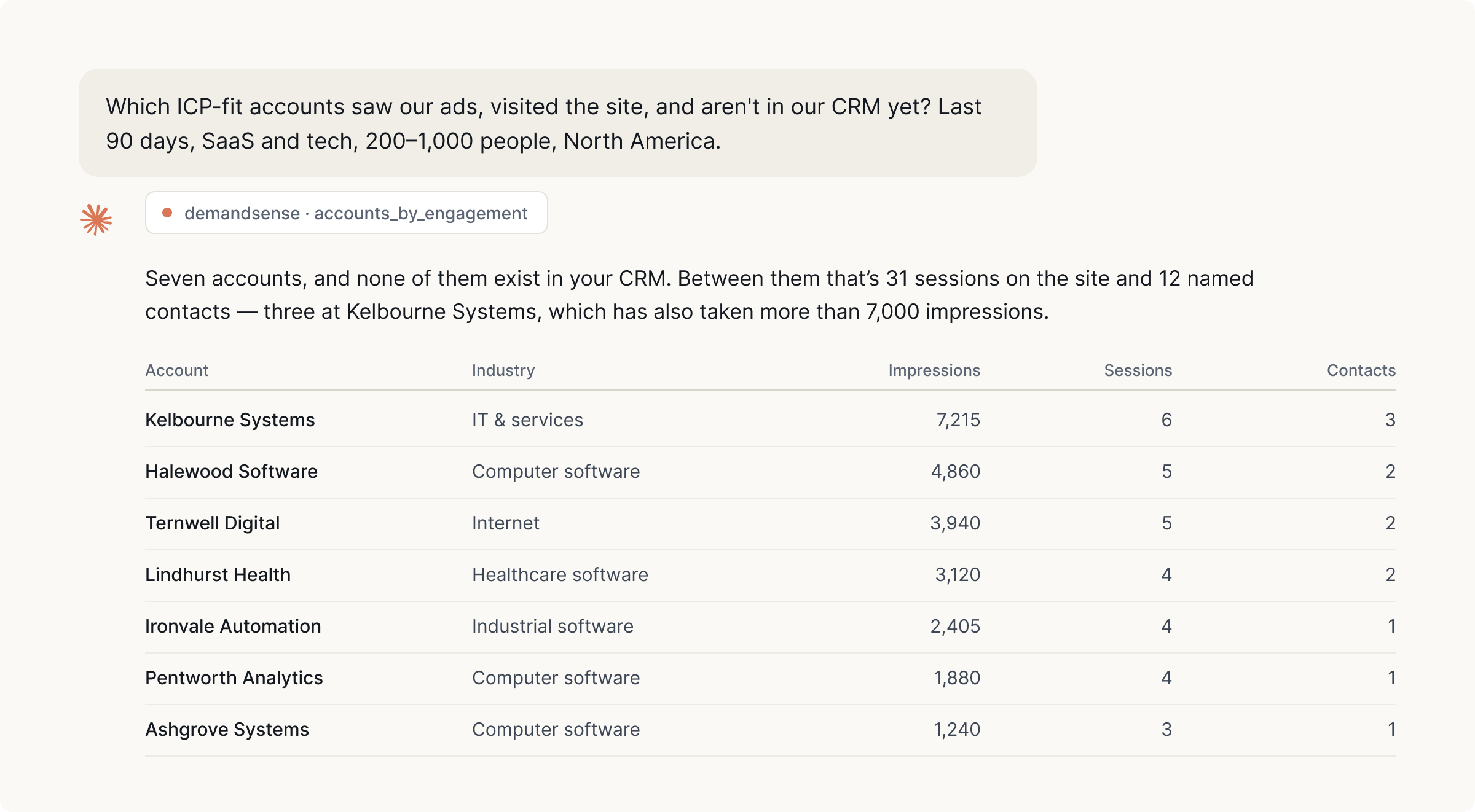
Figures from a DemandSense MCP run against our own account. Account names are placeholders.
Benefits of Using DemandSense MCP for LinkedIn Ads Analysis With Claude
- Cross-system answers in one question. “Which ICP-fit accounts are showing ad and site activity this week?” needs three sources. In a joined record it’s one query.
- Impression-level engagement, not just clicks. B2B buying committees read ads for months without clicking, and those silent accounts never appear in a clicks-based LinkedIn ads performance report.
- Person-level visitor identity. DemandSense resolves visitors at the person and company level rather than by reverse-IP lookup alone, so a named contact ties back to the campaign that reached them.
- No developer required. Getting LinkedIn advertising data into an AI agent used to mean creating a LinkedIn developer app, handling OAuth against the LinkedIn API and maintaining a pipeline. Now it’s a connection you switch on.
- Answers you can check. The join happens in the product rather than inside the model, so the rows behind any answer exist somewhere you can open.
- Read-only access to a live ad account. Asked to launch or pause something, Claude declines — for most teams, the only basis on which pointing an AI at live LinkedIn ads campaigns is worth considering.
Connecting LinkedIn Ads to Claude With DemandSense
DemandSense MCP is open to every DemandSense account, trial included. The path in:
- Start a free trial at demandsense.com/mcp-intelligence-hub, or sign in if you already have an account. The trial is 30 days, no card needed, and MCP is included.
- Connect your sources. LinkedIn Ads is the core. The DemandSense tracking script goes on your site through Google Tag Manager, so no developer ticket. CRM is optional.
- Connect your LinkedIn Ads data to Claude. Once your workspace is live, the MCP server URL goes into Claude Desktop or Claude Code, and the tools appear in your Claude conversation.
- Ask your first question. Plain English, in the chat window you already use.
Worth knowing when comparing options: there’s no official LinkedIn MCP server, and most of the ones on the market give Claude direct access to the Marketing API and stop there. They’re useful for pulling campaign metrics. They aren’t the same category of thing as a server that resolves identity across three sources before answering.
The same server works in ChatGPT too — if that’s where your team already lives, we’ve covered connecting LinkedIn Ads to ChatGPT separately.
DemandSense MCP vs. Manual CSV Analysis
The alternative most teams run today is an export, a spreadsheet and an afternoon.
| Manual CSV analysis | DemandSense MCP with Claude | |
|---|---|---|
| Getting the data | Export from Ads Manager, export from your visitor tool, export from the CRM | Already joined before the question is asked |
| Matching accounts | VLOOKUP on company name, then cleaning the near-misses by hand | Resolved at the person and company level in the product |
| Ad engagement depth | Clicks and conversions from the export | Impression-level exposure, including accounts that never clicked |
| How often it gets redone | Realistically monthly, because it’s an afternoon each time | Whenever you want to ask |
| Follow-up questions | New export, new spreadsheet | Next message in the same conversation |
Why LinkedIn Ads Data Alone Is Not Enough for B2B Analysis
Campaign Manager is built around the campaign, and B2B revenue happens around the account. That mismatch is the root of most reporting frustration on the channel.
Native LinkedIn reporting can tell you a campaign spent $8,000 and produced 40 leads. It can’t tell you that eleven of the accounts it reached most heavily are already open opportunities, that four are quietly reading your site every week, or that one is an existing customer you’re still paying to advertise to.
It’s also why wiring three separate connectors into Claude — LinkedIn here, CRM there, visitor tool over there — tends to disappoint. Each system holds the same company under a different key, and none of those keys matches another.
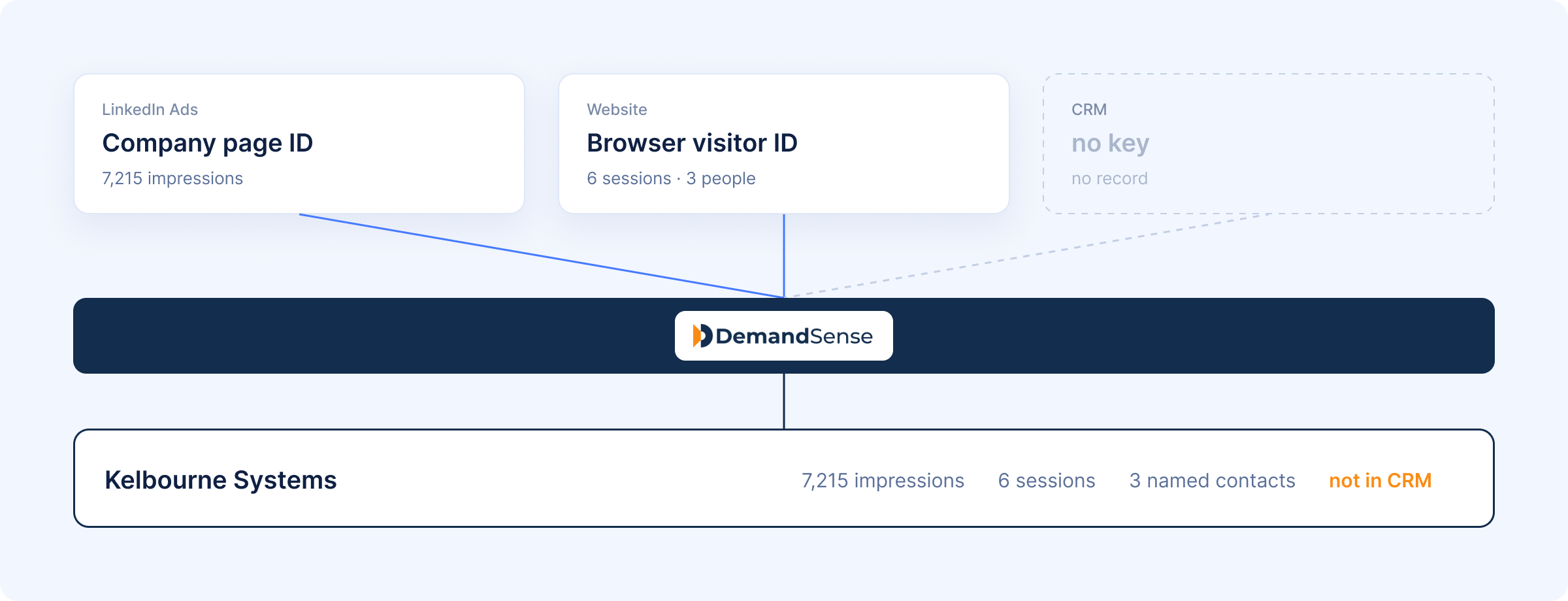
Figures from a DemandSense MCP run against our own account. Account names are placeholders.
With three separate connectors the model has to do that matching itself, across separate tool calls, with nothing shared between them. It will produce an answer and it will sound sure about it. The failure mode isn’t a refusal; it’s a plausible number you can’t check. Multi-touch attribution for B2B has the same problem one layer down.
LinkedIn Ads Data Claude Can Analyze
Campaign and Ad Performance
Spend, impressions, clicks, CTR, CPC, CPM, conversions and lead gen form completions, by campaign, campaign group and individual creative. Every LinkedIn Ads MCP server reaches this layer. Our breakdown of LinkedIn ads metrics covers where each of these numbers misleads.
Audience and Account Data
Which companies your budget reached, at impression level, and which came to the site afterwards — resolved to named people and companies with industry, employee size and region attached. That’s what turns “we reached 4,000 accounts” into “we reached these accounts, and these ones came looking.”
Visitor identification is probabilistic: match rates vary with your traffic and audience, and not every visitor resolves to a person.
Pipeline and Revenue Data
With a CRM connected, deal stage, open pipeline value and account status land in the same record as the ad exposure — which is what makes LinkedIn pipeline attribution a one-turn question instead of a one-afternoon one. The server also works without a CRM connected; you keep the ad and visitor layers and lose the deal context.
| Data stream | What it contributes | Required? |
|---|---|---|
| LinkedIn ad engagement | Impression-level exposure per company, plus campaign and creative metrics | Yes |
| Identified website visitors | Named people and companies, firmographics, sessions, the campaign they arrived via | Yes |
| CRM state | Deal stage, open pipeline, account ownership, whether the account exists at all | Optional |
LinkedIn Ads Analysis Workflows
Campaign Performance and Spend Analysis
The familiar one, and the one an ad-only connector handles fine. Use Claude to compare this month against last, find campaigns whose CPC drifted, or explain where spend concentrated across all LinkedIn campaigns in the account. What the join adds is the second half of the question — whether the campaigns that look efficient are reaching accounts you actually want.
Audience and ICP Analysis
Filter the accounts your budget reached down to the ones matching your ICP, then look at what they did. The reverse cut is often more useful: which accounts are we paying to reach that have never once visited the site. That’s a spend problem hiding inside a delivery report.
Creative Performance and Fatigue Analysis
Compare creatives on engagement rather than clicks, and look at frequency by account rather than by audience. In an ABM-shaped campaign against a finite list, what matters is how often one company has seen the same ad, not the blended average across a segment. Account-level LinkedIn ads benchmarks beat platform averages here, because a fatigue threshold that’s fine for a 500,000-person audience is not fine for 180 named accounts.
Account Engagement Analysis
Brief yourself on a single account before a call: what they’ve been shown, how often, who from that company has been on the site, and what stage the deal is at. Or run it weekly — which ICP-fit accounts are showing ad and site activity this week, ranked by engagement. This is where buyer intent tracking stops being a category and starts being a list of names.
Pipeline and Revenue Attribution
Ask which open opportunities saw your LinkedIn ads before they entered the pipeline, and how much open pipeline those accounts carry. The same joined record supports account-based marketing attribution without exporting anything, and it answers in accounts rather than last-click conversions.
Budget Waste and Allocation Analysis
Three questions cover most of it. Which accounts are we still paying to reach that already closed. Which have been heavily served and never engaged anywhere. Which CRM accounts went quiet but keep visiting the site after seeing our ads — ask Claude that last one and it usually turns up something a LinkedIn ads budget review would never catch, because the account looks dead in the CRM and alive everywhere else.
Claude Prompts for LinkedIn Ads Analysis
Every prompt below ran against a live account before it earned a place on the DemandSense MCP page. Treat them as a starting LinkedIn ads prompt library — edit the bracketed parts and analyze your LinkedIn Ads from there.
- “Show me ICP-fit companies that saw our ads, visited, and aren’t in our CRM yet.”
- “Which ICP-fit accounts are showing ad and site activity this week?”
- “At [account], which people visited after seeing our ads?”
- “Which accounts are we paying to reach that have never once visited the site?”
- “Which open opportunities saw our LinkedIn ads before they entered the pipeline?”
- “Which CRM accounts went quiet but keep visiting the site after seeing our ads?”
- “Brief me on [account] before my call.”
- “Draft this month’s client report: reach, identified visitors, top engaged accounts, versus last month.”
- “Who should sales call this week?”
For agencies and consultants, that report prompt is the one that changes the week. The joined report becomes the deliverable, and it’s a list nobody else on the call can produce.
Interpreting Claude’s LinkedIn Ads Recommendations
- Check what was connected. Without a CRM, Claude can’t tell you what’s already in the pipeline. DemandSense MCP is built to name the gap rather than fill it in, but noticing which question you actually asked is your job.
- Treat “no results” as information. An empty answer to “which accounts closed after ad exposure” is a real finding about your last quarter, not a broken query.
- Read exposure and intent as different things. An account exposed 5,000 times that clicked three times is an introduction, not a warm follow-up. The volume is a targeting artefact.
- Sanity-check anything you’d act on. The rows behind an answer exist in DemandSense. Open them before you move budget on the strength of a chat message.
Why Use DemandSense for LinkedIn Ads Analysis With Claude
Most tools here are solving a real but narrower problem: getting LinkedIn ads analytics into a chat window faster. That’s an improvement over exporting a CSV, and several connectors do it well.
DemandSense MCP is aimed at the other thing — the questions that were never answerable at all, because the answer lived across LinkedIn, your website and your CRM at once. Reading those three streams side by side before the model does is the whole product. The honest limits follow from it: read-only today, and probabilistic visitor identification.
If the three questions you ask your dashboard every Monday need two systems to answer, that’s what this is for — and it’s also why you’ve never had a straight answer to them. It comes with every DemandSense trial, at demandsense.com/mcp-intelligence-hub.
FAQ
Do You Need Coding Skills to Analyze LinkedIn Ads With Claude?
No. Once the MCP server is connected, you ask LinkedIn ads questions in plain English in a normal Claude conversation. There’s no query language, and no LinkedIn developer app to create. The underlying setup avoids a developer too — the DemandSense tracking code installs through Google Tag Manager.
Can Claude Make Changes Directly to LinkedIn Ads Campaigns?
No. DemandSense MCP is read-only today. Claude cannot edit campaigns, move budget, or launch or pause anything, and if you ask it to, it declines. Some MCP servers in the wider market do support write actions; this one deliberately doesn’t.
Can Claude Compare LinkedIn Ads With Other Advertising Channels?
Within DemandSense MCP, LinkedIn is the ad channel. What it adds isn’t another ad platform but the two systems that decide whether LinkedIn spend worked. For comparing LinkedIn and Google Ads spend, or Google and Meta Ads side by side, use a general reporting connector.
How Current Is the LinkedIn Ads Data Claude Analyzes?
Claude queries your live DemandSense workspace at the moment you ask, rather than a snapshot or training data. LinkedIn’s own reporting delay still applies to ad data exactly as it does in Campaign Manager, so treat same-day numbers as provisional.
How Secure Is LinkedIn Ads Data When Using Claude and MCP?
The MCP server gives Claude access to your LinkedIn Ads data through your own DemandSense workspace and nothing else. Read-only means no path from a conversation to a change in your live LinkedIn account. It’s also built not to surface another client’s data or a named competitor’s private numbers, and not to compile personal details like home addresses or private phone numbers.
Can Claude Analyze Multiple LinkedIn Ads Accounts at Once?
This matters most to agencies, and a multi-account workspace is something the team sets up with you rather than something you switch on. If you run several LinkedIn ad accounts across clients, get in touch once you’re in.
Can Claude Analyze LinkedIn Lead Gen Form Performance?
LinkedIn lead gen form completions sit in your campaign data alongside spend and clicks, so form performance by campaign and creative is a fair question. The more useful version is the joined one: of the accounts that filled in a form, which had been reading the site for weeks already — and of those that never filled one in, which were just as engaged.