
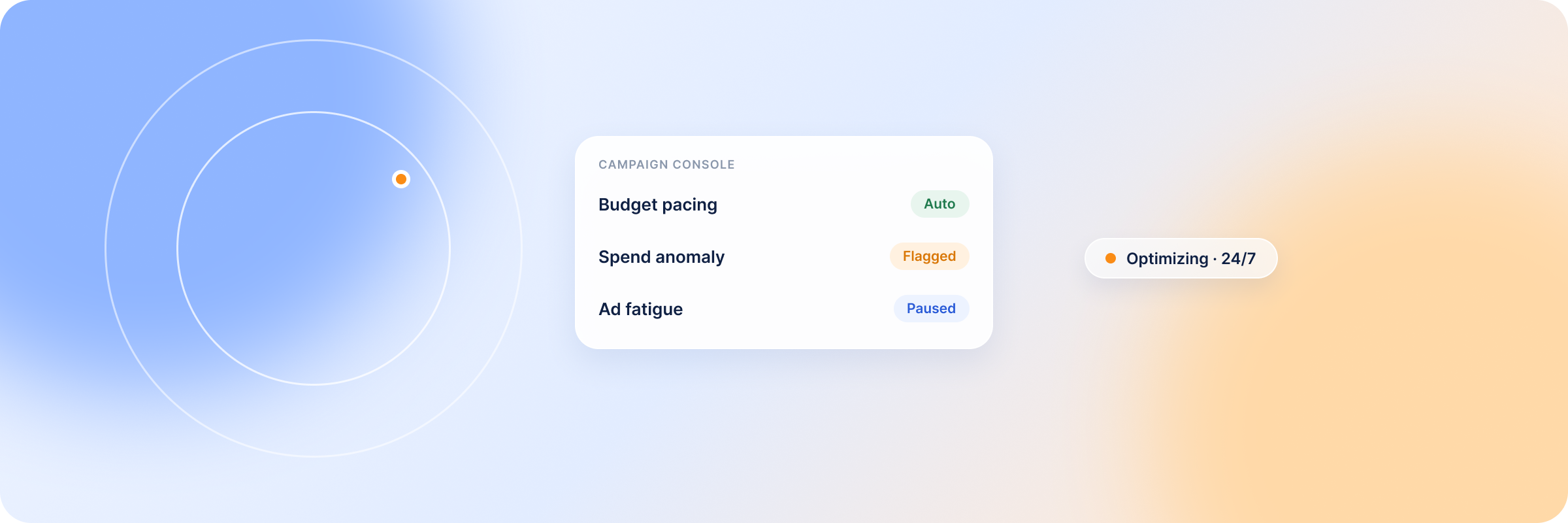
AI has taken the manual grind out of running LinkedIn ad campaigns: adjusting bids, building reports, and checking on delivery every day. Most B2B marketing teams now lean on AI assistants to brainstorm ideas, personalize messaging, and launch campaigns faster. But automation has a hard limit. Deciding which target accounts to pursue, what message will land, and whether a campaign is reaching the right buyers takes human judgment that AI doesn’t have. Hand those decisions to automation without oversight, and campaign performance drops.
This article breaks down which LinkedIn Ads tasks AI can genuinely take off your plate, which decisions must stay human, and how to build a workflow that uses both to protect pipeline and revenue.
Summary: Where AI Automation Helps in LinkedIn Ads Campaign Management
- Creative optimization — AI generates ad copy and visual variants at scale, which speeds up A/B testing. Always edit AI-generated copy so the message fits your audience and brand voice.
- Budget monitoring and spend alerts — AI watches spend continuously, flags anomalies the moment they happen, and can pause underperforming ads automatically before they waste more budget.
- Performance and predictive analysis — AI processes large volumes of campaign data, spots gaps, predicts outcomes, and builds reports in minutes instead of hours.
What Is AI-Powered Campaign Management for LinkedIn Ads?
AI-powered campaign management is the use of machine learning to monitor campaign performance and automate repetitive tasks while campaigns run. Instead of manually checking budget, fatigue, and delivery, marketers set automated rules and let AI analyze the data, then flag opportunities and anomalies as they surface.
Modern demand generation often runs across 15+ channels, and manual deployment can take weeks; by then competitors have moved. AI shortens that cycle and keeps every campaign visible in one place.
Its biggest advantage isn’t writing copy or generating images in seconds, though it does that. It’s that AI brings systems together: it combines data from LinkedIn Campaign Manager, your CRM, your website, and attribution platforms to answer questions that used to take hours or days of manual analysis. That’s what frees paid media teams from babysitting ad campaigns and gives them time to focus on pipeline and revenue.
Why LinkedIn Ads Need Smarter Campaign Management
LinkedIn is a high-intent, high-cost B2B channel. Without deliberate management, budget evaporates long before you hit your objectives. Manual management no longer keeps up, for two reasons:
- LinkedIn ads generate more data than a person can process. Ten years ago you checked campaigns once a week, and impressions and click-through rate (CTR) told the story. Today teams are under pressure to prove ROI while tracking budget pacing, ad variations, frequency, pipeline influence, website behavior, message personalization, and ROAS at once. No one manages all of that well without an AI assistant.
- The B2B buyer’s journey is complex. Buyers touch your brand across many channels over a long sales cycle before they decide, so it’s hard to know where and when influence happens. Without smarter tooling, you end up optimizing for surface-level clicks instead of actual pipeline.
What LinkedIn Ads Tasks Can Be Automated with AI?
As automation absorbs repetitive work, the marketer’s role shifts toward review, strategy, and interpretation.
Let’s look at the most automatable of these in detail.
| Campaign Task | What AI Does Well | Where It Fails | Human Involvement |
|---|---|---|---|
| Budget monitoring | Detects overspending, underdelivery, and pacing issues; can shift budget toward high-performing campaigns. | Ranks campaigns on vanity metrics like impressions and CTR, and may stop the wrong campaign to control spend. | Review the recommendations; decide which campaigns deserve budget based on pipeline influence and objectives. |
| Bid management | Monitors and adjusts bids around the clock on historical and live auction data. | With a niche B2B audience it may lack the data to bid well and overspend. | Bid manually for small audiences, such as ABM campaigns. |
| Ad scheduling | Learns when audiences are active and delivers only during high-intent hours. | Ignores external factors like seasons, industry events, or fiscal calendars. | Align scheduling with business events and buying cycles. |
| Frequency control | Detects and stops ad fatigue before engagement drops. | Can’t tell whether frequency is spread across the buying committee, so it may cut delivery when only one member has seen the ad. | Ensure ads reach every buying-committee member. |
| Performance alerts | Flags unusual changes in real time; alerts sales when high-intent buyers hit your site. | Doesn’t separate critical shifts from short-term noise. | Investigate the root cause before adjusting. |
| Audience analysis | Identifies engaging accounts, segments users, and pinpoints high-intent buyers. | May read accidental clicks or casual reading as strong intent. | Confirm accounts match your ICP and check for stronger signals before scoring leads. |
| Reporting & insights | Turns data into readable dashboards and summarizes performance. | Shows what happened, not why. | Interpret the reports against customer, sales, and market context. |
| Competitor monitoring | Tracks competitor ads and creative to surface ideas worth referencing. | Can’t read the strategy behind the messaging; copying trends blindly can backfire. | Use AI to find gaps; let the team judge messaging and strategy. |
Budget Monitoring and Spend Alerts
Budget monitoring is one of the safest tasks to automate because it runs on clear, automated rules. Set the thresholds, and AI watches your campaigns around the clock, flagging spend surges as they happen rather than in next week’s Campaign Manager report. What you shouldn’t automate is the allocation decision.
Say Campaign A generates more leads than Campaign B. AI will likely recommend shifting budget to A without weighing lead quality, when B might be the stronger campaign because, despite the higher cost, it brings in high-value clients. Let AI do the grunt work, and make the budget call yourself.
Ad Scheduling and Delivery Optimization
Manually pausing and unpausing ads sounds simple, but doing it across every campaign every day is exhausting, and it still won’t protect spend from time-zone gaps or late-night doomscrollers.
AI removes the guesswork through real-time optimization of delivery: it reads historical patterns to learn when an audience is engaged and when it’s dormant, then serves ads only during high-intent windows. Aligning delivery to those windows tends to lift CTR and conversion rates and lower cost per acquisition (CPA). In one controlled test, an API platform cut its CPC by 57% using DemandSense’s ad scheduling, and the only thing it changed was the timing of the ads.
Frequency Capping and Audience Fatigue Detection
Instead of a blanket three impressions per week for everyone, AI learns behavior and personalizes frequency: high-intent buyers can see ads more often, while cold audiences that zone out fast see them less.
It also catches fatigue early, often within 24–48 hours, and pauses delivery in real time. Newer tools analyze signals like color saturation and text density against historical fatigue data to predict how quickly a creative will wear out before it even launches, so teams can schedule a refresh ahead of time instead of discovering the waste at week’s end.
Performance Analysis and Anomaly Detection
To hit their goals, marketers have to keep checking campaign health, which usually means combing through data to answer time-sensitive questions like “why did CPL suddenly jump?” With an AI co-pilot, you ask in plain English and get an answer in seconds. Connected to your CRM and LinkedIn Ads, it spots patterns, builds predictive insights about where performance is heading, and surfaces anomalies like click fraud that are easy to miss by hand.
Reporting and Insight Generation
AI-powered reporting lets you trace every touchpoint in the buyer’s journey and prove LinkedIn Ads ROI, with multi-touch attribution crediting each step from first impression to closed-won deals. It also reads the data for you and surfaces the campaign insights that matter: which campaign influenced pipeline most, which wasted spend, which ads performed best, and the patterns across channels, so you’re not stitching spreadsheets together to find connections. You can then forecast ROI for future campaigns and target the gaps.
Common Risks of AI-Powered LinkedIn Ads Management
AI makes campaigns easier to run, but it brings its own risks:
- Over-reliance on AI-generated copy. Campaigns need a lot of content, and it’s tempting to ship whatever “Draft with AI” produces, especially after hours of staring at a blank screen. Unreviewed, that copy tends to read as generic, off-brand, or tone-deaf. Draft with AI, but review before launch.
- Inaccurate output. AI predicts from existing data, so messy or error-filled CRM data yields confident but wrong AI recommendations you might not catch. Clean your data and fact-check outputs before acting on them.
- Integration issues. Many AI tools clash with legacy systems, which weakens CRM and data integrations and disrupts campaign workflows; some carry a steep learning curve. Choose tools that fit your stack and train the team properly.
- Data privacy risks. Automation depends on monitoring audiences and collecting their data, sometimes sensitive information, which can trigger obligations under GDPR. Vet vendors for compliance.
- Optimization bias. AI leans on measurable, surface-level metrics like CTR, CPM, and CPC, so without guardrails it may pause a genuinely good campaign whose results aren’t visible yet.
What Should Stay Human in LinkedIn Ads Campaign Management?
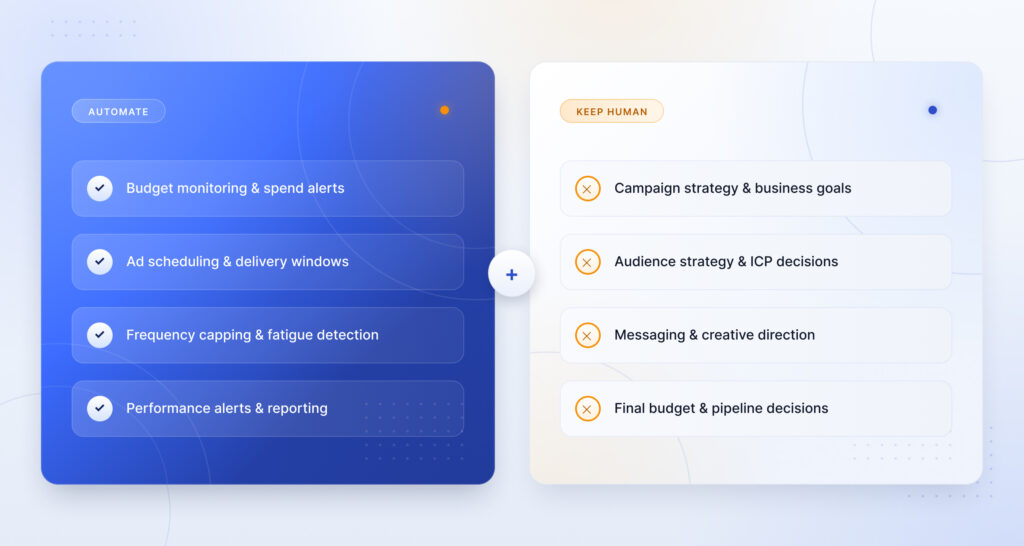
AI-powered management still needs human judgment. This strategic decision-making shouldn’t be handed over:
Campaign Strategy and Business Goals
A real go-to-market strategy takes deep understanding of who you’re targeting, their beliefs, the language they use for their pain, and their likely objections. That understanding comes from daily interactions, won and lost deals, and client feedback, not from a model. Leave AI to set the strategy and you get a generic plan. Keep strategy and goal-setting with your team.
Audience Strategy and ICP Decisions
AI can identify target accounts and site visitors, but it can’t tell you whether they’re the right audience for your business. You know which customers pay well, which close fast, and which are distractions. The audience logic behind your ICP should come from that knowledge, especially in account-based marketing (ABM), where a tight list matters more than a big one. Build the list yourself, then use AI to expand audience targeting with lookalikes.
Messaging, Positioning, and Creative Direction
Your brand voice, tone, and emotional appeal come from people who talk to customers every day and know their frustrations. Use AI as a starting point, then rework the copy so the messaging, positioning, and creative direction stay on-brand and accurate.
Final Budget and Pipeline Decisions
AI handles short-term calls like budget pacing and bids well, but strategic, long-horizon budgeting needs human judgment. As in the example above, AI tends to favor the cheaper campaign even when it brings weaker leads, because it can’t see the long-term pipeline effect. Let AI monitor; make the allocation decisions yourself.
How to Build an AI-Powered LinkedIn Ads Workflow
Here’s a practical way to combine AI automation with human decision-making:
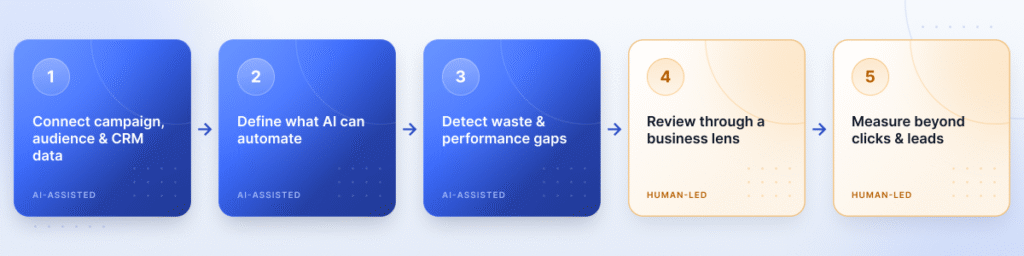
- Connect campaign, audience, and CRM data. AI needs data to work. Connect it to your CRM and website so it can analyze the full picture and generate the insights you need.
- Define what AI can automate. Set the rules. Keep strategic calls like budget allocation with people, and let AI handle repetitive work like pacing. Without limits, AI optimizes for the wrong outcomes.
- Use AI to detect waste and performance gaps. Once success is defined, AI analyzes across platforms to find budget-wasting campaigns and weak ads, and alerts you in real time.
- Review recommendations through a business lens. AI recommendations follow trends and historical performance without the experience to judge context. Weigh them against your business before acting.
- Measure impact beyond clicks and leads. Track customer lifetime value (CLV) and pipeline influence to see which campaigns drove revenue and which drew the wrong audience. You need this to prove ROAS and plan ahead.
AI Campaign Management Tools for LinkedIn Ads
LinkedIn’s Campaign Manager runs ads natively and has some AI built in, but it isn’t a reliable campaign management tool on its own. AI campaign management tools also solve different tasks, so when you evaluate external platforms, look for the delivery and attribution capabilities Campaign Manager lacks.
| Tool | Best For | LinkedIn Ads Delivery Control | Revenue Attribution |
|---|---|---|---|
| DemandSense | LinkedIn-primary B2B teams that need delivery control and revenue proof in one platform | Yes — scheduling, frequency & budget caps, audience tuning | Yes — CRM-connected |
| HubSpot | Consistent multi-channel messaging and content generation | No | Partial — CRM-side |
| monday.com | Campaign planning, collaboration, workflow | No | Partial |
| Optmyzr AI | Google Ads PPC automation | No — Google-focused | No |
DemandSense
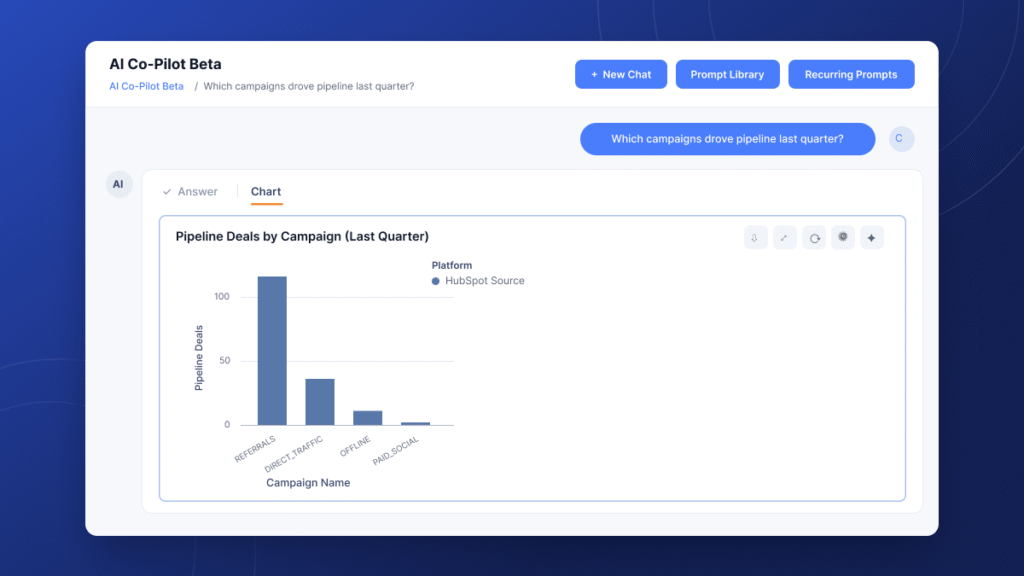
DemandSense is a LinkedIn Ads intelligence platform for B2B teams that sits as an optimization and attribution layer on top of LinkedIn Campaign Manager. It connects LinkedIn, Google, and Meta ad data to your CRM, so you can manage campaigns and see how they influence pipeline. Its AI Co-Pilot answers cross-campaign questions in plain English without building a report.
It stands out because it combines, in one platform:
- Ad scheduling — you set the hours; ads pause during low-intent windows and resume when prospects are active, with no manual checking.
- Frequency and budget caps — keep audiences from seeing the same ads too often, and get alerted when a campaign overspends or hits its cap.
- Audience tuning — include or exclude accounts in running campaigns and rate accounts against your ICP, so spend follows the right buyers.
- Competitor monitoring — the Ad Strategy Scanner shows you the LinkedIn ads your competitors are running and what changed this week, so you can see where your creative lags.
- Sensor Pixel — identifies a portion of the companies and individuals engaging with your campaigns, which matters most for ABM, where several stakeholders share the decision.
DemandSense is the one option here that pairs all of this with revenue attribution, which makes it the strongest overall fit for LinkedIn-primary teams.
HubSpot
HubSpot’s AI Campaign Assistant creates multi-channel assets fast: give it your brand voice, objectives, and audience, and it drafts emails, landing page copy, and ad copy, and summarizes CRM data. If consistent messaging across channels is your priority, it’s a strong pick, and the Campaign Assistant is free. Its limit: it doesn’t handle day-to-day LinkedIn delivery or optimization, so you’d pair it with a separate tool for that.
monday.com
monday.com AI focuses on planning, collaboration, and workflow, with agents that live in your workspace and draft emails or track campaign progress without leaving it. It organizes campaigns well and helps with attribution, but it doesn’t handle LinkedIn Ads optimization.
Optmyzr AI
Optmyzr AI automates PPC optimization for Google Ads through automated rules, bid management, reporting, and alerts. It’s a good fit for teams heavy on Google Ads that want assistance without full autonomy, but it doesn’t manage LinkedIn Ads.
How DemandSense Supports AI-Powered Campaign Management for LinkedIn Ads
DemandSense consolidates what usually takes three or four tools into one platform, from scheduling to budget control to attribution.
Use AI Co-Pilot to Ask Better Campaign Questions
Instead of digging through spreadsheets or waiting on a weekly report, ask the AI Co-Pilot in plain English and get a full answer in seconds, complete with charts and tables you can pin to a dashboard. Smart suggestions and prompt templates help when you’re not sure how to phrase a question, and you can follow up until you find what you need.
Automate Delivery Controls Without Losing Visibility
Set the rules once — when ads run, daily budget, frequency caps — and DemandSense manages delivery while keeping you informed: hourly budget reporting and alerts when accounts hit caps or high-intent buyers land on your site. That lets you optimize campaigns while they’re still live.
Connect LinkedIn Ads Management to Revenue Impact
DemandSense integrates with CRMs like HubSpot and Salesforce, so you can tie company-level engagement and ad performance to pipeline and revenue, and prove ROI from one dashboard.
Ready to see your LinkedIn campaigns connected to pipeline? Start your 30-day free trial of DemandSense.
FAQ
What is AI-powered campaign management?
It’s using machine learning to automate repetitive campaign tasks — budget control, bid adjustments, ad scheduling, reporting, and day-to-day monitoring — so teams get time back for higher-value work like strategy and improvement.
Can AI manage LinkedIn Ads automatically?
AI can automate routine tasks like budget pacing and anomaly detection when it has accurate data and clear rules, but it shouldn’t run campaigns without oversight. Connect it to your CRM so you can monitor everything and review recommendations before deciding.
What should not be automated in LinkedIn Ads?
Strategic, high-stakes decisions: ICP selection, brand positioning, creative direction, campaign objectives, and budget allocation. AI is strong at finding patterns in large data sets but lacks the experience and judgment those calls require.
How can AI improve LinkedIn Ads performance?
Tools built for LinkedIn Ads optimization, like DemandSense, add the controls Campaign Manager lacks — ad scheduling, budget controls, frequency capping, and audience tuning — so marketers manage how and when campaigns run, cut wasted spend, and reach the right audience.
Can AI help reduce wasted LinkedIn Ads spend?
Yes. AI detects overspending and pacing issues in real time, so instead of finding wasted budget at week’s end, you’re alerted as it happens. With DemandSense, you get hourly spend reporting, and the system pauses ads automatically when spend hits your threshold — no Friday afternoon surprises.
Is AI better than manual LinkedIn Ads management?
Neither wins alone. With campaigns running across channels at once, no one tracks everything manually and still has time to strategize, and AI alone lacks judgment. The B2B teams that win combine both.