
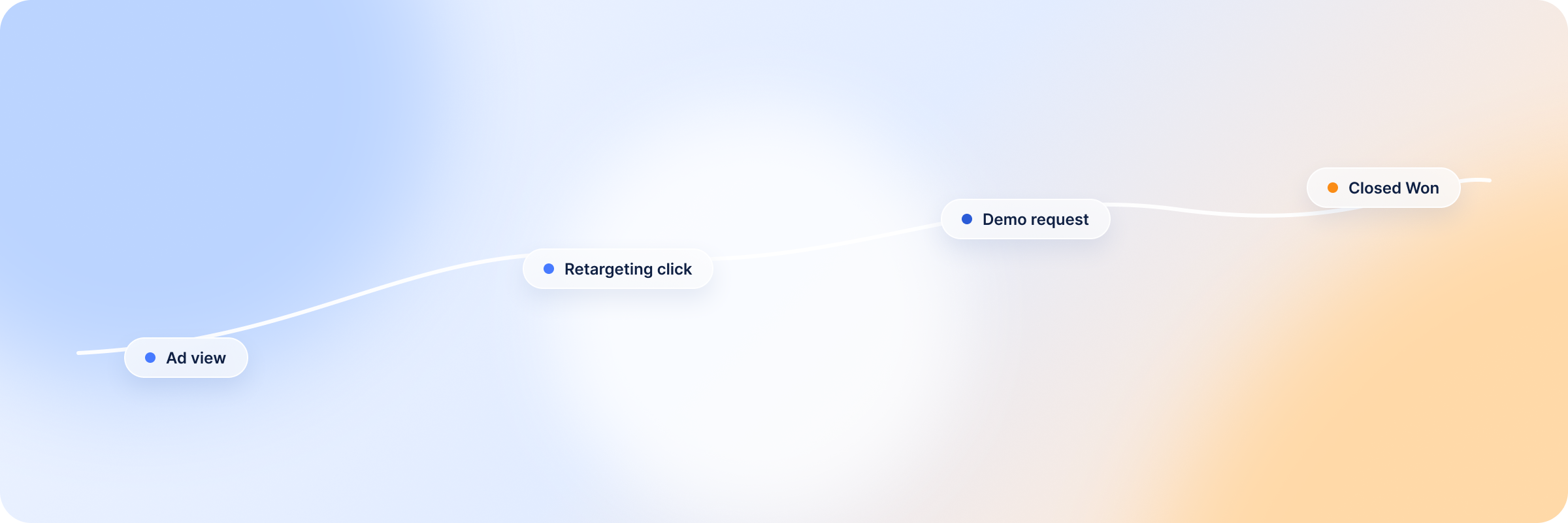
Yes, and there are four ways to do it. Each one moves different data in a different direction, and B2B teams usually need more than one before the numbers in Campaign Manager and the numbers in the CRM start describing the same campaigns.
Summary: Connecting LinkedIn Ads to Your CRM at a Glance
- Lead Gen Form integrations send new leads from LinkedIn into your CRM or marketing automation platform.
- CRM Sync sends CRM outcomes, like qualified leads, pipeline and closed revenue, into LinkedIn.
- The Conversions API sends conversion events from your server or CRM to LinkedIn, including the offline ones a browser never sees.
- Third-party platforms either shuttle records between the two systems or match LinkedIn ad engagement to the accounts and deals already in your CRM.
Most of the confusion about LinkedIn CRM integration comes from treating these as alternatives, when each one covers ground the others leave open.
What Does a LinkedIn Ads CRM Integration Connect?
A LinkedIn Ads CRM integration moves data in three directions:
- Into the CRM: Lead Gen Form leads arrive as new records once someone submits a form.
- Into LinkedIn: conversions, pipeline and revenue outcomes come back from the CRM, and contact or company lists go in for targeting.
- Matched across both: LinkedIn ad engagement is lined up against the accounts and deals in the CRM, which needs something that can read both systems.
There’s also a question of grain. The routes that move data between the two systems mostly move records: one lead, one contact, one conversion event. B2B deals are bought by accounts, though, and most of a buying committee never fills in a form.
LinkedIn does report at the company level as well. Companies Hub in Campaign Manager shows engagement by company, organic included, and once CRM Sync is connected it adds revenue won. That view is built from LinkedIn’s own touchpoints and the three CRMs CRM Sync supports. Your website visits, and the CRM history between first touch and close, are read somewhere else.
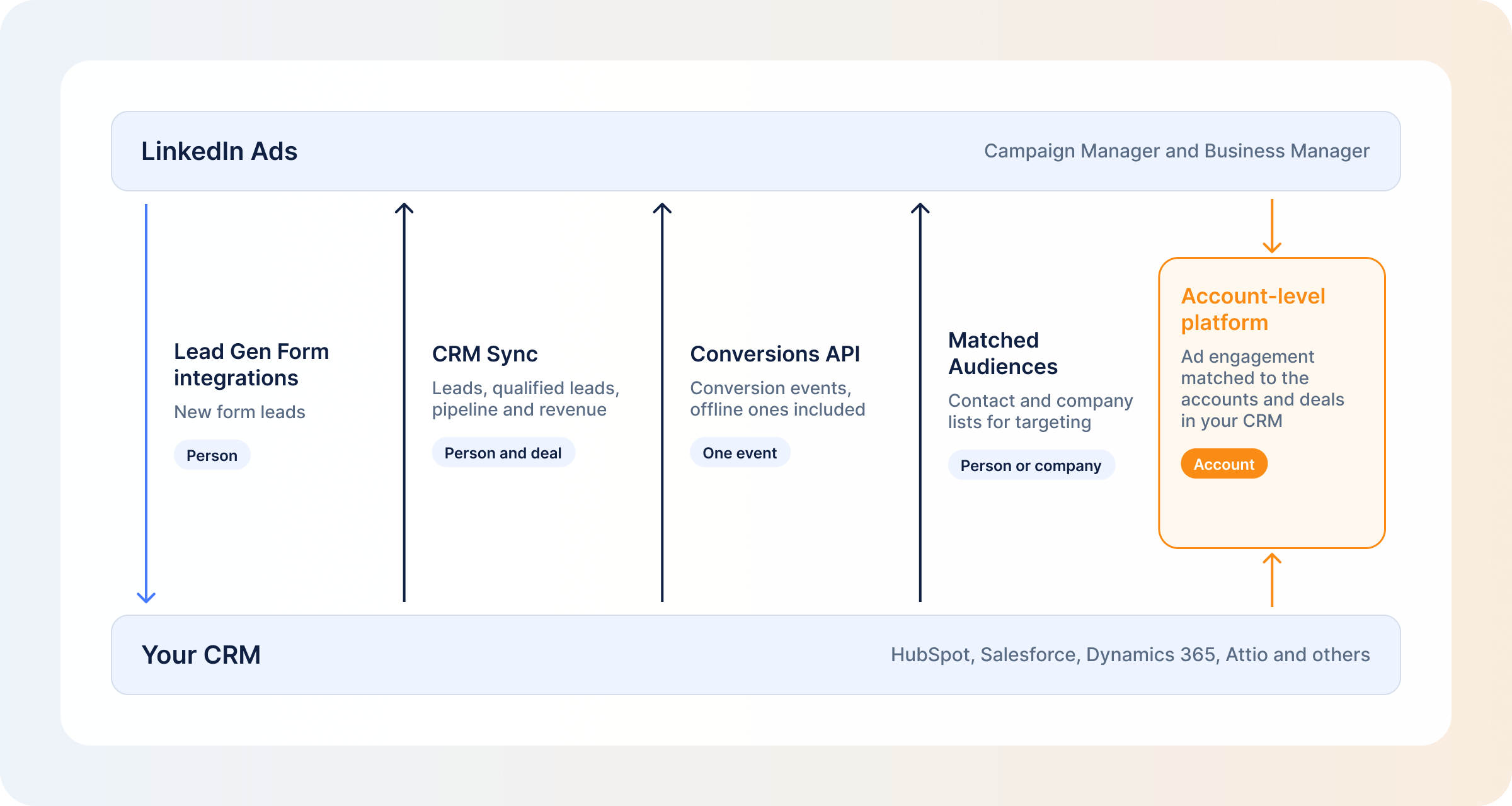
| Data | Direction | Grain | Route |
|---|---|---|---|
| Lead Gen Form leads | Into the CRM | Person | Lead Gen Form integrations |
| Leads, qualified leads, pipeline and revenue | Into LinkedIn | Person and deal; reported by company in Companies Hub | CRM Sync |
| Online and offline conversions | Into LinkedIn | Person, one event at a time | Conversions API |
| Contact or company lists | Into LinkedIn, for targeting | Person or company | Matched Audiences |
| Ad engagement matched to accounts and deals | Matched across both | Account | Account-level platforms |
Benefits of Integrating LinkedIn Ads with Your CRM
- No more CSV exports: leads land in the CRM without anyone downloading and re-importing a file every Monday.
- Faster follow-up: a synced lead reaches a rep while the person still remembers filling in the form.
- Better optimization signals: when qualified leads and closed deals go back to LinkedIn, its delivery stops chasing whoever fills in forms most readily.
- Targeting from real accounts: CRM lists put ads in front of companies you already know are a fit, on top of LinkedIn’s own targeting.
- Revenue reporting by campaign: a closed deal can be traced to the campaigns that reached the account, so spend and revenue stop living in two unrelated reports.
- Less spend on existing customers: excluding accounts once their deals close keeps acquisition budget off companies that already bought.
Ways to Connect LinkedIn Ads With Your CRM
The four routes below are layers. Most B2B sales and marketing teams run two or three of them, because each answers a different question.
Lead Gen Form Integrations
Lead Gen Form leads reach a CRM or marketing automation platform in one of three ways: a native integration through a LinkedIn Marketing Partner, a connector such as Zapier or LeadsBridge, or a CSV download from Campaign Manager. If you rely on the download, note that LinkedIn only stores member profile data from leads for one year, so old leads can’t be pulled later.
Two practical snags come up often. Some partners don’t carry hidden fields or profile-link fields, and any edit to the form has to be mirrored on the CRM side before test leads sync cleanly. The bigger limit: this route only sees people who submitted a form. That works for LinkedIn Ads lead generation and says nothing about the rest of the account.
LinkedIn CRM Sync
CRM Sync is set up in Business Manager, not Campaign Manager, and only works on ad accounts your business owns, not ones shared with you. It connects natively to three CRMs: Salesforce, Microsoft Dynamics 365 and HubSpot. You can also request access to a CRM already connected to Sales Navigator.
Once connected, CRM Sync gives you the Revenue Attribution Report in Business Manager, pipeline and revenue metrics in Campaign Manager, and auto-created conversions based on Leads, Qualified Leads or Contacts, which you approve per ad set. (LinkedIn renamed its levels: campaign groups are now campaigns, and campaigns are now ad sets.)
The limits are about scope. If your CRM isn’t one of those three, CRM Sync isn’t available, and the revenue reporting follows LinkedIn’s own attribution rules. How those auto-created conversions behave is covered in LinkedIn Ads conversion tracking.
LinkedIn Conversions API
The Conversions API is a server-to-server route for events the browser never sees, like a qualified opportunity or a closed deal that happens weeks after the click. You connect it through a partner (LinkedIn lists HubSpot, Zapier, Google Tag Manager, Adobe, Tealium and Dreamdata, among others) or build it directly with an access token generated in Campaign Manager.
If the Insight Tag and the Conversions API both report the same conversion with the same event ID, LinkedIn counts it once, so the two can run together. For a CRM, this is the route that turns a stage change into something LinkedIn can optimize toward. Sending closed-won deals this way is its own setup job, covered in detail for the LinkedIn Conversions API.
Third-Party CRM Connectors and Account-Level Platforms
This category covers two different kinds of tool. Connectors such as Zapier and LeadsBridge move leads, lists and events between LinkedIn and a CRM without a developer, record by record.
Account-level platforms match LinkedIn ad engagement to the accounts and deals already in your CRM and then do something with that match. DemandSense is one of them. It’s built for marketers who run LinkedIn Ads in small B2B teams, and it puts attribution, optimization and website visitor profiling in one place.
By connecting natively to HubSpot, Salesforce and Attio, DemandSense reads paid and organic LinkedIn engagement per account alongside site visits and the deals in your CRM. The table further down shows how it compares with the other platforms in this space.
Which CRMs Can You Connect to LinkedIn Ads?
| CRM | LinkedIn Connection Options | Typical Use Case |
|---|---|---|
| HubSpot | CRM Sync; HubSpot’s LinkedIn Ads app syncs Lead Gen Form leads, builds audiences from HubSpot segments and sends lifecycle-stage changes through the Conversions API for contacts who clicked a LinkedIn ad; Sales Navigator sync | Teams that want marketing automation, CRM and the LinkedIn connection in one system |
| Salesforce (Sales Cloud) | CRM Sync; native LinkedIn Lead Gen Ads-to-lead conversion with field mapping (leads submitted before connecting don’t sync); Marketing Cloud Advertising for audiences; Conversions API through a partner or a custom build; Sales Navigator sync | Teams whose pipeline and revenue reporting already lives in Salesforce |
| Microsoft Dynamics 365 | CRM Sync; Sales Navigator sync; Lead Gen Form sync and the Conversions API through a partner, since Microsoft removed its native LinkedIn Lead Gen integration | Teams on Dynamics who mainly want CRM Sync’s revenue reporting |
| Zoho CRM | Not supported by CRM Sync; Zoho LeadChain syncs Lead Gen Form leads into Leads or Contacts and can send Zoho CRM data to the Conversions API | Smaller teams that need lead sync and basic conversion reporting |
Any other CRM can still connect through the Conversions API via a partner, a connector like Zapier, or a CSV export and import. If you run Attio, there’s a separate walkthrough on connecting LinkedIn Ads to Attio.
Top Platforms for LinkedIn Ads with CRM Integration
These platforms differ mostly in whether they work with leads or accounts, and whether anything goes back to LinkedIn.
| Platform | CRM & Data Connections | LinkedIn Ads Capabilities | Best For |
|---|---|---|---|
| DemandSense | HubSpot, Salesforce and Attio natively; webhooks for everything else | Paid and organic LinkedIn engagement per account, read alongside site visits and CRM deals; closed-won deals and qualified opportunities sent back to Campaign Manager through the Conversions API | B2B teams on LinkedIn Ads who want to see which accounts each campaign reaches and which deals it influenced, and send those deals back to LinkedIn |
| Factors.ai | HubSpot, Salesforce, Zoho, LeadSquared | Account identification; LinkedIn AdPilot syncs intent-based audiences, caps impressions per account, measures view-through attribution and sends conversions back to LinkedIn | Teams that want an ABM platform built around intent data |
| HockeyStack | HubSpot, Salesforce, Dynamics | Pulls LinkedIn impression and engagement data by company daily; sends pipeline conversion events to LinkedIn | Revenue teams building funnel reporting across many channels |
| ZenABM | HubSpot, Salesforce, Attio, webhooks, API | Account-level LinkedIn ad engagement, with ABM stages written to the CRM company record in a once-daily sync | ABM teams that want engagement stages written into CRM records |
| LeadsBridge | CRMs and marketing automation platforms through its connector catalogue | Syncs Lead Gen Form and event registration leads, Matched Audiences and Conversions API events | Teams that mainly need lead and audience syncing across many tools |
| Zapier | Any CRM with a Zapier app | LinkedIn Ads app (premium): new Lead Gen Form response triggers for sponsored and organic forms; actions to add contacts or companies to an audience, create an audience, remove an email or create a report | Teams that want to build their own lead-sync automations without a developer |
How to Choose the Right LinkedIn Ads CRM Integration Platform
The questions worth asking of any tool here:
- CRM compatibility: does it connect natively to the CRM you use?
- Which LinkedIn data it sees: form leads only, or ad engagement too, and organic as well as paid?
- Lead sync: how does a new lead get into the CRM, and how fast?
- Account-level tracking: does it follow individual leads, or every company your ads reach?
- What goes back to LinkedIn: do qualified pipeline and closed-won deals ever reach Campaign Manager?
- Native integration or connector: is it built directly, or does a third tool sit in the middle?
- Reporting: what can you see once data is flowing, and who decides what counts as influence?
- What it automates: which jobs stop needing a person once it’s set up?
Most teams end up with one route for leads, usually a Lead Gen Form integration, and a separate one for accounts, because none of the tools above handles both equally well.
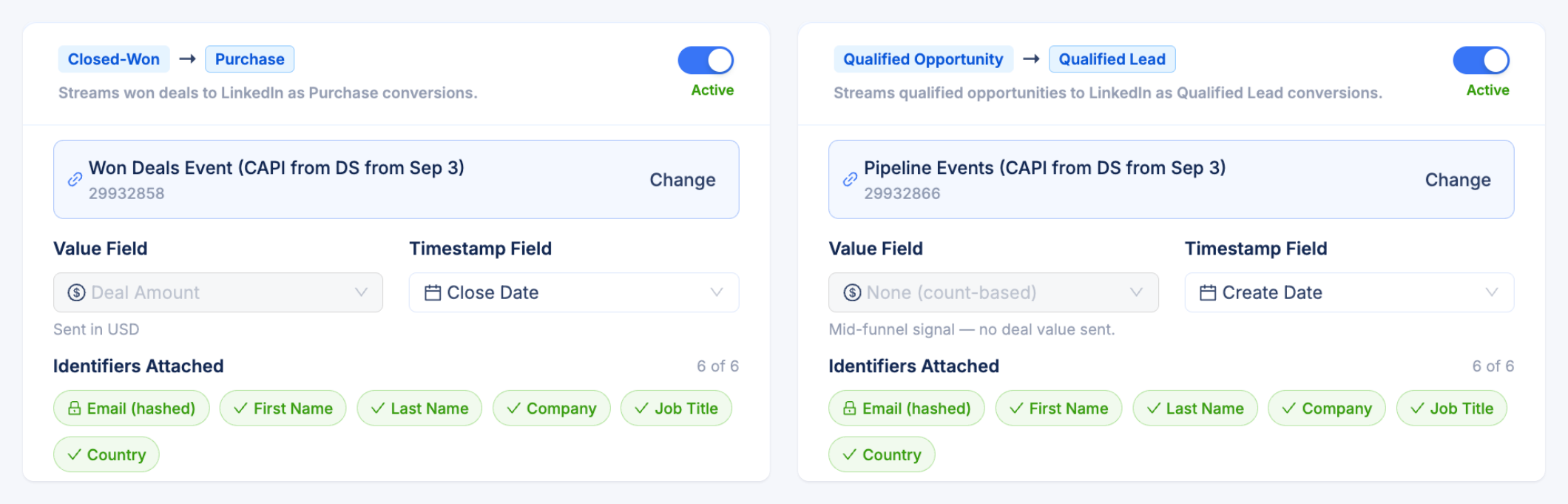
DemandSense covers the account side of that list. DemandSense matches paid and organic LinkedIn engagement to the account, shows it alongside site visits and the deal in HubSpot, Salesforce or Attio, and lets you decide what “influenced” means: three presets (Awareness, Engagement, Intent) or thresholds you set yourself, over a 3, 6 or 12-month lookback. DemandSense then sends the outcome back once a day through LinkedIn’s Conversions API, with closed-won deals arriving as Purchase conversions carrying the deal amount and qualified opportunities arriving as Qualified Lead conversions. DemandSense also pushes accounts with open deals into LinkedIn audiences and stops serving acquisition ads to accounts that have already closed.
You can try it on your own LinkedIn account and CRM free for 30 days, with no card required, at demandsense.com.
How to Set Up a LinkedIn Ads CRM Connection
Click-paths differ by CRM, so this is the order of decisions for any route.
- Decide what has to flow, and which way. Leads in, outcomes back, or accounts matched across both.
- Check your CRM against the routes. The CRM table above shows what each one supports natively and where you’ll need a partner.
- For CRM Sync, set up Business Manager first. Create it and claim the ad accounts your business owns. Nothing else in that route works until this is done.
- Connect, then map the fields. Check that hidden fields and custom questions come through. This is where data quietly goes missing.
- Create or approve the conversions. LinkedIn can’t optimize toward an outcome that isn’t set up as a conversion.
- Send a test lead through the whole path to catch a broken mapping before real leads hit it.
- Check the data after the first load. CRM Sync can take up to 72 hours to reach the Revenue Attribution Report, then another 24 to 48 hours to show up in Campaign Manager.
The failure that’s easiest to miss comes later. An integration works for a few weeks, then someone renames a form field or a CRM property, and leads or conversions stop arriving without any error. A short weekly check of conversion counts in Campaign Manager against the CRM catches it, and the right rule settings for LinkedIn conversion tracking make the drop easier to spot. If you follow HubSpot’s documentation while you set this up, it still uses LinkedIn’s old names for campaigns and ad sets.
What Can You Measure After Connecting LinkedIn Ads and CRM Data?
With LinkedIn’s native routes connected, you can report on:
- Leads and cost per lead by ad set
- Qualified leads
- Pipeline and revenue in the Revenue Attribution Report
- Company engagement and revenue won in Companies Hub
When LinkedIn engagement is read alongside site visits and the full CRM history, you can also see:
- Influenced accounts and influenced pipeline, by your own definition of influence
- Closed-won revenue and Won ROAS by campaign
- Account journeys from the first ad impression through site visits to the deal
- Engaged accounts that have no CRM record yet
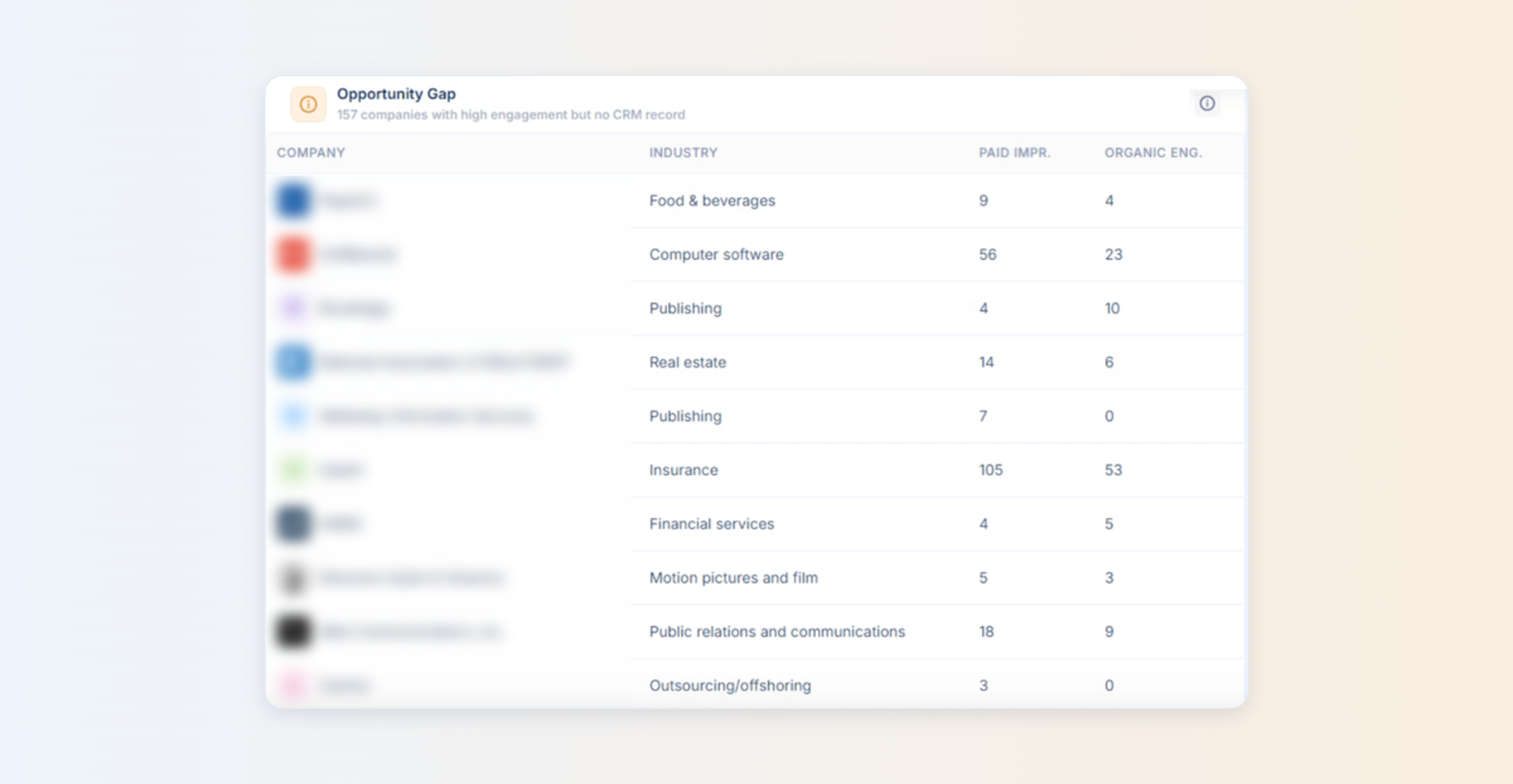
The second list is usually where budget decisions change, because it counts the buying committee and not just the one person who converted. In DemandSense, the last item has its own panel, Opportunity Gap, listing companies with strong paid and organic engagement and no CRM record. How influence gets counted in the first place is its own topic, covered under LinkedIn pipeline attribution.
FAQ
No. Sales Navigator sync, on Advanced Plus with Salesforce, Dynamics 365 or HubSpot, moves saved leads, accounts and rep activity for the sales team. Ads integrations move leads, conversions and revenue for marketing. They meet in one place: a CRM already connected to Sales Navigator can be requested for use in Business Manager.
Yes. CRM Sync can be disconnected at any time in Business Manager’s CRM Sync settings, and LinkedIn purges the CRM data within 30 days of disconnection. If you’re switching CRMs, review the conversions created from the old connection, since LinkedIn doesn’t document what happens to them.
It depends on the route. CRM Sync takes up to 72 hours for the first load into the Revenue Attribution Report and another 24 to 48 hours to reach Campaign Manager. LinkedIn doesn’t publish the ongoing refresh rate. Lead Gen Form sync depends on the partner, and HubSpot says new leads can take up to about two hours. DemandSense sends CRM outcomes to the Conversions API once a day.
According to LinkedIn’s CRM Sync documentation, identifiers such as email and name are pseudonymized with access controls, pipeline signals like revenue get differential privacy and encryption, individual-level CRM data isn’t shared with other advertisers, and data is purged within 30 days of disconnection. The advertiser is still responsible for having permission to share customer data in the first place.
Yes, and for B2B it’s often the more useful connection. CRM Sync, the Conversions API and account-level platforms all work without anyone filling in a form. The average LinkedIn CTR is 0.52% (0.875% across DemandSense clients), according to the 2025 DemandSense B2B Benchmark Report, so almost everyone your ads reach never clicks. A forms-only integration sees a small slice of that effect, which is why LinkedIn view-through attribution matters.