

The pipeline review has a slide for every channel and a different attribution story on each one. Paid search claims the deals, LinkedIn claims the same deals, and the CRM files most of them under “direct”. Dreamdata was built to settle that. It collects every touch from ad platforms, the website and the CRM, models them as account-based journeys, and divides revenue between channels under whichever multi-touch model you choose.
That is a model of the whole go-to-market, and it earns its keep in the budget review. DemandSense works on the same question from the other end. Dreamdata divides revenue once the deals are in; DemandSense measures LinkedIn’s influence on pipeline while the campaigns are still running, so you can change them before those deals arrive. The two tools read a lot of the same LinkedIn data. They do different things once they have it.
The Short Answer
Dreamdata is a B2B revenue attribution and activation platform. It builds account-based customer journeys across LinkedIn, Google, Meta, Microsoft, review sites, the website and the CRM, and attributes revenue under first-touch, last-touch, linear, U-shaped, W-shaped or data-driven models. Its activation side syncs audiences and conversions to LinkedIn, Google, Meta and Microsoft, and its Signals feature points sales at engaged accounts. A free Starter plan holds two months of history; the Advanced plan, which carries attribution and offers activation as an add-on, is priced on request.
DemandSense is LinkedIn revenue attribution that doesn’t wait for the deal to close. It covers attribution, optimisation and website visitor profiling in one product, with an MCP server on top. It measures LinkedIn’s influence on CRM pipeline under thresholds you set, identifies the companies on your site and the people behind US visits, and acts on that read with delivery settings, spend protection and the Conversions API. All of it is in every plan, starting at $89 a month.
Choose Dreamdata if revenue has to be attributed across every channel for RevOps or finance, there are enough closed deals for its models to learn from, and a custom-priced plan fits the budget. Choose DemandSense if LinkedIn is your main paid channel and you need more than a report. It reads which campaigns are reaching buyers without waiting for enough closed deals, lets you change delivery in the same product, and sends closed revenue back to LinkedIn, with every feature from $89 a month and a trial you can start today.
Use Cases Compared
| What you need | Dreamdata | DemandSense |
|---|---|---|
| Attribute revenue | Multi-touch models across every channel (Advanced plan) | LinkedIn’s influence on pipeline, with rules you set (every plan) |
| See which companies saw your LinkedIn ads | Yes, paid and organic | Yes, paid and organic, on each account’s timeline |
| Identify website visitors | Companies | Companies, plus the person on US visits |
| Control when and how often ads run | Exclusion audiences; the rest stays in Campaign Manager | Scheduling, frequency cap, audience tuning, budget cap |
| Send results back to LinkedIn | Pipeline stage events, plus Google, Meta and Microsoft | Won deals with the amount, and qualified opportunities |
| Ask your data in Claude or ChatGPT | MCP on the Advanced plan | MCP on every plan, and it can set ad schedules |
What Both Tools Read From LinkedIn
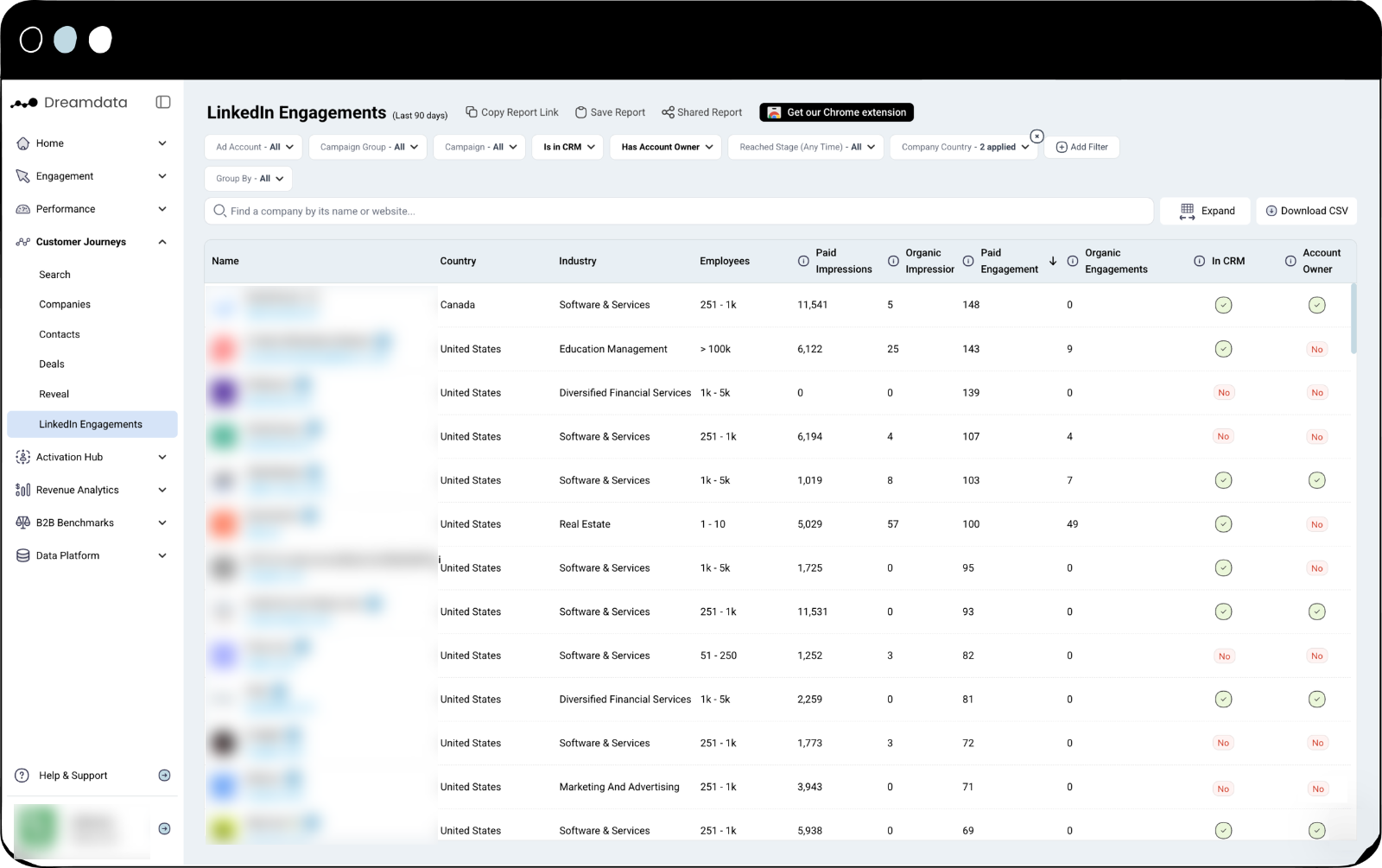
Dreamdata’s LinkedIn Engagements report lists the companies that saw and engaged with your ads and posts, paid and organic, with a flag for whether each one is in the CRM. Impression attribution puts those ad views into the customer journey, so a deal can carry LinkedIn’s influence without a single click.
DemandSense starts from the same data. It shows company-level impressions and engagement, paid and organic, on each account’s timeline next to the site visits and the CRM deal, and counts them toward influence under the thresholds you set. If your question is which accounts LinkedIn reached that Campaign Manager will not name, both tools answer it. The differences start with what happens after.
Where the Work Differs
Dividing revenue between channels
This is the centre of Dreamdata. It offers six standard models, including a data-driven one built on Markov chains, with custom models on top, and stage models that let you attribute to the pipeline stage you pick, such as an MQL. Reporting covers paid channels from Google and LinkedIn to Capterra and G2. If the job is to split credit across every paid channel for a finance audience, that is what Dreamdata built.
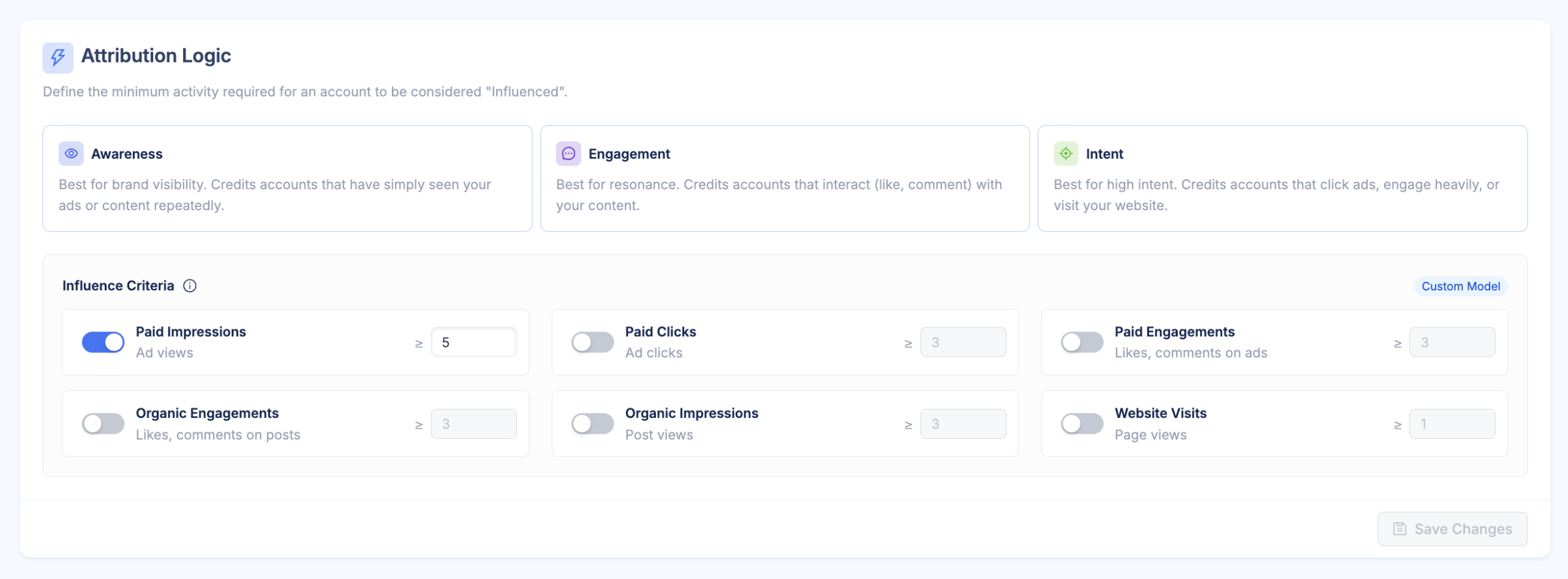
DemandSense measures LinkedIn’s influence on pipeline. You set what Awareness, Engagement and Intent mean in impressions, clicks, engagements and site visits, over three, six or twelve months, and the reporting returns influenced pipeline, revenue and Won ROAS, split by industry, headcount and country. Engagement from Google Ads, Facebook Ads and StackAdapt is tracked too.
Reading a campaign before the deals arrive
Data-driven models learn from closed deals, and B2B does not produce many. A team closing thirty deals a year gives a model two or three a month, each arriving long after the campaign that started it. Dreamdata puts the average B2B journey at 272 days, notes that with limited data its data-driven model ends up close to a linear one, and asks for at least 50 closed-won and 50 closed-lost deals in the past year before its AI signals can be trained. For a company with that volume the models have plenty to work with.
DemandSense reads the signals that arrive before the conversions do. The thresholds need engagement data and no closed deals, so the accounts crossing Intent this month are visible while the campaign that moved them is still spending. Rising Accounts shows who is heating up, and Opportunity Gap lists engaged accounts that are not in the CRM yet. The same definitions produce the pipeline figure later, when the budget is reviewed.
Changing the campaign
Dreamdata’s lever is the audience. It builds segments from journey data and syncs them daily to LinkedIn, Google, Meta and Microsoft, and it can build an impression-capped audience to exclude accounts that have already seen too much. Scheduling, frequency settings and budget rules stay in Campaign Manager.
DemandSense changes delivery directly. The scheduler drops the bid to $0.01 outside your hours so LinkedIn keeps its optimisation history, a frequency cap limits how often one company sees your ads, audience tuning removes job titles and companies outside your ICP, and a monthly ceiling pauses campaigns at your cap and restarts them on the first. Spend protection takes accounts that already closed out of targeting. Capping and suppression enforce weekly.
Sending Outcomes Back to LinkedIn
Both tools use LinkedIn’s Conversions API. Dreamdata sends stage-reached events from the last 90 days, with a value taken from your stage model settings, and runs equivalent conversion syncs for Google, Meta and Microsoft.
DemandSense sends two streams to LinkedIn. Closed-won deals go as Purchase events with the deal amount from the CRM, and qualified opportunities go as Qualified Lead events, each with six identifiers on a daily sync and mapped to a conversion rule a campaign can optimise toward. LinkedIn lets both event types use an attribution window of up to 365 days, which suits a long B2B cycle, and they slot into the rest of your LinkedIn Ads conversion tracking as two more conversion rules.
Asking the Data a Question
Dreamdata AI launched at the end of August 2026 with two parts on the Advanced plan: an Analytics Agent inside the product that turns a question into a report, and an MCP server that lets Claude, ChatGPT, Cursor and other clients run saved reports, look up company journeys and query audiences. Access is read by default, with optional permissions to save new reports, audiences and dashboards.
DemandSense MCP comes with every plan and with the 30-day trial. It covers LinkedIn ad exposure, identified website visits and CRM state, so once you connect LinkedIn Ads to ChatGPT or Claude you can ask which ICP-fit companies saw the ads, came to the site and still have no deal. It can also act now, not only read: ad scheduling is its first write capability, so you can set when your LinkedIn ads run from the same chat.
Is There a Downside?
Dreamdata’s reviewers most often mention a learning curve, especially around stage models and how attribution is calculated, missing features, and reports that take workarounds to customise. On DemandSense, people note that the full platform takes time to learn. Reviews describe one person’s setup at one point in time, so test the parts that matter to you.
Both rate well on G2: 4.7 for Dreamdata and 5.0 for DemandSense.
Pricing
| DemandSense | Dreamdata | |
|---|---|---|
| Entry | Base, $89/mo, 200 credits, every feature | Starter, free: 2 months of history, 5 seats, 3 stage models, 2 notifications, 1 sync; web analytics, company identification, ad spend report, benchmarks |
| Paid plans | Plus, from $149/mo: the same features with 500 credits, climbing to 10,000 | Advanced: attribution, custom pricing after a demo |
| Add-ons | None; every feature is on every plan | Activation and Data Warehouse |
| Conversions API | LinkedIn, every plan | LinkedIn, Google, Meta and Microsoft conversion syncs |
| MCP | Every plan | Advanced |
| Visitor identification | Companies worldwide, people for US traffic | Companies, on every plan |
| Free trial | 30 days, every feature, no card | Free plan; guided trial on Advanced |
| G2 | 5.0 | 4.7 |
Dreamdata’s free plan covers web analytics, company identification, an ad spend report and benchmarks, with two months of history. Attribution sits on the Advanced plan, with activation as an add-on, and that price comes after a demo. DemandSense’s Plus tier scales with monthly credits, so check it against your monthly traffic.
What Dreamdata Does Differently
- Multi-touch models across every channel. Six standard models, one of them data-driven, plus custom models. DemandSense measures influence under thresholds you set. Dividing credit between channels under a multi-touch model is not something DemandSense offers currently.
- Activation on four ad networks. Audiences and conversions sync to LinkedIn, Google, Meta and Microsoft. DemandSense activates audiences and sends conversions on LinkedIn, and reads engagement from Google Ads, Facebook Ads and StackAdapt.
- Your data in a warehouse. A data warehouse add-on puts the modelled data in BigQuery, Snowflake and other warehouses, where BI tools can read it. DemandSense keeps its reporting in the app and through MCP, with no warehouse export currently.
- Benchmarks. B2B Benchmarks compares your ad budget, ad performance and journey metrics with aggregated data from other Dreamdata customers. DemandSense publishes its LinkedIn Ads benchmarks in a free report rather than inside the app.
- Notifications in Slack and Teams. Audiences and signals post to a channel after each daily data run. DemandSense shows warming accounts in two in-app panels, Rising Accounts and Opportunity Gap, and does not post to Slack or Teams currently.
- Pipedrive and Dynamics. Dreamdata connects to HubSpot, Salesforce, Microsoft Dynamics and Pipedrive. DemandSense connects to HubSpot, Salesforce, Attio and Zoho.
What DemandSense Does With It
A model tells you what worked once the deals are in. DemandSense measures what LinkedIn is doing this month, changes the campaign, and returns the result to LinkedIn so delivery improves on the next round.
- A read you can act on while the campaign runs. Thresholds you write decide what counts as influence, and accounts crossing them show up while the budget is still being spent.
- Delivery settings in the same plan. The hours your ads run, how often one company sees them, who stays in the audience and where the month’s spending stops.
- People as well as companies on the site. Visitor identification resolves companies worldwide and the person behind US visits, each scored against your ICP. Dreamdata identifies at company level.
- Closed revenue back in Campaign Manager. Won deals return as Purchase conversions with the deal amount, so LinkedIn optimises toward buyers.
- Accounts that bought drop out of targeting. Spend protection reads closed deals from the CRM over a rolling twelve months and removes them.
- Your competitors’ LinkedIn ads. Competitor monitoring tracks the brands you pick, with up to twelve months of history, creative tests and a timeline.
- A price you can see. $89 a month for every feature, billed monthly, with a 30-day trial and no card.
Verdict
Choose Dreamdata if the question comes from RevOps or finance and covers every channel. Multi-touch models, a warehouse you can query and activation on four ad networks are what it built, for a company with enough closed deals for those models to learn from.
Choose DemandSense if LinkedIn is your main paid channel and you need more than a report. It measures influence on pipeline under thresholds you define without waiting for enough closed deals, shows the accounts that are warming before a deal exists, changes when and to whom the ads run, and tells LinkedIn which deals closed. All of that is in the first plan at $89 a month, with a trial you can start today.
If neither fits, there is a roundup of Dreamdata alternatives with more options.
Start a 30-day trial and see which accounts your current campaigns are reaching.
FAQ
For LinkedIn advertisers, yes. Both show which companies saw and engaged with LinkedIn ads, connect that to CRM deals, identify visiting companies and send conversions back to LinkedIn. Dreamdata adds multi-touch models across every channel, warehouse access and activation on four ad networks. DemandSense adds delivery settings, person-level identification for US traffic, spend protection and competitor monitoring from $89 a month.
Dreamdata’s Starter plan is free, with two months of user history, five seats, three stage models and one sync. The Advanced plan, which carries attribution with activation as an add-on, has custom pricing quoted after a demo, with a guided trial available. DemandSense publishes its prices: Base at $89 a month and Plus from $149, with every feature on both.
Yes. Dreamdata sends stage-reached events to LinkedIn with a value taken from the stage model, and offers conversion syncs for Google, Meta and Microsoft too. DemandSense sends closed-won deals with the deal amount and qualified opportunities to LinkedIn on a daily sync.
Dreamdata identifies visiting companies on all plans and does not offer person-level identification. DemandSense identifies companies from any country and, for US traffic, the person behind the visit with job title and work email.
Yes, since August 2026, on the Advanced plan, along with an in-product Analytics Agent. DemandSense MCP is open on every plan and included in the trial, and besides reading the data it can now set your ad schedules.