

Summary: B2B Intent Data at a Glance
- B2B intent data is behavioral information that shows a company is researching a topic before it becomes a lead.
- There are three types: first-party (your own site and ads), second-party (a partner’s data, shared with you) and third-party (research tracked across thousands of B2B websites).
- Marketing and sales teams use it to prioritize accounts and time outreach.
- It won’t identify the specific buyer, confirm budget or guarantee a deal. It shows that a company is interested, which is useful but isn’t a buying decision.
- On LinkedIn, third-party intent data helps you build the right target list. Engagement with your own ads and site then tells you which of those companies to prioritize.
What Is B2B Intent Data?
B2B intent data is behavioral information that shows a company is actively researching a problem, product or category. It comes from signals like content consumption, keyword searches and site visits, rather than from a form fill or a conversation.
Most intent data is account-level by default: the signal points to a company, not to an individual buyer. And it’s a signal of research. A company showing intent could be six months from buying, or simply benchmarking options for a report. Reading the signals over time rather than reacting to a single spike is what buyer intent tracking is for.
Benefits of B2B Intent Data for Sales and Marketing
- Earlier sight of accounts in market: Instead of waiting for a demo request, you see a company start researching the category, which gives sales more runway before a competitor gets there.
- Budget and reps pointed at fewer, better accounts: Ad spend and outreach hours go to companies already showing interest, instead of being spread evenly across a list where most accounts aren’t ready.
- Messaging matched to what an account is researching: If a company’s activity clusters around one problem, that’s what the first email or ad should speak to.
- Better timing for outreach: A rep who reaches out while a company is comparing options gets a different reception than one who arrives months early.
- Evidence for why an account was prioritized: When a manager asks why an account is on the list, there’s a reason beyond “it fits the ICP on paper.”
Types of B2B Intent Data
Most teams end up combining the three types of B2B intent data, since each one answers a different question about an account.
First-Party Intent Data
First-party intent data comes from your own properties: site visits, pricing and demo page views, content downloads and email activity. Engagement with your own LinkedIn ads and Company Page belongs here too, since it’s a direct response to your brand. The catch is scope. It only sees accounts that have already found you, so it says nothing about companies still researching the category elsewhere.
Second-Party Intent Data
Second-party intent data is another company’s first-party data, shared directly with you. The usual example is review sites like G2 and TrustRadius, which show which accounts compared your category, sometimes alongside specific competitors. Coverage is the limit here: it only captures research done on that partner’s site.
Third-Party Intent Data
Third-party intent data is research activity collected across publisher networks, content co-ops and bidstream, then resolved back to a company. Bombora’s co-op is the best-known example. The data is topic-level and account-level, so a surge tells you a company is reading about a subject. It doesn’t tell you anyone there has heard of you.
What Are B2B Intent Signals?
An intent signal is a single observable action, such as a page visit or a content download. Intent is the pattern you see once several signals from the same account line up.
Not every signal deserves the same attention. From strongest to weakest:
- Several people from one company engaging over a few weeks
- Visits to pricing or comparison pages
- Repeat visits from the same account
- Research on competitors or review sites
- Broader topic surges
One signal from one person could mean almost anything. When several people at the same company generate the same kind of activity within a short period, you have a pattern worth acting on. Reading the account as a whole instead of chasing individual clicks is the idea behind account-based intelligence.
How B2B Teams Use Intent Data
Intent data decides which accounts get attention, how sales opens the conversation, what marketing says, and finally how ad budget is spent to reach them.
Prioritize In-Market Accounts
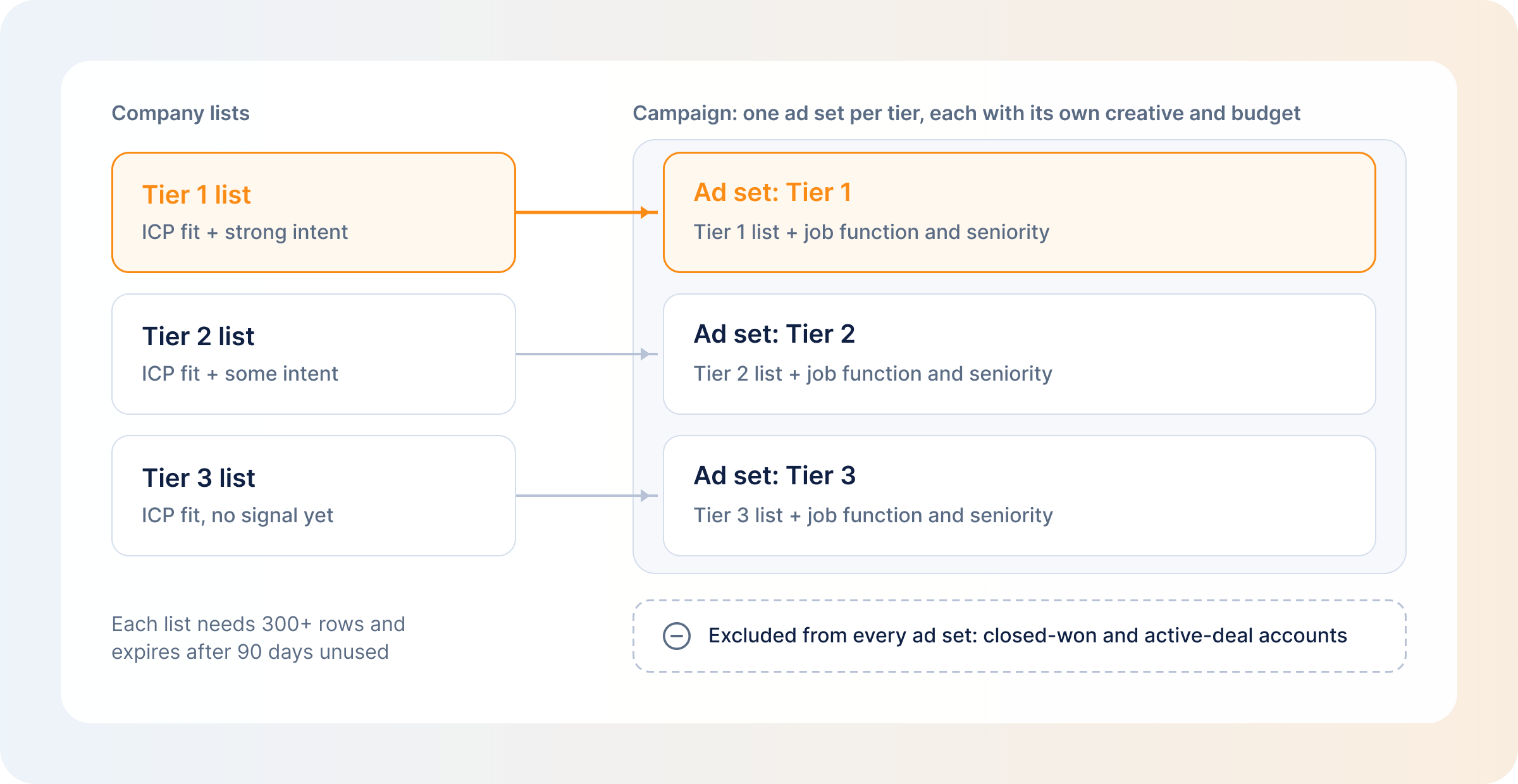
Intent data re-sorts the list you already have, and ICP fit still decides who’s on it. Tiers work better than a single list:
- Tier 1: ICP fit plus strong intent
- Tier 2: ICP fit plus some intent
- Tier 3: ICP fit, no signal yet
Budget, rep time and ad creative follow the tier. Tier 3 stays on the list, since fit hasn’t changed, but it waits its turn. This tiering is the backbone of a working B2B ABM strategy on LinkedIn.
Improve Sales Outreach and Lead Prioritization
Reps get more out of their time when they start with accounts already showing intent, instead of working a list in the order it was handed to them. And an opener about the topic an account has been researching reads very differently from a cold template.
LinkedIn has its own seller-side version, Sales Navigator Buyer Intent. It’s an account score built from 180+ signals, including LinkedIn activity, ad engagement and InMail responses, and it’s only on the Advanced and Advanced Plus plans. It helps sellers decide who to contact; it doesn’t build an ads audience.
Build ABM and Personalized Marketing Campaigns
The topic an account has been researching should decide what it sees next. An account early in the process needs content that names the problem. One comparing options needs comparison content. One further along needs proof: case studies, benchmarks, results.
Keep in mind that intent data is usually account-level, so a campaign built around a research signal still has to reach the several roles involved in the decision, not one contact. That’s the work of ABM prospecting on LinkedIn.
Activate Intent Signals in Paid Advertising and Retargeting
Here’s how it plays out as a campaign setup on LinkedIn:
- Build one company list per intent tier, uploaded as a CSV or synced from a provider. A list needs at least 300 rows and holds up to 300,000 companies (20 MB). LinkedIn can take up to 48 hours to build it, and it must match at least 300 members to run in an active ad set.
- Give each tier its own ad set, creative and budget, so you can compare tiers.
- Add job function or seniority on top of each list, so the ads reach the group of people involved in the decision.
- In Companies Hub (Campaign Manager → Plan → Companies), check which companies on the list are engaging, then save them as a dynamic company list you can keep targeting. It needs a Company Page linked to the ad account.
- Retarget people who’ve visited your site or engaged with your ads, and exclude accounts that have closed or are in an active deal.
- Keep the lists current. Static uploads don’t refresh on their own, and a list left unused for 90 days expires.
From there, let the tiers move with how accounts respond to the ads rather than staying where they started. LinkedIn Custom Audiences and LinkedIn retargeting are the two tools that keep that loop running.
What Intent Data Can and Cannot Tell You
What intent data can tell you:
- Which companies are researching a given topic
- Roughly when that research is happening
- How that activity compares with the account’s usual baseline
- Sometimes, which roles or seniority levels are involved
What intent data cannot tell you:
- Who the specific buyer is, since most intent data is account-level
- Whether the research is about you or a competitor
- Budget or timeline for any decision
- Why the research is happening. A job seeker, a student and a competitor doing due diligence can look identical in the data
- Whether that account will respond to your campaigns
The last one matters most on LinkedIn. Only your own data shows whether an account responds to your campaigns, and no provider can tell you that in advance.
Using AI to Analyze B2B Intent Signals
AI is good at spotting patterns across many weak signals that a person scanning a dashboard would miss. It also summarizes an account’s activity into something readable and ranks long account lists. That’s why 6sense (with 6AI) and Demandbase both build AI into how their platforms surface and rank accounts.
The limit is that AI ranks whatever it’s given. Feed it noisy signals, or signals from one thin source, and it will still produce a confident, ranked answer.
The other use is answering a direct question. The DemandSense MCP server lets Claude or ChatGPT query LinkedIn ad engagement, identified site visitors and CRM state side by side, so you can ask “Which ICP-fit companies saw our ads, visited the site, and aren’t in our CRM yet?” instead of assembling that answer across three tools by hand. The DemandSense MCP server is read-only and open to everyone on the trial. The DemandSense MCP Intelligence Hub covers setup, and there’s also a walkthrough of how to analyze LinkedIn Ads with Claude.
Top B2B Intent Data Providers in 2026
The best intent data providers differ first by where their intent comes from, and that decides what each one can see and where its blind spots sit. Here’s how the intent data providers in 2026 compare:
| Provider | Where the Intent Comes From | Level | LinkedIn Ads Route | Built For |
|---|---|---|---|---|
| DemandSense | Your own LinkedIn ad and organic engagement, site visits and CRM activity | Account; people on identified US site traffic | Pipeline accounts pushed to LinkedIn audiences automatically; closed deals excluded | B2B teams running LinkedIn Ads who want budget on the accounts responding to them |
| Bombora | A co-op of 5,000+ B2B sites; content consumption against a topic taxonomy | Account | Native sync as LinkedIn Matched Audiences, weekly | Teams wanting a topic-level view of category research |
| 6sense | Keyword tracking, third-party activity, partner data (Bombora, TechTarget, G2, TrustRadius) | Account, with buying-group modelling | Segments sync to Campaign Manager daily | Teams wanting a predicted buying stage alongside the signal |
| Demandbase | Bidstream from its own DSP, publisher content, your site engagement, plus Bombora, G2, TrustRadius | Account | Audiences sent to Campaign Manager nightly after a first sync | Teams running ABM advertising and orchestration together |
| ZoomInfo | Its own NLP content tracking, bidstream, IP identification, plus G2 and TrustRadius | Account and person | Audiences pushed to LinkedIn, Meta or Google | Sales-led prospecting teams |
| Cognism | Bombora-powered intent, plus hiring, funding and job-change signals | Company only | No native route; export and build the audience yourself | Sales teams prospecting with contact data |
DemandSense: Intent From Your Own LinkedIn, Site and CRM
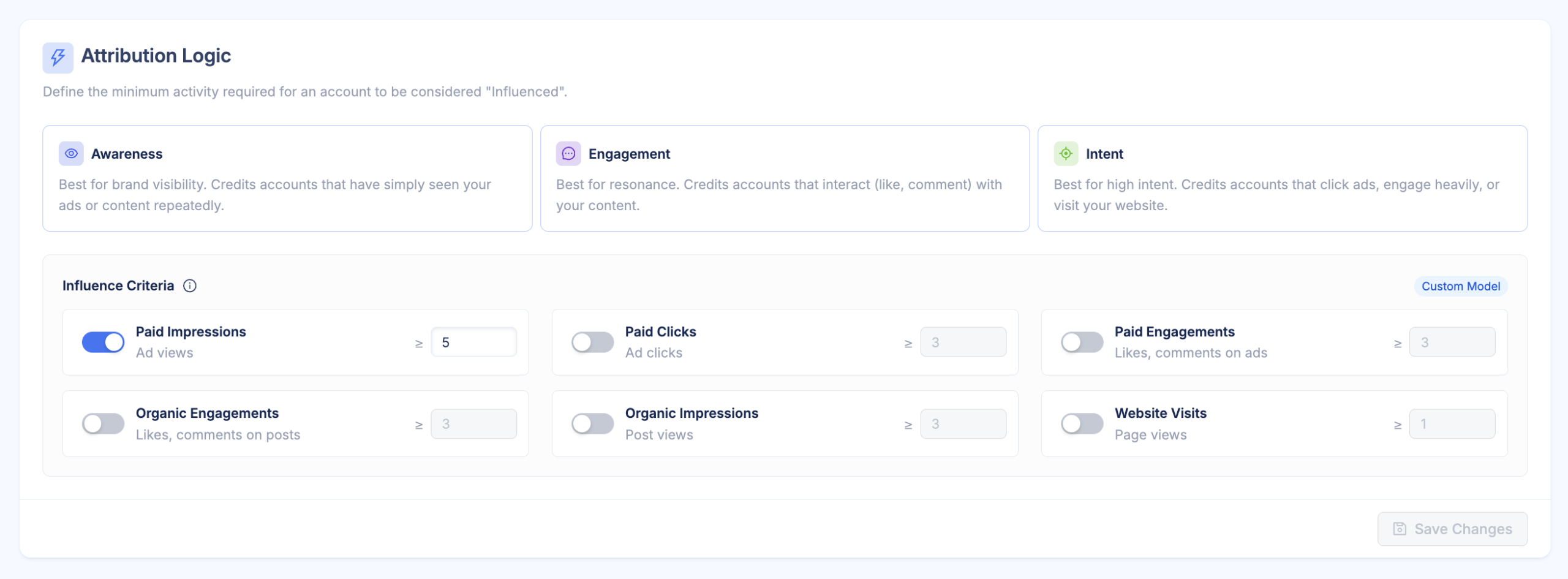
DemandSense is a platform for the marketer who runs LinkedIn Ads in a small B2B team. It puts three things in one place that usually live in three separate tools: attribution, optimization, and website visitor profiling. On top of that sits an MCP server. For this list, that means DemandSense reads intent from how accounts respond to you: paid and organic LinkedIn engagement, site visits and CRM movement, side by side. DemandSense turns that into LinkedIn audiences through Pipeline Sync, and its Spend Protection stops spend once a deal closes. In DemandSense you set what counts as engaged, with the Awareness, Engagement and Intent presets or your own thresholds.
Bombora: Co-op Topic Surge Data
Bombora’s Company Surge is built from a co-op of 5,000+ B2B sites, tracking content consumption against a shared topic taxonomy and updating weekly. The output is account-level, and it syncs natively into LinkedIn Matched Audiences through LinkedIn’s Ads API. 6sense, Demandbase and Cognism all license Bombora’s data. Bombora is built for teams that want a view of who is researching their category across the web.
6sense: Predictive Buying Stages
6sense combines keyword research tracking, third-party activity and partner data from Bombora, TechTarget, G2 and TrustRadius, with buying-group modelling on top. Each account is placed in a predicted buying stage, from Target and Awareness through Consideration and Decision to Purchase, and the stage moves as new signals come in. Segments sync to Campaign Manager daily as third-party Matched Audiences. It’s built for teams that want a predicted stage attached to the intent signal.
Demandbase: Intent Inside an ABM Platform
Demandbase draws intent from bidstream through its own B2B DSP, publisher content consumption and your own site engagement, supplemented by Bombora, G2 and TrustRadius. Scores are aggregated weekly at the account level. Audiences go to Campaign Manager in a first sync that takes 24 to 48 hours, then nightly. It’s built for teams that want intent data, advertising and ABM orchestration in one platform.
ZoomInfo: Intent Beside Contact Data
ZoomInfo tracks intent through its own NLP-based content analysis, bidstream data and IP identification, alongside G2 and TrustRadius signals. Unlike most providers here, it also offers person-level intent, next to its contact database. GTM Studio pushes audiences built from buying intent to LinkedIn, Meta or Google. It’s built for sales-led teams whose prospecting already runs through ZoomInfo’s contact data.
Cognism: Bombora-Powered Intent for Prospecting
Cognism’s intent data is Bombora-powered and company-level, with up to 12 topics per account on the Pro plan, chosen from a library of 11,000+. It sits next to hiring, funding and job-change signals. There’s no native LinkedIn Ads route, so accounts showing intent are exported and built into a LinkedIn audience by hand. It’s built for sales teams prospecting off contact data, with intent as a supporting filter.
How to Choose a B2B Intent Data Provider
Choosing an intent data provider is easier if you hold every option up against the same six questions:
- Source: Is the signal built from research across the web, or from response to you?
- Level: Does it resolve to accounts or to people?
- Freshness: How often does it refresh?
- LinkedIn route: Is there a native sync, or is it a CSV upload?
- Overlap: Would it repeat data you already have in your CRM or site analytics?
- Thresholds: Do you set the line for what counts as intent, or does the vendor?
Third-party intent data helps decide who to target, and first-party engagement decides who to prioritize once the campaign is live, so many teams run one of each. If the job is finding accounts researching your category before they’ve heard of you, that’s what co-op data is built for.
On overlap, thresholds and the LinkedIn route, DemandSense works from data your own accounts already generate: LinkedIn engagement, site visits and CRM activity, read side by side. In DemandSense you decide what counts as engaged, and Pipeline Sync and Spend Protection carry that decision into your LinkedIn audiences. The 30-day free trial needs no card: start it at demandsense.com.
Challenges of Using B2B Intent Data and How to Address Them
Intent data fails in predictable ways, and each has a fix you can put in place before launch.
- Noise from students, job seekers and competitors: They look like buyers in the data. Require several signals from several people at one company before an account moves up a tier.
- Intent without fit: A surge from a company outside your ICP wastes budget as fast as a cold list. Filter by ICP first, then let intent sort what’s left.
- Stale lists on LinkedIn: A static upload doesn’t update itself. Use dynamic company lists or scheduled syncs.
- Audiences that are too small: A list must match at least 300 members to run. If a tier falls short, widen its criteria or merge it with the next tier.
- Paying for overlapping data: Your CRM and site analytics may already show much of what a provider would sell you. Check what you can see before adding a source.
- Sales and marketing reading intent differently: One team calls an account hot at the first page view, the other waits for a demo request. Agree the thresholds in writing.
On privacy, check how each provider sources its data and handles consent. Regulations differ by region, so that’s a question for your legal team.
How DemandSense Helps Turn Intent Into LinkedIn Account Intelligence
Third-party intent tells you which companies are researching a topic somewhere on the web. DemandSense is built around the other question: which of them are responding to your LinkedIn campaigns.
- What DemandSense reads: DemandSense shows every paid and organic LinkedIn impression, click and engagement per account. Its website visitor identification, installed with Google Tag Manager, names the companies visiting (and the people on US traffic) and scores each visitor against your ICP with rules you write. DemandSense reads HubSpot, Salesforce or Attio activity alongside both.
- How you decide who’s engaged: In DemandSense you set the line with three presets (Awareness, Engagement, Intent) or your own thresholds, over a 3-, 6- or 12-month lookback. The Rising Accounts panel shows accounts whose engagement is climbing this week, and Opportunity Gap shows accounts engaging with your ads that aren’t in your CRM yet. Both are panels you open when you want to check.
- What changes on LinkedIn: DemandSense Pipeline Sync pushes accounts in active pipeline into LinkedIn audiences, and Spend Protection stops ads to accounts whose deals have closed. With Audience Tuning in DemandSense you can suppress a competitor, a customer or an active deal, and Frequency Cap limits how often any one company sees your ads. Both apply on a weekly sync.
The same account-level view is what connects ad engagement to pipeline in LinkedIn revenue attribution. You can try it on your own accounts with the 30-day free trial, no card needed, at demandsense.com.
FAQ
Three people from one company engage with your LinkedIn ads over two weeks, then someone from that company visits your pricing page. That pattern is a strong signal. The same pricing visit on its own, from one person, is much weaker.
The two terms are mostly used interchangeably. Strictly, intent data is the raw signal, such as a page visit or a topic surge, and buyer intent is the conclusion you draw from it: that an account may be in market.
It depends on the source and its coverage. Third-party intent is modelled from research activity and resolved to companies, so treat it as probable rather than proven. First-party engagement across your ads, site and CRM is observed directly.
No. Start with fit, then look at how strong the signals are and how many people they come from. Accounts that pass both go to reps. Accounts with a faint signal go to ads and nurture, where being early costs less.
Quickly, because research windows are short. Bombora updates weekly, and 6sense segments sync to LinkedIn daily. Refresh your LinkedIn company lists on the same rhythm, or a static upload keeps targeting accounts whose research has already ended.
Mostly companies. Bombora and Cognism work at company level; ZoomInfo offers person-level intent. On your own site, DemandSense identifies the companies visiting and the people on US traffic. Campaign Manager reports ad engagement by company, except for Lead Gen Form submissions.
Yes, through company lists (CSV or a provider’s sync), Companies Hub dynamic lists and retargeting. Our 2026 LinkedIn B2B Benchmark Report puts the average LinkedIn CTR at 0.52%, so most accounts in a tier won’t click. Judge tiers on engagement per account and connect impressions to pipeline.