

Summary: Marketing Workflow Tools for LinkedIn Ads Teams
A LinkedIn Ads workflow runs through several distinct stages: planning the campaign, getting it approved, setting up targeting, watching it run, handing leads to sales, and measuring what it produced. No single tool covers every stage. Work management tools handle planning and approval, Campaign Manager handles execution, the CRM handles the pipeline, and something has to join the ad data to what happens in the CRM. The handoffs between those tools are where most workflow problems show up.
What Is a Marketing Workflow?
A marketing workflow is a repeatable sequence of steps, owners and handoffs that takes a piece of work from request to result. For a B2B team running LinkedIn Ads, the marketing workflow differs in three ways:
- LinkedIn reviews every ad before it goes live. LinkedIn strives to review ads within 24 hours, though high volume can push that longer, so the workflow needs a wait built in between “submitted” and “live”.
- The results that actually matter, a closed deal or a qualified opportunity, don’t show up in the ad account. They show up in the CRM, often months after the ad ran.
- More than one person usually touches the same ad account. Campaign Manager splits access into five roles, from Viewer up to Billing Admin, so approvals and edits move through people with different levels of control.
Marketing automation (the email sequences and lead nurturing that run after a lead converts) is a separate workflow with its own tools, and it’s outside the scope here.
Benefits of Structured Marketing Workflows for B2B LinkedIn Ads Teams
Once a LinkedIn Ads marketing workflow has a structure, the payoff shows up in specific places:
- Faster launches: Approvals move through a defined path instead of stalling in an email thread until someone notices it.
- Fewer bad ads going live: A review step before submission catches the wrong claim, the wrong CTA or the wrong audience before the ad is running.
- Spend caught before it runs past budget: Someone is watching daily delivery, so a campaign gets paused before it burns through the month’s budget.
- Leads reaching sales while they’re still warm: A defined handoff means a Lead Gen Form submission gets to a rep the same day, not whenever someone remembers to export the list.
- One agreed definition of what counts as a result: Marketing and sales work from the same idea of what “influenced” or “qualified” means, instead of arguing about it after the numbers come in.
- Decisions made while the campaign is still running: A weekly check on performance means budget or targeting can shift mid-flight, instead of waiting for a quarterly review to say what went wrong.
Marketing Workflow Types for B2B Teams Running LinkedIn Ads
Running LinkedIn Ads is really running six separate workflows side by side. Each has a clear scope, a usual owner, a tool that tends to run it, and a specific handoff where things go wrong.
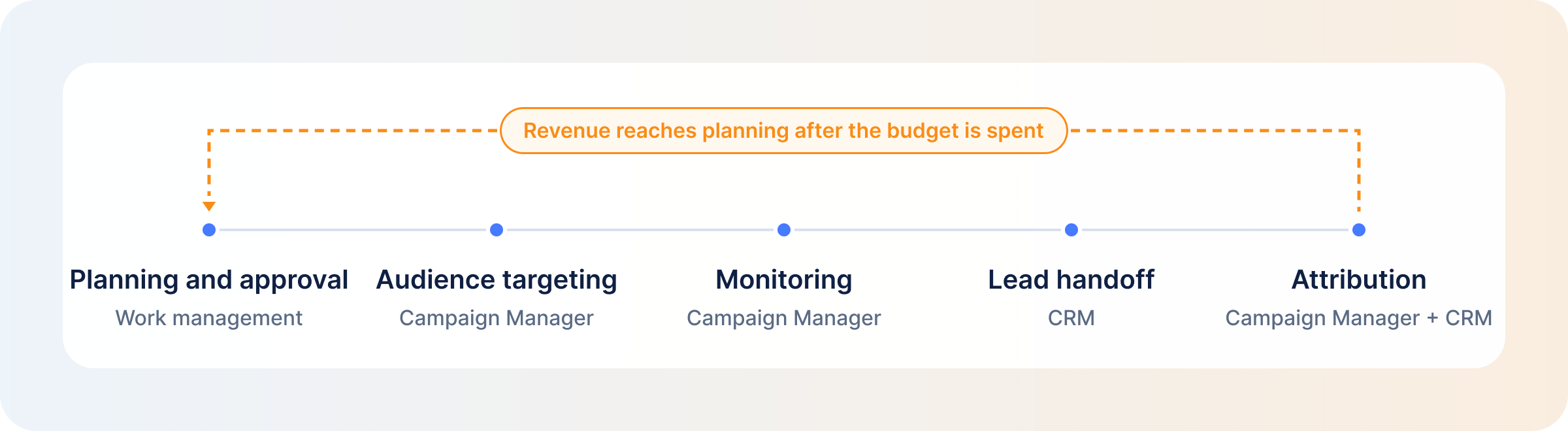
Campaign Planning and Approval
This workflow runs from the creative brief through budget sign-off, creative production and internal approval, ending at LinkedIn’s own review before the ad goes live. A marketing lead or ops person usually owns it, working out of a work management tool built for briefs and approvals. It breaks when teams plan around their own approval chain and forget LinkedIn’s. LinkedIn aims to review ads within 24 hours but says review can take longer at high volume, and a launch date built without that buffer slips before the campaign even starts.
Audience Targeting
This workflow starts with the ideal customer profile and finding your target audience on LinkedIn, then builds account and contact lists, uploads them as Matched Audiences, and layers in exclusions for customers, competitors and open deals. Demand gen usually owns it, with sales weighing in on who to exclude. It breaks at the exclusion list: once a deal closes or a rep flags a competitor, nobody circles back to update it, so budget keeps reaching accounts it shouldn’t.
Campaign Monitoring and Optimization
This workflow covers pacing, frequency, delivery by hour, which accounts the budget is reaching, and what to change in response. The person running the campaigns owns it day to day. Campaign Manager reports on performance but only schedules by start and end date, so anything more granular, such as off-hours delivery or company-level frequency, gets checked by hand or skipped. Those are the LinkedIn ad optimization settings Campaign Manager doesn’t offer.
Lead and CRM Handoff
This workflow starts when a Lead Gen Form or site conversion fires, moves the lead into the CRM, routes it to a rep, and ends at the first sales touch. Marketing ops and sales share ownership. It breaks in the routing step: the lead arrives, but the context behind it (weeks of LinkedIn engagement, site visits, prior touches) doesn’t travel with it, leaving a rep looking at a single form fill instead of an account that’s been warming up for weeks.
Analytics and Attribution
This workflow joins the clicks and leads sitting in Campaign Manager to the deals sitting in the CRM, which is what LinkedIn pipeline attribution measures. A marketing ops or demand-gen lead usually owns it. It breaks on timing: revenue shows up in the CRM after the budget decisions it should have shaped, so the feedback loop back to planning runs roughly a quarter behind the campaigns it’s meant to inform.
Competitor Monitoring
This workflow tracks what competitors are running on LinkedIn, what’s changed since the last check, and what should feed into the next creative brief. Whoever owns messaging usually runs it, and most teams monitor competitor LinkedIn ads by hand. It breaks by staying a one-off task done before a campaign launches rather than a standing input to planning, so the same gaps resurface brief after brief. DemandSense’s Competitor Monitoring adds a brand by domain and shows up to 12 months of its LinkedIn ad history, so the check becomes a standing view instead of a pre-launch scramble.
How to Create and Automate an Effective LinkedIn Ads Marketing Workflow
Here’s how to build an effective LinkedIn Ads marketing workflow, step by step.
1. Identify the Processes and Bottlenecks
Look for where time and budget are already being lost: approvals stuck in email, exclusion lists that haven’t been touched since a deal closed, leads that sit for a day before anyone calls, or a monthly report someone rebuilds from scratch. Those show you where the workflow needs fixing first.
2. Map the Current Workflow and Data Flow
Lay out both the sequence of steps and the path the data takes. Track what comes out of Campaign Manager, where it’s meant to land in the CRM, and the point where that link breaks. The gap is often not in the process itself but in what happens to the data between two systems.
3. Define Roles and Responsibilities
Match responsibilities to LinkedIn’s own account roles instead of inventing new ones. Whoever builds ads gets Creative Manager. Stakeholders who only check performance get Viewer. Whoever owns budget gets Account Manager or Billing Admin. That keeps access lined up with what each person is actually responsible for.
4. Choose the Right Tools and Integrations
Pick one tool for each stage of the workflow rather than one tool for everything, and confirm the integration between each pair actually exists before signing a contract. A tool that’s perfect for planning but doesn’t talk to the CRM just moves the bottleneck. The tools section below shows what each one is built to own.
5. Automate Repeatable Tasks and Controls
Put the controls first in line for automation, ahead of the busywork. A budget cap that fails or an exclusion that never syncs costs money immediately; a manually built report costs someone an afternoon. Automate closed-deal exclusions and spend caps before smaller repetitive tasks.
6. Document the Workflow and Set Guardrails
Put in writing who signs off on what, what the budget limits are, and which changes automation can make without a person in the loop. Without this, a new hire waits on approvals that used to be informal, or an automated rule quietly changes a budget nobody agreed it could touch.
7. Measure Performance and Iterate
Check both the workflow itself and what it produces, on a fixed schedule: cycle times and error rates on one side, pipeline and revenue on the other. A workflow that moves fast but doesn’t produce usable pipeline isn’t working, and one that’s precise but too slow to act on isn’t either.
Best Marketing Workflow Tools for B2B Teams Managing LinkedIn Ads
Here’s how the main marketing workflow tools line up against those stages. Three of them don’t touch LinkedIn Ads at all, and the table says so.
| Tool | Category | Role in a LinkedIn Ads Workflow | Key Workflow Capabilities | Best For |
|---|---|---|---|---|
| DemandSense | The intelligence layer between your ad stack and CRM, connecting signals, decisions, and execution | Audiences, delivery controls, CRM handoff and attribution | Ad scheduling, frequency cap, budget cap, Audience Tuning; LinkedIn engagement, site visits and CRM deals read side by side; outcomes sent back through the Conversions API; competitor monitoring | B2B teams with LinkedIn as the main paid channel who need CRM outcomes to change spend while campaigns run |
| LinkedIn Campaign Manager | Native ad platform | Where the ad is built, reviewed and run | Five account roles, Viewer through Billing Admin; Business Manager for shared account, Page and audience access; Accelerate campaigns for AI-assisted setup on website-visit and lead-gen objectives; start-and-end-date scheduling only | Every LinkedIn Ads team, whatever else it adds |
| HubSpot | CRM and marketing platform | Turns contacts and form fills into audiences and syncs lifecycle data back | Syncs Lead Gen Form leads; builds audiences from contact, company and site-visitor segments; sends lifecycle-stage changes through the Conversions API; workflows triggered by ad activity | Teams running sales and marketing in HubSpot who want that data feeding the ad account |
| Salesforce | CRM | Feeds LinkedIn’s pipeline reporting and audiences | One of three CRMs with native LinkedIn CRM Sync; Sales Cloud turns Lead Gen Form submissions into leads; Marketing Cloud Advertising builds audiences from Salesforce data | Teams whose deal data already lives in Salesforce |
| Metadata.io | Paid media platform | Builds and runs campaigns across several ad channels at once | AI agents for audiences, creative, launch with approval gates, bid and budget optimization, and experiments; LinkedIn, Google, Meta, X, Reddit and Microsoft; connects to Salesforce, HubSpot and Pipedrive | Teams managing paid spend across several channels, not just LinkedIn |
| Hootsuite | Social media management | Handles organic content and can also create ad campaigns | Publishes to LinkedIn profiles and Pages with multi-step approvals; boosts Page posts; creates ad campaigns through Hootsuite Social Advertising | Teams whose LinkedIn presence is mostly organic with some paid layered in |
| Buffer | Social media management | Doesn’t touch LinkedIn Ads | Schedules organic posts to Company Pages, Showcase Pages and personal profiles, with drafts and approvals; no ads or boosting | Teams handling organic LinkedIn scheduling only |
| Zapier | Automation | Connects Lead Gen Form data to whatever else the team uses | LinkedIn Ads app with a New Lead Gen Form Response trigger; adds contacts or companies to audiences, removes emails, creates audiences and reports; Zapier Agents and Zapier MCP | Teams that need LinkedIn Ads talking to a tool with no native connection |
| monday.com | Work management | Doesn’t touch LinkedIn Ads | Planning boards, briefs, approvals, automations, dashboards, AI agents; its LinkedIn integration only posts to personal profiles on a status change | Teams that want the planning and approval layer separate from the ad platform |
| Airtable | Work management | Doesn’t touch LinkedIn Ads on its own | Content calendars, campaign tracking, custom interfaces, automations, AI (Omni); reaches LinkedIn only through Zapier | Teams that want a customizable planning base and are comfortable wiring up the LinkedIn link themselves |
How to Choose Marketing Workflow Software for LinkedIn Ads
Picking between these rows for a specific team comes down to three checks:
- Compare the features that actually matter: Roles and approvals, automation, integrations and reporting. Those four areas explain most of the practical difference between one tool and the next.
- Match the tool to the workflow gap: The tool worth buying is the one built for the stage that’s currently breaking, not the one with the longest feature list. A team with an approval problem doesn’t need better reporting.
- Check integration and data flow before signing anything: Confirm exactly what moves between Campaign Manager, the CRM and the new tool, in which direction, and how often it syncs. This is the step most teams skip, and it’s usually why a tool that looked right on paper doesn’t close the gap it was bought for.
AI-Enhanced Marketing Workflows for LinkedIn Ads
AI shows up in a few specific places across these workflows, not everywhere at once. On the drafting side, LinkedIn’s Accelerate campaigns draft ad copy and suggest audiences for website-visit and lead-gen objectives.
On the monitoring side, teams are asking questions of their campaign data in plain language instead of building a new report each time something needs checking. DemandSense’s AI Co-Pilot works this way: you ask a question about your ad data in plain English and get an answer with a chart. The Co-Pilot answers questions; it doesn’t take actions.
Agents go a step further and run multi-step tasks without a person triggering each one. Zapier Agents can chain several actions together, and Metadata.io’s agents handle audience, creative and bid decisions inside their own approval gates.
None of this changes who’s in charge. AI runs pieces of the workflow faster, but a person still decides what the workflow is for and still approves what gets spent. That split is the core of AI-powered campaign management for LinkedIn Ads.
Manual vs. Automated LinkedIn Ads Workflows
Five tasks show the difference most clearly:
| Task | Manual | Automated |
|---|---|---|
| Exclusion lists | A person tracks closed deals and edits the exclusion list when they spot one | The list updates from deal status in the CRM on a set sync |
| Off-hours delivery | A person watches delivery by hour and decides when to pause | Bids drop during quiet hours without anyone pausing the campaign |
| Budget pacing | A person tracks spend daily and pauses once it nears the cap | Spend pauses at the cap on its own and picks back up on schedule |
| Lead Gen Form lead routing | A person pulls the form export and hands leads to reps | Leads move into the CRM and reach reps without anyone exporting anything |
| Monthly reporting | A person pulls numbers from two systems and builds the report by hand | The report is set up once and refreshes for whoever needs to check it |
Strategy, messaging and the final spend decision stay with a person, whichever column a task sits in.
Where DemandSense Fits in a B2B LinkedIn Ads Workflow
DemandSense is a platform for the marketer who runs LinkedIn Ads in a small B2B team. It puts three things in one place that usually live in three separate tools: attribution, optimization, and website visitor profiling. On top of that sits an MCP server.
In the workflow above, that covers the stages that run on data. The slowest of them is the loop from analytics back to planning, because revenue lands in the CRM after the budget it should have shaped is already spent.
Here’s what DemandSense does at each stage it touches:
- Audiences: Budget stops reaching accounts it shouldn’t. DemandSense’s Audience Tuning cuts customers, competitors and open deals on a weekly sync, Pipeline Sync pushes active pipeline accounts into LinkedIn audiences, and Spend Protection stops ads to accounts whose deals have closed.
- Delivery: Off-hours and overexposed spend gets caught. DemandSense’s Ad Scheduling drops the bid to $0.01 off-hours instead of pausing, Frequency Cap limits how often one company sees your ads each week, and Budget Control pauses at your cap and resumes on the 1st.
- CRM handoff: Sales gets the account context with the lead. DemandSense reads LinkedIn engagement, site visits and CRM deals side by side, and its Opportunity Gap panel lists engaged accounts missing from the CRM.
- Attribution: Budget can move while the campaign is still running. DemandSense’s revenue attribution lets you define what “influenced” means, shows Won ROAS, and sends closed-won and qualified-pipeline outcomes back to Campaign Manager through the Conversions API.
- Competitors: The next brief starts from what competitors changed, because DemandSense’s Competitor Monitoring keeps a standing view of their LinkedIn ads.
DemandSense doesn’t plan campaigns, run approvals, produce creative, publish organic posts or create LinkedIn campaigns. It sits beside the tool a team plans and approves in and gives that tool better inputs.
You can try DemandSense free for 30 days at demandsense.com, no card needed.
FAQ
Project management tracks tasks and deadlines. Marketing workflow software goes further. Gartner calls the category marketing work management and describes it as a self-service system of record for marketing projects and productivity, covering intake, resource allocation, project orchestration and workflow automation. Neither category runs LinkedIn Ads campaigns.
Some can, depending on the category. HubSpot syncs audiences and leads and can create simple ads. Hootsuite boosts posts and creates campaigns. Zapier adds contacts or companies to audiences. Metadata.io launches campaigns with human approval built in. DemandSense runs scheduling, frequency and budget controls plus Audience Tuning. Work management tools like monday.com and Airtable don’t touch LinkedIn Ads at all.
One per stage: a place to plan and approve campaigns, Campaign Manager to run them, a CRM to hold pipeline data, and something that joins ad engagement to that pipeline. Anything beyond that should be fixing a stage that’s actually breaking, not filling a gap that doesn’t exist yet.
As few as it takes to cover every stage without overlap. The useful test is overlap itself: if two tools both claim the same stage, the team ends up maintaining both and trusting neither. Sort that out before adding anything new.
The controls, then lead sync. Budget caps and exclusions for closed deals and existing customers come first, because a missed control spends money. Lead Gen Form leads flowing into the CRM come next, because speed to the first sales touch matters. Planning tools can wait until approvals start to slip.
A CRM integration connects the last stage of the workflow back to the first. Leads move to sales without a manual export. Deals that close or open feed back into targeting and exclusions. And pipeline data reaches the person setting next quarter’s budget while it’s still useful.
Two kinds matter. Workflow KPIs cover brief-to-launch time, approval cycle time, ads rejected at LinkedIn review, and time from lead to first sales touch. Outcome KPIs cover spend on accounts that should have been excluded, influenced pipeline, and time from first signal to a budget change. Both sit alongside the standard LinkedIn Ads metrics rather than replacing them.