
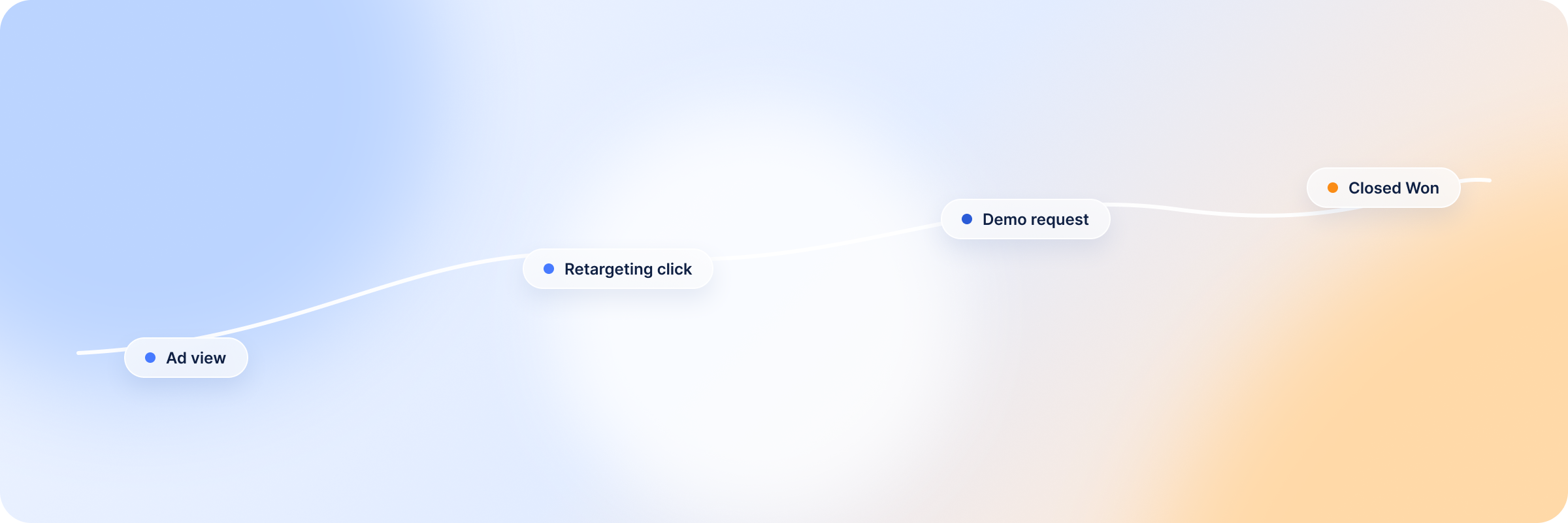
LinkedIn optimizes toward whatever you tell it a conversion is. For most B2B accounts that means a form fill, because a form fill is the only thing the browser can see. The demo that came out of it, the opportunity that followed and the deal that closed five months later all happen in a CRM that Campaign Manager has no view of.
So the campaigns get judged on cost per lead, and the delivery system learns to find more people who fill in forms. Whether any of them buy is a separate question, and LinkedIn never hears the answer.
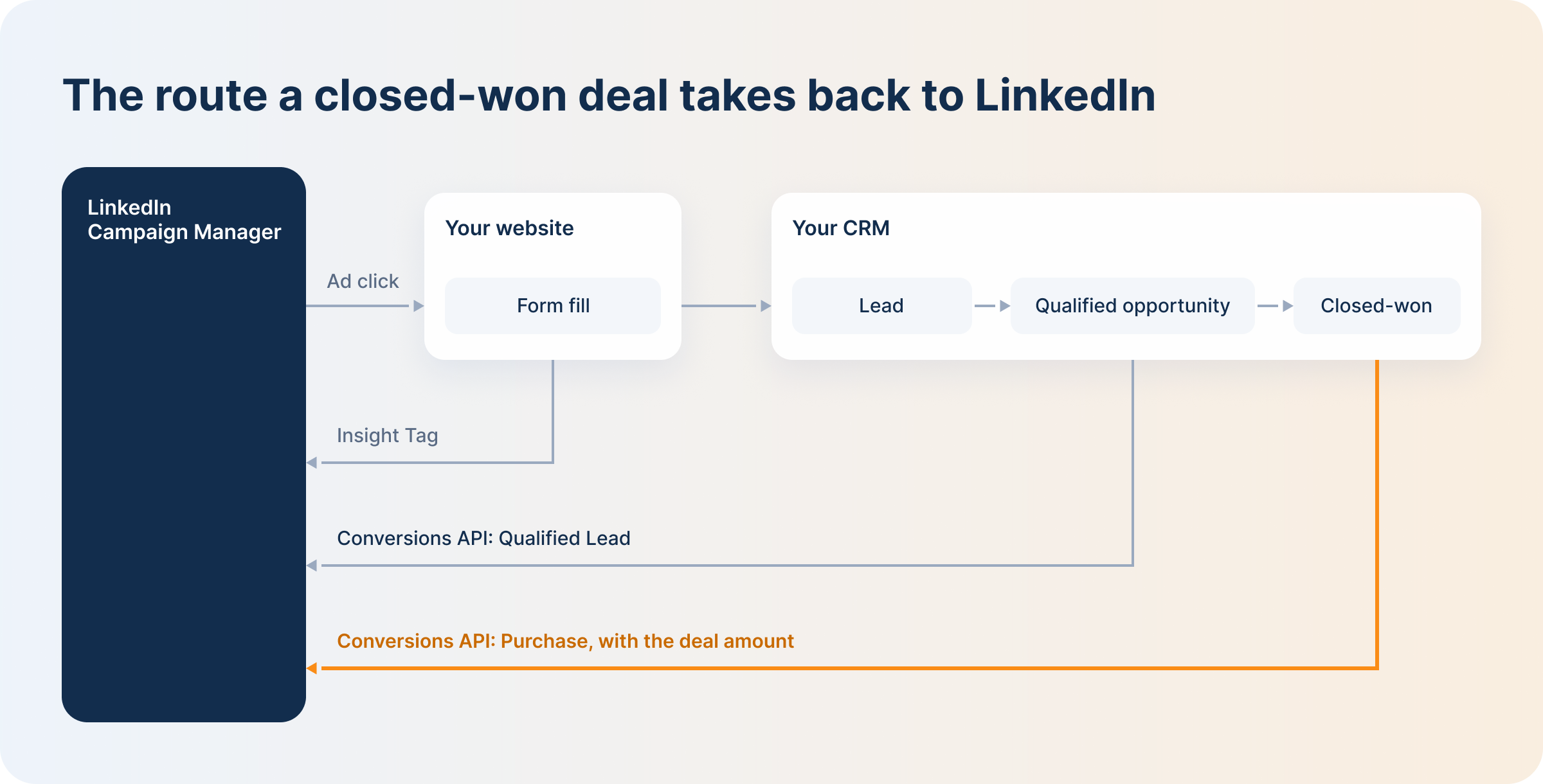
The LinkedIn Conversions API, or LinkedIn CAPI for short, is how the answer gets back. It’s LinkedIn’s official way for you to report what happened after the form: which leads your sales team accepted, which deals closed, and how much they were worth. This guide explains how it works in plain terms, how it fits with the Insight Tag you already have, what to send, how to set it up, and how DemandSense sends your CRM deals through it.
Summary: What B2B Teams Need to Know About LinkedIn CAPI
Here’s the short version.
- LinkedIn CAPI reports conversions from your systems instead of the browser. Your CRM, your server or a connected tool tells LinkedIn directly when someone converts, so an ad blocker or a declined cookie banner can’t drop the event.
- It doesn’t replace the Insight Tag. The tag still tracks what people do on your website. CAPI covers what happens afterwards, in your CRM. LinkedIn recommends running both and counts an event once when both copies share an event ID.
- It’s how closed deals get into Campaign Manager. Qualified leads, opportunities and closed-won deals can all be sent back, with the deal amount attached.
- It works with long sales cycles. Lead and purchase conversions can use an attribution window of up to 365 days, where most conversion types stop at 90.
- LinkedIn uses the data to find you better leads. Qualified Lead events sent through CAPI are what the qualified leads optimization goal learns from.
- You don’t have to build it yourself. You can code a direct integration, use a partner, or use a tool that already has your CRM data. DemandSense connected its CRM sync to the API, so closed-won deals and qualified opportunities go to LinkedIn once a day.
What Is the LinkedIn Conversions API?
The LinkedIn Conversions API is a way to report conversions to LinkedIn from your own systems instead of from the visitor’s browser. LinkedIn’s documentation calls it a server-to-server connection. In practice, your CRM, your server or a tool connected to them sends the event. LinkedIn matches the person to a member who saw or clicked your ad, and the conversion shows up in Campaign Manager next to the ones the Insight Tag records.
You’ll also see it called LinkedIn CAPI or LinkedIn server-side tracking. They all mean the same thing.
Here’s an example. Someone clicks your ad in March and downloads a guide. In May they book a demo, and in August their company signs. The Insight Tag saw the download in March. Everything after that happened in email, on calls and in your CRM, where no tag can follow. With the Conversions API you can send LinkedIn the opportunity in May and the closed deal in August, contract value included, and LinkedIn credits the campaign that started it.
There’s a second benefit. Browser tracking loses events to ad blockers, privacy settings and declined cookie banners. Events sent from your server aren’t affected by any of those, so CAPI also works as a backup for the website conversions you already track.
LinkedIn CAPI vs. the LinkedIn Ads API: What’s the Difference?
If you searched for the LinkedIn Ads API or the LinkedIn advertising API and ended up here, a quick map will help. The LinkedIn Marketing API is a family of APIs, and each one does a different job:
- Ad Campaigns and Creatives APIs create and manage campaigns. This is what people usually mean by a LinkedIn Campaign Manager API.
- Ad Analytics API is the LinkedIn Ads reporting API. Dashboards and reporting tools use it to pull performance data out.
- Lead Sync API is the LinkedIn lead gen API. It moves Lead Gen Form submissions from LinkedIn into your CRM or marketing automation.
- Matched Audiences pushes company and contact lists into LinkedIn for targeting.
- Conversions API sends results back to LinkedIn. It’s the only one of the five that tells LinkedIn what happened to a lead after it left the platform.
So the reporting API and Lead Sync take data out of LinkedIn, and the Conversions API puts data in.
LinkedIn CAPI vs. the Insight Tag: Server-Side Tracking vs. Pixel Tracking
The Insight Tag is what most people mean by LinkedIn pixel tracking. It’s a piece of JavaScript on your site, sometimes called the LinkedIn conversion tag, that records page views, button clicks and form submissions in the visitor’s browser. It is quick to install and good at what it does, and the rest of LinkedIn conversion tracking is built around it. It also stops at the edge of your website.
| Insight Tag | Conversions API | |
|---|---|---|
| Where it runs | In the visitor’s browser | On your server, in your CRM or in a partner tool |
| What it sees | Website conversions: page views, clicks, form submissions | Anything you can send: website events plus qualification, opportunities, closed deals, phone and in-person sales |
| What gets in its way | Ad blockers, cookie restrictions, declined consent banners | Weak identifiers. An event LinkedIn can’t match to a member is not attributed |
| Conversion value | Usually a fixed value set on the conversion rule | The real amount from your system, per event, with its currency |
| Setup | Paste the tag or add it through a tag manager | A direct build, a partner integration, or a tool that already holds your CRM data |
LinkedIn’s guidance is to run both, since each covers events the other misses. If you send the same event through the tag and the API, give both copies the same event ID. LinkedIn then keeps the Insight Tag event and discards the duplicate. Its documentation also asks for a separate conversion rule per data source, one for the browser and one for the server, so the two streams stay distinguishable in reporting.
What You Can Send Through LinkedIn CAPI
An event sent to the Conversions API has four parts: which conversion rule it belongs to, who converted, when, and what it was worth.
Online and Offline Conversion Events
Every event points at a conversion rule in Campaign Manager, and the rule has a type: Lead, Qualified Lead, Purchase, Sign Up, Submit Application and so on. The API accepts online events, which makes it a server-side backup for LinkedIn website conversions the tag might drop, and offline events that never had a web page at all.
The type you pick changes how LinkedIn counts. For most types only the first conversion by a member inside the window is counted. Purchase and Add to Cart are counted every time, which is the behavior you want when one account closes two deals in a year.
The Identifiers LinkedIn Matches On
LinkedIn has to connect the person in your event to a member who saw an ad, so every event needs at least one identifier. The main options are a SHA-256 hashed email, LinkedIn’s first-party click ID, an IP address, a Google advertising ID, or the person’s first and last name. Job title, company name and country can ride along with the name to tighten the match.
LinkedIn recommends sending the hashed email together with the click ID. The click ID is the `li_fat_id` parameter LinkedIn appends to your landing page URL when someone clicks an ad. If you capture it on the form and store it on the contact, you can send it back months later with the deal.
Events with thin identifiers still get accepted, but fewer of them match. Campaign Manager flags this with a Low Match Rate label under the conversion’s status, and the fix is nearly always to send more fields per event.
LinkedIn Conversion Value and Timestamps
Each event can carry a conversion value, sent as an amount and a currency code. For a Purchase event fed from closed-won deals this is the deal amount, and it is what makes return on ad spend and Total Conversion Value in Campaign Manager mean something. A count of conversions treats a $4,000 deal and a $90,000 deal as the same result.
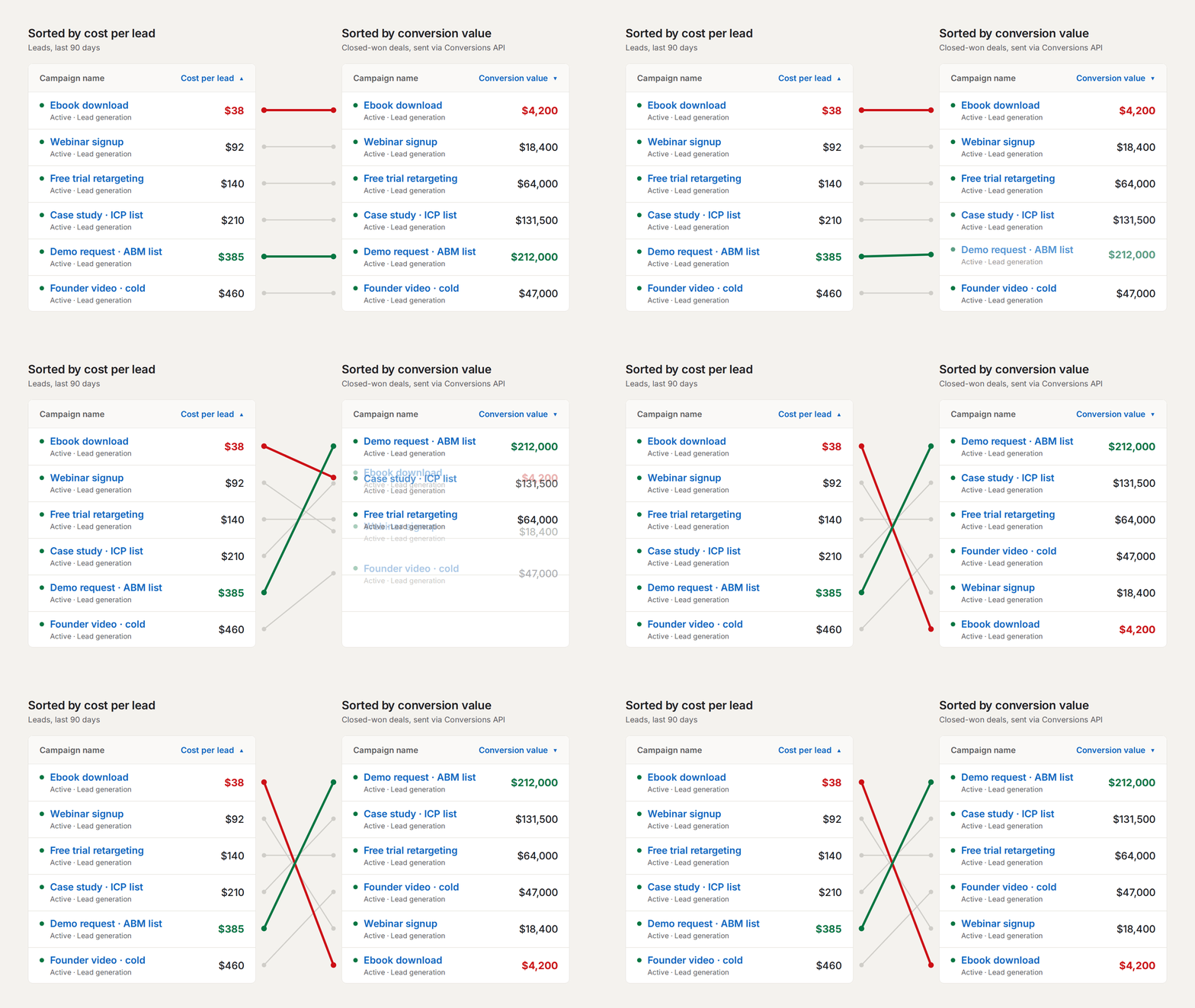
Illustrative campaigns and figures. The cheapest cost per lead and the most closed-won value are rarely the same campaign, and only the second ranking needs conversion value from your CRM.
The timestamp is when the conversion happened, which for CRM events means the close date or the stage-change date rather than the moment of upload. LinkedIn rejects events with a timestamp more than 90 days old, so a backfill of last year’s deals won’t go through. After an event is accepted, LinkedIn takes up to 24 hours to ingest it and up to another 48 to finish reporting, so give a new integration three days before you decide something is missing.
Attribution Windows for Long Sales Cycles
According to LinkedIn’s Conversions API FAQ, most conversion types can be attributed up to 180 days back in total: the event can be up to 90 days old when it arrives, and the rule can look back up to 90 days from there. For the types B2B teams care about most, including Lead, Marketing Qualified Lead, Sales Qualified Lead, Qualified Lead, Purchase and Submit Application, the conversion rule can be set to a 180-day or 365-day window instead.
A deal that closes seven months after the first ad click falls outside a 90-day rule and gets attributed to nothing. Choosing the right conversion type and widening the window is what keeps those deals visible, and it changes how LinkedIn view-through attribution reads too, since most B2B ad exposure never produces a click.
Why LinkedIn CAPI Matters More in B2B
In ecommerce, server-side tracking mostly recovers purchases the pixel missed. In B2B the purchase was never on the website. The sale happens in a CRM, months later, and often involves people who never filled in the original form, which is why LinkedIn Ads tracking that stops at the form tells you so little about revenue.
LinkedIn puts the typical B2B sales cycle at six months to a year. It also reports that early advertisers on the Conversions API saw cost per action drop by 20% and conversions attributed to LinkedIn rise by 31%. Those are a vendor’s numbers about its own product, but the direction makes sense, since LinkedIn can only credit the conversions it hears about.
Optimizing for Qualified Leads
The second reason is what LinkedIn does with the data. In April 2025 LinkedIn added a qualified leads optimization goal for campaigns using the Lead Generation objective. It learns from Qualified Lead events sent through the Conversions API and steers delivery toward people who resemble the leads your sales team accepted, which is a better target than people who resemble everyone who downloaded the ebook.
The requirements are specific. The conversion rule has to use the Qualified Lead type. Qualified lead data has to be shared with LinkedIn within 30 days to be included in optimization. LinkedIn recommends at least five qualified leads every two weeks and says the goal needs a two-week learning phase. In LinkedIn’s early results, cost per qualified lead came down by up to 39%.
For an account where the average cost per lead on LinkedIn looks fine and pipeline doesn’t, this is the most direct lever the platform offers. It only works if qualification data arrives on a regular schedule.
Audiences Built From Conversions
CAPI events can also seed audiences. Once a conversion rule has matched at least 300 members, you can build a retargeting audience from it or use it as the source for a predictive audience. That gives you two useful lists: one of people who became qualified leads, and one of closed customers you can exclude so the budget stops following them around. Both work the same way as the other LinkedIn Custom Audiences you already run.
How to Set Up the LinkedIn Conversions API
There are three routes, and they differ mostly in who does the work.
A direct integration. Your developers create an app in the LinkedIn Developer Portal, request the Conversions API product, and authenticate with the `rw_conversions` and `r_ads` permissions through someone who has a role on the ad account. From there the build creates conversion rules, associates them with campaigns, and streams events, up to 5,000 per batch request. You also own everything around it: hashing emails, storing click IDs, retrying failures and monitoring rejections.
A partner integration. LinkedIn lists partners including Google Tag Manager’s server-side container, Zapier, HubSpot, Adobe and Tealium. These take the API work off your hands, though you still have to decide which events to send and keep the mapping current. A common agency workaround is one Zap per CRM lifecycle stage. It works, and it is also a set of automations somebody has to remember exists when the pipeline stages get renamed.
A tool that already has the data. If a platform is already connected to both your CRM and your LinkedIn ad account, sending deals back is a small addition. This is the route DemandSense took, covered in the next section.
Whichever route you pick, the Campaign Manager side follows the same order:
- Create a conversion and choose the Conversions API as its source.
- Pick the conversion type that matches the event. This decides the counting rule and which attribution windows are available.
- Set the click and view windows against your real sales cycle, and choose the attribution model.
- Associate the conversion with the campaigns it should report on.
- Send events, then watch the status move from Unverified to Active once LinkedIn receives valid data.
Common LinkedIn CAPI Errors
Most failed integrations fail in one of a handful of ways.
| What you see | Usual cause | Fix |
|---|---|---|
| Events rejected with “Invalid conversion time” | The timestamp is more than 90 days old, or in the wrong format | Send deals soon after they close, and send the time in milliseconds |
| Low Match Rate on the conversion | Events carry one weak identifier | Add hashed email, the click ID, and name with company, title and country |
| Conversions counted twice | The same event arrives from the Insight Tag and the API without a shared event ID | Send a matching event ID from both sides |
| Closed deals missing from reports | The rule’s window is shorter than the sales cycle | Use a Lead, Qualified Lead or Purchase type and set a 180-day or 365-day window |
| Nothing in reports the day after launch | Normal processing time | Allow up to 72 hours before troubleshooting |
How DemandSense Connects Your CRM to the LinkedIn Conversions API
For most B2B teams, the events worth sending live in the CRM and the ad account lives somewhere else. Getting one to the other usually means a developer’s time or a stack of Zaps.
DemandSense already syncs with your CRM for revenue attribution and already holds the connection to your LinkedIn ad account, so it connected the two to LinkedIn’s Conversions API. In the app it is a tab under Settings.
There are two streams, each with its own on and off toggle:
- Closed-Won to Purchase. Won deals go to LinkedIn as Purchase conversions. The value is the deal amount, sent in USD, and the timestamp is the close date.
- Qualified Opportunity to Qualified Lead. Qualified opportunities go to LinkedIn as Qualified Lead conversions. This one is count-based with no value attached, and the timestamp is the opportunity’s create date. It is the event type the qualified leads optimization goal reads.
Each stream maps to a conversion rule in Campaign Manager, so the results show up next to the conversions you already track. Every event goes out with six identifiers: hashed email, first name, last name, company, job title and country.
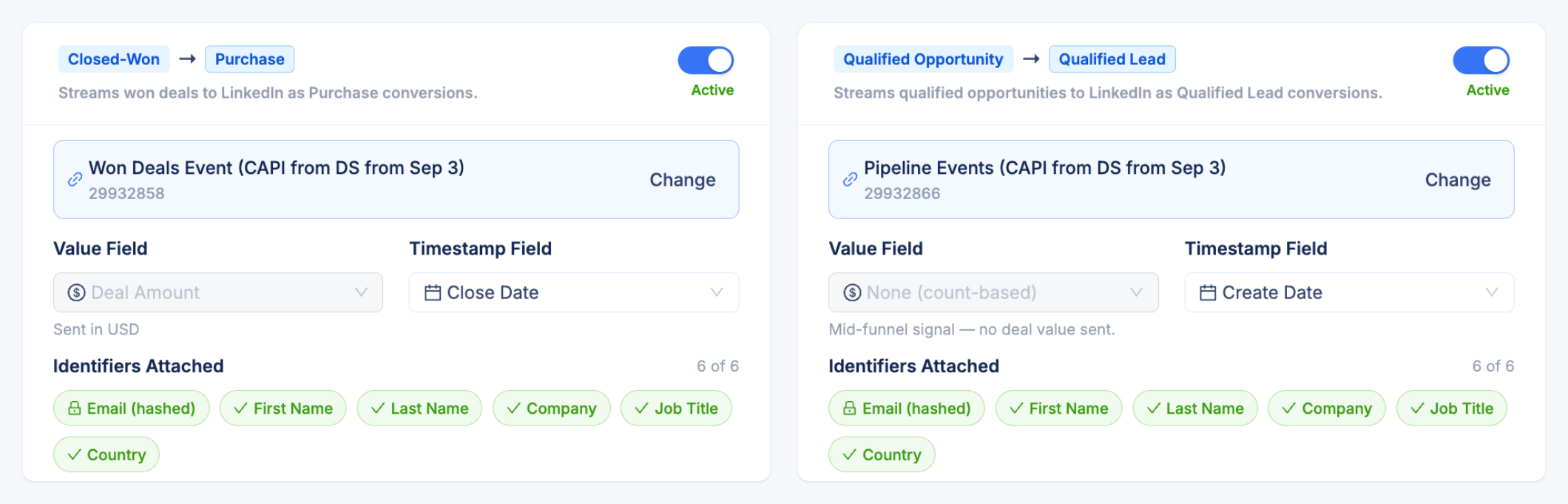
Events sync once a day. A Delivery Monitor in the same tab shows how many events were sent, how many LinkedIn accepted and rejected, and a list of recent errors with the reason for each. If LinkedIn refuses an event over a bad timestamp, that’s where you’ll see it.
Switching it on takes three steps:
- Reconnect your LinkedIn ad account under Settings → Ad Connections. CAPI needs a permission that earlier connections didn’t request, and LinkedIn shows you the extra scope before you approve it.
- Open Settings → CAPI and turn on the streams you want.
- Point each stream at a conversion rule in Campaign Manager.
You need a CRM connected in DemandSense, since that is where the deals come from. The streams go to LinkedIn’s Conversions API only.
What Happens Before the Deal Closes
CAPI tells LinkedIn about a deal once it exists. For a team closing twenty to fifty deals a year, that comes to a few Purchase events a month, each arriving long after the campaigns that influenced it ran. It is the right data to send, but too sparse and too late to run next week’s budget on by itself.
The rest of DemandSense is built for the months in between. It reads LinkedIn engagement, visits to your site and movement in your CRM side by side, so you can see which campaigns are reaching companies that go on to open opportunities while those campaigns are still running. If you want to track LinkedIn ad influence across a buying journey with several people in it, that happens at the account level, in LinkedIn pipeline attribution with influence thresholds you set yourself. When a deal closes, the closed-won data confirms the early read, and the Conversions API passes the same result to LinkedIn.
You can try all of it on your own campaigns, free for 30 days, with no card needed, at demandsense.com.
FAQ
Is It the LinkedIn Conversion API or the LinkedIn Conversions API?
LinkedIn’s name for the product is the Conversions API, plural, and CAPI for short. “LinkedIn conversion API” is a common way to search for it and refers to the same thing. Some guides also call it LinkedIn server-side tracking.
Does LinkedIn CAPI Replace the Insight Tag?
No. The Insight Tag still handles website conversions, retargeting audiences built from page visits, and website demographics. CAPI adds the events the tag can’t see and backs up the ones it might drop. LinkedIn recommends running both, with a shared event ID on anything sent through both.
Do You Need a Developer to Use the LinkedIn Conversions API?
For a direct integration, yes. A partner integration or a platform that already connects your CRM and ad account removes the build, though someone still needs to decide which CRM stages count as a qualified lead and a purchase.
How Long Do LinkedIn CAPI Conversions Take to Show Up in Campaign Manager?
Up to 72 hours. LinkedIn takes up to 24 hours to ingest an event and up to 48 more to complete reporting. With DemandSense, add the daily sync on top of that.
Can You Send Old Deals Through the LinkedIn Conversions API?
Only recent ones. LinkedIn rejects events with a conversion time more than 90 days in the past. Inside that limit, a conversion rule with a 365-day window can still attribute the deal to ad activity from up to a year before it closed.
What Is a Good Match Rate for LinkedIn CAPI?
LinkedIn doesn’t publish a target, and the rate depends on which identifiers you send and how many of your buyers use the same email at work and on LinkedIn. Campaign Manager shows a Low Match Rate warning when a conversion needs more identifiers. Sending hashed email with the click ID, plus name, company, title and country, is the combination LinkedIn’s documentation points to.
Does the LinkedIn Conversions API Work With HubSpot and Salesforce?
Yes, by more than one route. LinkedIn’s own CRM sync and partner integrations cover some setups, and any CRM can feed the API through a direct build or a connected platform. What matters is that the event carries a usable identifier and a timestamp from the last 90 days.