

Competitor ad research usually happens the week a campaign brief is due. Someone opens a rival’s LinkedIn page, screenshots four ads, drops them in a doc, and nobody opens that doc again. Three months later it happens again with different screenshots.
The research isn’t wrong. It has no memory, which is the frustrating part, because LinkedIn has one. The Ad Library keeps every ad for a year after it last ran and lets you search by date range. The history you’re missing is sitting there, and almost nobody opens it.
What follows is the version that holds up: where to look, what each source will and won’t give you, which competitor monitoring tools earn their place, and how to check often enough that the record means something.
What Competitor LinkedIn Ads Can Tell You
Whatever a competitor is paying to run this week is their strategy as it exists in market, before any of it reaches a case study or a positioning deck. Read their ad copy, creative and offers and you can see:
- Which messages they’re testing right now
- What they’re willing to trade for a contact detail — a demo, a report, a free tool
- Which formats they keep coming back to
- Roughly how long a given message has survived
That last one carries more weight than people give it. Ad spend is a running vote of confidence, and a campaign nobody has killed in four months has been through more scrutiny than anything on their homepage.
What it won’t give you is any read on your own buyers. Competitor ads tell you what the category believes, not what your customers want, and the two come apart more often than you’d think. Pair the ad data with competitor content analysis — the topics they publish for free versus the ones they pay to put in front of people — and the gap between the two is usually where the interesting question is.
Where to Find Competitor LinkedIn Ads
Three sources, each with a different shape of blind spot.
LinkedIn Ad Library
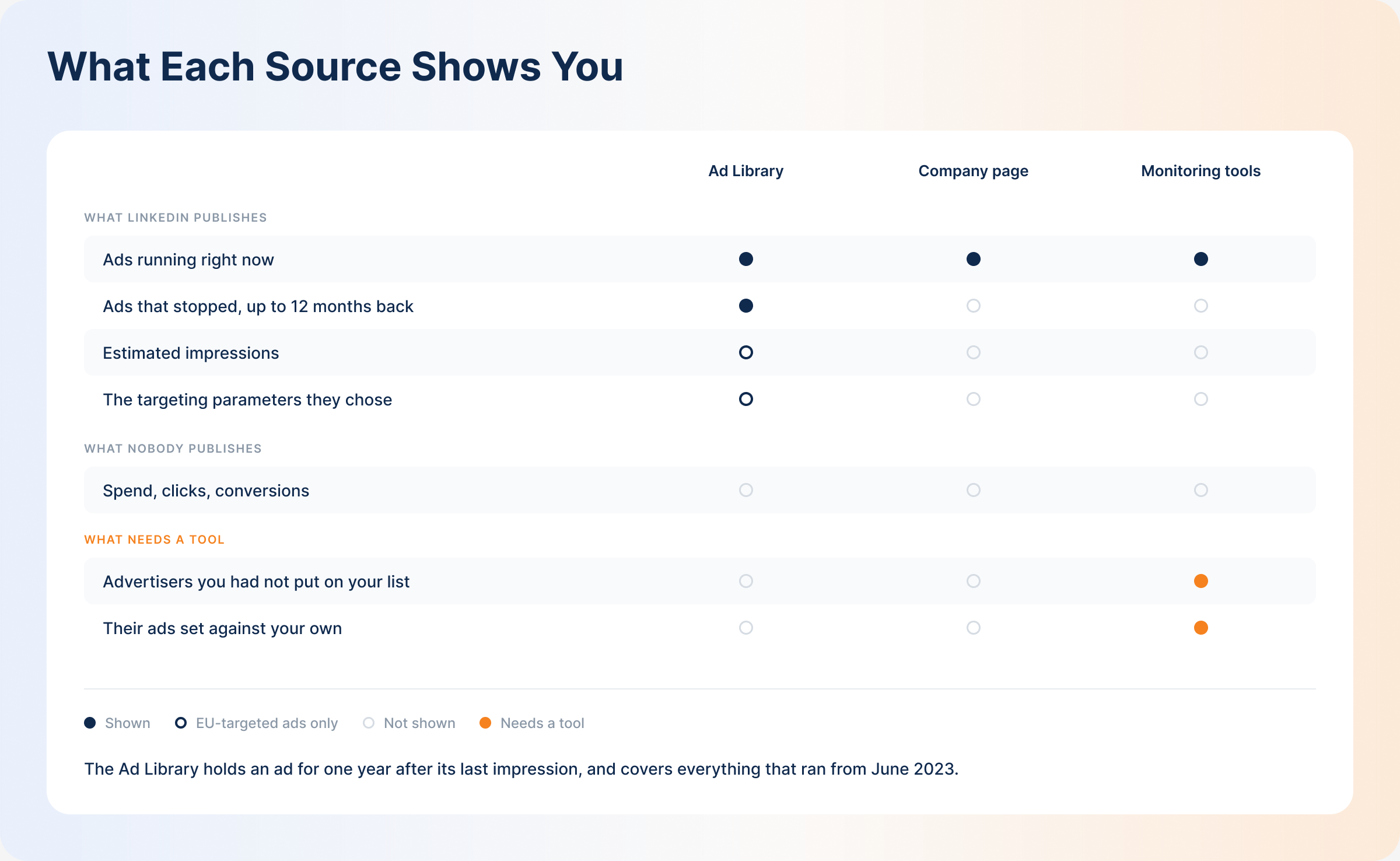
The Ad Library is LinkedIn’s own version of what Meta and Google already offer, and it is more capable than most people who have opened it once realise. You can search by advertiser name, but also by payer name, by keyword, by country, and by date range. It holds everything that ran from June 2023 onward, and an ad stays in the library for a full year after its last impression.
That last detail is the one worth acting on. Stopped campaigns do not vanish. You can pull a competitor’s ads from last spring, see what they’ve since dropped, and do it on your first afternoon rather than waiting a year to build the same picture yourself.
What you get for any ad is the creative and copy, the format, the advertiser and payer, and whether the ad is restricted. Ads targeted into the EU carry considerably more, because the DSA requires it: estimated total impressions with a country-by-country breakdown, the dates the ad ran, and the targeting parameters the advertiser chose, each flagged as inclusion or exclusion. You can even filter a search by impression range.
What no source publishes anywhere is spend, clicks or conversions. And you are still searching one advertiser at a time, which is fine for three competitors and unworkable for fifteen.
Competitor Company Pages
The same ads are reachable from a competitor’s company page — open it, click Posts, then the Ads tab. Nothing new is revealed this way. It just saves you a search when you’re already on their page reading something else.
Competitor Ad Tracking Tools
One-name-at-a-time research holds up while you’re watching a handful of known rivals. It falls apart the moment you want the category view: everyone bidding for your buyer’s attention, including the companies you haven’t thought to classify as competitors.
Dedicated competitor monitoring tools exist for that gap. DemandSense’s free Ad Strategy Scanner shows you the top-performing LinkedIn ads in a category and holds your own creative up against the hooks and formats that keep appearing in ads still running. Use it before you brief, when the question is what the category is converging on.
The free Competitor Analyzer works the other way round. Give it your website and it works out your industry, then comes back with about six companies it has found advertising in your niche. That list is worth reading before you pick anything, because it tends to surface at least one advertiser you would not have put on your own shortlist. Choose two, and it emails you a report in roughly half an hour setting your LinkedIn ads against theirs: what each of you sells and to whom, the tone and proof you lean on, your calls to action, visual style and content mix. It closes on the messages your category has already saturated and the position nobody has claimed. No access to your ad account needed.
Then there are the broad competitive intelligence platforms. Klue, Crayon and Contify all treat LinkedIn ads as one signal inside a much larger practice covering pricing pages, site changes and content. If somebody at your company already runs that program, ad monitoring should live inside it rather than beside it. If LinkedIn ads are the whole question, these are more machine than you need.
How to Monitor Competitor LinkedIn Ads
Finding an ad once is easy. Monitoring is what happens on a schedule.
- Build a shortlist. Five to ten companies. Direct rivals first, then anyone your buyers mention in a sales call even if you wouldn’t call them a competitor.
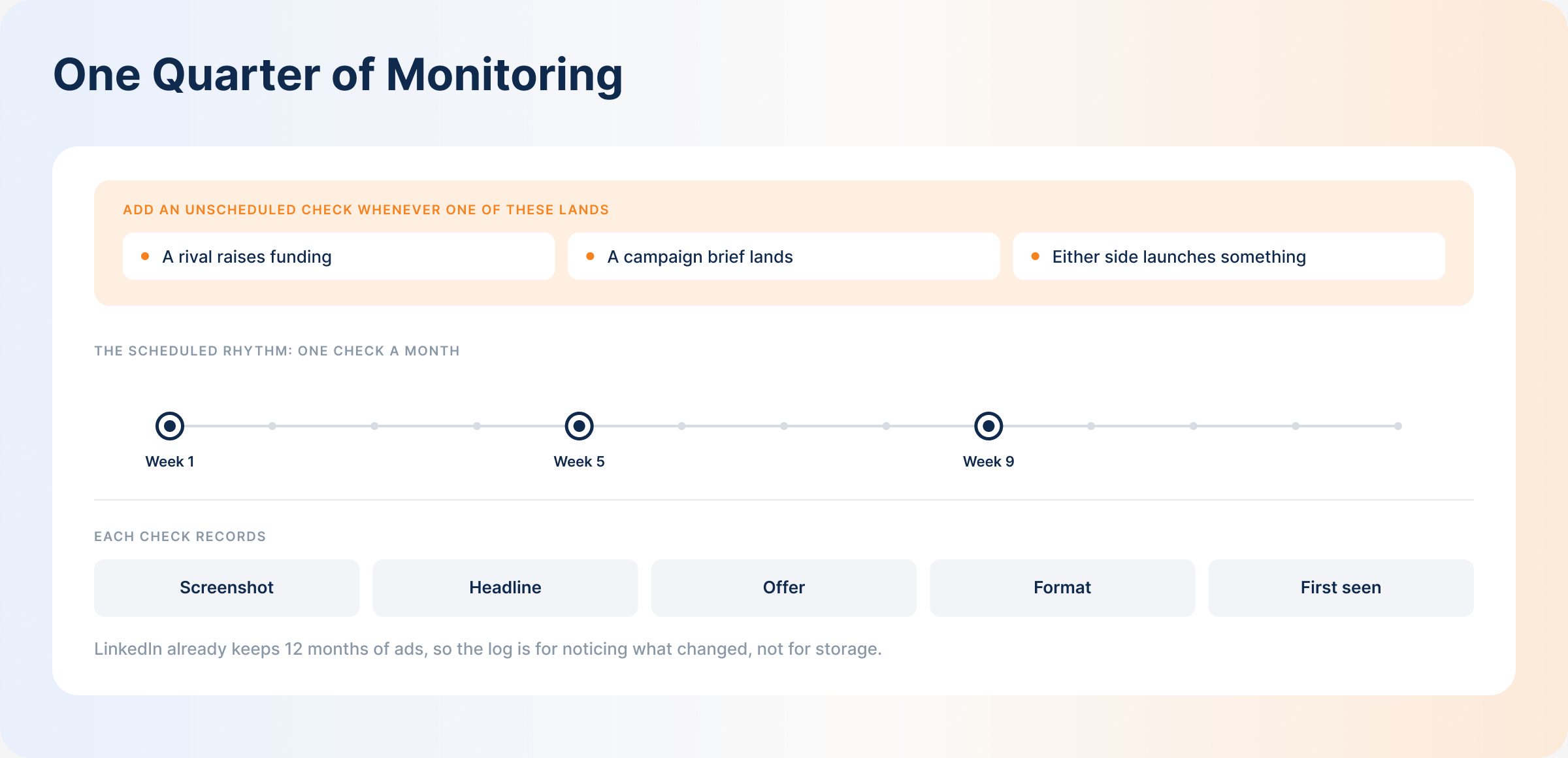
- Set a cadence. Monthly suits most B2B categories. Tighten it when something is happening — a launch, a competitor’s funding round, the fortnight before you brief.
- Check each advertiser. Run the names through the Ad Library or their company pages. Note what’s new, what’s gone, and what has survived since last time.
- Log what you find. Screenshot, headline, offer, format, the date you first saw it. A spreadsheet is enough. LinkedIn holds the ads; your log holds your reading of them, and that second thing is what you’ll reuse.
- Read the log, not the ads. Every quarter or so, ignore individual campaigns and look at the file as a whole. One competitor changing tack is noise. Four of them moving the same direction is not.
On your first pass, don’t start from today. Use the date-range filter to walk back through the past year for each name on the list, and you open with twelve months of history instead of waiting twelve months to accumulate it.
Cadence beats tooling here, and it isn’t close. A monthly check in a spreadsheet somebody owns will out-perform an elaborate setup that nobody has opened since it was configured.
What to Analyze in Competitor LinkedIn Ads
With the ads in front of you, four things repay attention:
- Messaging and positioning. What is the ad claiming, and who is it obviously talking to? Copy moves faster than a homepage does, so it tends to be the more honest statement of where a company thinks it stands.
- Offers and lead magnets. The thing behind the click tells you which funnel stage the campaign was built for.
- Creative formats. Whichever format a competitor keeps returning to has probably earned it.
- CTAs. “Book a demo” and “Download the guide” are asking for very different levels of commitment from the same person.
That’s the fast read. The fuller signal set — campaign frequency, landing pages, and what to change in response to each one — is the subject of our guide to running a LinkedIn competitor analysis.
How to Use Competitor Ad Insights in Your Own Campaigns
None of this counts for anything until it changes a brief.
Find Messaging Gaps
When every competitor leads with the same claim, you’ve learned two things: the message works, and the territory is crowded. The opportunity is in what none of them say. If your ICP cares about something that appears in zero competitor ads, you have either found an angle or found out why nobody bothers. Both are worth knowing, and one test will tell you which.
Turn Patterns Into Creative Tests
A hook that shows up across four competitors and survives six months is evidence of something. Not proof, but evidence. Copying the creative gets you a worse version of their ad; testing the structure underneath it — the format, the shape of the hook, the type of offer — gets you something you can actually learn from.
Improve Offers and CTAs
If the category has drifted toward low-commitment offers while you’re still opening with “book a demo,” the mismatch is in the funnel stage rather than the copy. That’s a test, not an edit.
How Competitor LinkedIn Ads Research Helps ABM Campaigns
ABM narrows the question usefully. You stop asking what a competitor is running and start asking what they’re running at the forty accounts you care about.
Knowing a rival’s ads are reaching your priority accounts, and knowing what those ads say, changes how you read a stalled deal. Set that against your own account engagement data, and the accounts going quiet start to separate into two groups: the ones being actively courted by someone else, and the ones that were never really engaged. Those need different responses, and without the competitor half of the picture they look identical.
Manual Monitoring vs Competitor Ad Tracking Tools
| Method | How it works | What you can learn | Limitations | Best for |
|---|---|---|---|---|
| LinkedIn Ad Library | Search by advertiser name, payer, keyword, country or date range | Live and stopped ads back to June 2023, copy, format; for EU-targeted ads also impressions, run dates and targeting parameters | No spend, clicks or conversions; most detail is EU-only; one advertiser at a time | Quick checks on a specific, known competitor |
| Competitor company pages | Manually open each competitor’s page and check the Ads tab | Same as the Ad Library, without a separate search step | Same limits, plus only works for competitors you already track | Spot-checking while already on a competitor’s page |
| DemandSense Ad Strategy Scanner | Free tool that surfaces top-performing LinkedIn ads across your category | Format and offer patterns across multiple competitors at once, benchmarked against your own ads | Category-level patterns, not a single-advertiser deep dive | Research before briefing a new campaign |
| DemandSense Competitor Analyzer | Free tool that identifies your industry, suggests around six advertisers in your niche, then emails a report on the two you pick | How your ads compare to named rivals on messaging, CTAs, visual style and content mix, plus the positions nobody in the category has claimed | Two competitors per report on the free tier, delivered by email rather than on screen | Going deep on your two closest rivals |
Common Mistakes When Monitoring Competitor LinkedIn Ads
- Checking when somebody remembers. Monitoring without a fixed date becomes monitoring that stopped in March. Put it on a calendar and give it a name next to it.
- Never revisiting the shortlist. The ad that should worry you tends to come from a company you haven’t yet decided is a competitor. Rebuild the list once a quarter.
- Assuming the history is gone. Plenty of teams screenshot frantically because they think a paused ad disappears. It doesn’t, not for a year. The thing you actually lose is your own reading of it: what you thought when you saw it and what you changed as a result.
- Never touching the date filter. Searching only the default view shows you today. Bracketing a date range shows you a competitor’s arc, which is where the useful reading is.
- Skipping past how long an ad has run. Duration is the cheapest signal available. For EU-targeted ads the run dates are published outright; elsewhere you can bracket them with a date-range search. A four-month-old campaign has survived a review that a two-week-old one hasn’t faced yet.
- Expecting the tool to reach the conclusion. Competitor monitoring tools collect, group and surface. Deciding which gap deserves next quarter’s budget is still a judgement call, and it needs someone’s time booked to make it.
Best Competitor LinkedIn Ads Monitoring Tools to Consider
| Tool | What it does | Best for |
|---|---|---|
| LinkedIn Ad Library | Native and free; searches live and stopped ads back to June 2023 by name, keyword, country or date range | Checking one known competitor, and backfilling a year of their history in an afternoon |
| DemandSense Ad Strategy Scanner | Free tool that surfaces category-wide ad patterns and benchmarks your ads against them | Research before briefing a campaign, category-level pattern spotting |
| DemandSense Competitor Analyzer | Free tool that suggests advertisers in your niche, then emails a report comparing your LinkedIn ads to the two you choose, ending on the tests worth running | A close read on your two closest rivals, and a way to find rivals you had not listed |
| General competitive intelligence platforms (e.g. Klue, Crayon, Contify) | Broader competitor tracking across websites, pricing, and content, with ad monitoring as one input among many | Teams already running a wider competitive intelligence program |
From Competitor Research to a Repeatable LinkedIn Ads Monitoring Process
The teams who get something out of this run it on a schedule, write down what they see, and go back to the file rather than to their memory.
Six months in, your file answers faster than a fresh search does. The Ad Library will tell you a competitor ran something in March if you go and ask it. Your log tells you that you noticed it in March, what you made of it then, and what you changed as a result. The raw history is public; the reading of it is yours, and it’s the reading you reuse when the next brief lands.
Most companies doing this well aren’t treating it as a LinkedIn ads task at all. It sits inside a wider habit of watching competitors online — organic posts, who they’re hiring, what changed on the pricing page — and the ad check is one more line on an existing list rather than a new chore for somebody to forget.
Set what you find against your own LinkedIn ad performance and attribution, and the competitive picture stops being interesting and starts being useful. You’ll know what the category is saying and which of your own campaigns is moving pipeline, and you need both numbers in the same room to make a decision worth making.
Frequently Asked Questions
What Does the LinkedIn Ad Library Show?
For any ad: the creative and copy, the format, the advertiser and payer, and whether the ad is restricted. It covers ads that ran from June 2023 onward, and keeps each one for a year after its last impression, so stopped campaigns stay searchable. Ads targeted into the EU show more, as the DSA requires: estimated impressions with a country breakdown, the dates the ad ran, and the targeting parameters chosen. Spend, clicks, and conversions are never shown.
Is it legal to look at competitors’ LinkedIn Ads?
Yes. LinkedIn built the Ad Library for this, and a competitor’s company page is public. There’s no login to get past and nothing to circumvent.
Do free LinkedIn Ads monitoring tools show inactive competitor ads?
The Ad Library does, for a year after an ad’s last impression. Set a date range covering the period you care about and paused campaigns come back in the results alongside live ones. Third-party tools vary, and many only report what is currently running, so check before you assume a gap in their data means a gap in the advertiser’s activity.
Can I see inactive competitor LinkedIn Ads?
Yes, within limits. The Ad Library retains an ad for twelve months after it last served, and covers everything from June 2023 onward. Anything older than that window has gone, which is the real argument for keeping your own log: not because LinkedIn deletes quickly, but because a year is shorter than the life of most positioning decisions.
Why do some competitor ads not appear in the LinkedIn Ad Library?
Usually one of four things. The ad last ran more than a year ago. The advertiser is running from a different LinkedIn Page than the one you searched. The ad is restricted, in which case the preview and advertiser name are withheld by law. Or it’s a format that doesn’t surface reliably in a name-based search, with thought leader ads posted from personal profiles the common case.
How often should you check competitor LinkedIn Ads?
Monthly is right for most B2B categories, where creative turns over slowly. Move to biweekly around a launch, a competitor’s funding announcement, or the weeks before you brief. The interval matters less than whether it’s fixed and whether somebody owns it. Check irregularly, and you get a series of unrelated snapshots, which is roughly where most teams already are.