
You already know that B2B buyers rarely convert after the first interaction. They need time to research and find reasons to trust you before committing. And with so many options floating online, it’s easy for them to forget about you. This is where LinkedIn retargeting comes in.
LinkedIn Retargeting lets you re-engage people who have already interacted with your company, but haven’t converted. It could be website visitors, contacts in your CRM, or dream companies. You build tailored campaigns to move these people down the buying funnel and finally get them to convert.
It is less awkward than talking to cold audiences because you talk to people who already have some interest in your business. However, you can lose them very quickly if you don’t get your LinkedIn ads optimization strategy right.
This article will guide you on everything you need to know about LinkedIn retargeting and how to build the right audience for your retargeting campaign.
How LinkedIn Retargeting Works
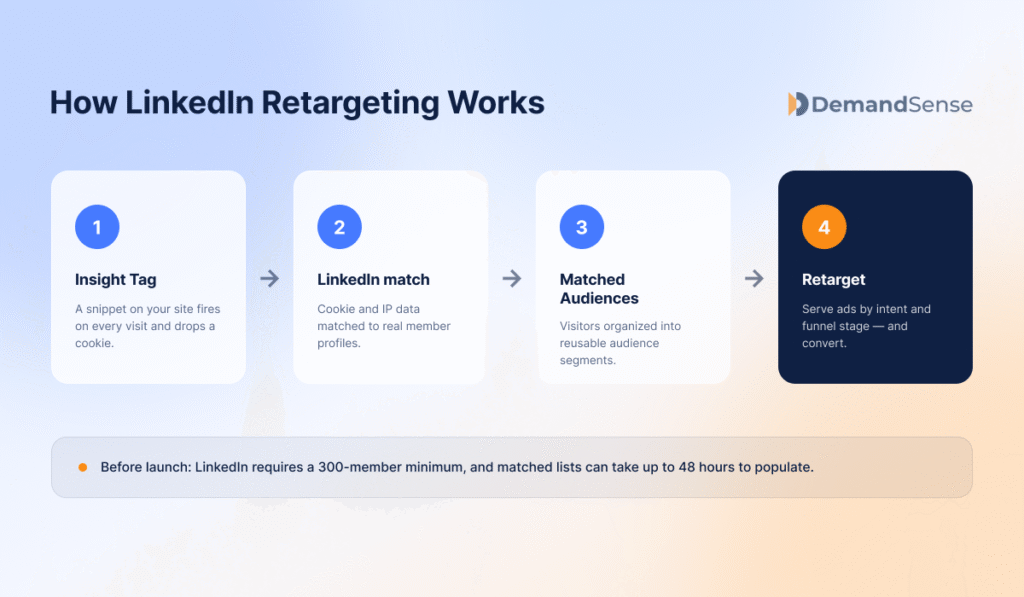
It all starts with LinkedIn Matched Audiences and the Insight Tag. The Insight Tag is a unique code you add to your website’s footer. So when someone visits your website, the tag gathers details (IP address, time on page, activities on the page) using cookies. LinkedIn then matches this information to profiles on the platform to identify your visitors. It can identify location, job title, and seniority.
After identification, use LinkedIn Matched Audiences to organize the list into audience segments you can use for campaigns. The segments could be website visitors, contact audiences, or company audiences. It may take up to 48 hours for your list to be ready.
Most marketers struggle to meet the 300-member strict minimum set by LinkedIn. If you are going for a niche category, it may take a while for the list to populate. You can try extending your time frame or grouping visitors from similar pages together to get more members.
Let’s also not forget about the current privacy restrictions that make it difficult for the Insight Tag to track visitors. To recover the conversions the tag misses, pair it with the LinkedIn Conversions API, which sends them server to server.
Types of LinkedIn Retargeting Audiences
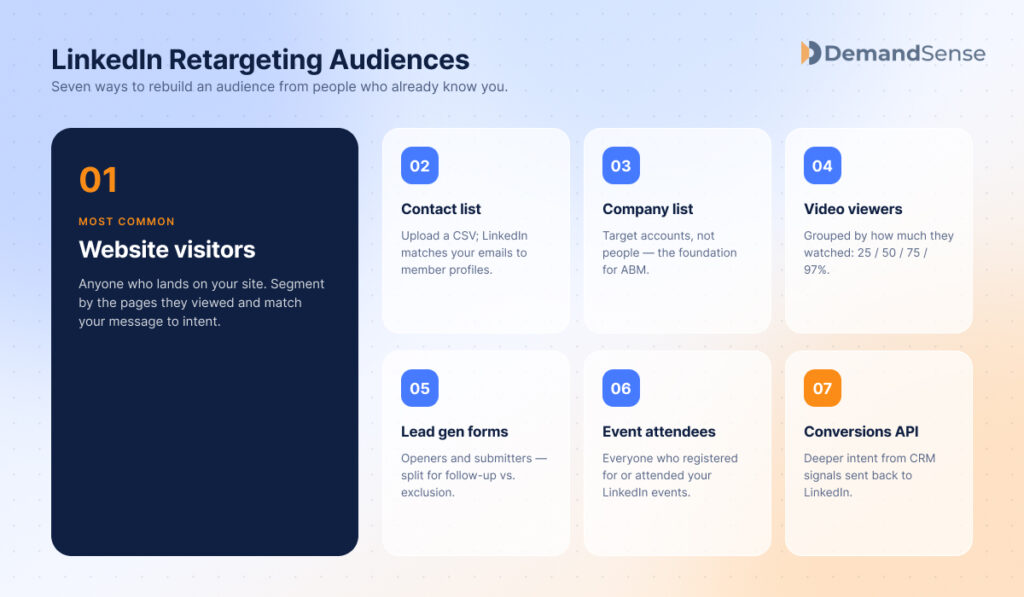
Before you launch your retargeting campaign, you must first find the audiences you want to reach. The most basic audience categories include:
| Audience type | What it captures | When to use it |
|---|---|---|
| Website visitors | People who have visited your website, grouped by the pages they viewed and the actions they took (via the Insight Tag). | Activate campaigns based on intent level — for example, pricing and demo page visitors are high intent and can get more direct messaging. |
| Contact list audiences | Individuals you upload as a CSV, which LinkedIn matches to member profiles (use professional emails; add company/title to improve match rate). | Re-engage past leads or follow up on inactive ones after outbound campaigns. |
| Company list audiences | Companies (not individuals) matched to their LinkedIn Pages; layer with job title and seniority to reach key stakeholders. | Account-Based Marketing — target high-value accounts and reach multiple stakeholders across long sales cycles. |
| Video viewer audiences | People who watched your LinkedIn video ads, grouped by how much they watched (25%, 50%, 75%, 97%). | Separate curiosity from real intent and retarget by how engaged each viewer was. |
| Lead Gen Form audiences | People who opened or submitted your LinkedIn lead gen forms. Openers are still high intent; submitters are converted leads. | Bottom-of-funnel campaigns — nurture openers, and exclude submitters so you don’t re-pitch converted leads. |
| Event attendees | People who registered for or attended your LinkedIn events (past or upcoming events hosted by your Page). | Pre-event reminders and teasers, plus post-event follow-up with recordings, slides, and next steps. |
| Conversions API (CAPI) audiences | Audiences built from online and offline data sent directly from your CRM to LinkedIn through the Conversions API. | Retarget on deeper intent signals — especially useful when your sales process spans both offline and online. |
1. Website visitors
Website visitors are the most common retargeting audience. These are people who have visited your website. You can group them by actions and interests, then send relevant messages that match where they are in their buying journey. Once you have the Insight Tag installed on your website, the setup is easy.
- Go to Plan and select Audiences.
- Click Create Audience, then select Matched Audiences.
- Select Website, then click Next.
- Name your audience and select your time range (lookback window).
- Enter the URL and choose from:
- Equals: Use this to target visitors of the exact URL page you enter.
- Starts with: Includes all pages starting with whatever URL you enter.
- Contains: This targets visitors of pages whose URL strings contain similar keywords.
- Use the And also button below the URL to retarget users who both visit a page URL and also visit another page with the URL you specify.
- Add more URLs and click Save.
Use this when you want to activate campaigns based on intent levels. For example, people who visit your pricing and demo pages are high-intent audiences. This lets you adjust messaging based on how close someone is to converting.
2. Contact list audiences
These are audiences you get from your existing contacts. You upload a CSV file of all the individuals you want to reach, and LinkedIn matches them to profiles. For higher match rates, ensure you add the correct email addresses (professional emails). If you happen to know your target’s company name or job title, add them just in case the email address does not match. Trust me, email mismatch is the number one cause of low match rates when it comes to contact audiences.
Once your CSV file is ready:
- Go to Plan and select Audiences.
- Click Create Audience, then select Matched Audiences.
- Select Company/Contact, then click Next.
- Name your audience, select List Type, then Select List. You’ll be prompted to upload from your computer.
- Upload the list and wait for match processing (24–48 hours).
- Apply audience to a campaign with exclusion of existing customers.
Use contact list audiences when you want to re-engage past leads or follow up on inactive ones after outbound campaigns. You can follow these same steps when setting up company list audiences.
3. Company list audiences
This is the foundation for successful Account-Based Marketing (ABM) campaigns. It is used to target companies instead of individuals. Once you identify the companies you want to reach, LinkedIn matches them against the ones on the platform to find them. You should layer your search with basic filters like job title and seniority, to ensure you only reach key stakeholders within the company.
Company lists are far more efficient and accurate than contact lists because they don’t change regularly. Unlike individuals who are always changing jobs and their interests, companies are consistent, so your data on them will always be accurate.
Use company lists when you want to target high-value B2B accounts and when you want to reach more people within the same account. It is very useful when you have long sales cycles that involve multiple stakeholders.
4. Video viewer audiences
These are audiences who watched your LinkedIn video ads. You can group them by how much of the video they watched. The percentage watched gives you a rough proxy of their interest levels. For example:
- 25%: We would still consider these cold audiences and still target them in awareness campaigns.
- 50%: Their interest is moderate. You can give them a quick product walk-through or keep them engaged through webinars.
- 75%: Consider these high-intent customers. Use gated content like whitepapers to push them to convert.
- 97%: They stayed for the entire video and even saw your CTA. You can forward them to sales.
| % of video watched | Interest level | How to retarget |
|---|---|---|
| 25% | Cold | Keep targeting them in awareness campaigns. |
| 50% | Moderate | Offer a quick product walk-through or keep them engaged through webinars. |
| 75% | High intent | Use gated content like whitepapers to push them toward conversion. |
| 97% | Highest — watched to the end and saw your CTA | Forward them to sales. |
To set up video audiences:
- Go to Plan and select Audiences.
- Click Create Audience, then select Matched Audiences.
- Select Video, then click Next.
- Name your audiences, select the percentage watched (25%, 50%, 75%, 97%), plus your lookback window.
- Pick the video campaign you want to create an audience from, and click Create.
Use video audiences when you want to separate curiosity from real intent and retarget accordingly.
5. Lead Gen Form audiences
These are people who either opened or submitted your lead gen forms on LinkedIn. Openers are people who opened your form but did not submit it. They are still high-intent prospects even though they hesitated. It is your duty to address their doubts and move them to the conversion line.
Form submitters are converted leads. You will still create their category so that you can use it for exclusions during retargeting campaigns. We wouldn’t want to annoy them with a new sales pitch when they have already converted.
Here is how you set up:
- Go to Plan, and Select Audiences.
- Click Create Audiences, then select Matched Audiences.
- Select Lead gen form, then click Next.
- Name your audience.
- Select how users engaged with the form:
- Anyone who opened your lead gen form
- Only people who submitted your lead gen form
- Select your lookback window (30, 60, 90, 180, or 365 days).
- Select the Lead gen form you want to create an audience from, and click Agree & Create.
Lead gen form audiences are great for bottom-of-funnel campaigns.
6. Event attendees
These are people who registered for or attended your LinkedIn events. When creating an event audience, you’ll be able to choose between past or upcoming events hosted by your LinkedIn page. You can use it for:
- Pre-event – even after they sign up, keep sending them ads or teasers of the event to build excitement. Most people forget to include the events on their calendars.
- Post-event – send them slides of what was covered in the event and the recording as well. Don’t forget to include them in follow-up campaigns.
To create an event audience:
- Go to Plan, and select Audiences.
- Click Create Audiences, then select Matched Audiences.
- Select Event, then click Next.
- Name your audience, select how users engaged with the event, and select your lookback window.
- Choose the events you want to include in the audience, and click Agree & Create.
Use this when you want to follow up after webinars with more direct messaging.
7. Conversions API audiences (CAPI)
These are audiences built using the data sent directly from your CRM to LinkedIn through CAPI. It connects both your online and offline data to LinkedIn so you can see how your ads influence your pipeline. You can then use these signals to build audiences for retargeting.
Use CAPI audiences when you want to retarget based on deeper intent signals. It is also advantageous when your sales process happens both offline and online.
The work with CAPI is the connection itself: something has to send your CRM data to LinkedIn. DemandSense connected LinkedIn’s Conversions API to your CRM, so closed-won deals and qualified opportunities reach LinkedIn on a daily sync without a build of your own.
How to Set up LinkedIn Retargeting
- Install the LinkedIn Insight Tag. You can install it yourself, email the code to your developer, or use Google Tag Manager. You only need to do it once.
- Verify tag installation in Campaign Manager. After 24–48 hours, check its status under the Analyze tab. If it’s working properly, it should read active. Sometimes it only takes a few minutes to become active.
- Go to Plan > Audiences > Create audience.
- Choose the audience type and configure rules (refer to the audience sections above).
- Wait for the 300-member minimum before launching.
- Attach an audience to a campaign.
Be very intentional with the ad format you choose for your retargeting campaigns. Consider using:
- Carousel ads when you want to showcase multiple products, services, or value props in one ad.
- Lead Gen Forms for conversion. They are more effective than directing users to landing pages.
- Document ads to promote whitepapers directly in the feed. People are more likely to read in-feed docs than visit your website to read more.
- Conversation ads are the best for personalized campaigns.
- Video ads are good for brand storytelling. And it is the only format that gives you engagement data in percentages.
- Single Image ads to promote testimonials, articles, case studies, and thought leadership content.
| Ad format | Best for |
|---|---|
| Carousel ads | Showcasing multiple products, services, or value props in a single ad. |
| Lead Gen Forms | Conversion — more effective than directing users to a landing page. |
| Document ads | Promoting whitepapers directly in the feed, where people are more likely to read them. |
| Conversation ads | Personalized, one-to-one campaigns. |
| Video ads | Brand storytelling — and the only format that reports engagement in percentages. |
| Single Image ads | Testimonials, articles, case studies, and thought leadership content. |
LinkedIn Retargeting Best Practices
- Segment your audience. You cannot treat someone who watched 97% of the video similarly to someone who watched 25% of it. Always group your audiences based on intentions and create campaigns that meet them wherever they are in the buying funnel.
- Use exclusion lists to filter out existing customers and the active pipeline. Showing retargeting ads to people who have already converted is a total waste of time and money. Exclude them from campaigns and put back that energy and spend into nurturing the cold audience.
- Ensure your ad content matches the funnel stage. Why would you use awareness content for your retargeting campaigns? Use creatives that address the client’s objections to make them trust you. You can try different content to see which one resonates with your audience the most.
- Set frequency caps. When dealing with a smaller group, your ads might show up in front of the same person regularly to the point that it becomes annoying. We don’t want to bore our audience. So always limit how frequently a person can see your ads. This saves your audience from ad fatigue and your budget, too.
- Layer with job title/seniority. These basic filters often leave LinkedIn guessing when used in isolation. But when you layer them with Matched Audiences, they filter out junior employees and ensure you only meet decision makers.
| Best practice | What to do |
|---|---|
| Segment your audience | Group audiences by intent and funnel stage — don’t treat someone who watched 97% of a video like someone who watched 25%. |
| Use exclusion lists | Filter out existing customers and active pipeline, and redirect that spend into nurturing cold audiences. |
| Match content to the funnel stage | Skip awareness creative for retargeting; use content that addresses objections and builds trust, and test which angles resonate. |
| Set frequency caps | Limit how often a person sees your ads (aim for no more than 3 times in a 90-day campaign) to avoid ad fatigue and wasted spend. |
| Layer job title / seniority | Combine these filters with Matched Audiences to filter out junior employees and reach decision-makers. |
The Gap: Who’s Visiting That Retargeting Doesn’t Show You
LinkedIn retargeting only works for people who clicked a LinkedIn ad or were matched to a list. Most site visitors come from organic, direct, or other paid channels, and those are invisible to LinkedIn’s retargeting setup. With current privacy restrictions and third-party cookie loss, the Insight Tag can’t match every visitor — and the ones it does match, LinkedIn only reports in aggregate (job titles, industry, location).
So how do you identify anonymous site visitors?
You need website visitor identification for that. DemandSense is a platform for the marketer who runs LinkedIn Ads in a small B2B team. It puts three things in one place that usually live in three separate tools: attribution, optimization, and website visitor profiling. On top of that sits an MCP server. It identifies who is visiting your site by company and, on US traffic, by name, scores their fit and engagement, and turns that into segmented audiences for your campaigns.
Measuring LinkedIn Retargeting Performance
Start by looking at pipeline impact from retargeted accounts. Are the people you’re retargeting moving forward, booking calls, or entering your CRM? Retargeting often plays a supporting role, so even if it’s not the first touch, it should show up in deals that progress or close.
Next, watch out for frequency. If your CTR starts to drop while your frequency keeps rising, then it’s a sign your audience is seeing ads more times than they need to. LinkedIn’s native frequency cap only covers brand awareness campaigns, so for retargeting you need a cap that works per company, like the frequency cap in DemandSense.
Thirdly, compare the cost-per-result for your retargeting and cold campaigns. If your CPR for retargeting is higher than that of cold campaigns, then it means the campaign is not performing so well. The CPR for retargeting campaigns should always be lower, because the audience already recognizes your brand.
Lastly, remember that the B2B sales cycles are long. Retargeting may influence decisions over time rather than drive immediate conversions. So test shorter windows to measure direct impact, but also be patient during longer ones too.
On the DemandSense side, Spend Protection stops your retargeting budget going to accounts that have already closed, and Pipeline Sync keeps LinkedIn audiences in line with CRM stage changes, so exclusions don’t depend on someone editing a list.
Try DemandSense on your own campaigns, free for 30 days — no card needed.