
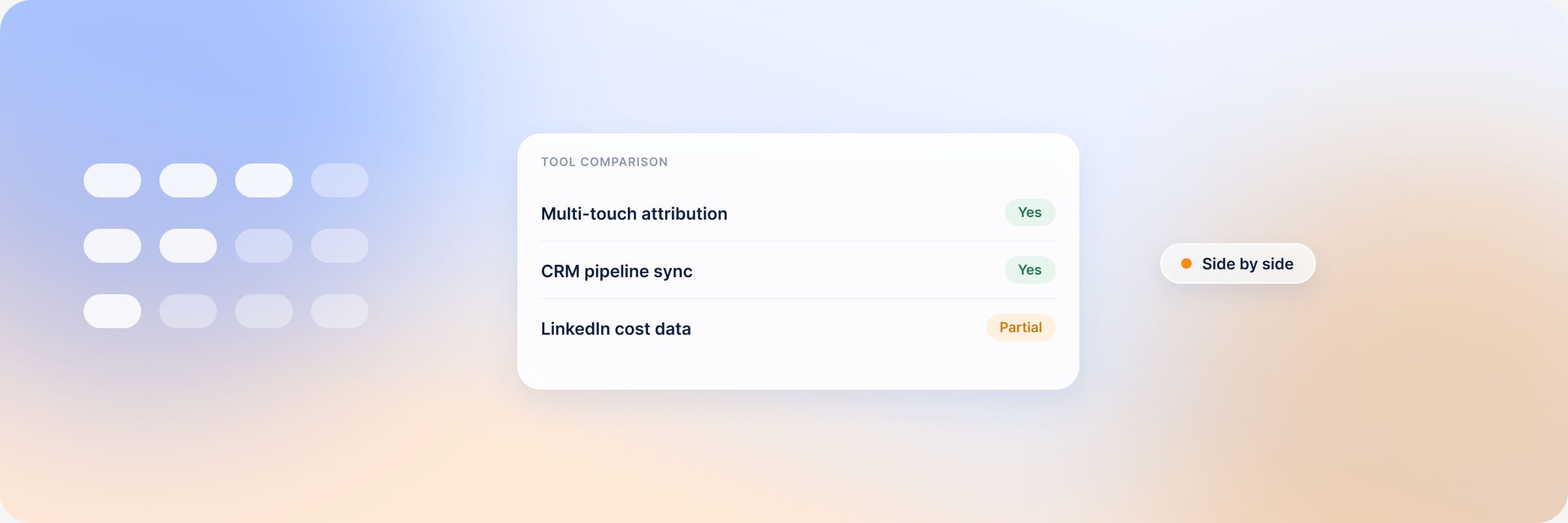
A single B2B deal leaves traces in your CRM, your marketing automation platform, your product, your ad accounts and your website analytics, usually under a different identifier in each one. A customer data platform pulls those records into one profile per account, so you can follow the whole buying journey instead of five partial versions.
Choosing one is harder than it looks, because most CDPs were built for consumer marketing and the B2B version of the problem has a different shape.
Summary: What Should You Look for in a B2B Customer Data Platform?
Five things decide the choice: account-level identity resolution, the integrations you actually run, activation rather than storage alone, compliance with data protection regulations, and total cost including implementation and the people to run it.
The platforms worth shortlisting:
- Salesforce Data 360 (formerly Data Cloud) — for enterprise teams already standardised on Salesforce.
- Adobe Real-Time CDP — for enterprise teams already running Adobe Experience Platform.
- Twilio Segment — for developer-first data teams that want flexible collection and routing.
- Hightouch — for teams with a modelled data warehouse who want a composable CDP on infrastructure they already own.
- DemandSense — not a CDP. It is the LinkedIn account-intelligence layer that sits beside one, adding website visitor identification, ICP scoring, and LinkedIn ad influence connected to CRM deals.
What Is a B2B Customer Data Platform?
A B2B customer data platform is software that unifies customer data from multiple sources into comprehensive customer profiles your teams can act on. Sales and marketing work from the same record, so both can see how a contact relates to a company, what their role is, and what they have done with your brand so far.
The B2B variant differs from its B2C counterpart in the unit of analysis. A B2C CDP builds a profile of an individual consumer. A B2B CDP matches contacts to accounts and buying committees, because what you are selling to is a group of people at one company who rarely act in unison.
Most B2B CDPs also enrich those profiles with firmographic, technographic and behavioural data: the signals you need to qualify leads and build precise audience segments.
How a B2B CDP Differs from CRM
Both systems hold company and contact data, and most B2B teams end up needing both. The difference is where the data comes from and how much of the customer journey it covers.
| Dimension | CRM | B2B CDP |
|---|---|---|
| Primary job | Manage customer relationships and the record of them | Unify and analyse customer data from across your stack |
| Data sources | Contacts, accounts, deals and activities your team logs by hand | Data pulled automatically from your website, campaigns, product, marketing platforms and offline events |
| Identity | Known contacts and accounts | Known contacts plus anonymous engagement |
| What it tells you | Contact details, deal stage, sales activity | Website behaviour, email engagement, product usage, offline events |
A CRM records the relationships your team manages by hand. A CDP ingests and unifies data from every source automatically, then feeds it back out to the tools that act on it. So the first question to put to any CDP vendor is how cleanly the platform integrates with the CRM you already run.
Benefits of a B2B CDP for Businesses
- Unified customer view: the platform pulls customer data from various sources into a 360-degree view of each customer, so you see the whole journey rather than one channel at a time.
- Account-level intelligence: it connects contacts to parent accounts and shows you who the stakeholders in each buying committee are.
- Fewer data silos: marketing, CRM, website and product data sit in one place, so teams work from the same version of an account.
- Better audience activation: enriched profiles and behavioural signals make it possible to build segments precise enough for ABM campaigns, then push them where they run.
- Cleaner compliance: centralising consent records and data-subject requests makes obligations under GDPR and CCPA easier to meet, though accountability still sits with you rather than the vendor.
Core Features and Capabilities of B2B CDPs
- Data ingestion from multiple sources: the platform has to unify first-party and third-party data from every system that touches a buyer, or it captures only part of a long B2B journey.
- Identity resolution and account matching: can it recognise the same person across devices, deduplicate records, and connect contacts to the companies they work for? Account matching is what separates a B2B CDP from a B2C one.
- Unified account and customer profiles: every team sees the same profile, which is what stops two people sending one account contradictory offers.
- Segmentation: you should be able to filter on contact, account and intent data at once, not firmographics alone, to build lists worth nurturing.
- Activation to ad and marketing platforms: can you push segments straight into LinkedIn, Google or Meta, or do you export CSVs by hand? Synced lists update themselves as buyers move; manual ones go stale between exports.
- Governance and compliance with data regulations: the platform should process customer data in a way that holds up under data protection regulations, with consent and access handled in one place.
Weigh these against your own use cases, since a platform that is strong everywhere costs more than one that is strong where you need it.
How to Choose a B2B Customer Data Platform in 5 Steps
Establish your data requirements before you talk to vendors. Skip that and you will end up paying for an enterprise data model whose best features you never switch on.
1. Define the B2B Use Cases and Account Decisions You Need to Support
Decide what the platform is for. Better audience segments for campaigns is one goal; unifying data so teams stop arguing about whose number is right is another. The features you need follow from that answer.
Because the tool gets used across departments, set the goals with the people who will live in it. Each team brings its own wish list, so agree on three to five priorities and write your requirements from those.
2. Map the Customer Data Sources and Integrations You Need
Write down every system the CDP has to connect to: CRM, website, product, marketing automation platform, advertising platforms, data warehouse, customer support system and analytics tools.
Then ask each vendor about your tools by name. “We integrate with hundreds of platforms” is not an answer. What matters is whether yours are among them, and whether the integration runs two ways or exports one. A CDP that cannot reach half your stack is one more silo with a licence fee attached.
3. Evaluate Account Matching and Identity Resolution
Most B2B buyers stay anonymous until they are close to a decision, which makes anonymous-to-known resolution the capability that carries the most weight. Ask how the vendor’s data model handles it, and where the underlying identity data comes from.
Then make them prove it. Run the demo on your own records rather than the vendor’s script, and hand over the awkward cases: multiple contacts at one company, duplicate company names, different domains, missing fields, historical records. How it handles those tells you more about your future account-based intelligence than any feature list.
4. Compare Audience Activation, Usability, and Implementation Requirements
If campaigns are the point, you need a platform that combines several attributes into a segment and then sends that segment somewhere useful. Good audience data management depends on that round trip, so ask to see a segment built and synced end to end.
Ask how long onboarding takes and which skills your team needs to run the thing day to day. A platform that requires an engineer for every new segment will quietly stop being used.
5. Estimate Total Cost and Validate the Platform Before Buying
Total cost = licence + implementation + the people to run it. That third term is routinely left out of the business case.
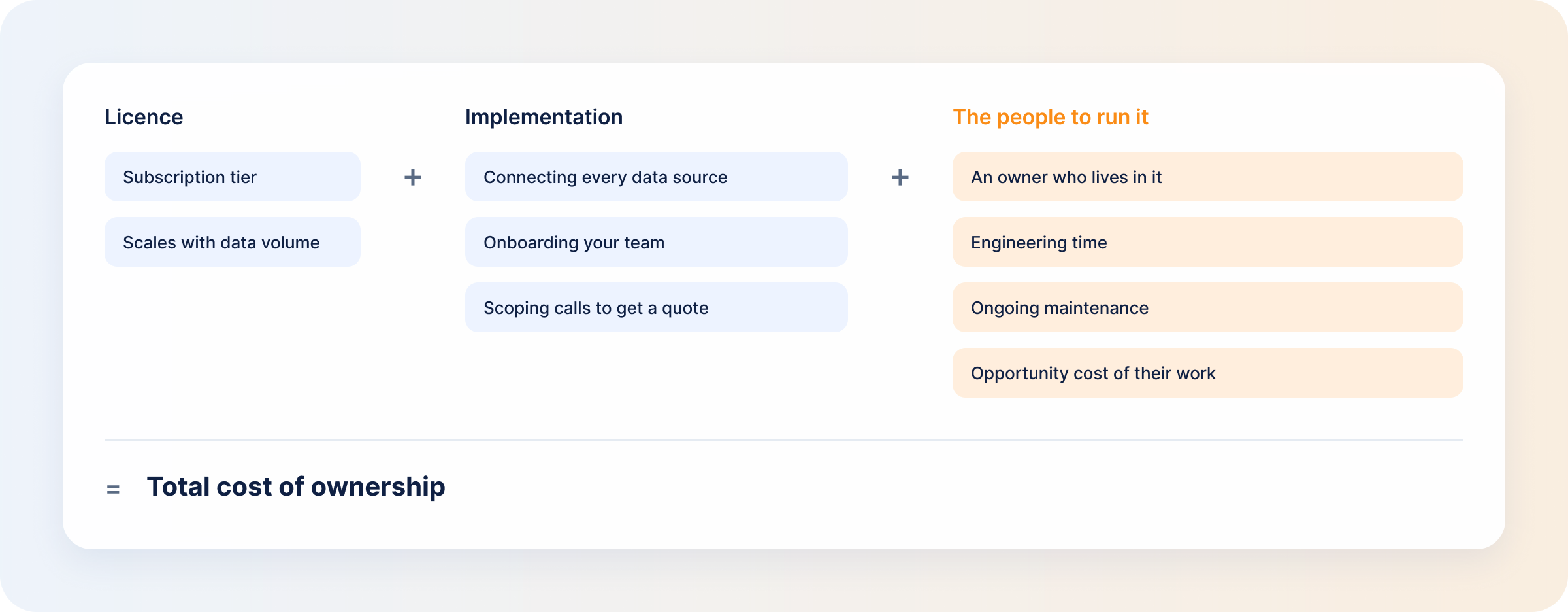
Most enterprise CDPs publish no pricing at all, so budgeting means scoping calls. Ask for a three-year total cost of ownership model before you commit, and ask how the price behaves as data volume grows. Usage-based models can look modest in year one and climb steeply in year two.
Choose the platform that reaches value fastest, which is not always the cheapest. It should fit your use cases, be implementable with the team you have, and scale without a repricing conversation every time traffic grows.
5 Best Customer Data Platforms for B2B Teams
| Platform | Best for | Pricing | B2B strength | Main limitation |
|---|---|---|---|---|
| Salesforce Data 360 (formerly Data Cloud) | Teams already standardised on Salesforce | Consumption-based credits; entry rates published, full deals quoted by sales | Sits on the Salesforce record, with Einstein AI producing predictive insights | Most of the advantage depends on already being a Salesforce shop |
| Adobe Real-Time CDP | Enterprise teams on Adobe Experience Platform | Custom enterprise pricing; no figures published | Real-time profiles and cross-channel activation | Enterprise-scale platform that needs specialist skills to run |
| Twilio Segment | Developer-first data teams | Connections tier published (free tier; Team from $120/month with a 14-day trial); full CDP is contact-sales | 700+ integrations and anonymous-to-known stitching through one API | Unlinked anonymous visitors count toward monthly tracked users, raising cost |
| Hightouch | Teams with a modelled data warehouse | Free Basic reverse-ETL tier (2 active syncs); composable CDP usage-based, contact-sales | Composable CDP with a no-code audience builder and warehouse-native identity resolution | Of little use until your warehouse is properly modelled |
| DemandSense (not a CDP) | The LinkedIn account-intelligence layer you pair with a CDP or CRM | Base $89/month (200 credits); Plus from $149/month with more credits; every feature on both plans; 30-day trial, no card | Identifies anonymous companies and people on your site, scores them against your ICP, and ties LinkedIn ad influence to CRM deals | LinkedIn-first, and not a system of record |
1. Salesforce Data 360
Salesforce Data Cloud is now Salesforce Data 360. It combines CRM, marketing, commerce, service and streaming data on the Salesforce record, with Einstein — its AI and machine-learning layer — generating predictive scores. Zero-copy sharing into Snowflake, BigQuery and Databricks means unified profiles are not trapped inside it. Nearly all of the advantage assumes you already run Salesforce.
2. Adobe Real-Time CDP
Built on Adobe Experience Platform, it makes profiles usable across channels and devices in real time, with segmentation and activation into email, paid media and on-site experiences. Adobe publishes no pricing for its B2C, B2B or B2P editions.
3. Twilio Segment
Segment collects, cleans and routes customer data through a single API, with 700+ integrations in its own catalogue. Its Protocols product enforces a tracking plan, detecting violations and, where configured, blocking unplanned events before they reach downstream tools. Watch the billing: Segment’s own documentation confirms that anonymous visitors not tied to a user ID count toward monthly tracked users, so heavy anonymous traffic costs you.
4. Hightouch
Hightouch reads from the warehouse you already own instead of storing a second copy, which is what makes it composable. It ships its own identity resolution: you define matching rules in a no-code builder, and Hightouch runs resolution inside your warehouse and writes the results back. The free Basic reverse-ETL tier covers two active syncs; the composable CDP is usage-based with no published figures. All of it rests on your warehouse being well modelled; if it isn’t, fix that first.
5. DemandSense (not a CDP)
DemandSense is not a CDP and does not replace one. It covers the gap a CDP leaves open: the companies and people on your website who never fill in a form, and so never enter the unified profile. It resolves those visits, scores each against your ICP, and connects LinkedIn ad exposure to deal stages in HubSpot, Salesforce or Attio. Its scope is the limitation — LinkedIn-first, and not a system of record.
How DemandSense Adds LinkedIn Account Intelligence to Your Data Stack
A CDP stitches an anonymous session to a person once that person identifies themselves: fills in a form, clicks a tracked email, logs in. Visitors who never do stay anonymous, and on most B2B sites they are the majority.
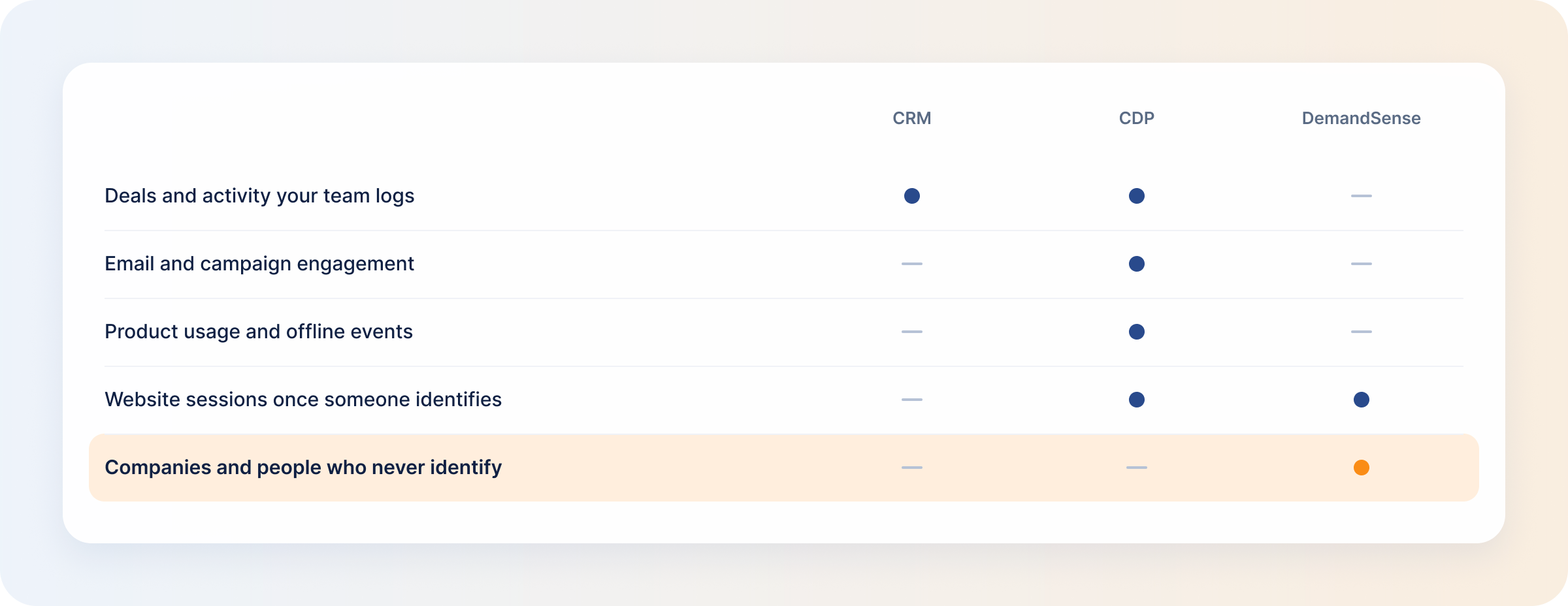
- DemandSense resolves that traffic to companies and the people at them, using an identity graph sourced through data vendors, so an account that never converts still shows up. How much resolves depends on your traffic, so you see the answer on your own site during the trial.
- Every identified visitor is scored against your ICP on fit and engagement rules you write, so you can see which accounts your spend is actually reaching.
- Audiences push to LinkedIn as a custom audience, with a global suppression list that fills itself, so your LinkedIn custom audiences stay current without a CSV export. Activation is LinkedIn-only — Google Ads, Facebook Ads and StackAdapt connect and their engagement is tracked, but audiences do not push to them.
- Revenue attribution connects LinkedIn ad exposure to CRM deal stages, and you decide what “influenced” means — three presets (Awareness, Engagement, Intent) or your own thresholds, over a 3, 6 or 12-month lookback.
- It also sends the result back. Closed-won deals with their value, and qualified opportunities, go from your CRM to LinkedIn through the Conversions API on a daily sync, so Campaign Manager optimises toward buyers rather than form fills.
- It integrates natively with HubSpot, Salesforce and Attio, where Attio AI and data enrichment can prioritise the accounts it sends you. Webhooks cover everything else, and it installs through Google Tag Manager without a developer. The MCP server is on every plan, so Claude or ChatGPT can query the same data.
Try DemandSense on your own site, free for 30 days — no card needed.
FAQ
How do you know if your company is ready for a B2B CDP?
You are ready when customer data sits across disconnected systems and that fragmentation costs you something concrete: you cannot see the full customer journey, or cannot build and activate a segment fast enough to act on it.
Who should be involved in a B2B CDP vendor evaluation?
Marketing, sales and customer success, because they define the use cases; IT or data engineering, because they own the integrations; and whoever will run the platform daily. Involving that last person early is what makes adoption stick after the contract is signed.
What should you ask a CDP vendor to prove in a live demo?
Three things, on your own data rather than the vendor’s script: identity resolution against your messiest records, a working integration into your CRM, and a full activation round trip, with the segment built, synced to an ad platform and results coming back.
How should you estimate the total cost of a B2B CDP?
Start with the licence, then add implementation, engineering time, maintenance and the opportunity cost of the people running it. Check how the pricing model behaves as data volume grows, and ask for a three-year total cost of ownership model before you sign.
Can a small B2B marketing team get value from a CDP without dedicated RevOps?
A full CDP usually needs an owner, and without one it becomes expensive shelfware. Small teams often do better starting with a narrower layer that pairs website visitor identification with a CRM sync, then growing into a CDP once there is someone to run it.