
LinkedIn has more than 20 audience attribute categories, so B2B marketers can narrow targeting to the accounts most likely to buy. That precision is what makes it one of the strongest B2B advertising platforms, and it comes at a price: the average LinkedIn CPC is $5.59. Set campaigns up loosely and a large share of that spend goes to people who will never buy.
Most of that waste comes from settings Campaign Manager switches on for you and from campaigns judged on clicks instead of pipeline.
Below we cover whether LinkedIn is worth it for B2B, what it costs, what to settle before launch, the six setup steps, and how to find and fix budget leaks once the ads are running.
Key takeaways
- Is it worth it: yes for B2B teams selling to specific companies and roles, as long as you judge it on pipeline, not cost per click.
- Before launch: settle the campaign goal, the target accounts and buyers, the offer and conversion path, and tracking.
- The setup: six steps in Campaign Manager: ad account, objective, audience, ad format, budget and schedule, then review and launch.
- What it costs: the minimum is $10 a day or $100 lifetime for a new campaign, and the average CPC in our benchmark data is $5.59.
- Where budget leaks: Audience Expansion switched on by default, ads delivering around the clock, and results read in clicks instead of pipeline.
Is LinkedIn Advertising Worth It for B2B?
Yes, for most B2B teams:
- Profiles are built from professional details, so you can target by company, job function and seniority and reach decision-makers directly.
- There are objectives and formats for every stage, from brand awareness to lead generation.
- People come to LinkedIn for work content, and organic posts that do well can be promoted as Thought Leader Ads.
- You can upload your own company and contact lists as matched audiences and reach the exact accounts you want.
LinkedIn can deliver high-quality B2B leads, but there are trade-offs:
- Clicks are expensive. The average CPC is $5.59, and 75% of advertisers in our benchmark data pay more than $6.
- B2B deals take months to close, so the first leads say little about whether the channel works.
Most deals close outside the platform, often through sales conversations, so many marketers can’t tell what their LinkedIn ads actually did. You only know LinkedIn pays off when you measure it against pipeline, not cost per click.
How Much Does It Cost to Advertise on LinkedIn?
LinkedIn’s minimums are $10 a day, or $100 lifetime for a new campaign. Beyond that there’s no fixed price, because ads are sold at auction. What you pay depends on the audience you target, how many advertisers compete for it, the campaign objective and your bidding strategy.
To decide how much to spend, set your goal and work backwards to your LinkedIn ads budget, down to the click.
In our benchmark data, the average cost per lead is $221.14 with a landing page and $810.83 with a native Lead Gen Form. Your own CPL moves with your CPC and your conversion rate:
CPL = CPC ÷ conversion rate
For example, a $5 CPC with a 2% conversion rate gives a CPL of $5 ÷ 0.02 = $250. The higher the conversion rate, the lower the CPL.
Your own historical spend gives a more accurate budget than any average, because benchmarks don’t know your deal size or sales cycle. Use them to see where you stand; our breakdown of LinkedIn ads cost adds CPM and budget figures.
What to Define Before Launching a B2B LinkedIn Ad Campaign
Most wasted budget is decided before the first impression. Before you launch, work through these four:
1. Campaign goal and buying stage. Do you want awareness or leads? The answer decides the objective you pick during setup. LinkedIn groups its objectives into awareness, consideration and conversion. Match the ask to where the buyer is: a demo request shown to a cold audience mostly burns budget.
2. Target accounts and buyers. Define your ICP: the companies you want to reach and the roles inside them. Use the traits your best customers share as targeting attributes to find your target audience on LinkedIn, and use account scoring to decide which accounts deserve the most budget.
3. Offer and conversion path. Decide what you’re offering and where the click goes. Native Lead Gen Forms usually convert better than website forms because they prefill from the member’s profile, but in our data they also cost more per lead ($810.83 against $221.14). The right choice depends on the offer and the buying stage.
4. Tracking and success criteria. Pick the metrics that will decide whether the campaign worked, and choose the conversion windows LinkedIn should count: click-through and view-through, each set to 1, 7, 30 or 90 days. You need the Insight Tag to track LinkedIn ads conversions and website visitors, so install it before launch.
Types of Ad Formats on LinkedIn for B2B
Single image ads are the usual starting point. They run in the feed and work at every stage of the funnel. The other formats work just as well when they match the campaign objective:
| Format | Where It Appears | Best For | Budget Watch-Out |
|---|---|---|---|
| Single image ads | LinkedIn feed | Awareness, consideration and conversion | A high CTR with a low conversion rate means the ad is attracting the wrong people |
| Video ads | LinkedIn feed | Brand storytelling, product demos | Production takes time and money before the first impression is bought |
| Carousel ads | LinkedIn feed | Feature comparisons, several angles on one offer | Every card needs a reason to exist; weak cards get swiped past and drag the ad’s engagement down |
| Document ads | LinkedIn feed | Educating buyers, gated content for lead capture | Ungated documents can be read in full without any action you can measure |
| Thought Leader Ads | LinkedIn feed | Engagement and brand awareness | On the engagement objective, likes, comments and follows count as paid clicks |
| Event ads | LinkedIn feed | Event sign-ups | Cold audiences rarely sign up for an event from a brand they don’t know |
| Lead Gen Forms | Attached to the feed formats above | Lead generation | The form prefills from the member’s profile, so poor-fit accounts submit as easily as good ones |
| Message and Conversation Ads | The member’s LinkedIn inbox | Direct offers, invitations | Billed per send, whether the message is opened or not |
| Dynamic ads (Follower and Spotlight) | Right rail, desktop only | Page followers, limited-time offers | Easy to miss in that placement, so expect a low CTR |
| Text ads | Right rail, desktop only | Retargeting a warm audience | Tight character limits and a low CTR |
How to Advertise on LinkedIn for B2B Step by Step
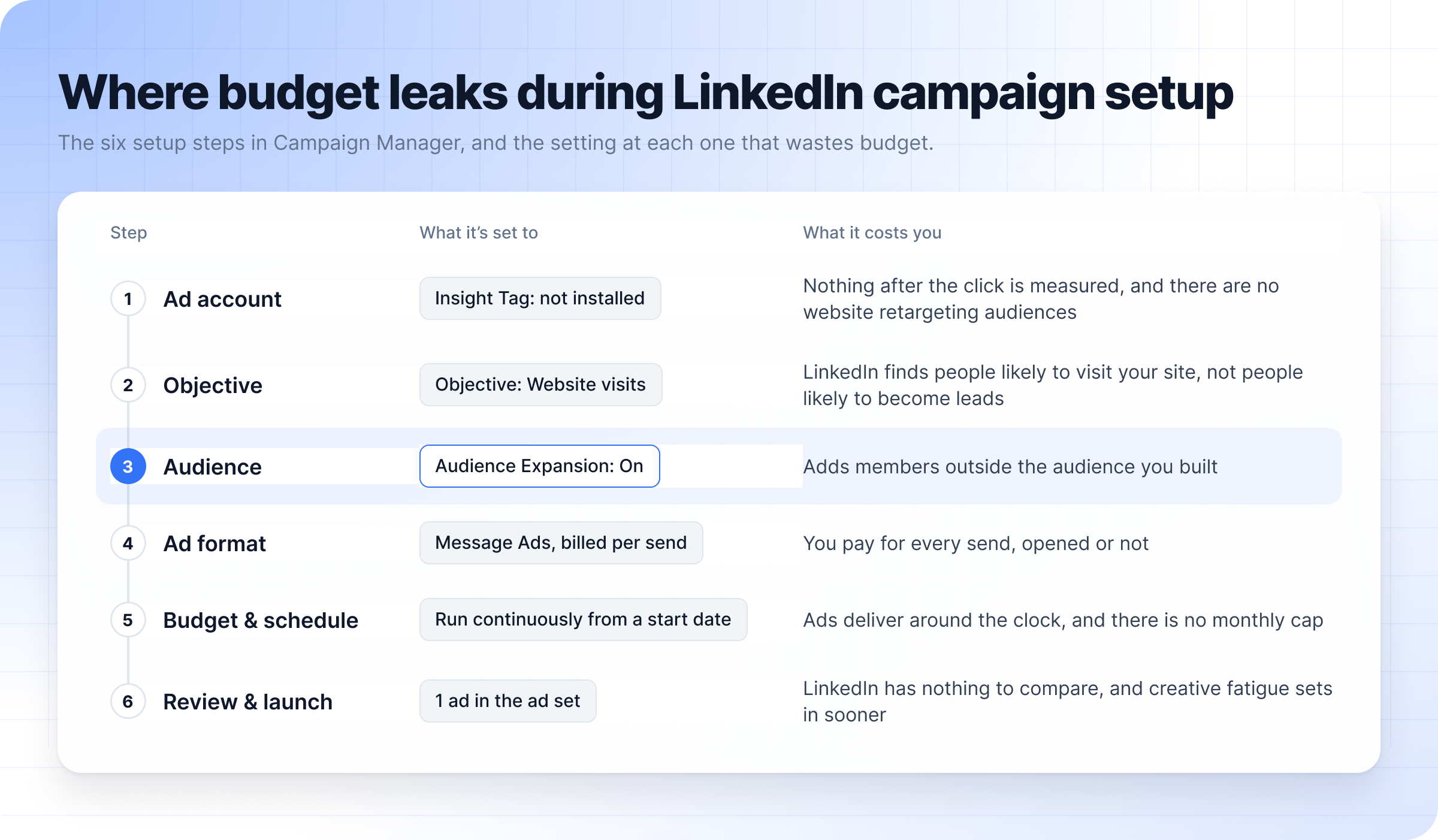
1. Set Up Your LinkedIn Ads Account
- Go to Campaign Manager and sign in with your LinkedIn profile.
- Create an ad account: give it a name, choose the currency, and link your LinkedIn Company Page.
- Add billing details and give teammates access.
- Install the Insight Tag on your website before your first campaign.
Budget check: without the Insight Tag, nothing after the click is measured, and you can’t build website retargeting audiences.
2. Choose the Right Campaign Objective
LinkedIn offers three groups of campaign objectives:
- Awareness: brand awareness
- Consideration: website visits, engagement and video views
- Conversions: lead generation, website conversions and talent leads
The objective decides what LinkedIn optimizes for, which formats and bids you get, and how you’re charged.
Budget check: an objective that doesn’t match the goal optimizes for the wrong result. Pick website visits when you need leads, and LinkedIn will find people likely to click through to your site, not people likely to become leads.
3. Define Your B2B Target Audience
Use only the attributes that separate your ICP from the rest of the market. Every one you stack shrinks the audience and limits delivery.
Location is the only required attribute. For B2B, company, job function and seniority do most of the work. Instead of starting from scratch for every campaign, build custom audiences on LinkedIn by uploading company or contact lists, then layer job function and seniority on top to reach the decision-makers. Clean B2B audience data from your CRM is what keeps those lists accurate.
A campaign needs at least 300 matched members to run. LinkedIn recommends 50,000 or more for Sponsored Content and 15,000 or more for Message Ads.
Values inside one attribute category combine with OR, and categories combine with AND. If the audience is too narrow, add values within a category; if it’s too broad, add a category. In most campaigns, also exclude current customers, competitors, your own employees and students.
Budget check: Audience Expansion adds members who resemble your audience but sit outside it, and the LinkedIn Audience Network shows your ads to your targeted members on third-party apps and sites. Both are on by default, so decide on purpose whether you want them.
4. Select an Ad Format for Your Campaign Goal
Pick the format from the goal, not the other way round. For engagement, Thought Leader Ads and document ads work well. For conversions, pair a document ad with a Lead Gen Form and gate the content.
LinkedIn ties some formats to specific objectives. Lead Gen Forms need the lead generation objective, for example, and document ads only run under brand awareness, engagement and lead generation.
Budget check: Message and Conversation Ads are billed per send, opened or not.
5. Set Your Budget, Bidding Strategy, and Schedule
You can run ads on:
- A daily budget: the most you want to spend per day, at least $10.
- A lifetime budget: the total you’ll spend between the start and end dates, at least $100 for a new campaign.
- Both: the daily limit applies, and the campaign stops once the lifetime total is spent. This gives you the most control over how your LinkedIn ads budget is spent.
Budgets can sit at the campaign level, shared across its ad sets, or on individual ad sets.
For the auction, you can choose:
- Maximum delivery: LinkedIn bids automatically for the most results from your budget.
- Cost cap: LinkedIn bids automatically and tries to keep your average cost per result under the cap you set.
- Manual bidding: you set the bid, charged per click, per thousand impressions, per view or per send, depending on the objective and format.
Costs swing in a new ad set’s first days while LinkedIn works out who responds, so give it time before judging.
Budget check: unless you set a schedule, LinkedIn delivers around the clock, including the hours your buyers are offline. Campaign Manager also has no monthly budget cap.
6. Create, Review, and Launch Your Campaign
Aim for four or five ads per ad set, each testing one thing: the hook, the visual or the offer.
Most members browse on mobile, so before you submit:
- Preview every ad on mobile.
- Check that each destination URL works and loads quickly.
- Check your UTM parameters so the traffic is attributed correctly.
Then submit the campaign. Ads go through LinkedIn’s review before they run, which usually takes a day or two.
Budget check: one ad per ad set leaves LinkedIn nothing to choose between, and creative fatigue sets in sooner.
B2B LinkedIn Ads Performance and Optimization
Measuring and optimizing LinkedIn ads is hard while your LinkedIn data and your CRM sit apart. You need both to see what’s working.
Measuring B2B LinkedIn Ad Performance After Launch
Start with the LinkedIn ads metrics in Campaign Manager: impressions, CPM, CTR, CPC, frequency, conversions and CPL. They show whether the campaign delivers efficiently and the audience engages.
The average CTR for LinkedIn ads is 0.52% in our benchmark data, and top performers reach 0.875%. A CTR well below the average usually means the message or the audience is off.
Platform metrics on their own can mislead: a high CTR is no good if the clicks come from the wrong people. Connect LinkedIn to your CRM and measure LinkedIn ads ROI against the outcomes that matter: qualified leads, account engagement, opportunities and closed deals.
Read results per account too. Campaign Manager’s company engagement report shows impressions and clicks for the companies in your uploaded lists, and that tells sales which accounts to call first.
Optimizing B2B LinkedIn Ads Based on Performance
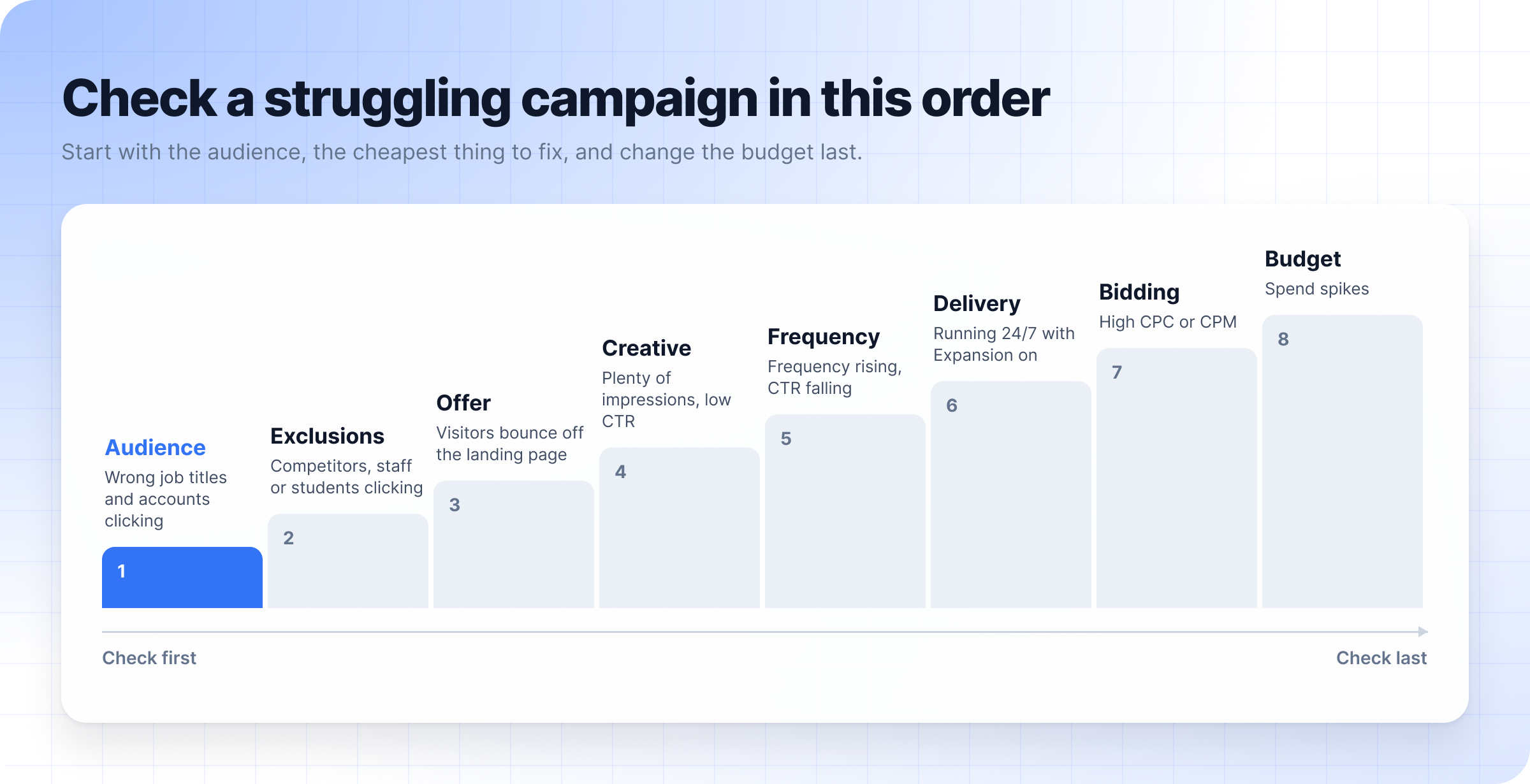
When a campaign underperforms, check these in order. Each step is cheaper to fix than the one after it.
| What to Check | What the Data Shows | What to Optimize |
|---|---|---|
| Audience | Wrong job titles and poor-fit accounts clicking and filling in forms | Refine the attributes: job titles, company size, seniority |
| Exclusions | Competitors, employees or students clicking | Add exclusion lists |
| Offer | Visitors bouncing off the landing page: the offer is unclear, or the page doesn’t match the ad | Match the offer to the buying stage and make the page’s CTA clear |
| Creative | Plenty of impressions, low CTR | Test hooks, visuals and formats, one test at a time |
| Frequency | Rising frequency with a falling CTR | Cap frequency. LinkedIn’s native cap only covers brand awareness campaigns, so on other objectives cap per account |
| Delivery | Ads running 24/7, Audience Expansion on | Turn Audience Expansion off and stop ads running in hours your buyers are offline. Put audiences in distant time zones, such as the US and UK, in separate ad sets |
| Bidding | High CPC or CPM | Change the bidding strategy. Manual bidding gives you the most control |
| Budget | Spend spikes | Set tight budget caps, and move budget only after checking results against pipeline |
LinkedIn Advertising Best Practices for B2B
- Give each segment its own ad set and compare the results, so you know where extra budget will do the most.
- Refresh creative before the audience tires of it.
- Retarget warm audiences such as site visitors and engaged accounts. Accounts that already know you tend to convert faster than cold ones.
- Exclude current customers, employees, competitors, students and closed deals, so the budget goes to new prospects.
- Send CRM outcomes back to LinkedIn. The LinkedIn Conversions API sends conversions server to server, so cookie restrictions don’t hide them, and LinkedIn can optimize toward the accounts that become pipeline.
- Judge campaigns on pipeline. A low CPC looks good until you check ROI against ROAS and find the cheap leads never converted.
B2B LinkedIn Ads Budget Optimization With DemandSense
DemandSense is a platform for the marketer who runs LinkedIn Ads in a small B2B team. It puts three things in one place that usually live in three separate tools: attribution, optimization, and website visitor profiling. On top of that sits an MCP server.
Budgets leak on off-hours impressions, the wrong accounts and spend nobody can tie to pipeline. Campaign Manager has no setting for most of these. DemandSense adds them, so you can:
- Control ad frequency across B2B audiences: set how often any one company can see your ads. When an account reaches the cap, DemandSense excludes it and leaves the rest of your targeting alone. Caps are enforced in a weekly batch.
- Schedule campaigns around higher-value time windows: Hourly Breakdown shows when your audience is active, and Ad Scheduling runs campaigns in those hours. Off-hours, the bid drops to $0.01 instead of pausing, so the ad set keeps its LinkedIn optimization history. Our LinkedIn ad scheduling test shows the effect on costs.
- Optimize budget allocation across LinkedIn campaigns: set monthly budgets for the ad account and for campaigns. Campaigns pause at the cap and come back on the 1st, with an email when a cap is hit. DemandSense shows where pipeline comes from; you decide where budget moves.
- Use account signals to prioritize higher-value audiences: Audience Tuning shows every company and job title your budget reaches. Rate a poor-fit row thumbs down, or suppress a competitor, a customer, an employee or an active deal, and it leaves delivery. Exclusions reach LinkedIn on a weekly sync.
- Connect LinkedIn ad spend with pipeline outcomes: DemandSense Revenue Attribution reads account-level ad engagement next to website visits and CRM deals, and reports influenced pipeline, revenue and won ROAS. Closed-won deals and qualified opportunities go back to LinkedIn as conversions once a day through the Conversions API, and Spend Protection checks weekly for accounts whose deals have closed and stops your ads reaching them.
You can try all of this free for 30 days at demandsense.com, with no card needed.
FAQ
How Long Should You Run a LinkedIn Campaign Before Making Changes?
Run a LinkedIn campaign until costs settle and each ad has enough results to compare, then change one thing at a time. Fix broken tracking or a wrong audience straight away.
Should B2B Advertisers Use LinkedIn Lead Gen Forms or a Landing Page?
B2B advertisers should choose between Lead Gen Forms and a landing page by goal. Lead Gen Forms are quicker to fill in, so they suit high-volume offers; landing pages filter for intent and show what the visitor read. In our benchmark data the average CPL is higher with Lead Gen Forms ($810.83 against $221.14).
Can Small B2B Companies Advertise Effectively on LinkedIn?
Small B2B companies can advertise effectively on LinkedIn with a narrow audience, one goal and one or two ad sets. The $10 daily minimum is enough to launch, but at a $5.59 average CPC it buys one or two clicks a day, so keep a small budget in a single ad set.
When Should You Increase Your LinkedIn Ads Budget?
Increase your LinkedIn ads budget when an ad set spends its full budget, the target accounts are engaging, and the leads are turning into opportunities. Raise it in steps. A good CTR on its own isn’t a reason.
Is a High LinkedIn CPC Always a Sign of Wasted Budget?
A high LinkedIn CPC isn’t always a sign of wasted budget. A narrow, senior audience costs more per click because more advertisers compete for it, and it may convert better. Waste is spending on companies that will never buy. The average LinkedIn CPC is $5.59; if yours is higher, check cost against pipeline before you change anything.